1. บทนำ
This manual provides detailed instructions for the setup, operation, and maintenance of your Radiolink T12D ELRS 12-Channel RC Transmitter. The T12D is a 2.4GHz remote radio controller designed for a wide range of remote-controlled models, including airplanes, drones, cars, and boats. It features ELRS support, a 2.8-inch color screen, and comes with R12F and R16F receivers.
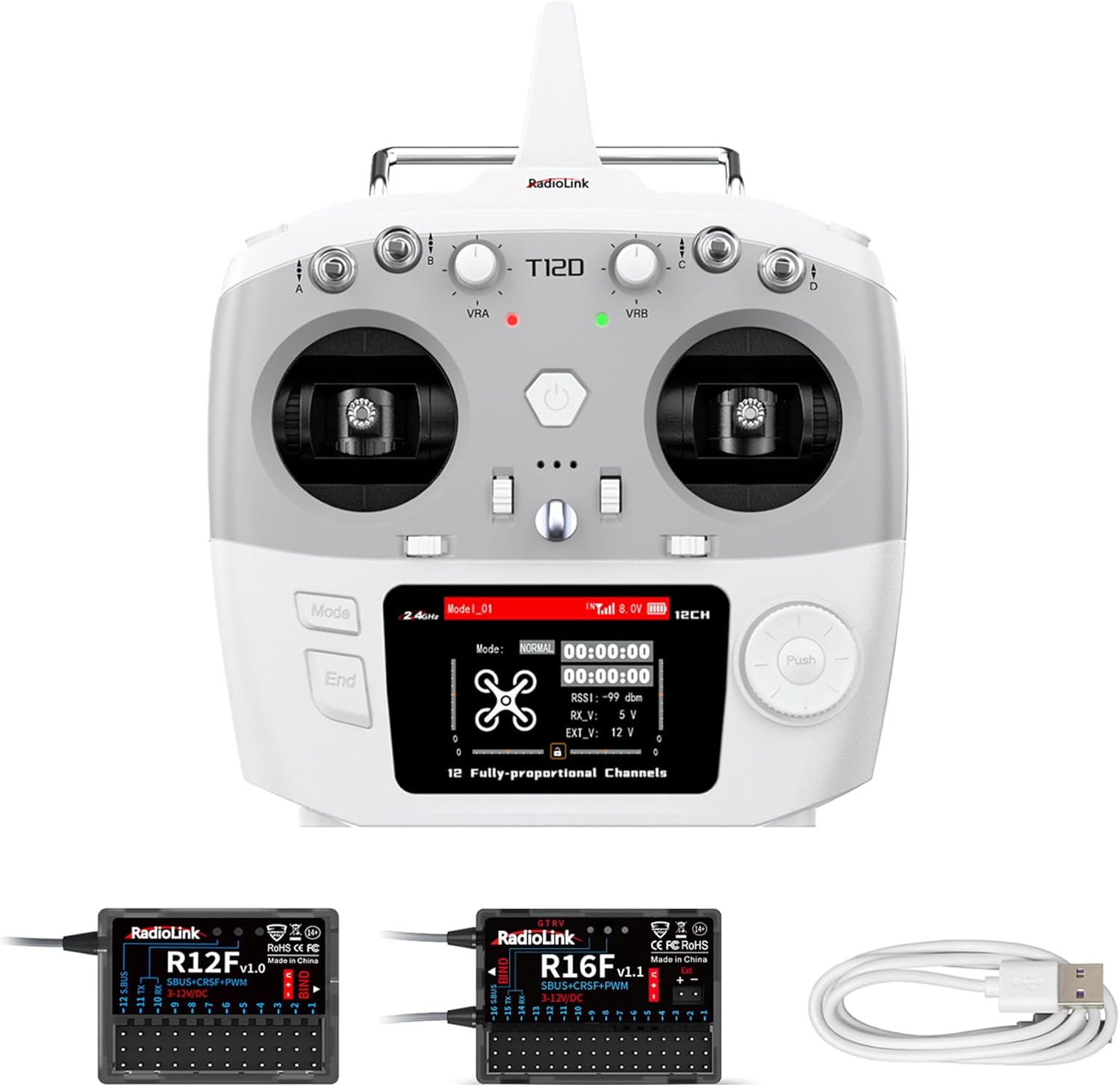
Image 1.1: Radiolink T12D Transmitter, R12F Receiver, R16F Receiver, and USB Type-C Cable.

ภาพที่ 1.2: จบแล้วview of Radiolink T12D Key Features.
2. การตั้งค่า
2.1 เนื้อหาบรรจุภัณฑ์
ตรวจสอบว่ามีส่วนประกอบทั้งหมดอยู่:
- Radiolink T12D ELRS 12-Channel RC Transmitter
- Radiolink R12F Receiver
- Radiolink R16F Receiver
- USB Type-C Cable (for data transmission)
2.2 การจ่ายไฟให้เครื่องส่งสัญญาณ
The T12D transmitter supports multiple power sources:
- 2S-4S LiPo battery
- แบตเตอรี่ AA 8 ก้อน
- 18650 แบตเตอรี่ลิโพ
The transmitter includes built-in voltage protection software technology to prevent damage from reverse polarity connections. Ensure correct battery insertion according to the polarity markings.

Image 2.1: T12D Supported Battery Types and Power Connections.
2.3 การเชื่อมต่อและการผูกตัวรับสัญญาณ
The R16F receiver supports PWM, SBUS, and CRSF signals, allowing for flexible configuration with various models. Refer to the diagrams below for signal output modes.

Image 2.2: R16F Receiver Signal Output Configurations.
To bind the receiver to the transmitter, locate the binding button on the R16F receiver. Follow the specific binding procedure outlined in the full user manual for your model.

Image 2.3: R16F Receiver Dimensions and Binding Button Location.
2.4 External Module Support
The T12D supports mainstream long-range modules such as ELRS (ExpressLRS) and TBS Crossfire. Modules like TBS Crossfire Nano TX and BETAFPV ELRS Nano TX can be inserted directly into the transmitter.
บันทึก: TBS Crossfire TX and BETAFPV ELRS Micro TX may not support direct insertion due to their size.

Image 2.4: T12D External Module Support and Parameter Adjustment Screen.
3. คู่มือการใช้งาน
3.1 อินเทอร์เฟซผู้ใช้และการนำทาง
The T12D features a 2.8-inch color screen with a user-friendly navigation menu. This allows for easy adjustment of settings and monitoring of model parameters.
- หลายภาษา: The menu supports various languages including English, German, French, Russian, Chinese, Japanese, Spanish, Korean, Thai, and Polish.
- การปรับแต่งธีมเมนู: Personalize the display with different menu themes.
- Model Information Telemetry: View real-time data from your model.
- Subsidiary ID: Configure up to 16 groups of subsidiary IDs.

Image 3.1: T12D Additional Features and Menu Options.

Image 3.2: T12D Menu Multiple Language Options.
3.2 Controls and Ergonomics
The T12D is ergonomically designed for comfortable and precise control, featuring:
- Three 3-position switches
- One 2-position switch
- Two dials
- Two slider switches
- Bearing joysticks for smooth operation
- A trainer switch

Image 3.3: T12D Ergonomic Design and Control Features.
3.3 ฟังก์ชั่นขั้นสูง
- Model Storage: จัดเก็บการตั้งค่าได้ถึง 50 รุ่นที่แตกต่างกัน
- Programmable Mix Controls: Utilize 32 groups of programmable mix controls for complex setups.
- ฟังก์ชันการฝึกฝน: Connect with another transmitter for training purposes.
- RC Simulator Support: Use the transmitter with RC flight simulators for practice.
- telemetry: Real-time built-in telemetry provides crucial flight data.
3.4 ความสามารถในการใช้งานที่หลากหลาย
The T12D is suitable for controlling a diverse range of RC models, including:
- เฮลิคอปเตอร์
- Fixed-wing aircraft
- เครื่องร่อน
- Multi-rotors (drones)
- Racing drones
- Football drones
- Engineering vehicles
- Racing boats
- หุ่นยนต์
- เครื่องตัดหญ้า
- Bait boats
- Mechas

Image 3.4: T12D Wide Applicability Across RC Models.

Image 3.5: T12D Application for Bait Boats with Advanced Features.
4. การบำรุงรักษา
การอัปเดตเฟิร์มแวร์ 4.1 รายการ
The T12D and R12F/R16F receivers support online firmware upgrades. Connect the T12D or R12F/R16F to a computer using the provided Type-C cable to update to the latest firmware and access new features.

Image 4.1: T12D and R12F Receiver Online Upgrade Process.
4.2 การดูแลแบตเตอรี่
- Always use recommended battery types (2S-4S LiPo, 8*AA, 18650 LiPo).
- ตรวจสอบให้แน่ใจว่าใส่แบตเตอรี่โดยให้ขั้วถูกต้อง
- เก็บแบตเตอรี่ไว้ในที่เย็นและแห้งเมื่อไม่ได้ใช้งาน
- อย่าชาร์จแบตเตอรี่ LiPo เกินกำหนด หรือปล่อยประจุจนหมดเกินกำหนด
4.3 การทำความสะอาด
Use a soft, dry cloth to clean the transmitter and receivers. Avoid using harsh chemicals or solvents that could damage the plastic or electronic components.
5 การแก้ไขปัญหา
If you encounter issues with your Radiolink T12D transmitter or receivers, consider the following general troubleshooting steps:
- ปัญหาเรื่องพลังงาน: Ensure batteries are fully charged and correctly inserted. Check for proper voltage.
- ปัญหาการเชื่อมต่อ: ตรวจสอบว่าสายเคเบิลทั้งหมดเชื่อมต่ออย่างแน่นหนา
- ผูกพัน: Confirm that the transmitter and receiver are properly bound. Re-bind if necessary.
- Range Problems: Check for obstructions or sources of interference in your operating environment. Ensure antennas are correctly positioned.
- Control Response: Check servo connections and calibration in the transmitter settings.
For more detailed troubleshooting and FAQs, please refer to the official Radiolink support resources or contact customer service.
6. ข้อมูลจำเพาะ
| คุณสมบัติ | ข้อมูลจำเพาะ |
|---|---|
| ช่องทางการ | 12 |
| ความถี่ | 2.4กิกะเฮิรตซ์ |
| ช่วงการควบคุม | Up to 2.5 miles (4km) |
| เวลาตอบสนอง | 3มิลลิวินาที |
| หน้าจอแสดงผล | 2.8-inch color screen, 320*240 pixels |
| แบตเตอรี่ที่รองรับ | 2S-4S LiPo, 8*AA, 18650 LiPo |
| ความเข้ากันได้ของตัวรับ | R16F, R12F, R8EF, R8FM, R8XM, R8SM, R6FG, R8FGH, R7FG, R6F, R4FGM |
| การสนับสนุนโมดูลภายนอก | ELRS (ExpressLRS), TBS Crossfire |
| การป้องกัน | Anti-polarity Connect Protection |
| Model Storage | 50 กลุ่ม |
| Programmable Mix Controls | 32 กลุ่ม |
6.1 Compatible Radiolink Transmitters
The R16F receiver is compatible with a range of Radiolink transmitters:
- T12D, T16D, RC8X, RC6GS V3, RC4GS V3, RC4GS V2, RC6GS V2, T8FB, T8S.

Image 6.1: Compatible Radiolink Transmitters.

Image 6.2: T12D Receiver Compatibility Chart.
7. การรับประกันและการสนับสนุน
Radiolink products are manufactured to high-quality standards. For warranty information, please refer to the official Radiolink webเว็บไซต์หรือเอกสารการซื้อของคุณ
7.1 การสนับสนุนลูกค้า
For quick support, contact Radiolink after-sales service. You can find assistance through the Radiolink Direct store or by accessing online user instructions. Comprehensive user manuals and FAQ troubleshooting files are also available on product sales pages.
เยี่ยมชมอย่างเป็นทางการ ร้านเรดิโอลิงก์ สำหรับทรัพยากรเพิ่มเติมและข้อมูลผลิตภัณฑ์


