1. บทนำ
This manual provides detailed instructions for the operation and maintenance of your BOBLOV A23Pro Body Camera. Please read this manual thoroughly before using the device to ensure proper function and to maximize its capabilities. The A23Pro is designed for reliable video and photo capture in various environments, featuring a 180° rotatable lens, 4K video recording, and night vision capabilities.
2. เนื้อหาบรรจุภัณฑ์
ตรวจสอบว่ารายการทั้งหมดที่ระบุไว้ด้านล่างนี้รวมอยู่ในแพ็คเกจของคุณ:
- กล้องติดตัว BOBLOV A23Pro
- ที่ยึดจักรยาน
- สาย USB (ประเภท-C)
- คู่มือการใช้งาน

3. สินค้าหมดview
ทำความคุ้นเคยกับส่วนประกอบและปุ่มควบคุมของกล้อง:
- เลนส์หมุนได้ 180°: ช่วยให้สามารถบันทึกภาพได้ในมุมที่ยืดหยุ่น
- หน้าจอแสดงผล: สำหรับ viewอิงไลฟ์ฟูtage, recorded files, and menu options.
- ปุ่มควบคุม: Power, Menu, OK/Record, Navigation (Up/Down).
- พอร์ต USB-C: สำหรับการชาร์จและถ่ายโอนข้อมูล
- ช่องเสียบการ์ด Micro SD: Supports external memory up to 256GB.
- ไฟอินฟราเรด (IR): Four IR lights for night vision functionality.
4. การตั้งค่า
4.1 การชาร์จแบตเตอรี่
Before first use, fully charge the camera. Connect the supplied USB-C cable to the camera's USB-C port and the other end to a USB power adapter (not included) or a computer. The charging indicator will show the charging status and turn off when fully charged.
4.2 การใส่การ์ด Micro SD
The camera supports Micro SD cards up to 256GB (Class 10 or higher recommended). Locate the Micro SD card slot on the side of the camera. Gently insert the card with the gold contacts facing the front of the camera until it clicks into place. To remove, push the card in again until it springs out.

5. คู่มือการใช้งาน
5.1 เปิด/ปิดเครื่อง
Press and hold the Power button for a few seconds to turn the camera on or off.
5.2 การบันทึกวิดีโอ
From the main screen, press the OK/Record button to start video recording. Press it again to stop. The camera supports 4K resolution for clear and detailed footage.
5.3 การถ่ายภาพ
Switch to photo mode using the Mode button (if available, or navigate through the menu). Press the OK/Record button to capture a still image. The camera captures photos at 48MP resolution.
5.4 เลนส์หมุนได้ 180°
The camera features a manually rotatable lens that can be adjusted 180 degrees. This allows for versatile recording angles, whether mounted or handheld, ensuring optimal capture for various perspectives.

5.5 Night Vision Function
The A23Pro is equipped with four powerful IR lights for enhanced visibility in low-light conditions. This feature ensures clear recordings during night patrols, outdoor activities after sunset, or in dimly lit environments. Activate night vision through the camera's menu settings.

5.6 การบันทึกแบบวนซ้ำ
กล้องรองรับการบันทึกแบบวนซ้ำซึ่งจะเขียนทับส่วนที่เก่าที่สุดโดยอัตโนมัติ files when the memory card is full. This ensures continuous recording without manual intervention. You can set the duration of video segments (e.g., 5, 10, 15, or 20 minutes) in the camera's settings.

6. การชาร์จและอายุการใช้งานแบตเตอรี่
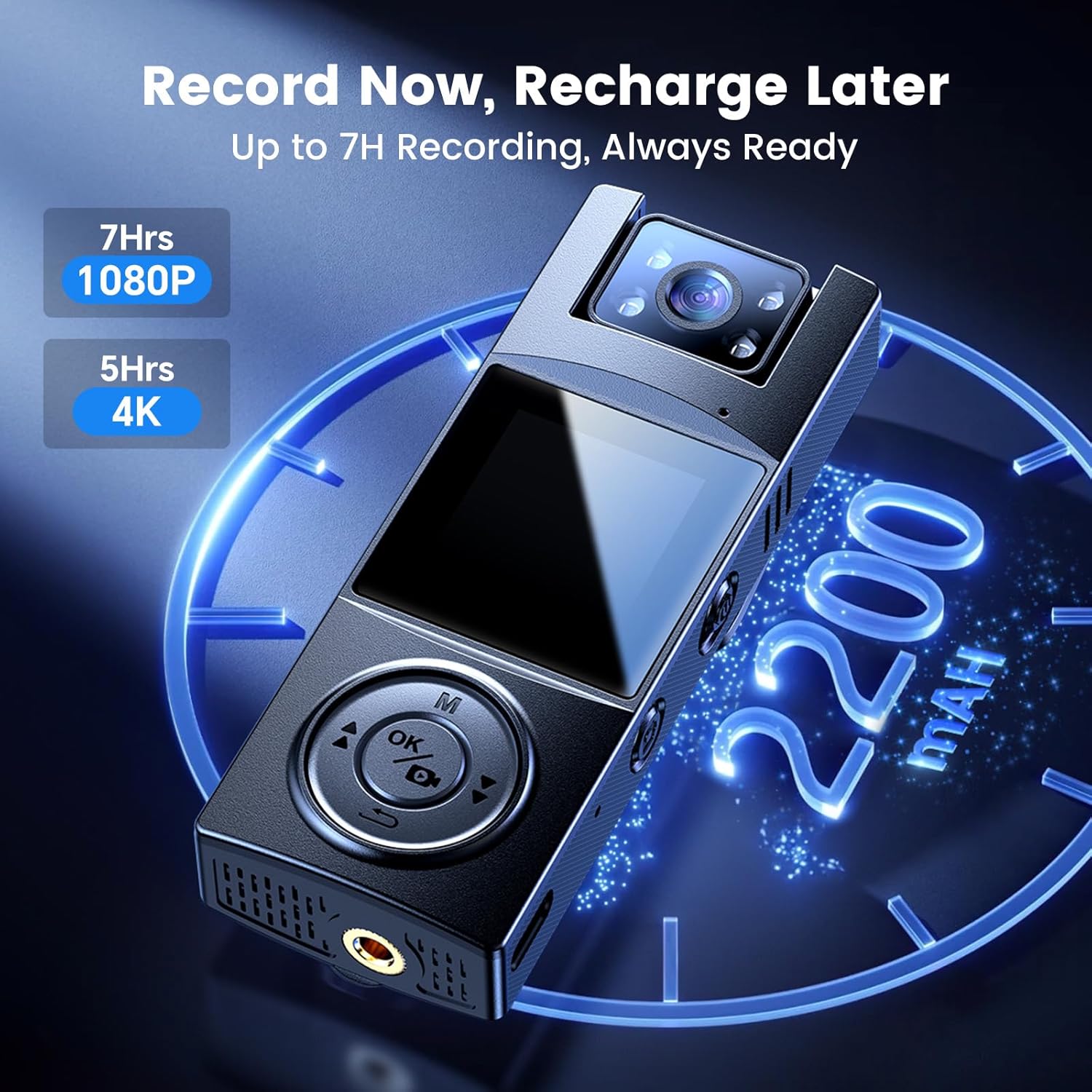
The A23Pro body camera is equipped with a 2200mAh battery, providing up to 7 hours of continuous recording time. Charging is facilitated via the USB-C port, offering fast and reliable power replenishment. A full charge typically takes approximately 4 hours.
7. การโอนข้อมูล
เพื่อโอนบันทึก files to a computer, connect the camera using the supplied USB-C cable. The camera will appear as a removable disk drive. You can then access and copy your video and photo files. Alternatively, remove the Micro SD card and use a card reader to transfer data.
8. ตัวเลือกการติดตั้ง
The BOBLOV A23Pro offers versatile mounting options to suit various activities:
- คลิปหลัง: Attach the camera securely to clothing, backpack straps, or other suitable surfaces for hands-free recording.
- ที่ยึดจักรยาน: Use the included bike mount to attach the camera to bicycle handlebars, capturing your rides from a stable perspective.

9. การบำรุงรักษา
- ใช้ผ้าเนื้อนุ่มที่ไม่เป็นขุยเช็ดทำความสะอาดเลนส์อยู่เสมอ
- ควรหลีกเลี่ยงการนำกล้องไปวางไว้ในที่ที่มีอุณหภูมิสูงหรือต่ำเกินไป หรือตากแดดโดยตรงเป็นเวลานาน
- เก็บกล้องไว้ในที่แห้งและเย็นเมื่อไม่ได้ใช้งาน
- สำรองข้อมูลที่บันทึกไว้ของคุณเป็นประจำ fileเพื่อป้องกันข้อมูลสูญหาย
10 การแก้ไขปัญหา
- กล้องไม่เปิด: ตรวจสอบให้แน่ใจว่าแบตเตอรี่ชาร์จเต็มแล้ว เสียบปลั๊กเข้ากับแหล่งจ่ายไฟแล้วลองอีกครั้ง
- ไม่สามารถบันทึกได้: Check if a Micro SD card is inserted and has sufficient free space. Format the card if necessary (this will erase all data).
- คุณภาพวิดีโอไม่ดี: Ensure the lens is clean. Check the resolution settings in the camera menu.
- กล้องหยุดนิ่ง: กดปุ่มเปิด/ปิดค้างไว้ 10-15 วินาทีเพื่อบังคับให้รีสตาร์ท
11. ข้อมูลจำเพาะ
| คุณสมบัติ | ข้อมูลจำเพาะ |
|---|---|
| ยี่ห้อ | BOBLOV |
| หมายเลขรุ่น | โปร |
| ความละเอียดในการจับภาพวิดีโอ | 4K |
| เทคโนโลยีโฟโต้เซนเซอร์ | ซีมอส |
| คุณสมบัติพิเศษ | Night Vision, 180° Rotatable Lens |
| ความจุของแบตเตอรี่ | 2200mAh (รวมแบตเตอรี่ 1 A) |
| เวลาในการบันทึก | Up to 7 hours (1080P) |
| ประเภทหน่วยความจำแฟลช | ไมโคร SD (สูงสุด 256GB) |
| เทคโนโลยีการเชื่อมต่อ | แบบมีสาย (USB-C) |
| ขนาดหน้าจอ | 1.3 นิ้ว |
| น้ำหนักสินค้า | 7.4 ออนซ์ |
| ขนาดแพ็คเกจ | 4.96 x 2.99 x 2.24 นิ้ว |
12. การรับประกันและการสนับสนุน
BOBLOV provides product coverage for 24 months. For technical support or warranty claims, please contact BOBLOV customer service. We aim for a quick response within 24 hours and offer lifetime technical support.
หากต้องการข้อมูลเพิ่มเติม กรุณาเยี่ยมชมเว็บไซต์อย่างเป็นทางการ ร้านบ็อบเลิฟ.


