1. บทนำ
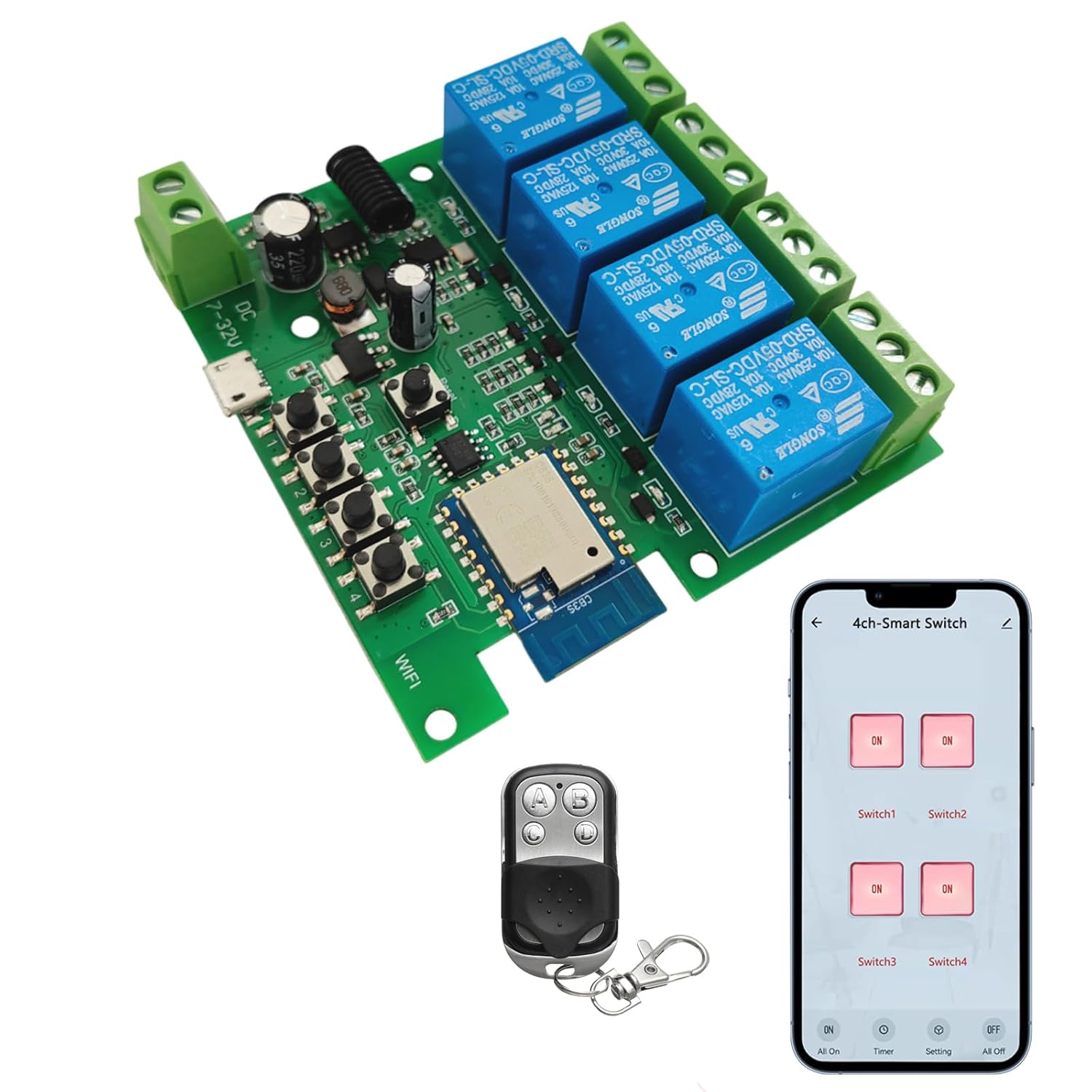
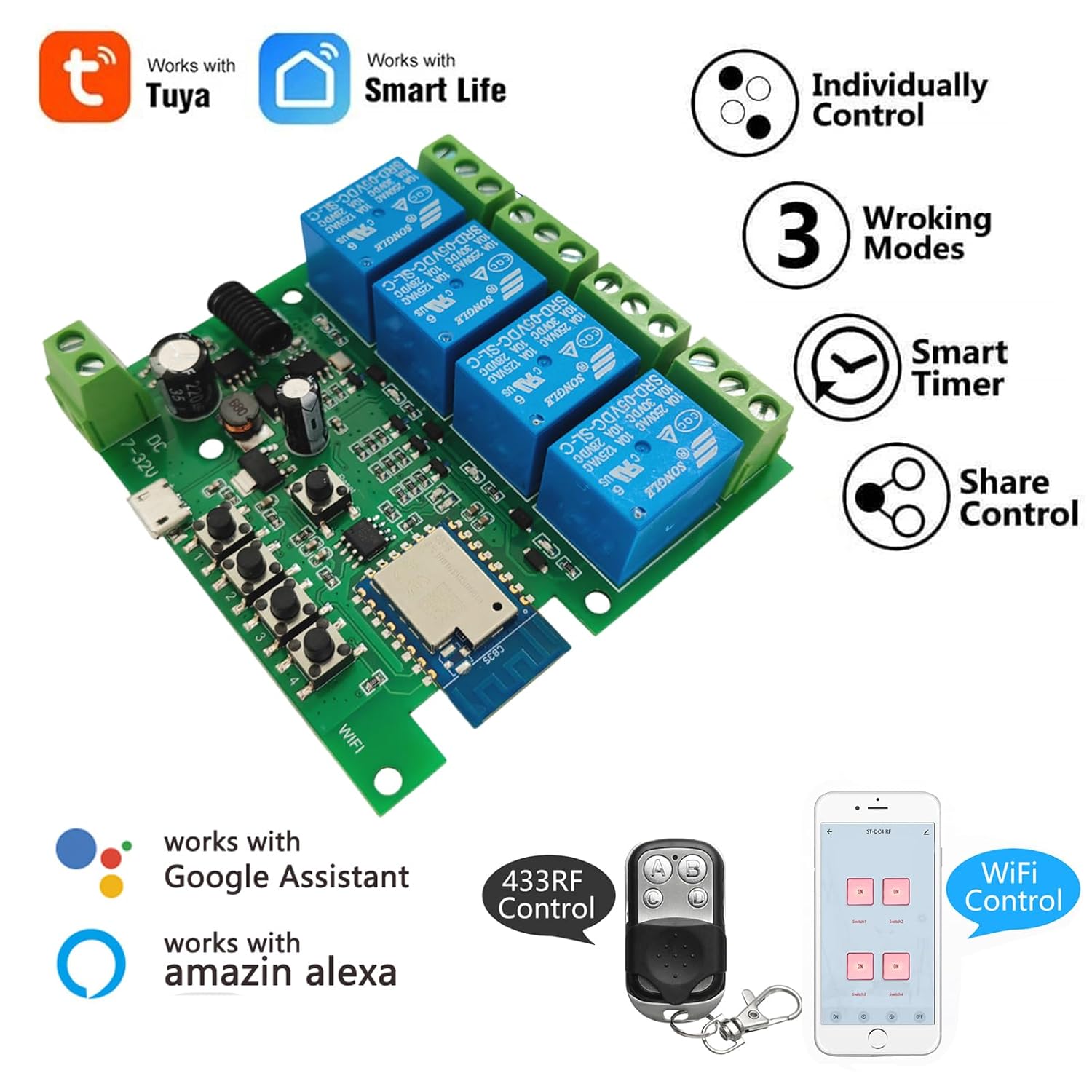
The Newgoal 4-Channel Smart Wireless Relay Switch is a versatile device designed for home automation, allowing remote control of connected appliances or power circuits. It supports multiple operating modes, including momentary (inching), self-locking, and interlock, and can be controlled via the Tuya Smart Life mobile application, a 433MHz RF remote control, or voice commands through Amazon Alexa and Google Home.
2. ข้อมูลด้านความปลอดภัย
- โปรดตรวจสอบให้แน่ใจว่าได้ตัดกระแสไฟทั้งหมดแล้วก่อนทำการติดตั้งหรือเดินสายไฟ เพื่อป้องกันไฟฟ้าช็อต
- This device operates with electrical currents. If you are unsure about electrical wiring, consult a qualified electrician.
- Do not exceed the maximum rated current of 10 Amperes หรือ voltage ของ 250V AC/DC
- The device supports 2.4GHz Wi-Fi networks only. It is not compatible with 5GHz Wi-Fi or Mesh Wi-Fi systems.
- เก็บอุปกรณ์ให้ห่างจากน้ำและอุณหภูมิที่สูงหรือต่ำเกินไป
3. เนื้อหาบรรจุภัณฑ์
- 1 x Newgoal 4-Channel WiFi Relay Module
- 1 x 433 MHz RF Remote Control
- 1 x User Manual (English and Chinese)
4. ข้อมูลจำเพาะ
| คุณสมบัติ | ข้อมูลจำเพาะ |
|---|---|
| แบบอย่าง | 4CH Tuya App/Smart Life |
| ขนาด | 7.4 x 7.4 x 1.9 ซม. |
| น้ำหนัก | 98 กรัม |
| แหล่งจ่ายไฟ | USB 5V or AC/DC 7-32V |
| กระแสไฟฟ้าที่ได้รับการจัดอันดับ | 10 Amperes (per channel) |
| ปฏิบัติการฉบับที่tage (Relay Output) | ไฟฟ้ากระแสสลับ 0-250V / ไฟฟ้ากระแสตรง 0-30V |
| ประเภทการติดต่อ | ปกติเปิด (NO), ทั่วไป (COM), ปกติปิด (NC) |
| ประเภทวงจร | 4 ทาง |
| การเชื่อมต่อแบบไร้สาย | Wi-Fi 2.4GHz (IEEE 802.11 b/g/n) |
| ควบคุม RF | 433MHz (Fixed code / Learning code, up to 14 codes per gang) |
| การสนับสนุนแอป | Tuya Smart Life (Android/iOS) |
| การควบคุมด้วยเสียง | อเมซอน อเล็กซา, กูเกิล โฮม |
| โหมดการทำงาน | Momentary (Inching), Self-locking, Interlock |
5. สินค้าหมดview

6. การตั้งค่า
6.1 การเปิดเครื่องอุปกรณ์
The relay module can be powered in two ways:
- ยูเอสบี 5 โวลต์: Connect a standard Micro USB cable to the 'Power Input 1' port.
- AC/DC 7-32V: Connect a power source within this voltage range to the 'Power Input 2' screw terminals.
Note: The power supply input is for the PCBA (circuit board) only. The relays themselves are switches without output; they control the power to your connected devices.
6.2 Wiring Connected Devices
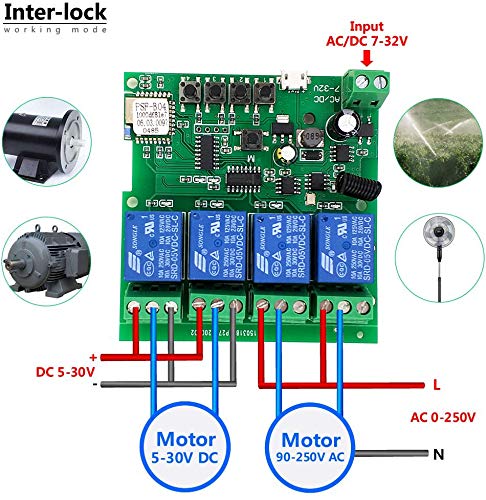
Refer to the wiring diagrams in Section 9 for specific connection instructions based on your desired operating mode and device type. Each relay has Normally Open (NO), Common (COM), and Normally Closed (NC) terminals. Connect your appliance's power line through the appropriate relay terminals.
6.3 App Installation and Device Pairing (Tuya Smart Life)
- ดาวน์โหลด ตุยย่า สมาร์ท or ชีวิตที่ชาญฉลาด ดาวน์โหลดแอปจาก App Store (iOS) หรือ Google Play Store (Android)
- ลงทะเบียนหรือเข้าสู่ระบบบัญชีของคุณ
- โปรดตรวจสอบให้แน่ใจว่าสมาร์ทโฟนของคุณเชื่อมต่อกับเครือข่าย Wi-Fi 2.4GHz แล้ว อุปกรณ์นี้ไม่รองรับ Wi-Fi 5GHz
- Power on the Newgoal relay module. The WiFi LED should blink, indicating it's in pairing mode. If not, press and hold the central button on the module for 5 seconds until the LED blinks rapidly.
- In the app, tap '+' to add a device. The app should automatically discover the device nearby. Follow the on-screen instructions to connect the device to your Wi-Fi network.
- Once connected, you can rename the device and individual channels within the app.
6.4 RF Remote Control Pairing
To pair the 433MHz RF remote control with the relay module:
- Press and hold one of the manual switch buttons (RF Pairing Button) on the relay module for 3 seconds. The corresponding LED will illuminate.
- While the LED is lit, press the desired button on your 433MHz remote control. The LED on the module will flash to confirm successful pairing.
- Repeat this process for each channel you wish to control with the remote. The module can learn up to 14 different 433MHz codes per channel.
To clear all paired RF codes for a specific channel, press and hold the corresponding manual switch button for 15 seconds until the LED flashes rapidly and then turns off.
7. โหมดการทำงาน
The Newgoal 4-Channel Smart Wireless Relay Switch supports three operating modes, which can be configured via the Tuya Smart Life app:
- Momentary (Inching) Mode: In this mode, the relay turns on for a set duration (e.g., 1 second) and then automatically turns off. This is ideal for applications like garage door openers or momentary button presses. You can configure two wiring ways: turn on for 1s then auto-off, or turn off for 1s then auto-on.
- โหมดล็อคอัตโนมัติ: The relay acts like a standard toggle switch. Pressing the button (in app or on remote) turns the relay ON, and pressing it again turns it OFF. This is suitable for controlling lights or other devices that need to stay on or off until manually changed.
- โหมดอินเตอร์ล็อค: (Supported on 2-gang and 4-gang versions) In this mode, only one relay can be ON at a time. If one relay is activated, any other active relay in the group will automatically turn OFF. This is useful for controlling motors with forward/reverse functions or ensuring only one device operates at a time.
8. การควบคุมแอป (Tuya Smart Life)
Once paired, the Tuya Smart Life app provides comprehensive control and automation features:
- เปิด/ปิดระยะไกล: ควบคุมอุปกรณ์ที่เชื่อมต่อจากทุกที่ที่มีการเชื่อมต่ออินเทอร์เน็ต
- ตารางเวลา: Set schedules for devices to turn on or off automatically at specific times.
- ฟังก์ชั่นนับถอยหลัง: Set a timer for a device to automatically turn off after a specified duration.
- การแชร์อุปกรณ์: แบ่งปันการควบคุมอุปกรณ์กับสมาชิกในครอบครัว
- การบริหารจัดการกลุ่ม: จัดกลุ่มอุปกรณ์หลายเครื่องเข้าด้วยกันเพื่อการควบคุมพร้อมกัน
- การทำงานอัตโนมัติของฉาก: Create custom scenes and automations based on conditions like time, weather, or other smart devices.


8.1 การบูรณาการการควบคุมด้วยเสียง
The device is compatible with Amazon Alexa and Google Home. After linking your Tuya Smart Life account in the Alexa or Google Home app, you can use voice commands to control your connected devices. For exampเลอ:
- "Alexa เปิดสวิตช์ 1"
- "เฮ้ Google ปิดไฟห้องนั่งเล่นหน่อย"
Note: Currently, US/UK English and German voice commands are supported.

9. แผนภาพการเดินสายไฟ
Proper wiring is crucial for safe and correct operation. Always ensure power is off before making any connections.


10. การบำรุงรักษา
- รักษาอุปกรณ์ให้สะอาดและปราศจากฝุ่น
- Avoid exposing the device to moisture or direct sunlight.
- ตรวจสอบการเชื่อมต่อสายไฟเป็นประจำเพื่อให้แน่ใจว่ามีความปลอดภัย
- Periodically update the Tuya Smart Life app to ensure optimal performance and access to new features.
11 การแก้ไขปัญหา
- อุปกรณ์ไม่เชื่อมต่อกับ Wi-Fi:
- Ensure your Wi-Fi network is 2.4GHz. 5GHz networks are not supported.
- Make sure the device is within range of your Wi-Fi router during pairing.
- ตรวจสอบว่ารหัสผ่าน Wi-Fi ที่ป้อนในแอปถูกต้อง
- Try resetting the device by holding the central button for 5 seconds until the WiFi LED blinks rapidly, then attempt pairing again. - รีโมท RF ไม่ทำงาน:
- Ensure the remote control has a working battery (27A 12V).
- Re-pair the remote control with the specific channel on the module (refer to Section 6.4).
- Ensure the remote is within the maximum range of 30 meters (98 feet). - อุปกรณ์ที่เชื่อมต่อไม่ตอบสนอง:
- Verify that the relay module is powered on and the WiFi LED is solid (indicating a stable connection).
- Check the wiring connections to the appliance (refer to Section 9). Ensure they are secure and correct for the chosen operating mode.
- Confirm the appliance itself is functional. - การควบคุมด้วยเสียงไม่ทำงาน:
- Ensure your Tuya Smart Life account is correctly linked to your Amazon Alexa or Google Home app.
- Check that the device names in the smart assistant app match those in Tuya Smart Life.
- Verify your voice commands are in a supported language (US/UK English, German).
12. การรับประกันและการสนับสนุน
For warranty information and technical support, please refer to the documentation provided with your purchase or contact Newgoal customer service through their official channels. Keep your purchase receipt for warranty claims.


