TABWEE T20 Tablet Tabwee

คู่มือการใช้งานแท็บเล็ต TABWEE T20

Model: T20 Tablet Tabwee

Brand: TABWEE

การแนะนำ

Thank you for choosing the TABWEE T20 Tablet. This manual provides essential information for setting up, operating, and maintaining your device. The T20 Tablet is designed for versatile use, featuring the latest Android 15 with Gemini AI, a powerful Octa-Core processor, and a comprehensive accessory kit for enhanced productivity and entertainment.

มีอะไรอยู่ในกล่อง

โปรดตรวจสอบสิ่งของภายในบรรจุภัณฑ์ของคุณ หากมีสินค้าใดสูญหายหรือเสียหาย โปรดติดต่อฝ่ายสนับสนุนลูกค้า

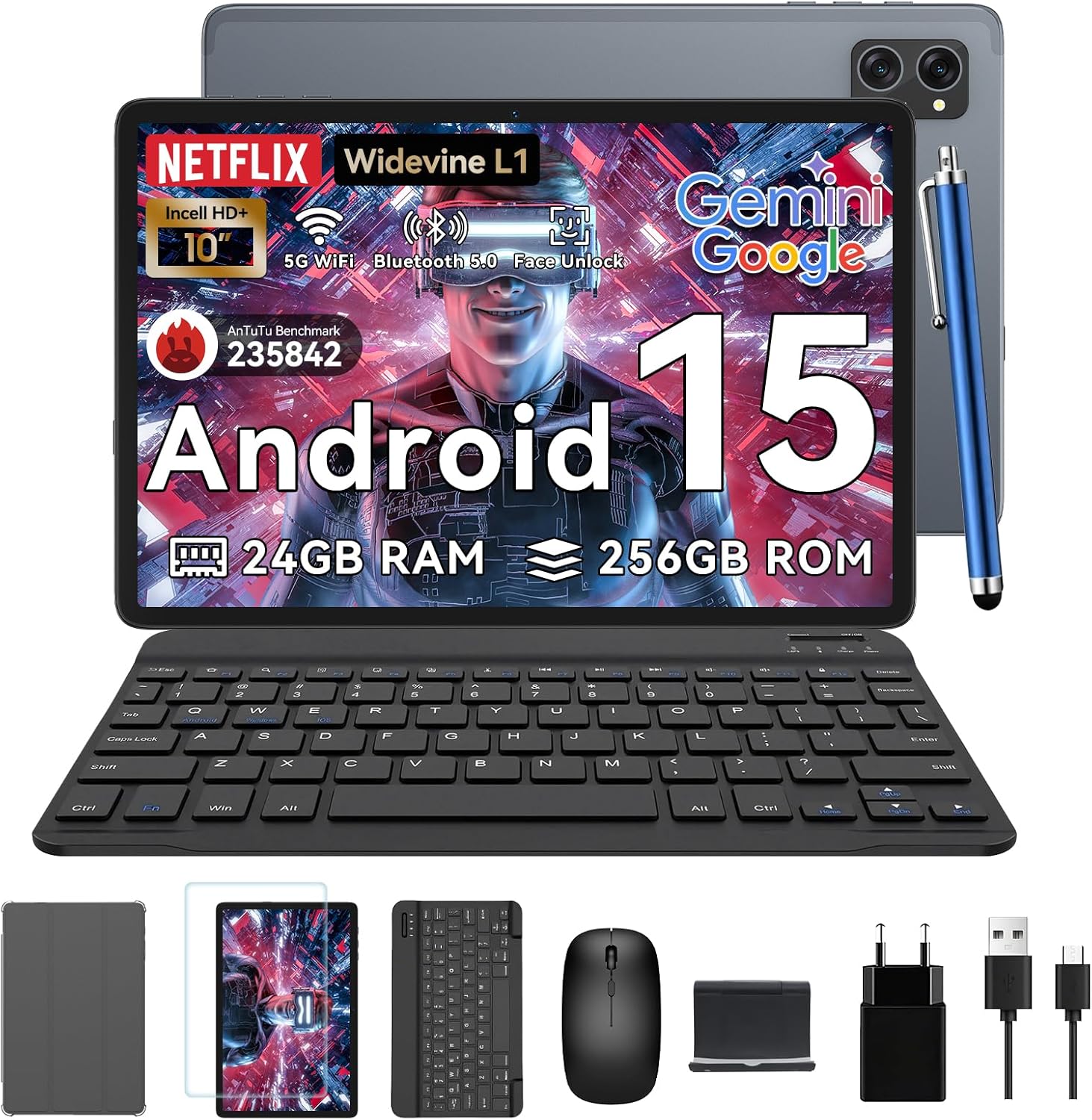
Contents of the TABWEE T20 Tablet box including tablet, keyboard, mouse, stylus, case, stand, screen protector, charger, and cable.

Image: All items included in the TABWEE T20 Tablet package, neatly arranged.

สินค้าเกินview

Familiarize yourself with the physical components of your TABWEE T20 Tablet.

ด้านหน้าและด้านหลัง view of the TABWEE T20 Tablet, highlighting camera placement and screen.

ภาพ: ด้านหน้าและด้านหลัง view of the TABWEE T20 Tablet, showing the display and camera module.

ส่วนประกอบหลัก:

การตั้งค่าเริ่มต้น

  1. การชาร์จแท็บเล็ต:

    Connect the provided charger and USB cable to the tablet's USB-C port. Plug the charger into a power outlet. The battery indicator will show charging status. Fully charge the tablet before first use.

  2. การเปิด/ปิดเครื่อง:

    Press and hold the Power button until the TABWEE logo appears to turn on. To turn off, press and hold the Power button, then select "Power off" from the options.

  3. การกำหนดค่าเริ่มต้น:

    Upon first power-on, follow the on-screen prompts to select your language, connect to a Wi-Fi network, sign in with your Google account, and set up security features like Face Unlock.

  4. Inserting a MicroSD Card (Optional):

    Locate the MicroSD card slot. Gently insert a compatible MicroSD card (up to 2TB) until it clicks into place. This expands your tablet's storage capacity.

การใช้งานแท็บเล็ตของคุณ

Android 15 with Gemini AI

Your TABWEE T20 runs on Android 15, enhanced with Gemini AI for an intuitive and efficient experience. Features include real-time language translation, intelligent task management, and personalized widget previews.

Screenshot showing various Android 15 features like App Pairs, Bluetooth Popup Dialog, and Enhanced Physical Keyboard Support.

Image: Visual representation of Android 15 features, including app management and connectivity options.

Diagram illustrating Gemini AI features such as AI Voice-wake up, AI Smart Control, and AI Text to Image.

ภาพ: เหนือview of Gemini AI 2.0 experimental features, including voice control and smart assistance.

จอแสดงผลและเสียง

The 10.1-inch Full HD display with Widevine L1 certification provides vibrant 1080p visuals. Enjoy immersive sound with the Smart-K dual BOX speakers.

Image showing the 10.1-inch display with Widevine L1 support and various eye-friendly modes.

Image: The tablet display showcasing Widevine L1 certification and different eye-friendly viewโหมดไอเอ็นจี

Image showing the tablet's dual Smart-K Box speakers and their audio output.

Image: Illustration of the tablet's dual Smart-K Box speakers, emphasizing sound quality.

ฟังก์ชั่นกล้อง

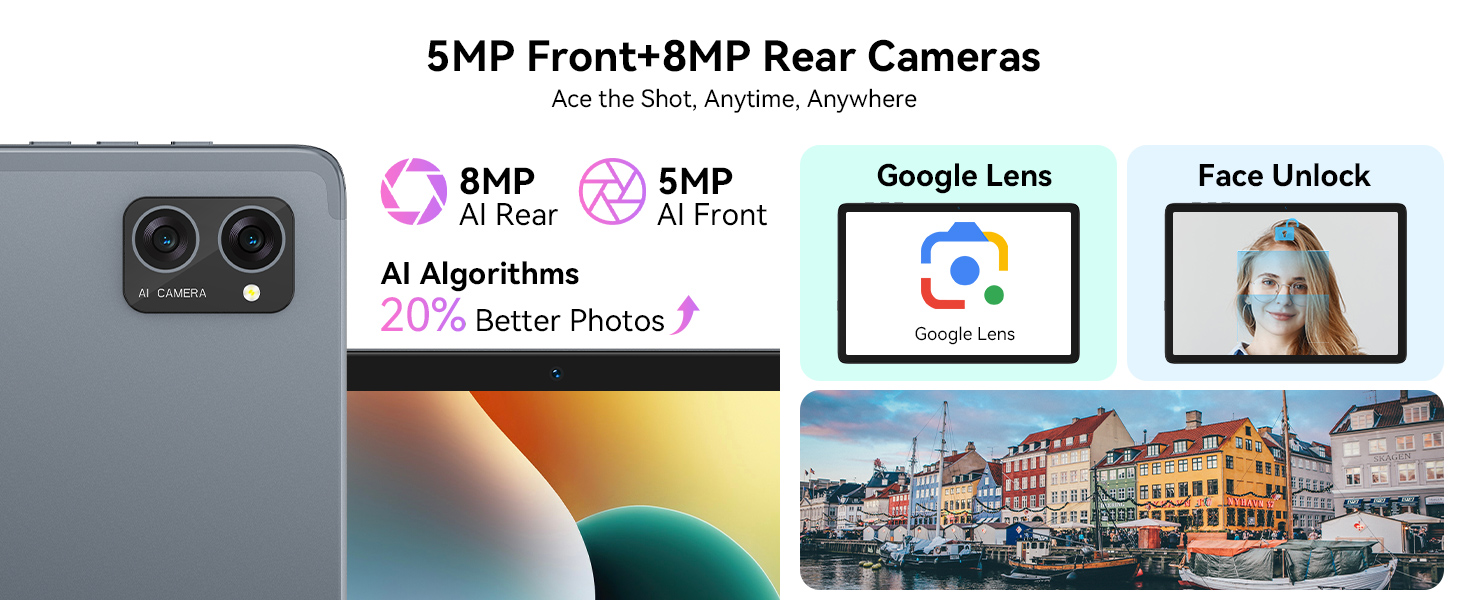
The tablet features 8MP front and rear AI cameras. Utilize the Smart Scan camera for efficient document scanning.

Image showing the tablet's 5MP front and 8MP rear AI cameras, with features like Face Unlock and Smart Google Lens.

Image: The tablet's camera system, highlighting 5MP front and 8MP rear AI cameras, along with Google Lens and Face Unlock capabilities.
Examples of Smart Google Lens functions including solving math problems, identifying plants, and translating text.

Image: Various applications of Smart Google Lens for scanning, searching, and exploring.

การเชื่อมต่อ

Image illustrating the tablet's Lightning Fast WiFi 5 Technology with a tablet connected to a keyboard and mouse.

Image: The tablet demonstrating fast WiFi 5 connectivity, shown with connected keyboard and mouse.

Image showing a person using wireless earbuds connected via Advanced Bluetooth 5.0 to the tablet.

Image: A user enjoying audio content with wireless earbuds connected to the tablet via Bluetooth 5.0.

Using Included Accessories

The TABWEE T20 Tablet comes with a suite of accessories to enhance your experience.

Image showing the tablet with its keyboard and mouse accessories, set up like a laptop.

Image: The TABWEE T20 Tablet configured with its keyboard and mouse, demonstrating its 2-in-1 versatility.

การดูแลรักษา

Image showing the tablet's 5000mAh battery capacity and estimated usage times for various activities.

Image: The tablet's internal battery, illustrating its 5000mAh capacity and estimated usage durations.

การแก้ไขปัญหา

ปัญหาวิธีแก้ปัญหาที่เป็นไปได้
แท็บเล็ตไม่เปิดEnsure the tablet is charged. Connect to charger for at least 30 minutes. Try holding the Power button for 10-15 seconds.
ปัญหาการเชื่อมต่อ Wi-FiRestart the tablet and your Wi-Fi router. Forget the network and reconnect. Ensure you are within range.
แท็บเล็ตทำงานช้าหรือไม่ตอบสนองClose unused apps. Clear cache. Restart the tablet. Check for available system updates.
อุปกรณ์เสริม (คีย์บอร์ด/เมาส์) เชื่อมต่อไม่ได้Ensure Bluetooth is enabled on the tablet. Put the accessory in pairing mode. Check battery levels of accessories.
Apps crashing frequently.Clear the app's cache and data (Settings > Apps > [App Name] > Storage). Reinstall the app. Ensure sufficient storage space.

ข้อมูลจำเพาะทางเทคนิค

คุณสมบัติรายละเอียด
แบบอย่างT20 Tablet Tabwee
ระบบปฏิบัติการAndroid 15 (with Gemini AI)
โปรเซสเซอร์UNISOC T606 Octa-Core (2 GHz)
แรมหน่วยความจำ 24GB (8GB พื้นฐาน + 16GB สำหรับเพิ่มความจุ)
การจัดเก็บข้อมูลภายใน256GB
พื้นที่เก็บข้อมูลแบบขยายได้สูงสุด 2TB ผ่านการ์ด MicroSD
ขนาดจอแสดงผล10.1 นิ้ว
ความละเอียดการแสดงผล1280 x 800 Pixels (Full HD, Widevine L1)
กล้องหลังกล้อง AI 8MP
กล้องหน้า8MP
แบตเตอรี่5000mAh ลิเธียมโพลิเมอร์
การเชื่อมต่อ5G Dual-Band Wi-Fi (802.11ac), Bluetooth 5.0
ขนาด24.64 x 15.49 x 0.76 ซม.
น้ำหนัก500 กรัม
Image showing the internal components of the tablet, highlighting the 24GB RAM and 256GB ROM with 2TB expansion capability.

Image: Internal memory architecture of the TABWEE T20 Tablet, detailing RAM and ROM capacities.

Image showing the Unisoc T606 Octa-Core processor chip with its specifications.

Image: The Unisoc T606 Octa-Core processor, highlighting its core configuration and GPU.

การรับประกันและการสนับสนุน

Your TABWEE T20 Tablet comes with a 2-year UK warranty, ensuring peace of mind. TABWEE is committed to quality and customer satisfaction.

For technical support, warranty claims, or general inquiries, please contact TABWEE customer service through the official channels provided at the point of purchase or on the TABWEE brand webเว็บไซต์.

Image detailing TABWEE's 2-Year Warranty and Lifetime Support, including free repair and technical assistance.

Image: Information regarding TABWEE's 2-year warranty and lifetime customer support.
เอกสารที่เกี่ยวข้อง - T20 Tablet Tabwee

พรีview คู่มือการใช้งานและใบรับประกัน TABWEE T20
คู่มือผู้ใช้และข้อมูลการรับประกันสำหรับแท็บเล็ต TABWEE T20 รวมถึงการตั้งค่า แนวทางด้านความปลอดภัย การบำรุงรักษา และการปฏิบัติตามกฎระเบียบ
พรีview TABWEE W90 Tablet - ข้อมูลผลิตภัณฑ์และการซ่อมแซม
การผลิตอย่างเป็นทางการของ TABWEE W90 แท็บเล็ต, das technische Spezifikationen, Energieeffizienz und den Reparierbarkeitsindex gemäß der EU-Verordnung 2023/1669 detailliert beschreibt.
พรีview แผ่นข้อมูลผลิตภัณฑ์แท็บเล็ต TABBEE T90 - ข้อมูลจำเพาะทางเทคนิคและการติดฉลากพลังงาน
ข้อมูลจำเพาะผลิตภัณฑ์โดยละเอียดสำหรับแท็บเล็ต TABWEE T90 รวมถึงข้อมูลจำเพาะทางเทคนิค ระดับประสิทธิภาพพลังงาน อายุการใช้งานแบตเตอรี่ ดัชนีความสามารถในการซ่อมแซม และการปฏิบัติตามข้อบังคับ EU 2023/1669
พรีview TABWEE T90 Tahvelarvuti Toote Teabeleht
Toote teabeleht TABWEE T90 tahvelarvutile, sisaldades energiatõhususe klassi, aku Vastupidavust, parandatavust และ muid tehnilisi และ meid Vastavalt EL määrusele 2023/1669
พรีview คู่มือการใช้งานและข้อมูลการรับประกัน TABWEE T80
คู่มือการใช้งานฉบับสมบูรณ์และรายละเอียดการรับประกันสำหรับแท็บเล็ต TABWEE T80 ครอบคลุมการเปิดใช้งาน คุณสมบัติ ความปลอดภัย การบำรุงรักษา และการปฏิบัติตามกฎระเบียบ
พรีview รายงานผลการทดสอบ FCC Part 22/24 สำหรับแท็บเล็ต TABWEE W90
เอกสารฉบับนี้แสดงผลการทดสอบ FCC Part 22 และ Part 24 สำหรับแท็บเล็ตคอมพิวเตอร์ TABWEE W90 ที่ผลิตโดย Shenzhen Baijin Technology Co., Ltd. ครอบคลุมถึงกำลังส่งแบบนำไฟฟ้าและแผ่รังสี การปล่อยคลื่นรบกวน แบนด์วิดท์ที่ใช้งาน การปฏิบัติตามขอบแบนด์ ความเสถียรของความถี่ และอัตราส่วนค่าสูงสุดต่อค่าเฉลี่ย ซึ่งดำเนินการโดย Shenzhen CTA Testing Technology Co., Ltd.