1. บทนำ
This manual provides detailed instructions for the Taiahiro BK820 Typewriter Mechanical Gaming Keyboard and Mouse Combo. Designed for both gaming and daily computing, this combo offers a unique retro aesthetic combined with modern mechanical performance and customizable RGB lighting. Please read this manual thoroughly to ensure proper setup, operation, and maintenance of your new device.
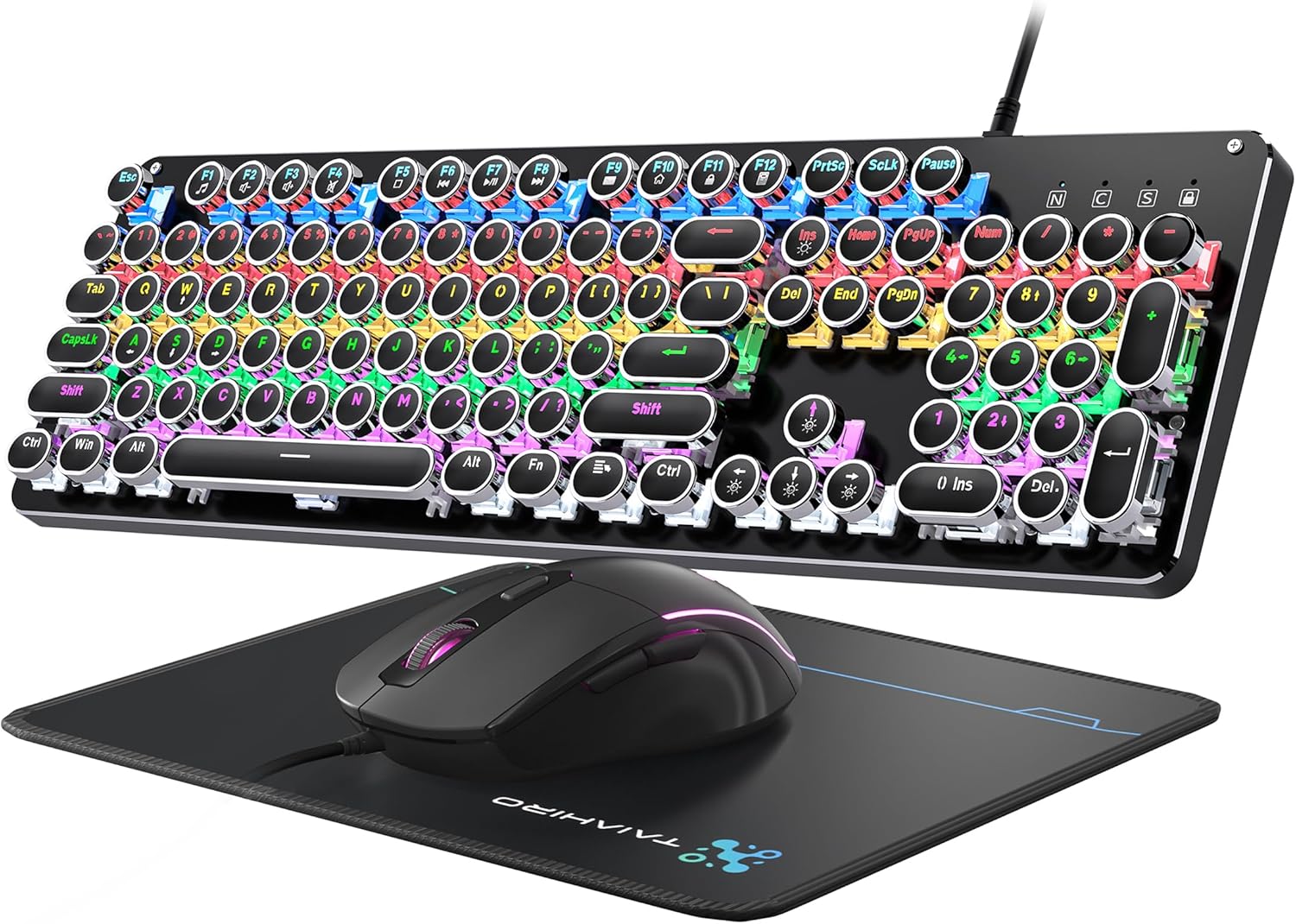
Figure 1: Taiahiro BK820 Typewriter Mechanical Gaming Keyboard and Mouse Combo.
2. เนื้อหาบรรจุภัณฑ์
The Taiahiro BK820 combo includes the following items:
- แป้นพิมพ์เครื่องกลของเครื่องพิมพ์ดีด
- เมาส์แบบมีสาย
- แผ่นรองเม้าส์
3. คุณสมบัติของผลิตภัณฑ์
The Taiahiro BK820 combo is equipped with several features to enhance your user experience:
- Typewriter Mechanical Keyboard and Mouse Set: Features mechanical blue switches, durable round keycaps, and an adjustable DPI optical mouse. Offers speed, accuracy, and comfort with a crisp click sound and precise tactile feedback.
- Metal Panel & Top Quality: The mechanical gaming keyboard is constructed from top-grade aluminum alloy with a matte finish. Double-shot-molded ABS keycaps are wear-resistant, non-fading, and removable for easy cleaning.
- 7 Colors Breathing RGB Gaming Mouse: Wired gaming mouse with a high-precision optical sensor and super-fast game engine. Features 4 Adjustable DPI Levels (800/1600/2400/3200), RGB backlighting, an anti-skid scroll wheel, and 7-color lighting with breathing and cycling effects.
- 104-Key Anti-Ghost Ergonomic Keyboard: 104 anti-ghosting keys for fast response. Full-size keyboard includes 12 multimedia keys and a number pad. Ergonomically designed with a high-low key layout, suspended round keys, and adjustable double kickstand feet to reduce hand fatigue.
- 11 Modes RGB Backlighting: Keyboard features 4-color RGB backlighting with 11 different lighting modes. Double-shot injection molded keycaps ensure clear backlight and extreme durability. Brightness and breathing speed are adjustable.
- Wide Compatible: USB 2.0 plug-and-play connection. Compatible with PC, laptop, Mac, and other devices, supporting Windows, Linux, and Mac OS systems.
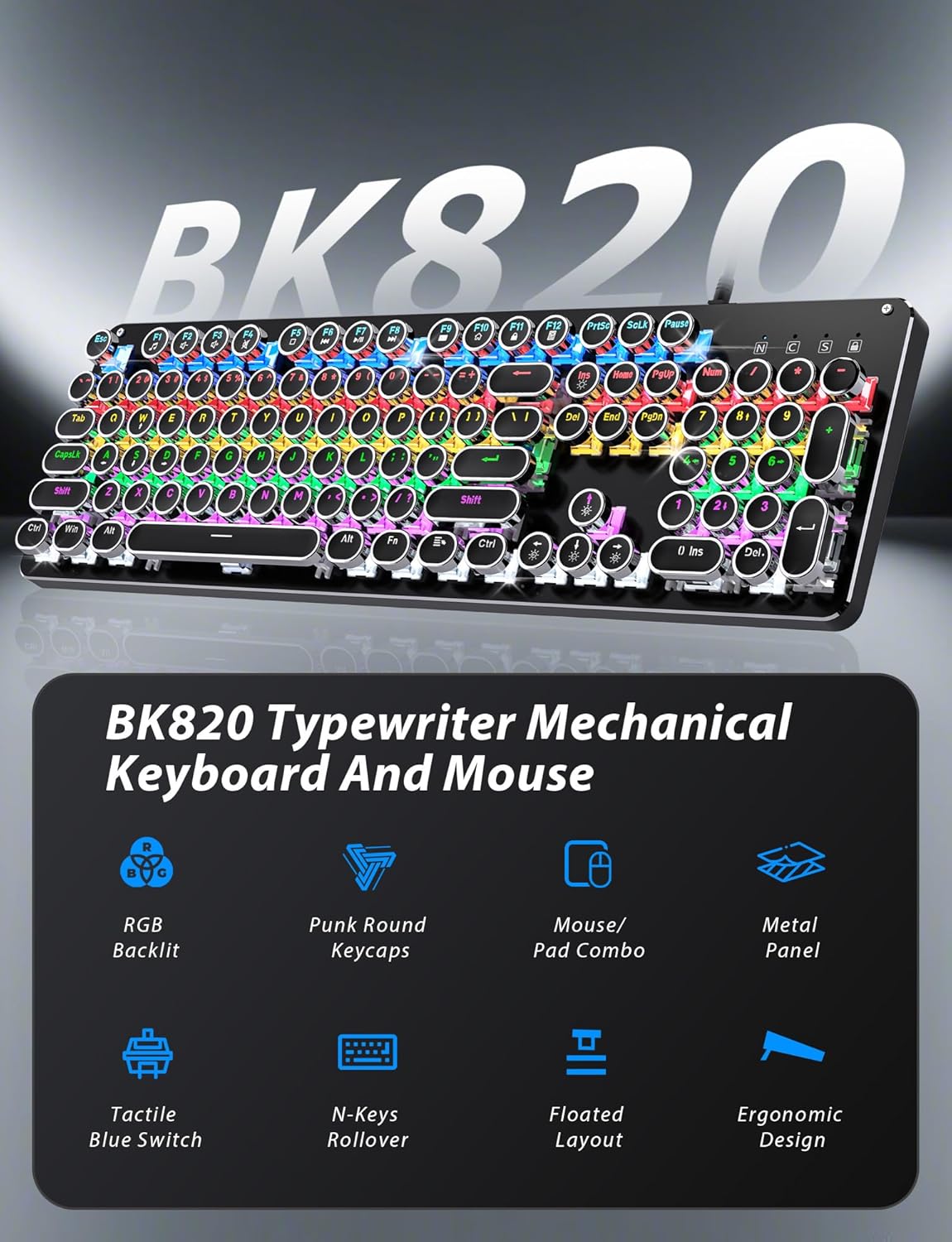
Figure 2: Key features of the Taiahiro BK820 combo.
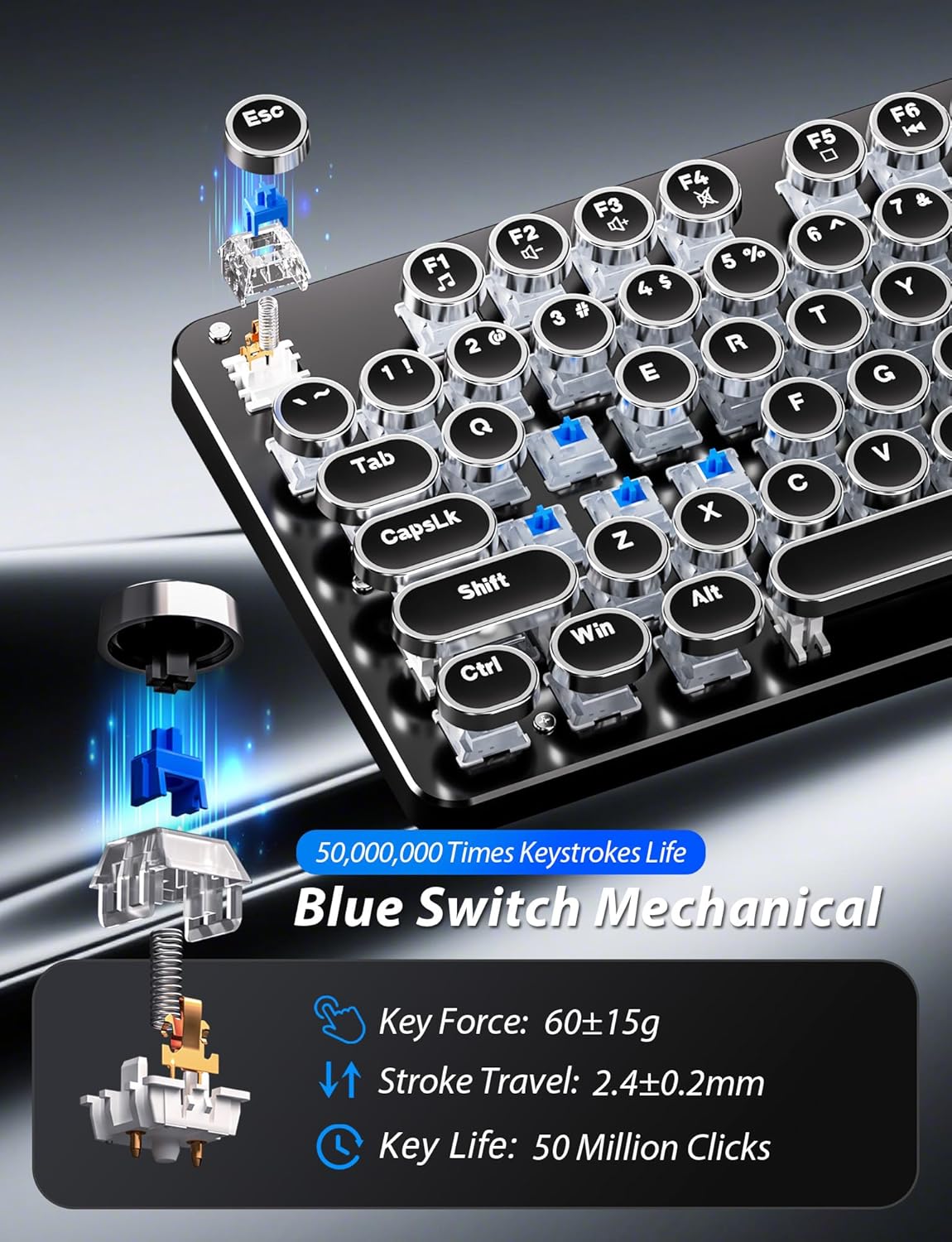
รูปที่ 3: รายละเอียด view of the mechanical blue switches.
4. คำแนะนำในการตั้งค่า
- เชื่อมต่อคีย์บอร์ด: Plug the keyboard's USB cable into an available USB 2.0 port on your computer. The keyboard is plug-and-play and should be recognized automatically by your operating system.
- เชื่อมต่อเมาส์: Plug the mouse's USB cable into another available USB 2.0 port on your computer. The mouse is also plug-and-play.
- ปรับมุมแป้นพิมพ์: Flip the keyboard over. Extend the adjustable double kickstand feet located on the underside of the keyboard to achieve your preferred typing angle.
- ติดที่พักข้อมือ (ทางเลือก): The keyboard features a magnetic wrist rest. Align the wrist rest with the front edge of the keyboard until it snaps into place.
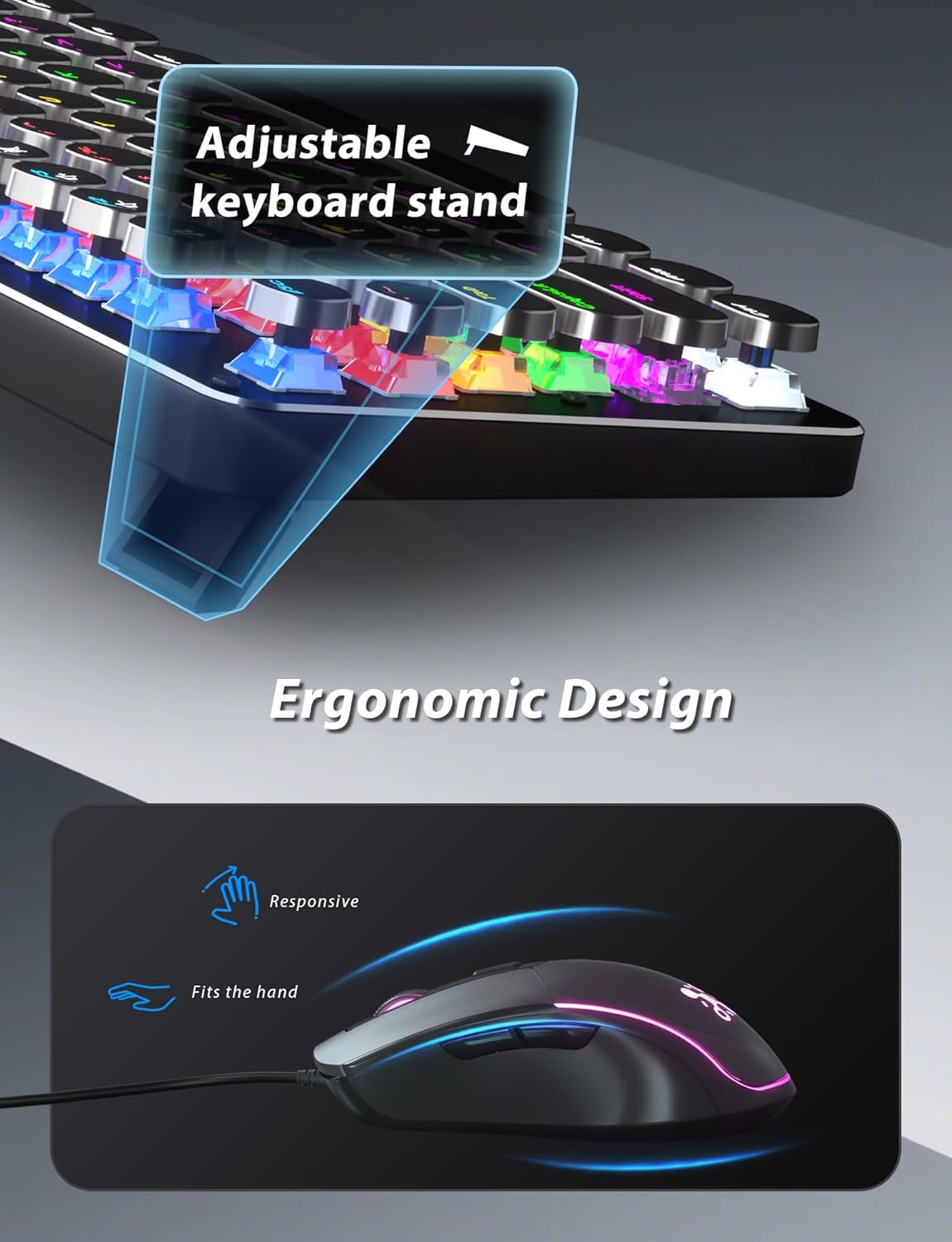
Figure 4: Adjustable keyboard stand for ergonomic comfort.
5. คู่มือการใช้งาน
5.1 ฟังก์ชั่นคีย์บอร์ด
- โหมดแสงไฟ RGB: กด Fn + อิน เพื่อสลับไปมาระหว่างโหมดแสงไฟ RGB 11 แบบที่แตกต่างกัน
- ปรับความสว่างของแบ็คไลท์: กด Fn + ↑ (ลูกศรขึ้น) เพื่อเพิ่มความสว่างหรือ Fn + ↓ (ลูกศรลง) เพื่อลดความสว่าง
- ปรับความเร็วแบ็คไลท์: กด Fn + ← (ลูกศรซ้าย) to decrease animation speed or Fn + → (ลูกศรชี้ไปทางขวา) to increase animation speed for dynamic lighting modes.
- โหมดการเล่นเกม: The keyboard offers 6 preset gaming modes. Press Fn+F1 ผ่าน Fn+F6 to activate specific key lighting for different game types.
- คีย์มัลติมีเดีย: ใช้ Fn คีย์ร่วมกับ F1-F12 keys for various multimedia controls (e.g., volume, play/pause, calculator).
- ล็อคคีย์ Windows: กด Fn + วิน เพื่อล็อคหรือปลดล็อคปุ่ม Windows เพื่อป้องกันการกดปุ่มโดยไม่ได้ตั้งใจในระหว่างการเล่นเกม

Figure 5: Keyboard RGB backlight controls.
5.2 ฟังก์ชันเมาส์
- การปรับ DPI: Press the DPI button located on the top of the mouse to cycle through 4 adjustable DPI levels (800/1600/2400/3200).
- แสงไฟ RGB: The mouse features 7-color breathing and cycling RGB lighting that changes automatically.
- ปุ่มเดินหน้า/ถอยหลัง: ใช้ปุ่มด้านข้างเพื่อการนำทางอย่างรวดเร็ว web เบราว์เซอร์หรือแอปพลิเคชันอื่นๆ

Figure 6: Taiahiro BK820 Gaming Mouse with RGB lighting and DPI button.
5.3 วิดีโอผลิตภัณฑ์อย่างเป็นทางการ
วิดีโอ 1: วิดีโอนี้ให้ภาพรวมview of the 104-Key Retro Typewriter Mechanical Gaming Keyboard and Mouse combo, showcasinก. การออกแบบและคุณสมบัติ
Video 2: This video demonstrates the unboxing experience of the BK820 Typewriter Mechanical Keyboard and Mouse, showing the contents as they are removed from the packaging.
Video 3: This video introduces the Typewriter Mechanical Keyboard and Mouse Combo, highlighting its design and functionality.
6. การบำรุงรักษา
To ensure the longevity and optimal performance of your keyboard and mouse:
- การทำความสะอาดคีย์แคป: The double-shot-molded ABS keycaps are removable. Gently pull them off to clean any dust or debris underneath. Use a soft, damp cloth to wipe the keycaps and the keyboard surface. Ensure all parts are dry before reattaching keycaps.
- Mouse Cleaning: Use a soft, dry cloth to clean the mouse surface. Avoid using harsh chemicals or abrasive materials.
7 การแก้ไขปัญหา
- แป้นพิมพ์หรือเมาส์ไม่ตอบสนอง: Ensure both the keyboard and mouse USB cables are securely plugged into your computer's USB ports. Try plugging them into different USB ports.
- Backlight Not Working/Adjusting: Verify that the keyboard is powered on. Use Fn + อิน to cycle through modes. Adjust brightness with ฟน + ↑/↓ และความเร็วด้วย Fn + ←/→.
- Windows Key Disabled: หากปุ่ม Windows ไม่ทำงาน อาจเป็นเพราะปุ่มถูกล็อก ให้กดปุ่มดังกล่าว Fn + วิน to toggle its lock status.
- DPI ของเมาส์ไม่เปลี่ยนแปลง: Press the dedicated DPI button on the mouse to cycle through the available sensitivity settings.
8. ข้อมูลจำเพาะ
| ยี่ห้อ | ไทอาฮิโระ |
| หมายเลขรุ่น | BK820 |
| สี | สีดำ |
| เทคโนโลยีการเชื่อมต่อ | ยูเอสบี |
| คุณสมบัติพิเศษ | มีไฟแบ็คไลท์ |
| อุปกรณ์ที่รองรับ | พีซี, แล็ปท็อป, แมค |
| น้ำหนักสินค้า | 2.51 ปอนด์ |
| ขนาดแพ็คเกจ | 17.8 x 6.42 x 3.03 นิ้ว |
9. การรับประกันและการสนับสนุน
For warranty information, technical support, or any inquiries regarding your Taiahiro BK820 Typewriter Mechanical Gaming Keyboard and Mouse Combo, please refer to the manufacturer's official webหรือติดต่อฝ่ายบริการลูกค้าโดยตรง เก็บใบเสร็จรับเงินไว้เพื่อใช้ในการเคลมประกัน


