1. บทนำ
Thank you for choosing the EZIclean Cyclomax R22 Station Cordless Stick Vacuum Cleaner. This manual provides essential information for the safe and efficient operation, maintenance, and troubleshooting of your new appliance. Please read this manual thoroughly before first use and keep it for future reference.
2. คำแนะนำด้านความปลอดภัยที่สำคัญ
เมื่อใช้เครื่องใช้ไฟฟ้า ควรปฏิบัติตามข้อควรระวังพื้นฐานเสมอ ซึ่งรวมถึงสิ่งต่อไปนี้:
- อ่านคำแนะนำทั้งหมดก่อนใช้เครื่องดูดฝุ่นนี้
- ห้ามใช้กลางแจ้งหรือบนพื้นผิวเปียก
- ห้ามให้เด็กใช้เป็นของเล่น ควรให้เด็กดูแลอย่างใกล้ชิดเมื่อใช้งานใกล้เด็ก
- ใช้เฉพาะตามที่อธิบายไว้ในคู่มือนี้เท่านั้น ใช้เฉพาะอุปกรณ์เสริมที่ผู้ผลิตแนะนำเท่านั้น
- ห้ามใช้หากสายไฟหรือปลั๊กชำรุด หากเครื่องใช้ไฟฟ้าทำงานผิดปกติ ตกหล่น เสียหาย ถูกทิ้งไว้กลางแจ้ง หรือตกน้ำ ให้ส่งคืนอุปกรณ์ไปยังศูนย์บริการ
- ห้ามดึงหรือถือสายไฟ ห้ามใช้สายไฟเป็นที่จับ ปิดประตูทับสายไฟ หรือดึงสายไฟรอบขอบหรือมุมที่คม ห้ามวางเครื่องใช้ไฟฟ้าทับสายไฟ ห้ามวางสายไฟไว้ใกล้พื้นผิวที่ร้อน
- ห้ามถอดปลั๊กโดยดึงสายไฟ หากต้องการถอด ให้จับที่ปลั๊ก ไม่ใช่ที่สายไฟ
- ห้ามจับปลั๊กหรือเครื่องใช้ไฟฟ้าขณะที่มือเปียก
- ห้ามใส่สิ่งของใดๆ เข้าไปในช่องเปิด ห้ามใช้ในขณะที่ช่องเปิดใดๆ ถูกปิดกั้น หลีกเลี่ยงฝุ่น เศษผ้า เส้นผม และสิ่งใดๆ ที่อาจขัดขวางการไหลเวียนของอากาศ
- ให้ผม เสื้อผ้าที่หลวม นิ้ว และส่วนต่างๆ ของร่างกายอยู่ห่างจากช่องเปิดและชิ้นส่วนที่เคลื่อนไหว
- ห้ามหยิบจับสิ่งของที่กำลังเผาไหม้หรือมีควัน เช่น บุหรี่ ไม้ขีดไฟ หรือขี้เถ้าร้อน
- ห้ามใช้ตักของเหลวไวไฟหรือติดไฟได้ เช่น น้ำมันเบนซิน หรือใช้ในพื้นที่ที่อาจมีของเหลวเหล่านี้อยู่
- ห้ามเก็บวัสดุที่เป็นพิษ เช่น น้ำยาฟอกขาวที่มีคลอรีน แอมโมเนีย หรือน้ำยาทำความสะอาดท่อ
- ห้ามใช้โดยไม่มีถุงเก็บฝุ่นและ/หรือตัวกรอง
- ปิดการควบคุมทั้งหมดก่อนที่จะถอดปลั๊ก
- ควรระมัดระวังเป็นพิเศษเมื่อทำความสะอาดบันได
- จัดเก็บเครื่องใช้ในบ้าน
- ห้ามจุ่มเครื่องดูดฝุ่นในน้ำหรือของเหลวอื่นๆ
3. สินค้าหมดview
The EZIclean Cyclomax R22 Station is a versatile cordless stick vacuum cleaner designed for efficient cleaning across various surfaces. It features a powerful digital motor, multi-level HEPA filtration, and an intelligent touch screen.
ส่วนประกอบหลัก
- หน่วยหลัก: ประกอบด้วยมอเตอร์ ถังขยะ และแผงควบคุม
- ท่อต่อ: Connects the main unit to the brush head for floor cleaning.
- หัวแปรงมอเตอร์: Equipped with a roller brush and LED lights for effective cleaning.
- Automatic Emptying Station: A docking station that charges the vacuum and automatically empties its dustbin.
- หน้าจอสัมผัสอัจฉริยะ: Displays battery status, suction power, and other real-time information.
- สิ่งที่แนบมาต่างๆ: (e.g., crevice tool, dusting brush - specific attachments may vary)

Image: The EZIclean Cyclomax R22 Station Cordless Stick Vacuum Cleaner positioned in a living room, demonstrating its adaptable design for various cleaning tasks.
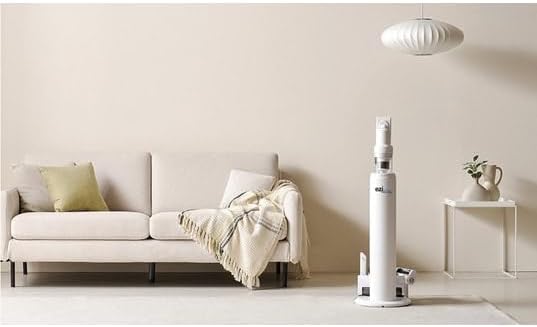
Image: The EZIclean Cyclomax R22 Station vacuum cleaner is shown upright in its automatic emptying and charging station, placed beside a sofa in a home environment.
4. การติดตั้งและการประกอบ
4.1 การประกอบเครื่องดูดฝุ่น
- เชื่อมต่อท่อต่อ: เสียบท่อต่อเข้ากับตัวเครื่องหลักจนกระทั่งได้ยินเสียงคลิกและเข้าที่อย่างแน่นหนา
- ติดตั้งหัวแปรงมอเตอร์: Connect the motorized brush head to the other end of the extension tube, ensuring it locks firmly.
- ติดตั้งไฟล์แนบ: For handheld use, attach desired accessories (e.g., crevice tool) directly to the main unit.
4.2 Setting Up the Automatic Emptying Station
- เลือกตำแหน่ง: Place the automatic emptying station on a flat, stable surface near a power outlet. Ensure there is enough space around it for the vacuum cleaner to dock easily.
- เชื่อมต่อพลังงาน: Plug the power adapter into the station and then into a wall outlet.
- ติดตั้งถุงเก็บฝุ่น: Ensure a dust bag is correctly installed inside the emptying station. Refer to Section 6.1 for dust bag replacement.
4.3 การชาร์จเริ่มต้น
Before first use, fully charge the vacuum cleaner. Dock the assembled vacuum cleaner onto the automatic emptying station. The smart touch screen will indicate charging status. A full charge can take several hours.
5. คู่มือการใช้งาน
5.1 Power On/Off and Suction Control
- เปิดเครื่อง: Press the power button on the main unit. The smart touch screen will illuminate.
- ปรับพลังดูด: Use the controls on the smart touch screen to cycle through different suction modes (e.g., Eco, Standard, Max). The screen displays the current mode and battery level.
- หมดแรง: กดปุ่มเปิด/ปิดอีกครั้งเพื่อปิดเครื่องดูดฝุ่น
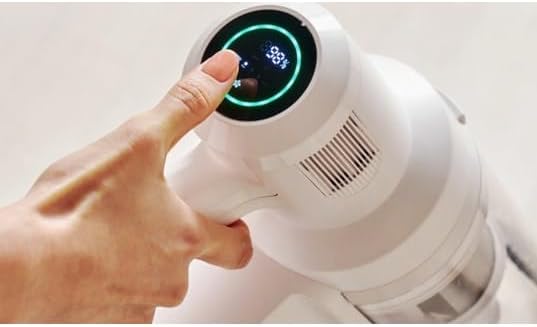
Image: A hand interacts with the smart touch screen of the EZIclean Cyclomax R22 Station, which displays a battery percentage of 98% and is encircled by a green light.
5.2 Cleaning with the Motorized Brush Head
The motorized brush head is suitable for both hard floors and carpets. Its intelligent detection technology automatically adjusts suction power based on the surface and dirt level.

Image: The EZIclean Cyclomax R22 Station vacuum cleaner is actively cleaning a pile of debris, including crumbs and small particles, from a light-colored hard floor.
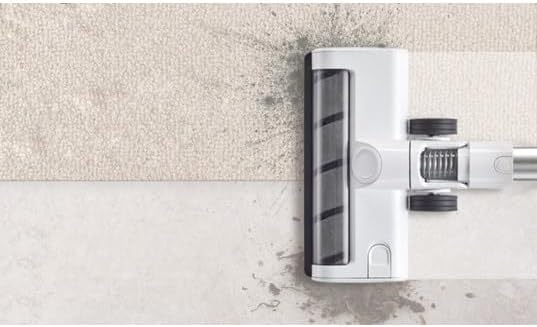
ภาพ: ภาพระยะใกล้ view of the EZIclean Cyclomax R22 Station's brush head, showing its roller brush and wheels, positioned across a transition from a carpeted area to a hard floor.
5.3 ไฟ LED
The motorized brush head features built-in LED lights that illuminate dark areas and corners, making hidden dust and debris visible for thorough cleaning.
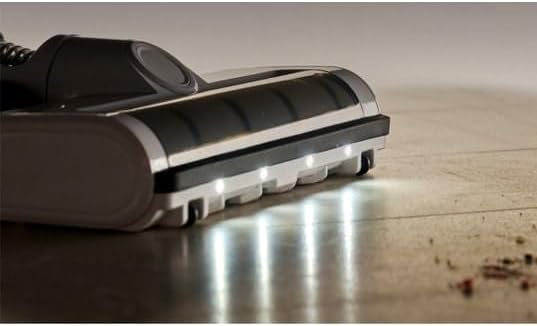
Image: A close-up of the EZIclean Cyclomax R22 Station's brush head with its front-facing LED lights illuminated, casting light on a wooden floor with some visible dust particles.
5.4 Automatic Emptying Function
When the vacuum cleaner is docked in the automatic emptying station, its dustbin will be automatically emptied into the station's larger dust bag. This process typically starts automatically after docking.
6. การบำรุงรักษา
Regular maintenance ensures optimal performance and extends the lifespan of your EZIclean Cyclomax R22 Station.
6.1 การเทขยะ (ด้วยตนเอง)
While the automatic emptying station handles most dust disposal, you may occasionally need to manually empty the vacuum's dustbin:
- Disconnect the main unit from the extension tube.
- Locate the dustbin release button and press it to open the dustbin flap.
- Empty contents into a waste bin.
- ปิดฝาถังขยะให้สนิท
6.2 Replacing the Automatic Emptying Station Dust Bag
The dust bag in the automatic emptying station should be replaced when full. The station may indicate when replacement is needed.
- Open the cover of the automatic emptying station.
- Carefully remove the full dust bag by pulling it upwards.
- Dispose of the full bag responsibly.
- ใส่ถุงเก็บฝุ่นใหม่ ตรวจสอบให้แน่ใจว่าเข้าที่อย่างถูกต้อง
- Close the station cover securely.
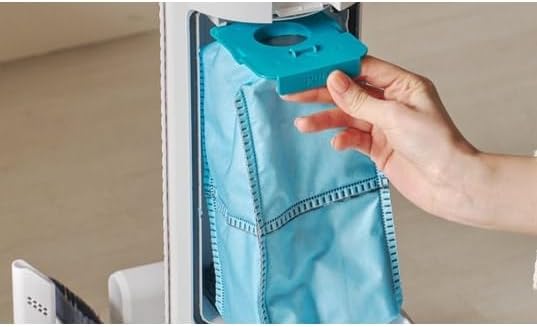
Image: A hand is shown removing a blue dust bag from the internal compartment of the EZIclean Cyclomax R22 Station's automatic emptying unit.
6.3 การทำความสะอาดตัวกรอง
The multi-level HEPA filtration system requires regular cleaning to maintain suction power and air quality.
- ถอดถังเก็บฝุ่นออกจากตัวเครื่องหลัก
- ถอดแผ่นกรอง HEPA และส่วนประกอบตัวกรองอื่นๆ ออกอย่างระมัดระวัง
- Tap the filters gently to remove loose dust. If washable, rinse under cold running water until the water runs clear.
- ปล่อยให้ส่วนประกอบของตัวกรองทั้งหมดแห้งสนิทอย่างน้อย 24 ชั่วโมงก่อนประกอบกลับเข้าที่ ห้ามใช้เครื่องดูดฝุ่นกับตัวกรองที่เปียก
6.4 การทำความสะอาดแปรงลูกกลิ้ง
เส้นผมและเศษฝุ่นอาจพันกันในลูกกลิ้งแปรง ทำให้ประสิทธิภาพการใช้งานลดลง
- Turn off the vacuum and disconnect the brush head.
- หาตำแหน่งกลไกปลดล็อคลูกกลิ้งแปรง (โดยปกติจะเป็นสลักหรือสกรู) แล้วถอดลูกกลิ้งแปรงออก
- ใช้กรรไกรหรือเครื่องมือทำความสะอาดตัดและกำจัดขนหรือเส้นใยที่พันกันออก
- ใส่แปรงกลับเข้าไปและล็อคให้แน่น
6.5 การดูแลแบตเตอรี่
- Always charge the battery using the provided charging station.
- หลีกเลี่ยงการให้แบตเตอรี่สัมผัสกับอุณหภูมิที่สูงเกินไป
- If storing the vacuum for an extended period, ensure the battery is partially charged (around 50%) and recharge every few months.
7 การแก้ไขปัญหา
If you encounter issues with your EZIclean Cyclomax R22 Station, refer to the following table for common problems and solutions.
| ปัญหา | สาเหตุที่เป็นไปได้ | สารละลาย |
|---|---|---|
| เครื่องดูดฝุ่นไม่เปิดขึ้น | แบตเตอรี่หมด กดปุ่มเปิด/ปิดไม่ถูกต้อง | ชาร์จแบตเตอรี่ให้เต็ม กดปุ่มเปิดปิดอย่างแน่นหนา |
| กำลังดูดต่ำ | ถังขยะเต็มแล้ว ตัวกรองอุดตัน แปรงม้วนผมพันกัน ท่อ/สายยางอุดตัน | ล้างถังขยะ ทำความสะอาดหรือเปลี่ยนไส้กรอง ทำความสะอาดม้วนแปรง ตรวจสอบและกำจัดสิ่งอุดตัน |
| การเททิ้งอัตโนมัติไม่ทำงาน | Vacuum not properly docked Emptying station dust bag is full or incorrectly installed Station power not connected | Ensure vacuum is fully seated in the station Replace or correctly install the dust bag Check power connection to the station |
| แปรงลูกกลิ้งไม่หมุน | แปรงม้วนผมพันกัน Brush head is blocked หัวแปรงไม่ได้ติดตั้งอย่างถูกต้อง | ทำความสะอาดม้วนแปรง Remove any obstructions from the brush head ใส่หัวแปรงกลับเข้าที่อย่างแน่นหนา |
8. ข้อมูลจำเพาะ
| คุณสมบัติ | รายละเอียด |
|---|---|
| หมายเลขรุ่น | CYCLOMAX R22 STATION |
| ยี่ห้อ | EZICLEAN |
| ขนาดสินค้า | 3.94 x 9.45 x 44.09 นิ้ว |
| น้ำหนักสินค้า | 2.2 ปอนด์ (1 กิโลกรัม) |
| เล่มที่tage | 28.8 โวลต์ |
| พลังดูด | สูงถึง 35,000 Pa |
| อายุการใช้งานแบตเตอรี่ | Up to 52 minutes (in standard mode) |
| ระบบการกรองน้ำ | Multi-level HEPA filtration (captures 99.97% of particles down to 0.3 microns) |
| คุณสมบัติพิเศษ | Automatic Emptying Technology, Smart Touch Screen, Intelligent Detection Technology, LED Lighting |
9. การรับประกันและการสนับสนุน
For warranty information and customer support, please refer to the warranty card included with your product or contact EZICLEAN customer service through their official website or the retailer where the product was purchased. Please have your model number (CYCLOMAX R22 STATION) and purchase details ready when contacting support.


