1. บทนำ
Thank you for choosing the Roborock Q10 VF Robot Vacuum and Mop. This device is designed to provide efficient and thorough cleaning of your home, combining powerful vacuuming with advanced mopping capabilities. This manual will guide you through the setup, operation, maintenance, and troubleshooting of your new robot cleaner to ensure optimal performance and longevity.
2. ข้อมูลด้านความปลอดภัย
โปรดอ่านคำแนะนำด้านความปลอดภัยทั้งหมดอย่างละเอียดก่อนใช้ผลิตภัณฑ์นี้ การไม่ปฏิบัติตามคำแนะนำเหล่านี้อาจส่งผลให้เกิดไฟฟ้าช็อต ไฟไหม้ หรือบาดเจ็บสาหัสได้
- เด็กอายุตั้งแต่ 8 ปีขึ้นไป รวมไปถึงบุคคลที่มีความบกพร่องทางร่างกาย ประสาทสัมผัส หรือจิตใจ หรือขาดประสบการณ์และความรู้ สามารถใช้เครื่องใช้ไฟฟ้านี้ได้ หากมีการดูแลหรือได้รับคำแนะนำเกี่ยวกับการใช้เครื่องใช้ไฟฟ้าในลักษณะที่ปลอดภัย และเข้าใจถึงอันตรายที่อาจเกิดขึ้น
- ควรมีผู้ดูแลเด็กเพื่อให้แน่ใจว่าไม่ได้เล่นกับเครื่องใช้ไฟฟ้าดังกล่าว
- การทำความสะอาดและการบำรุงรักษาผู้ใช้ไม่ควรทำโดยเด็กโดยไม่มีผู้ดูแล
- ใช้เฉพาะอะแดปเตอร์ไฟและแท่นชาร์จดั้งเดิมที่ผู้ผลิตให้มาเท่านั้น
- ห้ามใช้หุ่นยนต์ในสภาพแวดล้อมที่มีเปลวไฟหรือวัสดุไวไฟ
- เก็บผม เสื้อผ้าที่หลวม นิ้ว และส่วนต่างๆ ของร่างกายให้ห่างจากช่องเปิดและชิ้นส่วนที่เคลื่อนไหว
- ห้ามจุ่มหุ่นยนต์หรือแท่นชาร์จลงในน้ำหรือของเหลวอื่นๆ
- Ensure the robot is placed on a stable surface to prevent falls.
3. การตั้งค่า
3.1 การแกะกล่องและการจัดวาง
Carefully remove all components from the packaging. Place the charging dock against a wall on a hard, level surface, ensuring there is adequate space around it for the robot to maneuver. Connect the power adapter to the charging dock and plug it into a power outlet.

Image: The Roborock Q10 VF robot vacuum and mop with its charging dock, ready for initial setup.
3.2 ค่าบริการเริ่มต้น
Place the robot on the charging dock. Ensure the charging contacts on the robot align with those on the dock. The robot will begin charging automatically. For first-time use, it is recommended to fully charge the robot before operation.
3.3 การดาวน์โหลดแอปและการเชื่อมต่อ
Download the Roborock app from your mobile device's app store. Follow the in-app instructions to connect your robot to your home Wi-Fi network. Note: The robot supports only 2.4GHz Wi-Fi networks.
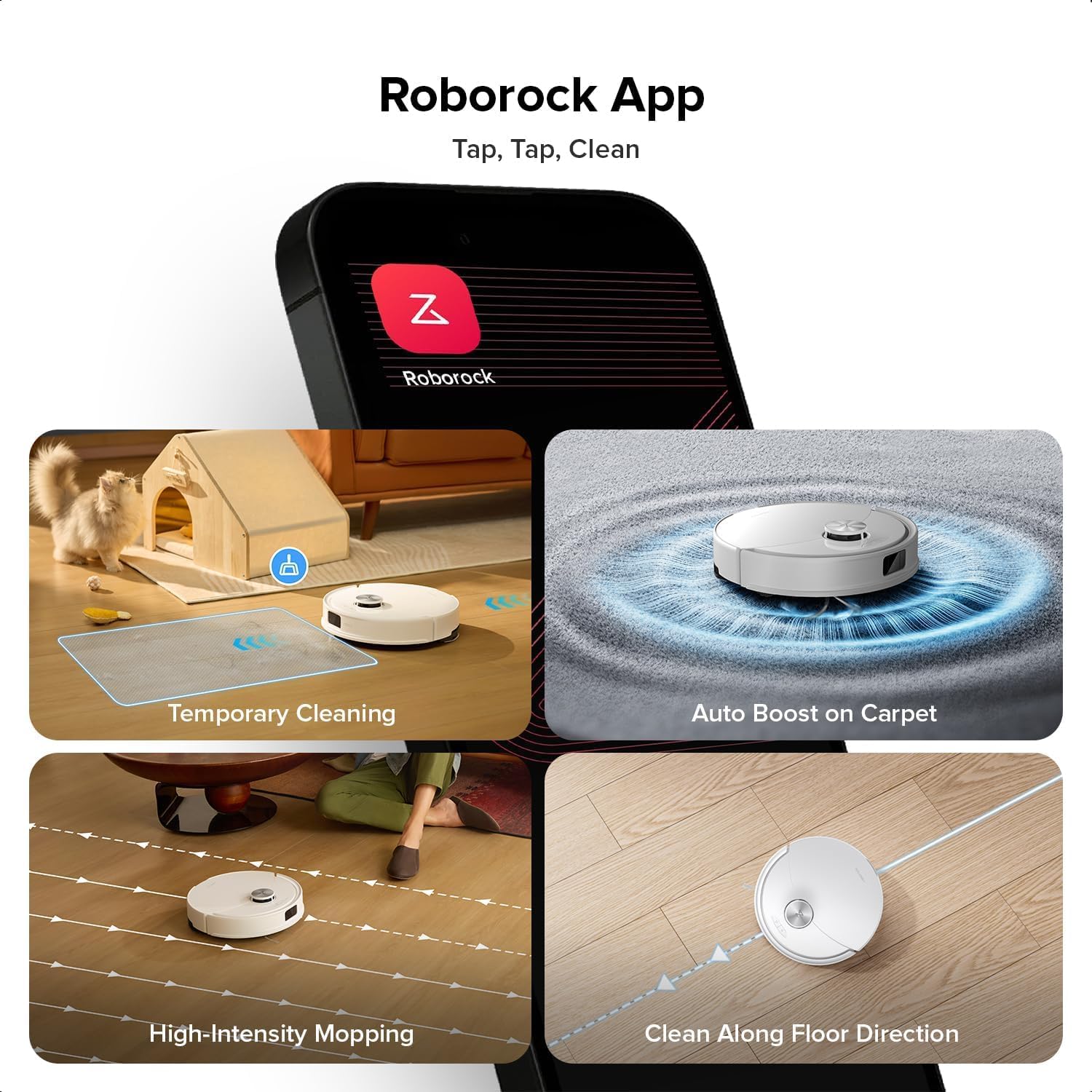
Image: A smartphone displaying the Roborock app interface, showing various cleaning options and controls.
3.4 การกำหนดแผนที่เบื้องต้น
Once connected, initiate a full cleaning cycle from the app. The robot will use its PreciSense LiDAR Navigation system to create a detailed map of your home. This map is crucial for efficient cleaning and allows for advanced features like zone cleaning and no-go zones.

Image: The Roborock Q10 VF robot vacuum using its LiDAR sensor to scan and map the surrounding environment for navigation.
4. คู่มือการใช้งาน
4.1 การเริ่มและหยุดการทำความสะอาด
Press the power button on the robot or use the Roborock app to start a cleaning cycle. Press the button again or use the app to pause or stop cleaning. The robot will automatically return to its charging dock when cleaning is complete or when its battery is low.
โหมดทำความสะอาด 4.2 โหมด
The Roborock Q10 VF offers various cleaning modes accessible via the app:
- เฉพาะสูญญากาศ: สำหรับการกำจัดเศษแห้ง
- เฉพาะไม้ถูพื้น: สำหรับการทำความสะอาดแบบเปียกสำหรับพื้นแข็ง
- ดูดฝุ่นและถูพื้น: ดูดฝุ่นและถูพื้นพร้อมกันได้
- การทำความสะอาดแบบกำหนดเอง: Select specific rooms or zones to clean.
คุณสมบัติขั้นสูง 4.3 ประการ
- ระบบดูดไฮเปอร์ฟอร์ซ: The robot provides an impressive 10000Pa suction power, effectively lifting hair, crumbs, and debris from deep carpets and floor crevices.
- ReactiveTech Obstacle Avoidance: Powered by structured light, this advanced system detects and navigates around obstacles effortlessly, even in cluttered rooms.

Image: The Roborock Q10 VF robot vacuum transitioning from a hard floor to a carpet, with its mop module automatically lifting to avoid wetting the carpet.
- ระบบถูพื้นแบบยกขึ้นอัตโนมัติ: The mop automatically lifts when carpet is detected, allowing for seamless cleaning of both hard floors and carpets in a single session without manual adjustments.

Image: The Roborock Q10 VF robot vacuum intelligently detecting and navigating around various household obstacles on the floor.
- Smart No-Go Zones: The app allows you to define virtual no-go zones and invisible walls to restrict the robot from entering certain areas or crossing boundaries.
5. การบำรุงรักษา
Regular maintenance ensures your Roborock Q10 VF operates at peak performance. Always power off the robot before performing any maintenance.
5.1 การล้างถังขยะ
Open the robot's top cover and remove the dustbin. Empty its contents into a trash can. It is recommended to empty the dustbin after each cleaning cycle.
5.2 Cleaning the Main Brush and Side Brush
The Dual Anti-Tangle Design features a main brush and a side brush that work together to minimize hair tangles. Remove the main brush cover and lift out the main brush. Use the cleaning tool to remove any tangled hair or debris. Clean the side brush similarly. Reinstall all components securely.

ภาพ: ภาพระยะใกล้ view of the Roborock Q10 VF's underside, highlighting its dual anti-tangle main brush and side brush design.
5.3 Cleaning the VibraRise 2.0 Mopping System
Remove the mop pads from the robot. Wash the mop pads thoroughly with water and mild detergent. Allow them to air dry completely before reattaching. The VibraRise 2.0 system tackles stubborn stains with high-frequency scrubbing.
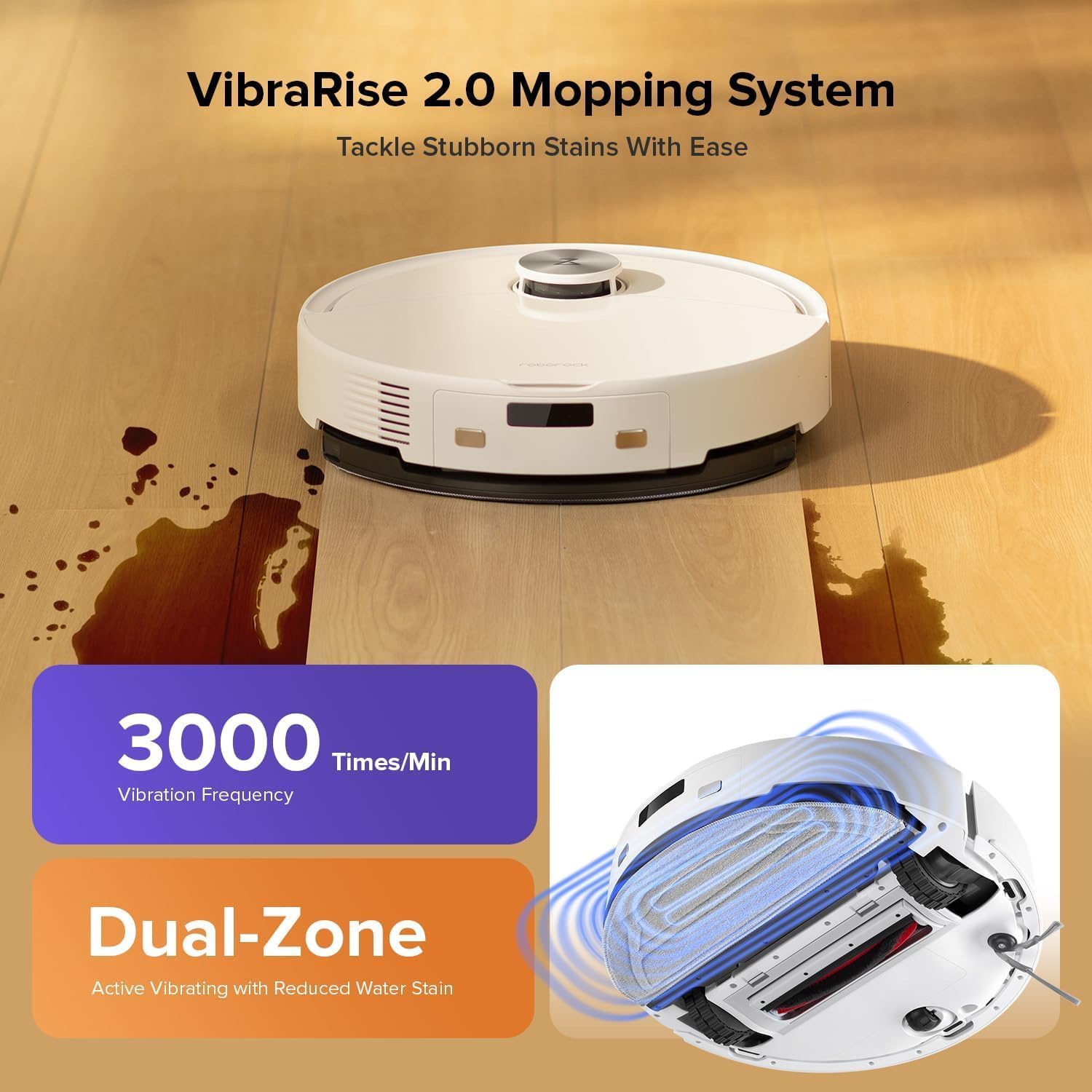
Image: The Roborock Q10 VF robot vacuum actively mopping a hard floor, illustrating the VibraRise 2.0 high-frequency scrubbing action.
5.4 Cleaning Filters and Sensors
Tap the filter to remove dust. The filter can be rinsed with water; ensure it is completely dry before reinstalling. Wipe all sensors (LiDAR, cliff sensors, wall sensors) with a soft, dry cloth to maintain optimal navigation and obstacle detection.
6 การแก้ไขปัญหา
หากคุณพบปัญหาเกี่ยวกับหุ่นยนต์ของคุณ โปรดดูปัญหาทั่วไปและวิธีแก้ไขต่อไปนี้:
| ปัญหา | สาเหตุที่เป็นไปได้ | สารละลาย |
|---|---|---|
| หุ่นยนต์ไม่เปิดขึ้น | แบตเตอรี่อ่อน; กดปุ่มเปิด/ปิดไม่ถูกต้อง | ชาร์จหุ่นยนต์; กดปุ่มเปิด/ปิดค้างไว้ 3 วินาที |
| ไม่สามารถเชื่อมต่อ Wi-Fi ได้ | Incorrect Wi-Fi password; Not 2.4GHz network; Router issues | Verify password; Ensure 2.4GHz network; Restart router and robot |
| ประสิทธิภาพการทำความสะอาดแย่ | Full dustbin; Clogged brushes/filter; Dirty sensors | Empty dustbin; Clean brushes and filter; Wipe sensors |
| หุ่นยนต์ติดขัดบ่อยมาก | Obstacles on floor; Dirty cliff sensors | Clear floor of small objects; Clean cliff sensors |
| Mop not lifting on carpet | Carpet detection sensor dirty or blocked | Clean the carpet detection sensors on the underside of the robot |
7. ข้อมูลจำเพาะ
| คุณสมบัติ | รายละเอียด |
|---|---|
| ยี่ห้อ | โรโบร็อค |
| หมายเลขรุ่น | Q10VF02-00 |
| สี | สีขาว |
| ขนาดสินค้า | 39.2 x 46.8 x 14 ซม. |
| น้ำหนักสินค้า | 15.2 กิโลกรัม |
| เล่มที่tage | 220.0 โวลต์ |
| ระดับเสียง | 65 เดซิเบล |
| รันไทม์สูงสุด | 250 minutes (4 hours 10 minutes) |
| คุณสมบัติพิเศษ | LiDAR Navigation, ReactiveTech Obstacle Avoidance, Auto-Lifting Mop |
| คำแนะนำด้านพื้นผิว | Carpet, Hardwood Floor |
| ประเภทตัวควบคุม | การควบคุมแอพ |
| ส่วนประกอบที่รวมอยู่ | แบตเตอรี่ |
| ประเภทตัวกรอง | Cloth and Foam |
| ความจุของถังขยะ | 500 มล. |
| ความจุถังน้ำ | 200 มล. |
| พื้นที่ดูดฝุ่นสูงสุด | 1,937 ตารางฟุต |
8. การรับประกันและการสนับสนุน
Your Roborock Q10 VF Robot Vacuum and Mop comes with a standard manufacturer's warranty. For detailed warranty information, please refer to the warranty card included in your product packaging or visit the official Roborock webไซต์ หากต้องการการสนับสนุนด้านเทคนิค ความช่วยเหลือในการแก้ไขปัญหา หรือต้องการซื้อชิ้นส่วนทดแทน โปรดติดต่อฝ่ายบริการลูกค้าของ Roborock ผ่านช่องทางอย่างเป็นทางการ
You can visit the official Roborock store on Amazon for more information and support: Roborock Amazon Store