การแนะนำ
Welcome to the ULTRICS Digital Multimeter D2 user manual. This device is designed for precise and reliable electrical measurements, suitable for professionals and DIY enthusiasts. It accurately measures AC/DC voltage, DC current, resistance, continuity, and diodes. This manual provides essential information for safe and effective operation, helping you to maximize the utility of your new multimeter.
ข้อมูลด้านความปลอดภัย
คำเตือน: Always exercise extreme caution when working with electrical circuits. Improper use of this multimeter can result in electric shock, personal injury, or damage to the device.
- อย่าเกินค่าอินพุตสูงสุดสำหรับช่วงใดๆ
- Do not use the multimeter if it or the test leads appear damaged. Inspect them before each use.
- Ensure the function switch is in the correct position before making measurements. Changing ranges while connected to a live circuit can cause damage.
- Disconnect power to the circuit before measuring resistance, continuity, or diodes.
- ใช้ความระมัดระวังเมื่อทำงานกับ voltages สูงกว่า 30V AC RMS, 42V peak หรือ 60V DC ปริมาตรเหล่านี้tages pose a significant shock hazard.
- Always connect the common (COM) test lead first, then the live lead. Disconnect the live lead first, then the common lead.
- Replace the battery when the low battery indicator appears to ensure accurate readings and proper device function.
This multimeter is rated CAT II 600V, indicating its suitability for measurements on circuits directly connected to the low-voltagการติดตั้งอี
เนื้อหาแพ็คเกจ
ตรวจสอบว่ามีรายการทั้งหมดอยู่ในแพ็คเกจ:
- 1 x ULTRICS Digital Multimeter D2
- สายทดสอบ 2 เส้น (สีแดงและสีดำ)
- 1 x 9V แบตเตอรี่
- 1 x คู่มือผู้ใช้ (เอกสารนี้)
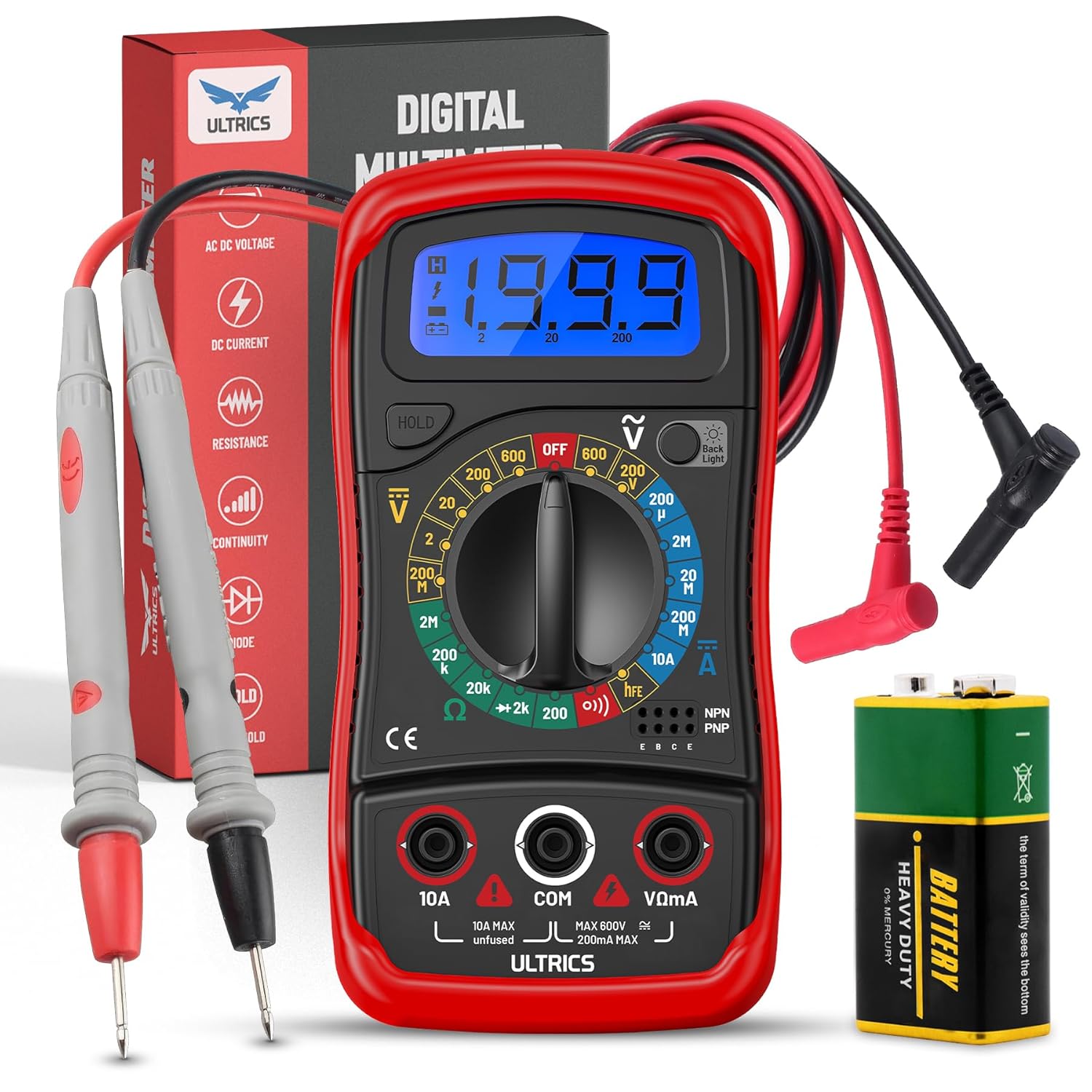
Image: Contents of the ULTRICS Digital Multimeter D2 package, including the multimeter, red and black test leads, and a 9V battery.
สินค้าเกินview
Familiarize yourself with the components of your ULTRICS Digital Multimeter D2.

Image: Detailed diagram of the ULTRICS Digital Multimeter D2, highlighting its key components such as the LCD display, data hold button, backlight button, function switch, test lead jacks, and protective rubber shell.
- จอแสดงผล LCD: Shows measurement readings, units, and polarity. Features a bright backlight for low-light conditions.
- ปุ่มพักข้อมูล: Freezes the current reading on the display for easier recording.
- ปุ่มแบ็คไลท์: เปิดหรือปิดไฟแบ็คไลท์ของจอแสดงผล
- Function Switch (Rotary Dial): เลือกฟังก์ชันและช่วงการวัดที่ต้องการ
- แจ็คอินพุต 10A: Used for measuring DC current up to 10 Ampเอเรส
- COM (Common) Input Jack: The negative (-) input for all measurements. Always connect the black test lead here.
- VΩmA Input Jack: The positive (+) input for voltage, ความต้านทาน และมิลลิampere current measurements. Connect the red test lead here.
- Transistor Test Jacks (hFE): Used for testing NPN and PNP transistors.
- Protective Rubber Shell: Provides durability and protection against minor impacts and splashes.
- ขาตั้งพับได้: Allows for hands-free operation and easy viewมุมอิง
การตั้งค่า
การติดตั้งแบตเตอรี่
The ULTRICS Digital Multimeter D2 requires one 9V battery (included).
- ค้นหาช่องใส่แบตเตอรี่ที่ด้านหลังของมัลติมิเตอร์
- ใช้ไขควงถอดสกรูที่ยึดฝาครอบแบตเตอรี่ออก
- ค่อยๆ ถอดฝาครอบแบตเตอรี่ออก
- ต่อแบตเตอรี่ 9V เข้ากับคลิปหนีบแบตเตอรี่ ตรวจสอบให้แน่ใจว่าขั้วถูกต้อง (+ ต่อกับ + และ - ต่อกับ -)
- วางแบตเตอรี่ไว้ในช่องใส่
- ใส่ฝาครอบแบตเตอรี่และขันให้แน่นด้วยสกรู
การเชื่อมต่อสายการทดสอบ
Always ensure test leads are securely connected before taking measurements.
- Insert the black test lead's banana plug into the คอม ช่องเสียบอินพุต (ทั่วไป)
- สำหรับการวัดส่วนใหญ่ (ปริมาตร)tage, resistance, continuity, diode, small current), insert the red test lead's banana plug into the VΩmA แจ็คอินพุต
- For high current measurements (up to 10A DC), insert the red test lead's banana plug into the 10เอ แจ็คอินพุต
คำแนะนำการใช้งาน
This section details how to perform various measurements using your multimeter.
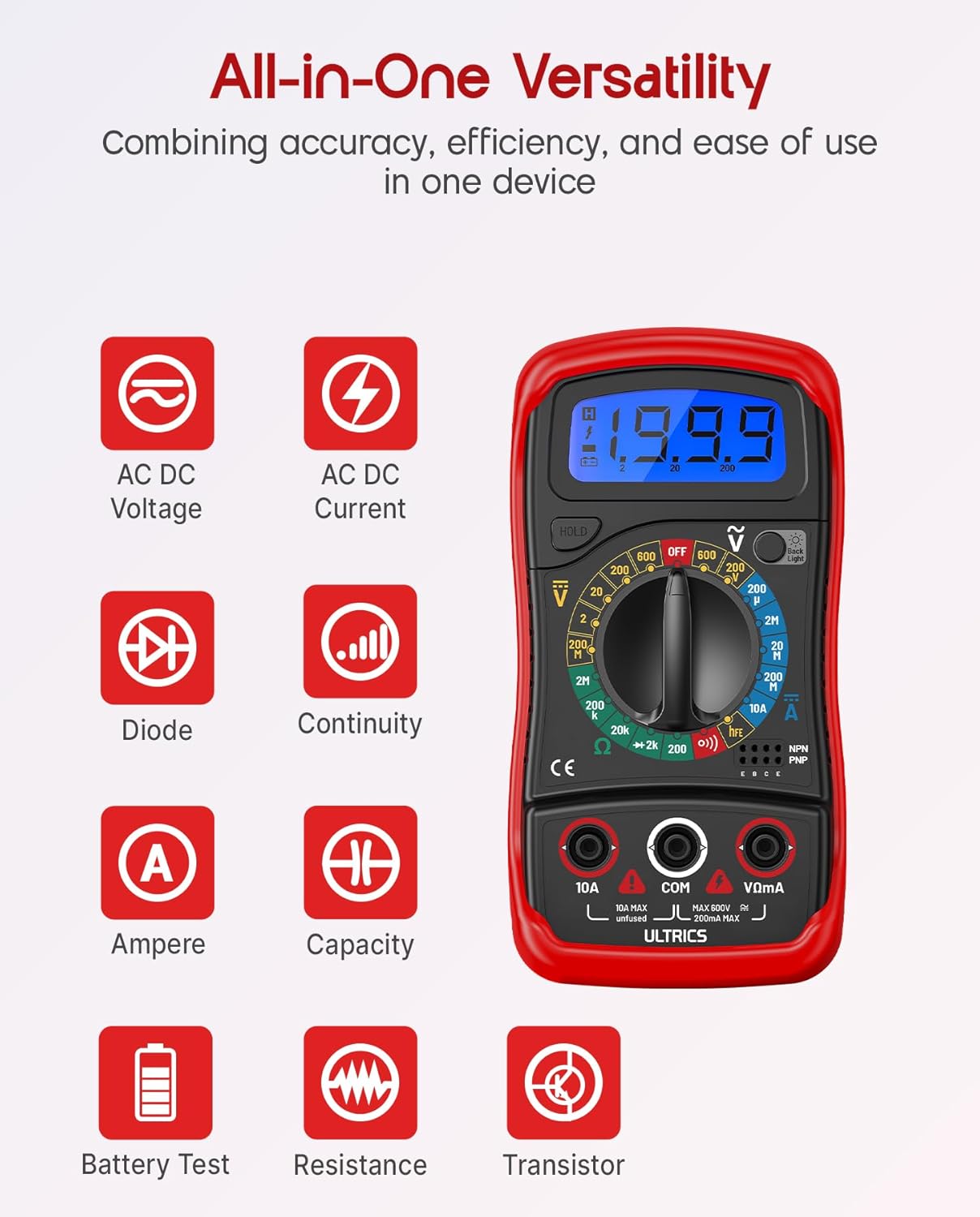
Image: Visual representation of the multimeter's versatile functions, including AC/DC Voltage, AC/DC Current, Diode, Continuity, Ampere, Capacity, Battery Test, Resistance, and Transistor measurements.
การวัด DC Voltagอี (VDC)
- เชื่อมต่อสายทดสอบสีดำเข้ากับ คอม แจ็คและการทดสอบสีแดงนำไปสู่ VΩmA แจ็ค.
- Turn the function switch to the desired VDC range (e.g., 200mV, 2V, 20V, 200V, 600V). If unsure, start with the highest range and decrease as needed.
- ต่อสายวัดทดสอบแบบขนานเข้ากับส่วนประกอบหรือวงจรที่ต้องการวัด
- อ่านเล่มที่tagค่า e บนจอ LCD
การวัด AC Voltagอี (VAC)
- เชื่อมต่อสายทดสอบสีดำเข้ากับ คอม แจ็คและการทดสอบสีแดงนำไปสู่ VΩmA แจ็ค.
- Turn the function switch to the desired แวค range (e.g., 200V, 600V).
- เชื่อมต่อสายทดสอบแบบขนานข้าม AC voltagแหล่งที่มา
- อ่านเล่มที่tagค่า e บนจอ LCD
Measuring DC Current (ADC)
คำเตือน: Never connect the multimeter in parallel when measuring current. Always connect it in series with the circuit. Improper connection can damage the multimeter or the circuit.
- ปิดไฟเข้าวงจร
- For currents up to 200mA, connect the black test lead to the คอม แจ็คและการทดสอบสีแดงนำไปสู่ VΩmA แจ็ค.
- For currents up to 10A, connect the black test lead to the คอม แจ็คและการทดสอบสีแดงนำไปสู่ 10เอ แจ็ค.
- Turn the function switch to the desired เอดีซี range (e.g., 200µA, 2mA, 20mA, 200mA, 10A).
- ตัดวงจรและต่อมัลติมิเตอร์แบบอนุกรมเข้ากับวงจร
- Turn on power to the circuit.
- อ่านค่าปัจจุบันบนจอ LCD
- Turn off power to the circuit before disconnecting the multimeter.
Measuring Resistance (Ω)
คำเตือน: Ensure the circuit is completely de-energized before measuring resistance. Measuring resistance on a live circuit can damage the multimeter.
- เชื่อมต่อสายทดสอบสีดำเข้ากับ คอม แจ็คและการทดสอบสีแดงนำไปสู่ VΩmA แจ็ค.
- Turn the function switch to the desired Ω range (e.g., 200Ω, 2kΩ, 20kΩ, 200kΩ, 2MΩ, 20MΩ).
- ต่อสายวัดทดสอบเข้ากับชิ้นส่วนที่คุณต้องการวัดค่าความต้านทาน
- อ่านค่าความต้านทานบนจอ LCD
การทดสอบความต่อเนื่อง
The continuity test checks for a complete circuit path. An audible buzzer will sound if continuity is detected.
- เชื่อมต่อสายทดสอบสีดำเข้ากับ คอม แจ็คและการทดสอบสีแดงนำไปสู่ VΩmA แจ็ค.
- หมุนสวิตช์ฟังก์ชั่นไปที่ ความต่อเนื่อง (buzzer) position.
- เชื่อมต่อสายทดสอบข้ามวงจรหรือส่วนประกอบ
- ถ้าค่าความต้านทานต่ำกว่าประมาณ 50 โอห์ม เสียงกริ่งจะดังขึ้น ซึ่งแสดงว่ามีการเชื่อมต่อกัน
การทดสอบ Diode
การทดสอบไดโอดจะวัดปริมาตรไปข้างหน้าtagแรงดันตกคร่อมของไดโอด
- เชื่อมต่อสายทดสอบสีดำเข้ากับ คอม แจ็คและการทดสอบสีแดงนำไปสู่ VΩmA แจ็ค.
- หมุนสวิตช์ฟังก์ชั่นไปที่ ไดโอด ตำแหน่ง.
- Connect the red test lead to the anode (+) and the black test lead to the cathode (-) of the diode.
- อ่านฉบับหน้าtage drop on the LCD display. Reverse the leads; the display should show "OL" (Overload) for a good diode.
การทดสอบทรานซิสเตอร์ hFE
This function tests the DC current gain (hFE) of NPN and PNP transistors.
- หมุนสวิตช์ฟังก์ชั่นไปที่ เอชเอฟอี ตำแหน่ง.
- Identify the Emitter (E), Base (B), and Collector (C) leads of the transistor.
- Insert the transistor leads into the corresponding holes in the เอชเอฟอี socket on the multimeter, ensuring correct NPN or PNP type.
- อ่านค่า hFE บนหน้าจอ LCD
ฟังก์ชันเก็บข้อมูล
กดปุ่ม ถือ ปุ่มนี้ใช้สำหรับหยุดการแสดงค่าปัจจุบันบนหน้าจอ กดอีกครั้งเพื่อยกเลิกการหยุดชั่วคราวและกลับมาแสดงค่าแบบเรียลไทม์
ฟังก์ชั่นแบ็คไลท์
กดปุ่ม แสงไฟแบ็คไลท์ button to turn the LCD backlight on or off, improving visibility in dim environments.

ภาพ: ภาพระยะใกล้ view of the multimeter's LCD display, demonstrating its bright backlight feature for enhanced readability in various lighting conditions.
การซ่อมบำรุง
การทำความสะอาด
ในการทำความสะอาดมัลติมิเตอร์ ให้เช็ดตัวเครื่องด้วยผ้าamp cloth and a mild detergent. Do not use abrasives or solvents, as these may damage the casing หรือจอแสดงผล
การเปลี่ยนแบตเตอรี่
When the low battery indicator appears on the display, replace the 9V battery as described in the "Installing the Battery" section to ensure continued accurate readings.
การเปลี่ยนฟิวส์
If the current measurement function stops working, the fuse may need replacement. This multimeter is equipped with internal fuses for protection.
- ตรวจสอบให้แน่ใจว่ามัลติมิเตอร์ปิดอยู่ และถอดสายวัดทั้งหมดออกแล้ว
- ถอดฝาครอบแบตเตอรี่และแบตเตอรี่ออก
- Carefully open the main casing (this may require removing additional screws, typically located under the rubber shell).
- Locate the fuse(s) on the circuit board. This model typically uses a 200mA/250V fuse for the mA range and a 10A/250V fuse for the 10A range.
- Replace the blown fuse with a fuse of the same type and rating. Never use a fuse with a different rating.
- Reassemble the multimeter, ensuring all screws are tightened and the casing ถูกปิดผนึกอย่างถูกต้อง
พื้นที่จัดเก็บ
If the multimeter is not used for a long period, remove the battery to prevent leakage and store the device in a cool, dry place, away from direct sunlight and extreme temperatures.
การแก้ไขปัญหา
| ปัญหา | สาเหตุที่เป็นไปได้ | สารละลาย |
|---|---|---|
| ไม่มีจอแสดงผลหรือจอแสดงผลมืด | แบตเตอรี่หมดหรือหมด | เปลี่ยนแบตเตอรี่ 9V |
| แสดง "OL" (โอเวอร์โหลด) | Input value exceeds selected range; open circuit (for resistance/continuity) | Select a higher range; check for breaks in the circuit or component. |
| การอ่านไม่ถูกต้อง | Incorrect function/range selected; poor test lead connection; low battery | Verify function switch position and range; ensure leads are firmly connected; replace battery. |
| การวัดกระแสไฟฟ้าไม่ทำงาน | ฟิวส์ขาด | Replace the appropriate fuse (refer to Maintenance section). |
| No continuity buzzer | Open circuit; resistance too high | Ensure circuit is closed; check resistance value (buzzer typically activates below 50Ω). |
ข้อมูลจำเพาะ
| คุณสมบัติ | รายละเอียด |
|---|---|
| แบบอย่าง | Digital Multimeter D2 |
| แสดง | 3 ½ digit LCD, 1999 counts, with backlight |
| DC ฉบับที่tage | 200mV / 2V / 20V / 200V / 600V |
| ฉบับ ACtage | 200โวลต์/600โวลต์ |
| กระแสไฟฟ้าตรง | 200µA / 2mA / 20mA / 200mA / 10A |
| ความต้านทาน | 200Ω / 2kΩ / 20kΩ / 200kΩ / 2MΩ / 20MΩ |
| การทดสอบ Diode | ใช่ |
| Buzzer ต่อเนื่อง | ใช่ |
| การทดสอบทรานซิสเตอร์ hFE | ใช่ |
| การเก็บข้อมูล | ใช่ |
| แหล่งพลังงาน | แบตเตอรี่ 9V |
| ระดับความปลอดภัย | IEC CAT II 600V, CE, RoHS compliant |
| ขนาด (กว้าง x ยาว x สูง) | 14.6 x 10 x 5 ซม. (5.75 x 3.94 x 1.97 นิ้ว) |
| น้ำหนัก | 240 กรัม (0.53 ปอนด์) |
การรับประกันและการสนับสนุน
ULTRICS provides a 12-month warranty for this product, covering manufacturing defects from the date of purchase. Please retain your proof of purchase for warranty claims.
For technical support, warranty claims, or any questions regarding your ULTRICS Digital Multimeter D2, please contact ULTRICS customer service through the retailer's platform or the official ULTRICS website. Please have your purchase details and model number ready when contacting support.
ผู้ผลิต: อัลทริคส์
หมายเลขรุ่น: Digital Multimeter D2
ASIN: B0DYP62MW7


