สินค้าเกินview
The Festool SYS-AIR is a compact and powerful air filtration system designed to effectively capture airborne dust in workshops and job sites. It helps prevent dust from settling on surfaces, improving cleanliness and air quality. Its Systainer design makes it highly portable, and its two-stage filter system efficiently removes even the tiniest dust particles.
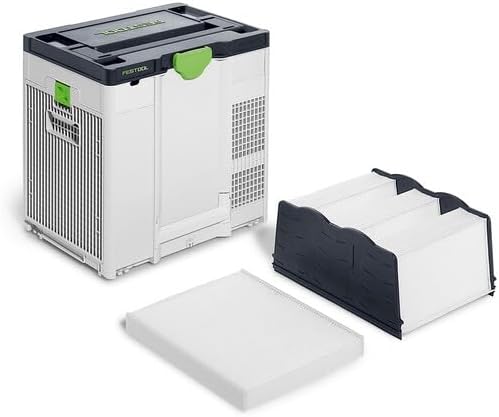
Figure 1: Festool SYS-AIR Air Filtration System with its main unit, preliminary filter, and main filter housing displayed separately.
คุณสมบัติหลัก
- ขนาดกะทัดรัดและน้ำหนักเบา: Weighs 22 lbs (10 kg) in a Systainer³ M437 format, ideal for mobile use.
- Powerful Air Filtering: Provides up to 400 cfm (680 m³/h) airflow, circulating air in rooms up to 613 ft² (57 m²) for three full air changes per hour.
- ปรับแรงลมได้: Offers two airflow levels to adapt to varying dust conditions.
- Smart Airflow Dispersion: Air disperses upwards in three directions (left, right, back) to minimize dust disturbance and disruptive air currents.
- ตัวกรองเบื้องต้น: Captures larger dust particles, protecting the main filter. It is easy to replace and cost-effective.
- Efficient Main Filtration: Features a specially designed TripleV main filter with a large surface area, reducing clogging and extending its lifespan.
- Cleaner Work Environment: Achieves over 99.9% filtration for significantly cleaner air.
- ไฟสัญญาณ: Alerts users when filters are clogged or require replacement.
- พอร์ตการเชื่อมต่อ: Includes a port for connecting a 7-7/8” (200 mm) air supply hose (accessory) for hard-to-reach areas or dust protection barriers.
- ความเข้ากันได้: Connects easily to other Festool Systainers and extractors via T-LOC, and integrates into Systainer Systems vehicle racking systems.
การตั้งค่า
Before operating your Festool SYS-AIR, ensure proper setup for optimal performance and safety.
การเปิดออกและการตรวจสอบเบื้องต้น
- Carefully remove the SYS-AIR unit and all components from its packaging.
- Verify that all included components are present: Main Filter HF-SYS-AIR, Preliminary Filter VF-SYS-AIR, and the SYS-AIR US unit.
- Inspect the unit for any signs of damage that may have occurred during shipping. Do not use the unit if it appears damaged.
การติดตั้งตัวกรอง
The SYS-AIR comes with a preliminary filter and a main filter. Ensure they are correctly installed before first use.

Figure 2: The Festool SYS-AIR unit, showcasing its compact Systainer design with top handle and side ventilation grilles.
- Open the filter compartment according to the instructions in the detailed manual (not provided here).
- Insert the Preliminary Filter VF-SYS-AIR into its designated slot.
- Install the Main Filter HF-SYS-AIR (TripleV filter) securely.
- Close the filter compartment, ensuring it is latched properly.
การจัดวางและการเชื่อมต่อแหล่งจ่ายไฟ
- Place the SYS-AIR on a stable, level surface in the area where air filtration is desired. Ensure adequate clearance around the unit for proper airflow.
- Connect the power cord to a standard 120-volt electrical outlet.
คำแนะนำการใช้งาน
Follow these steps to operate your Festool SYS-AIR effectively.

Figure 3: Close-up of the Festool SYS-AIR control panel, showing the power button, airflow settings, and filter status indicator light.
- เปิดเครื่อง: กดปุ่มเปิด/ปิดบนแผงควบคุมเพื่อเปิดเครื่อง
- Select Airflow Level: Use the airflow control buttons to select between the two available airflow levels (e.g., low for general maintenance, high for active dust generation).
- Monitor Filter Status: Observe the signal light on the control panel. A steady light indicates normal operation. A flashing or changed color light indicates that filters may be clogged or require replacement.
- Optional Air Supply Hose: If needed, connect a 7-7/8” (200 mm) air supply hose (sold separately) to the designated connection port for directing filtered air to specific areas or creating dust protection barriers.
- หมดแรง: Press the power button again to turn off the unit when filtration is no longer needed.
การซ่อมบำรุง
Regular maintenance ensures the longevity and efficiency of your Festool SYS-AIR.
การเปลี่ยนตัวกรอง
- Preliminary Filter (VF-SYS-AIR): This filter captures most dust particles and should be checked and replaced regularly, especially when the signal light indicates reduced airflow or clogging. It is designed for easy and cost-effective replacement.
- Main Filter (HF-SYS-AIR - TripleV): The main filter has a large surface area to reduce clogging and extend its lifespan. Replace this filter when the signal light indicates it is clogged or when you notice a significant reduction in air purification effectiveness, even after replacing the preliminary filter.
Always refer to the detailed product manual for specific instructions on how to access and replace filters safely.
การทำความสะอาด
- เช็ดภายนอกตัวเครื่องด้วยโฆษณาamp ผ้า. อย่าใช้สารเคมีที่รุนแรงหรือน้ำยาทำความสะอาดที่มีฤทธิ์กัดกร่อน
- Ensure air intake and exhaust vents are free from obstructions.
การแก้ไขปัญหา
This section addresses common issues you might encounter with your Festool SYS-AIR.
| ปัญหา | สาเหตุที่เป็นไปได้ | สารละลาย |
|---|---|---|
| Reduced Airflow / Unit Not Filtering Effectively | Clogged preliminary or main filter. Signal light is on. | Check and replace the preliminary filter. If the issue persists, replace the main filter. |
| เครื่องไม่เปิดใช้งาน | ไม่มีแหล่งจ่ายไฟ | Ensure the power cord is securely plugged into a 120V outlet. Check the circuit breaker. |
| เสียงรบกวนที่ผิดปกติระหว่างการทำงาน | Obstruction in fan or motor. | Turn off and unplug the unit. Inspect for any foreign objects near the fan or vents. If noise persists, contact Festool support. |
สำหรับปัญหาที่ไม่ได้ระบุไว้ในที่นี้ โปรดติดต่อฝ่ายบริการลูกค้าของ Festool
ข้อมูลจำเพาะ
| คุณลักษณะ | รายละเอียด |
|---|---|
| ผู้ผลิต | เฟสตูล |
| หมายเลขรุ่นสินค้า | 577790 |
| น้ำหนักสินค้า | 21.8 ปอนด์ (9.9 กก.) |
| ขนาดแพ็คเกจ | 25.59 x 16.22 x 12.28 นิ้ว (65 x 41.2 x 31.2 ซม.) |
| สี | ผสม |
| แหล่งพลังงาน | สายไฟ |
| เล่มที่tage | 120 โวลต์ |
| ส่วนประกอบที่รวมอยู่ | Main Filter HF-SYS-AIR, Preliminary Filter VF-SYS-AIR, SYS-AIR US Unit |
การรับประกันและการสนับสนุน
Festool products are known for their durability and precision. For specific warranty details and to register your product, please visit the official Festool webเว็บไซต์หรือดูเอกสารประกอบที่รวมอยู่ในการซื้อของคุณ
For technical support, troubleshooting assistance beyond this manual, or to inquire about replacement parts, please contact Festool customer service. You can find contact information on the official Festool webเว็บไซต์: www.festtool.com.


