1. บทนำ
คู่มือนี้ให้คำแนะนำอย่างละเอียดเกี่ยวกับการติดตั้ง การใช้งาน และการบำรุงรักษาขาตั้งโปรเจคเตอร์แบบพับได้ BESIGN PS01 โปรดอ่านคู่มือนี้อย่างละเอียดก่อนใช้งานเพื่อให้มั่นใจถึงการทำงานที่ถูกต้องและอายุการใช้งานที่ยาวนานของผลิตภัณฑ์ BESIGN PS01 ออกแบบมาเพื่อยึดโปรเจคเตอร์ กล้อง คลิปหนีบโทรศัพท์ และไฟถ่ายภาพได้อย่างปลอดภัยด้วยสกรูยึดขนาด 1/4 นิ้ว สามารถปรับความสูงและมุมได้สำหรับการใช้งานที่หลากหลาย
2. สินค้าหมดview
ขาตั้งโปรเจคเตอร์ BESIGN PS01 โดดเด่นด้วยดีไซน์ที่แข็งแรงทนทาน พับได้ ผลิตจากวัสดุโลหะคุณภาพสูง เพื่อความมั่นคงและทนทาน รองรับอุปกรณ์ได้สูงสุด 8 ปอนด์ (4 กิโลกรัม) และมีแผ่นยางรองที่มือจับเพื่อการวางที่มั่นคง ขาตั้งมาพร้อมกับสกรูยึดขนาด 1/4 นิ้วแบบสากลเพื่อความเข้ากันได้กับอุปกรณ์หลากหลาย

รูปที่ 2.1: ขาตั้งโปรเจคเตอร์ BESIGN PS01 ในสภาพกางออก พร้อมสำหรับการติดตั้งอุปกรณ์

รูปที่ 2.2: ขาตั้งโปรเจคเตอร์ BESIGN PS01 พร้อมโปรเจคเตอร์ที่ติดตั้งอย่างมั่นคง แสดงให้เห็นถึงการใช้งานหลัก
3. คำแนะนำในการตั้งค่า
การติดตั้งขาตั้ง BESIGN PS01 นั้นง่ายมาก เพียงทำตามขั้นตอนเหล่านี้เพื่อเตรียมขาตั้งให้พร้อมใช้งาน:
- กางขาตั้งออก: ค่อยๆ กางขาตั้งออกจากตำแหน่งพับเก็บอย่างเบามือ บานพับได้รับการออกแบบมาเพื่อให้เคลื่อนไหวได้อย่างราบรื่น
- ปรับความสูงและมุม: ปรับขาตั้งให้ได้ความสูงและมุมที่ต้องการ ขาตั้งสามารถปรับมุมได้ตั้งแต่ 0°-180° ตรวจสอบให้แน่ใจว่าข้อต่อทุกส่วนแน่นสนิทหลังจากปรับแล้ว
- เชื่อมต่ออุปกรณ์ของคุณ: จัดตำแหน่งสกรูยึดขนาด 1/4 นิ้วบนขาตั้งให้ตรงกับรูสกรูที่ตรงกันบนโปรเจ็กเตอร์ กล้อง หรืออุปกรณ์อื่นๆ ที่ใช้งานร่วมกันได้ หมุนอุปกรณ์ของคุณตามเข็มนาฬิกาลงบนสกรูจนกระทั่งยึดแน่นสนิท
- รักษาความปลอดภัยของอุปกรณ์: ตรวจสอบให้แน่ใจว่าอุปกรณ์ตั้งมั่นคงและไม่โยกเยก หากจำเป็น ให้ขันสกรูปรับระดับบนขาตั้งให้แน่นเพื่อป้องกันการเคลื่อนไหว
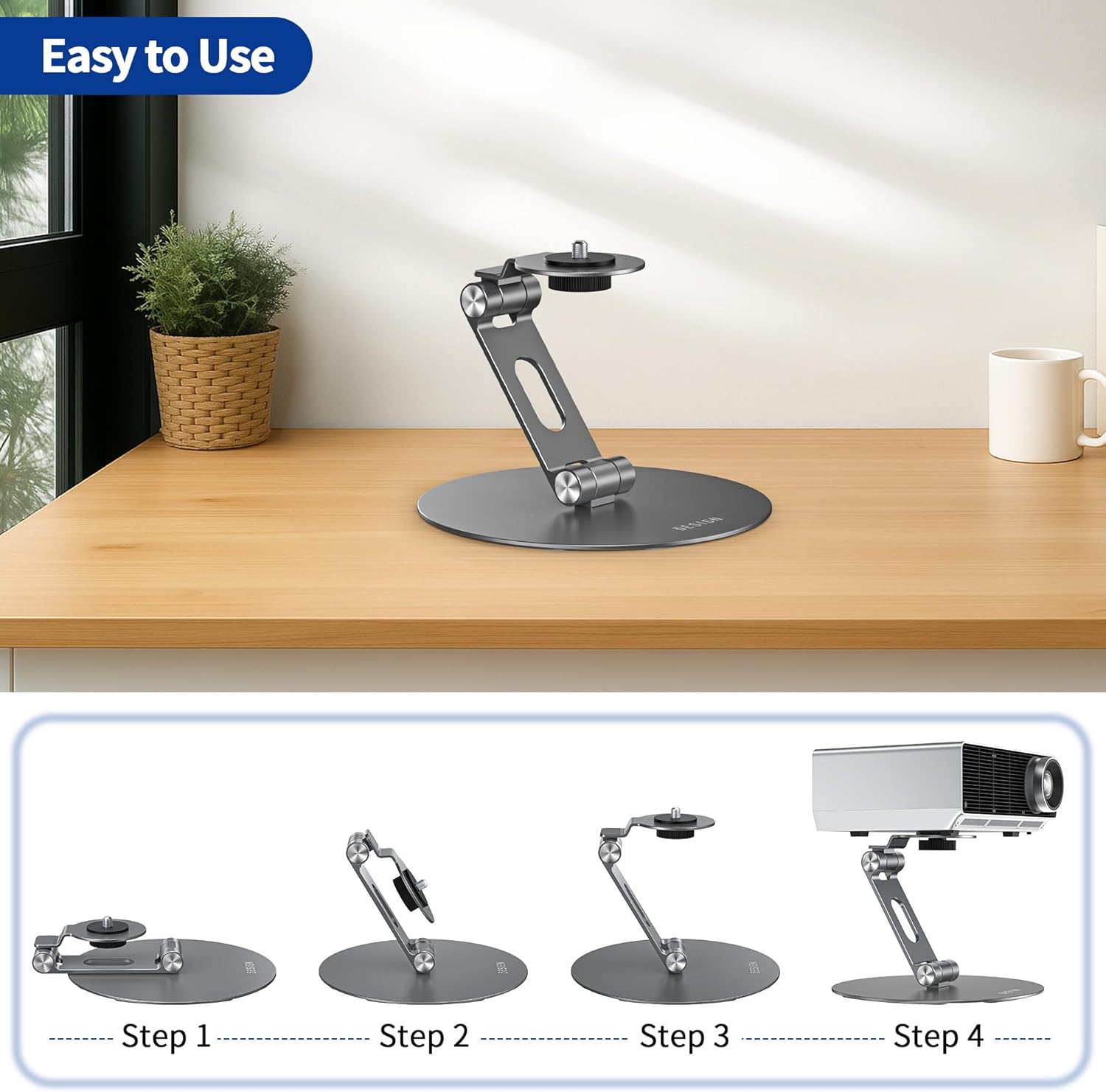
รูปที่ 3.1: คู่มือภาพประกอบแสดงขั้นตอนทั้งสี่ในการติดตั้งขาตั้ง BESIGN PS01 และการติดตั้งโปรเจคเตอร์
4. คู่มือการใช้งาน
4.1 การปรับมุม
ขาตั้ง BESIGN PS01 สามารถปรับมุมได้อย่างยืดหยุ่นตั้งแต่ 0° ถึง 180° วิธีการปรับมุมคือ จับอุปกรณ์และขาตั้งเบาๆ จากนั้นหมุนแขนขาตั้งไปยังตำแหน่งที่ต้องการ บานพับที่แข็งแรงของขาตั้งได้รับการออกแบบมาเพื่อยึดมุมที่ตั้งไว้ให้มั่นคง ควรตรวจสอบให้แน่ใจเสมอว่าอุปกรณ์อยู่ในสมดุลและขาตั้งมั่นคงหลังจากปรับมุมแล้ว

รูปที่ 4.1: ภาพประกอบแสดงความสามารถในการปรับมุมได้ 0°-180° ของขาตั้ง PS01 ซึ่งแสดงให้เห็นถึงความอเนกประสงค์ของขาตั้งนี้
4.2 ความเข้ากันได้กว้าง
ขาตั้งนี้มาพร้อมกับสกรูยึดขนาดมาตรฐาน 1/4 นิ้ว ทำให้สามารถใช้งานร่วมกับอุปกรณ์ได้หลากหลายประเภท ซึ่งรวมถึงแต่ไม่จำกัดเพียง โปรเจ็กเตอร์ส่วนใหญ่ กล้องดิจิทัล คลิปหนีบโทรศัพท์ (โดยใช้ตัวแปลง 1/4 นิ้ว) กล้องแอ็คชั่น ไฟวงแหวน และอื่นๆ webกล้อง

รูปที่ 4.2: ภาพแสดงสกรูยึดขนาด 1/4 นิ้วและส่วนต่อขยายampอุปกรณ์ที่ใช้งานร่วมกันได้ เช่น โปรเจ็กเตอร์ กล้องถ่ายรูป และคลิปหนีบโทรศัพท์
5. การบำรุงรักษา
เพื่อให้ขาตั้ง BESIGN PS01 ของคุณใช้งานได้ยาวนานและมีประสิทธิภาพสูงสุด โปรดปฏิบัติตามคำแนะนำในการบำรุงรักษาอย่างง่ายเหล่านี้:
- การทำความสะอาด: เช็ดแท่นวางด้วยผ้าแห้งเนื้อนุ่มเพื่อกำจัดฝุ่นและรอยนิ้วมือ หลีกเลี่ยงการใช้สารทำความสะอาดที่มีฤทธิ์กัดกร่อนหรือตัวทำละลาย เพราะอาจทำให้พื้นผิวเสียหายได้
- พื้นที่จัดเก็บ: เมื่อไม่ใช้งาน ให้พับขาตั้งให้มีขนาดกะทัดรัดเพื่อความสะดวกในการจัดเก็บ เก็บไว้ในที่แห้งและห่างจากอุณหภูมิที่สูงหรือต่ำเกินไป
- การตรวจสอบ: ตรวจสอบข้อต่อและสกรูทั้งหมดเป็นระยะเพื่อให้แน่ใจว่าแน่นสนิท หากพบว่าหลวม ให้ขันสกรูให้แน่นเบาๆ
6 การแก้ไขปัญหา
หากคุณพบปัญหาใดๆ กับขาตั้ง BESIGN PS01 โปรดดูปัญหาและวิธีแก้ไขที่พบบ่อยต่อไปนี้:
| ปัญหา | สาเหตุที่เป็นไปได้ | สารละลาย |
|---|---|---|
| ขาตั้งโยกเยกหรือไม่มั่นคง | น็อตหลวม อุปกรณ์หนักเกินไป พื้นผิวไม่เรียบ | ตรวจสอบให้แน่ใจว่าขันสกรูทุกตัวแน่นแล้ว ตรวจสอบว่าน้ำหนักของอุปกรณ์ไม่เกิน 8 ปอนด์ (4 กิโลกรัม) วางขาตั้งบนพื้นผิวเรียบและมั่นคง |
| อุปกรณ์ติดตั้งไม่แน่นหนา | ขนาดสกรูไม่ถูกต้อง อุปกรณ์ไม่ได้หมุนเข้ากับสกรูจนสุด | ตรวจสอบให้แน่ใจว่าอุปกรณ์ของคุณมีรูสำหรับยึดด้วยสกรูขนาด 1/4 นิ้ว หมุนอุปกรณ์ตามเข็มนาฬิกาจนกว่าจะยึดแน่นดีแล้ว |
| การปรับมุมไม่สามารถคงค่าไว้ได้ | ข้อต่อหลวม อุปกรณ์หนักเกินไปสำหรับมุมนี้ | ขันสกรูข้อต่อให้แน่น ตรวจสอบให้แน่ใจว่าน้ำหนักของอุปกรณ์อยู่ในขีดจำกัด โดยเฉพาะอย่างยิ่งในมุมที่ผิดปกติ |
7. ข้อมูลจำเพาะ
คุณสมบัติหลักของขาตั้งโปรเจคเตอร์แบบพับได้ BESIGN PS01:
- หมายเลขรุ่น: พีเอส01
- ยี่ห้อ: การออกแบบ
- วัสดุ: โลหะพรีเมียม
- สกรูยึด: ขนาด 1/4 นิ้ว แบบอเนกประสงค์
- ความจุน้ำหนัก: มากถึง 8 ปอนด์ (4 กก.)
- การปรับมุม: 0° - 180°
- น้ำหนักสินค้า: 15.5 ออนซ์
- ขนาดแพ็คเกจ: 7.36 x 6.18 x 1.54 นิ้ว
- สี: สีเทา

รูปที่ 7.1: ขนาดโดยละเอียดของขาตั้ง PS01 รวมถึงความสูง (120 มม./4.7 นิ้ว) และเส้นผ่านศูนย์กลางฐาน (145 มม./5.7 นิ้ว)
8. การรับประกันและการสนับสนุน
BESIGN มุ่งมั่นที่จะมอบผลิตภัณฑ์คุณภาพสูง หากมีข้อสงสัย ข้อกังวล หรือต้องการความช่วยเหลือใดๆ เกี่ยวกับขาตั้งโปรเจคเตอร์แบบพับได้รุ่น PS01 โปรดติดต่อฝ่ายบริการลูกค้าของ BESIGN ผ่านทางแพลตฟอร์มของผู้ค้าปลีกหรือเว็บไซต์อย่างเป็นทางการของ BESIGN webโปรดเก็บหลักฐานการซื้อไว้เพื่อใช้ในการเรียกร้องการรับประกัน หากมีเงื่อนไขการรับประกันที่เฉพาะเจาะจงอาจแตกต่างกันไปตามภูมิภาคและผู้ค้าปลีก


