การแนะนำ
This manual provides essential instructions for the safe and efficient use of your ZEBRONICS EnergiTank 10R1 10000 mAh Power Bank. Please read this manual thoroughly before operating the device and retain it for future reference.

Image: ZEBRONICS EnergiTank 10R1 10000 mAh Power Bank in black, held in a hand, showcasing its compact size and integrated cables.
เนื้อหาแพ็คเกจ
ตรวจสอบว่ามีรายการทั้งหมดอยู่ในแพ็คเกจ:
- ZEBRONICS EnergiTank 10R1 Power Bank - 1 unit
- Charging Cable (for power bank) - 1 unit
- คู่มือการใช้คิวอาร์โค้ด - 1 ชุด

Image: The ZEBRONICS EnergiTank 10R1 power bank with its integrated Type-C and Lightning cables.
คุณสมบัติผลิตภัณฑ์
- ความจุ 10,000mAh: Provides efficient power for multiple device charges.
- 22.5W Rapid Charging: Supports fast charging for compatible smartphones and tablets.
- สายเคเบิลในตัว: Includes integrated Type-C and Lightning output cables for convenience.
- เอาท์พุตหลายรายการ: Features a Type-C port (DC 5V/3A, 9V/2.2A, 10V/2.25A, 12V/1.67A), Type-C cable (DC 5V/3A, 9V/2.2A, 12V/1.67A), and Lightning cable (DC 5V/2A).
- อินพุตประเภท C: Recharges the power bank via a Type-C port (DC 5V/3A, 9V/2A, 12V/1.5A).
- LED เปอร์เซ็นต์tagอี ตัวบ่งชี้: Displays real-time battery status.
- การออกแบบที่กะทัดรัด: Features a sleek metallic finish and a convenient carry loop.
- การป้องกันความปลอดภัย: Incorporates overcharge, overload, and short-circuit protection.

Image: Highlighting the 10000 mAh capacity and 22.5W fast charging output.

Image: Close-up of the power bank showing the Type-C input and output port.
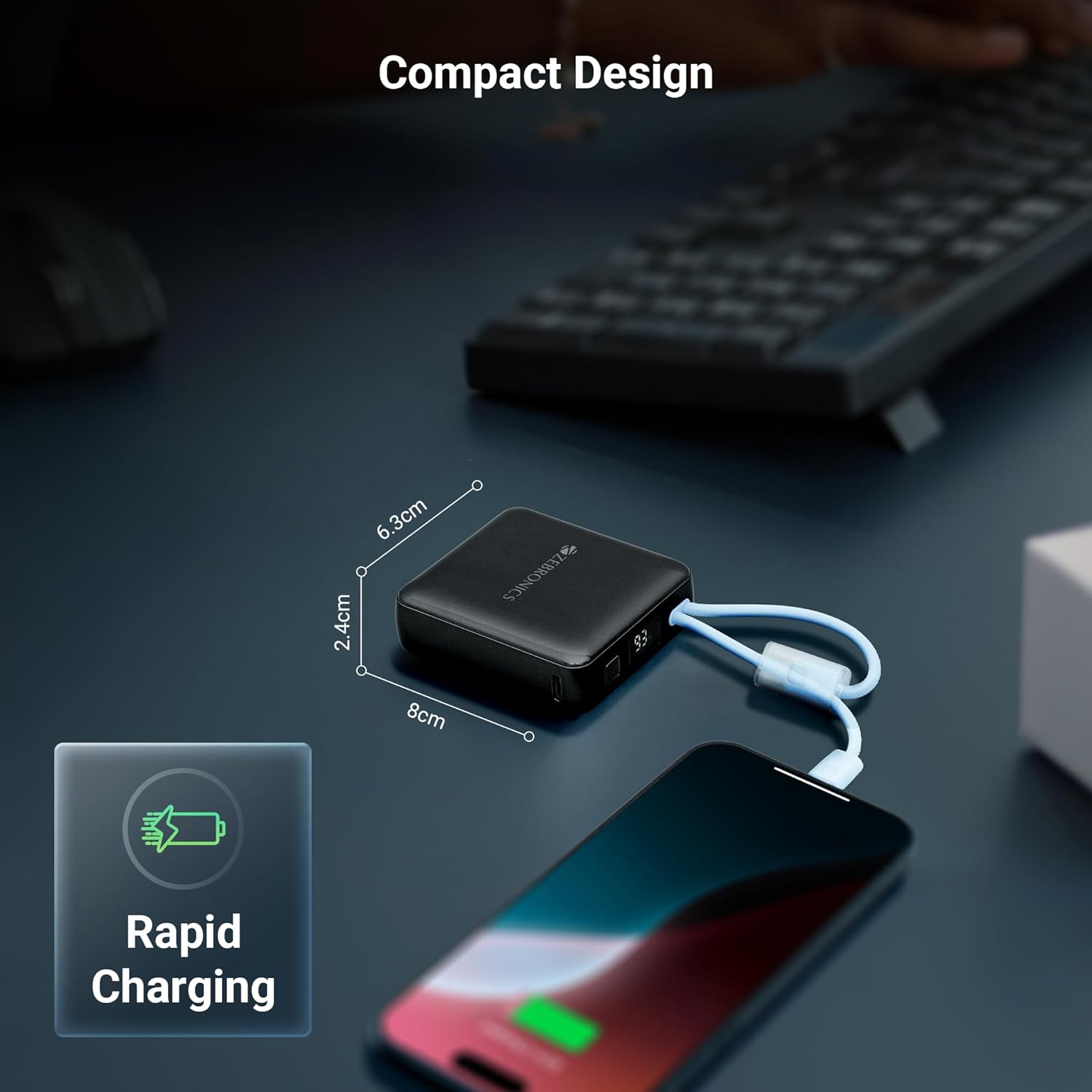
Image: Collage showing attached cables, LED display, and carry loop design.
การตั้งค่าเริ่มต้น
- แกะ: นำพาวเวอร์แบงค์และอุปกรณ์เสริมทั้งหมดออกจากบรรจุภัณฑ์อย่างระมัดระวัง
- การใช้ครั้งแรก: It is recommended to fully charge the power bank before its first use. Connect the power bank to a suitable USB power adapter (not included) using the provided Type-C charging cable.
- ตรวจสอบระดับแบตเตอรี่: The LED percentage indicator will show the current battery level during charging and discharge.
คำแนะนำการใช้งาน
การชาร์จอุปกรณ์ของคุณ
- การใช้สายเคเบิลในตัว: Select the appropriate built-in cable (Type-C or Lightning) for your device. Connect the cable directly to your smartphone, tablet, or other compatible device.
- การใช้พอร์ต Type-C: For devices requiring a separate cable or if the built-in cables are in use, connect your device's charging cable to the Type-C output port on the power bank.
- เริ่มการชาร์จ: พาวเวอร์แบงค์จะเริ่มชาร์จอุปกรณ์ของคุณโดยอัตโนมัติ จอแสดงผล LED จะแสดงเปอร์เซ็นต์แบตเตอรี่ที่เหลืออยู่tage.
ชาร์จแบตสำรอง
- Connect Input Cable: Use the provided Type-C charging cable to connect the power bank's Type-C input port to a USB wall adapter or a computer's USB port.
- ตรวจสอบการชาร์จ: The LED display will show the charging progress. When the display shows 100%, the power bank is fully charged.
- การตัดการเชื่อมต่อ: เมื่อชาร์จเต็มแล้ว ให้ถอดพาวเวอร์แบงค์ออกจากแหล่งจ่ายไฟ

Image: The compact design of the power bank charging a smartphone, with dimensions indicated.
การซ่อมบำรุง
การดูแลรักษาและการเก็บรักษา
- Keep the power bank away from water, moisture, and liquids.
- หลีกเลี่ยงการสัมผัสอุปกรณ์ในอุณหภูมิที่สูงหรือต่ำเกินไป (ร้อนหรือเย็น)
- Do not attempt to disassemble, repair, or modify the power bank.
- ทำความสะอาดอุปกรณ์ด้วยผ้านุ่มและแห้ง ห้ามใช้สารเคมีรุนแรงหรือวัสดุที่มีฤทธิ์กัดกร่อน
- เก็บพาวเวอร์แบงค์ไว้ในที่แห้งและเย็นเมื่อไม่ใช้งาน
- เพื่อให้แบตเตอรี่มีอายุการใช้งานยาวนานที่สุด ควรชาร์จแบตเตอรี่สำรองให้เต็มอย่างน้อยทุกๆ สามเดือน หากเก็บไว้เป็นเวลานาน
การแก้ไขปัญหา
ปัญหาทั่วไปและแนวทางแก้ไข
- พาวเวอร์แบงค์ไม่สามารถชาร์จอุปกรณ์ได้:
- Ensure the power bank has sufficient charge. Check the LED display.
- Verify that the charging cable (built-in or external) is securely connected to both the power bank and the device.
- Try a different charging cable or port on the power bank. - พาวเวอร์แบงค์ไม่ชาร์จ:
- Ensure the Type-C input cable is securely connected to the power bank and the power source.
- Try a different USB wall adapter or power source.
- Check if the charging cable itself is functional. - การชาร์จช้า:
- Ensure your device supports fast charging and that the power bank is providing the appropriate output.
- Using a high-quality wall adapter for recharging the power bank can improve its charging speed.
- Environmental factors can affect charging speed.

Image: Illustrative image depicting the short circuit, overcharge, and overload protection features.
ข้อมูลจำเพาะทางเทคนิค
| หมายเลขรุ่นสินค้า | ZEB-PB 9 |
| ความจุของแบตเตอรี่ | 10000 มิลลิแอมป์ |
| กำลังขับ | สูงสุด 22.5W |
| พอร์ตเอาต์พุต Type-C | กระแสตรง 5V/3A, 9V/2.2A, 10V/2.25A, 12V/1.67A |
| เอาต์พุตสายเคเบิล Type-C ในตัว | กระแสตรง 5V/3A, 9V/2.2A, 12V/1.67A |
| สาย Lightning เอาท์พุตในตัว | กระแสตรง 5V/2A |
| พอร์ตอินพุต Type-C | กระแสตรง 5V/3A, 9V/2A, 12V/1.5A |
| ขนาด (แพ็คเกจ) | 17.6 x 8.9 x 4.4 ซม. |
| น้ำหนักสินค้า | 180 กรัม |
| สี | สีดำ |
| ประเภทขั้วต่อ | USB ประเภท C |
| แหล่งพลังงาน | แบตเตอรี่ |
ข้อควรระวังเพื่อความปลอดภัยที่สำคัญ
- ห้ามทำตก เจาะ หรือถอดประกอบพาวเวอร์แบงค์
- เก็บให้พ้นจากมือเด็ก
- Avoid placing the power bank near heat sources, direct sunlight, or in high humidity environments.
- ห้ามใช้พาวเวอร์แบงค์หากชำรุดหรือจมน้ำ
- ทิ้งพาวเวอร์แบงค์อย่างมีความรับผิดชอบตามกฎระเบียบท้องถิ่น
การรับประกันและการสนับสนุน
ข้อมูลการรับประกัน
Your ZEBRONICS EnergiTank 10R1 Power Bank comes with a standard manufacturer's warranty. Please refer to the warranty card included in your package or visit the official ZEBRONICS website for detailed warranty terms and conditions. An optional 1-year extended warranty may be available for purchase.
การสนับสนุนลูกค้า
For any product-related queries, technical assistance, or warranty claims, please contact ZEBRONICS customer support. Contact details can typically be found on the official ZEBRONICS webเว็บไซต์หรือในบรรจุภัณฑ์ของผลิตภัณฑ์


