1. บทนำ
This manual provides essential information for the safe and efficient operation of your TRU COMPONENTS TC-Q200 2-Channel Industrial Radio Control system. This device is designed for controlling motors, vehicles, or machinery across two independent channels. Please read this manual thoroughly before installation and use, and keep it for future reference.
2. คำแนะนำด้านความปลอดภัย
- Always ensure the power supply is disconnected before performing any installation, maintenance, or troubleshooting.
- This device operates with 10-30 V AC/DC. Verify your power source matches these requirements.
- Do not expose the unit to extreme temperatures, moisture, or corrosive environments.
- Only qualified personnel should perform installation and wiring to prevent electrical shock or damage to the equipment.
- ตรวจสอบให้แน่ใจว่าการเชื่อมต่อทั้งหมดมีความปลอดภัยและมีฉนวนป้องกันอย่างเหมาะสม
- Do not attempt to modify or repair the unit yourself. Contact qualified service personnel for assistance.
3. สินค้าหมดview
The TRU COMPONENTS TC-Q200 is a robust industrial radio control system designed for reliable remote operation. It features a durable GFK housing and advanced communication protocols.
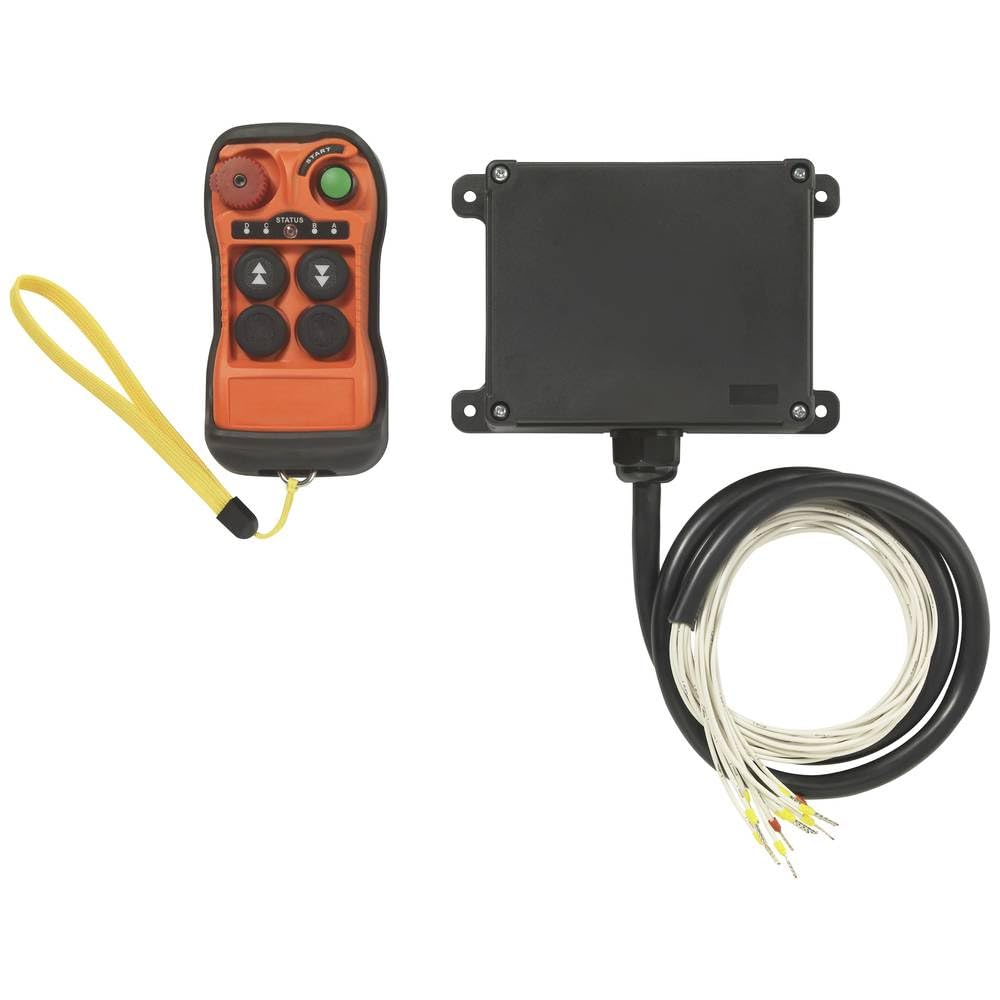
Image showing the TRU COMPONENTS TC-Q200 2-channel industrial radio control unit, featuring its robust housing and compact design.
คุณสมบัติหลัก:
- การควบคุม 2 ช่องสัญญาณ: Enables independent control of two separate functions or devices.
- ปุ่มการทำงาน: Equipped with 2 buttons for single-speed control.
- ช่วงความถี่: Operates within 433.88 - 433.95 MHz for stable communication.
- ระยะขยาย: Provides a reliable operating range of over 100 meters (approximately 328 feet).
- การสื่อสารที่ปลอดภัย: Features an automatic channel search function and over one million unique ID codes to ensure secure and interference-free communication between the transmitter and receiver.
- โครงที่แข็งแกร่ง: Encased in a durable GFK (Glass Fiber Reinforced Plastic) housing for industrial environments.
- แหล่งจ่ายไฟ: The receiver operates on a versatile 10 - 30 V AC/DC power input.
4. การตั้งค่า
4.1. การเปิดออกและการตรวจสอบ
- Carefully unpack all components and verify that all parts are present and undamaged.
- If any damage is found, do not proceed with installation and contact your supplier.
4.2. การต่อสายเครื่องรับสัญญาณ
- Ensure the power source is OFF before making any connections.
- Connect the receiver to a 10-30 V AC/DC power supply according to the wiring diagram provided with the product (refer to product packaging or separate wiring instructions).
- Connect the output channels of the receiver to the motors, vehicles, or machinery you intend to control. Ensure correct polarity and load capacity.
- Secure all wiring connections to prevent accidental disconnection or short circuits.
4.3. Pairing (Automatic Channel Search)
The receiver is equipped with an automatic channel search function. Typically, the transmitter and receiver are pre-paired from the factory. If re-pairing is necessary, follow these general steps:
- เปิดเครื่องรับ
- Activate the pairing mode on the receiver (refer to specific instructions provided with the product, usually a button press or sequence).
- Activate the transmitter (e.g., press a button) to initiate the pairing process.
- The receiver will automatically search for and establish a secure connection with the transmitter using its unique ID code.
5. คู่มือการใช้งาน
Once the system is properly installed and paired, operating the TRU COMPONENTS TC-Q200 is straightforward.
- เปิดเครื่อง: Ensure the receiver is powered on and the transmitter has fresh batteries (if applicable).
- Channel 1 Control: Press and hold the designated button on the transmitter for Channel 1 to activate the corresponding output on the receiver. Release the button to deactivate.
- Channel 2 Control: Press and hold the designated button on the transmitter for Channel 2 to activate the corresponding output on the receiver. Release the button to deactivate.
- พิสัย: Maintain a clear line of sight between the transmitter and receiver for optimal performance. The effective range is over 100 meters. Obstacles may reduce this range.
6. การบำรุงรักษา
- การทำความสะอาด: Keep the unit clean and free from dust and debris. Use a soft, dry cloth for cleaning. Do not use abrasive cleaners or solvents.
- Battery Replacement (Transmitter): If the transmitter uses batteries, replace them regularly or when the indicator light shows low power. Use only the specified battery type.
- การตรวจสอบ: Periodically inspect all wiring and connections for signs of wear, damage, or corrosion. Tighten any loose connections.
- การปกป้องสิ่งแวดล้อม: Ensure the unit remains protected from harsh environmental conditions as specified in the product's technical data.
7 การแก้ไขปัญหา
If you encounter issues with your radio control system, refer to the following common problems and solutions:
- No Response from Receiver:
- Check if the receiver is properly powered (10-30 V AC/DC).
- Ensure the transmitter batteries are not depleted.
- Verify that the transmitter and receiver are paired. If not, perform the pairing procedure.
- Check for any physical obstructions or excessive distance between the transmitter and receiver.
- การควบคุมแบบไม่ต่อเนื่อง:
- Check for sources of radio interference in the operating environment.
- Ensure the transmitter and receiver antennas (if external) are properly positioned and undamaged.
- The range might be at its limit; try operating closer to the receiver.
- One Channel Not Working:
- Verify the wiring for that specific channel's output.
- Test the connected device (motor/machine) independently to ensure it is functional.
หากปัญหายังคงอยู่หลังจากลองวิธีแก้ไขเหล่านี้แล้ว โปรดติดต่อฝ่ายบริการลูกค้าหรือช่างเทคนิคผู้เชี่ยวชาญ
8. ข้อมูลจำเพาะ
| คุณสมบัติ | ข้อมูลจำเพาะ |
|---|---|
| ผู้ผลิต | ส่วนประกอบ TRU |
| หมายเลขชิ้นส่วน | TC-12835188 |
| ชื่อรุ่น | TC-Q200 |
| ASIN | B0DY4BH8TM |
| ช่องควบคุม | 2 |
| ปุ่ม | 2 (1 speed) |
| ช่วงความถี่ | 433.88 - 433.95 เมกะเฮิรตซ์ |
| ระยะการทำงาน | ≥ 100 ม. |
| แหล่งจ่ายไฟของเครื่องรับ | 10 - 30 V AC/DC |
| วัสดุที่ใช้ทำตัวเรือน | Robust GFK |
9. การรับประกันและการสนับสนุน
For warranty information, please refer to the documentation provided with your purchase or contact your retailer. For technical support or service inquiries, please contact TRU COMPONENTS customer service through their official website or the contact details provided with the product.


