สินค้าเกินview
พบกับทีมสไปเดอร์แมนจากซีรีส์ยอดฮิตของมาร์เวลเรื่อง Spidey and his Amazing Friends และมาดูกันว่ารถบังคับวิทยุ 2-in-1 คันนี้ทำอะไรได้บ้าง! หมุนที่จับมือและแปลงร่างยานพาหนะระหว่างโหมดของสไปเดอร์แมนและโหมดอื่นๆ ได้อย่างง่ายดาย Web-Crawler and Spin’s Techno-Racer. Practice driving each vehicle while exploring the rules of the road. Learn about Spidey and his friends Spin, Ghost-Spider, Ms. Marvel and Hulk by pressing the WEB-Ster or character buttons. Team up with Spidey to play seven thrilling games and follow instructions to complete missions—like rescuing a puppy or stopping super-villains such as Doc Ock, Green Goblin, and Rhino. What a ride! Intended for ages 3+ years. Requires 2 AA batteries. Batteries included for demo purposes only. New batteries recommended for regular use.
- Web out and hop in this 2-in-1 driver that switches between Spidey’s Web-Crawler and Spin’s Techno-Racer.
- Turn the steering wheel and explore driving directions, turn signals and traffic lights.
- Hear super facts about Spidey, Spin, Ghost-Spider, Ms. Marvel, and Hulk with voices, phrases, and cool sound effects from the show.
- Complete simple missions or go up against super-villains like Doc Ock, Green Goblin and Rhino in seven action-packed games.
- Intended for ages 3+ years; requires 2 AA batteries; batteries included for demo purposes only; new batteries recommended for regular use.
- This pretend-play driver toy is great for preschoolers to explore problem-solving and cause-and-effect; makes an exciting unisex gift for holidays, birthdays or just because.
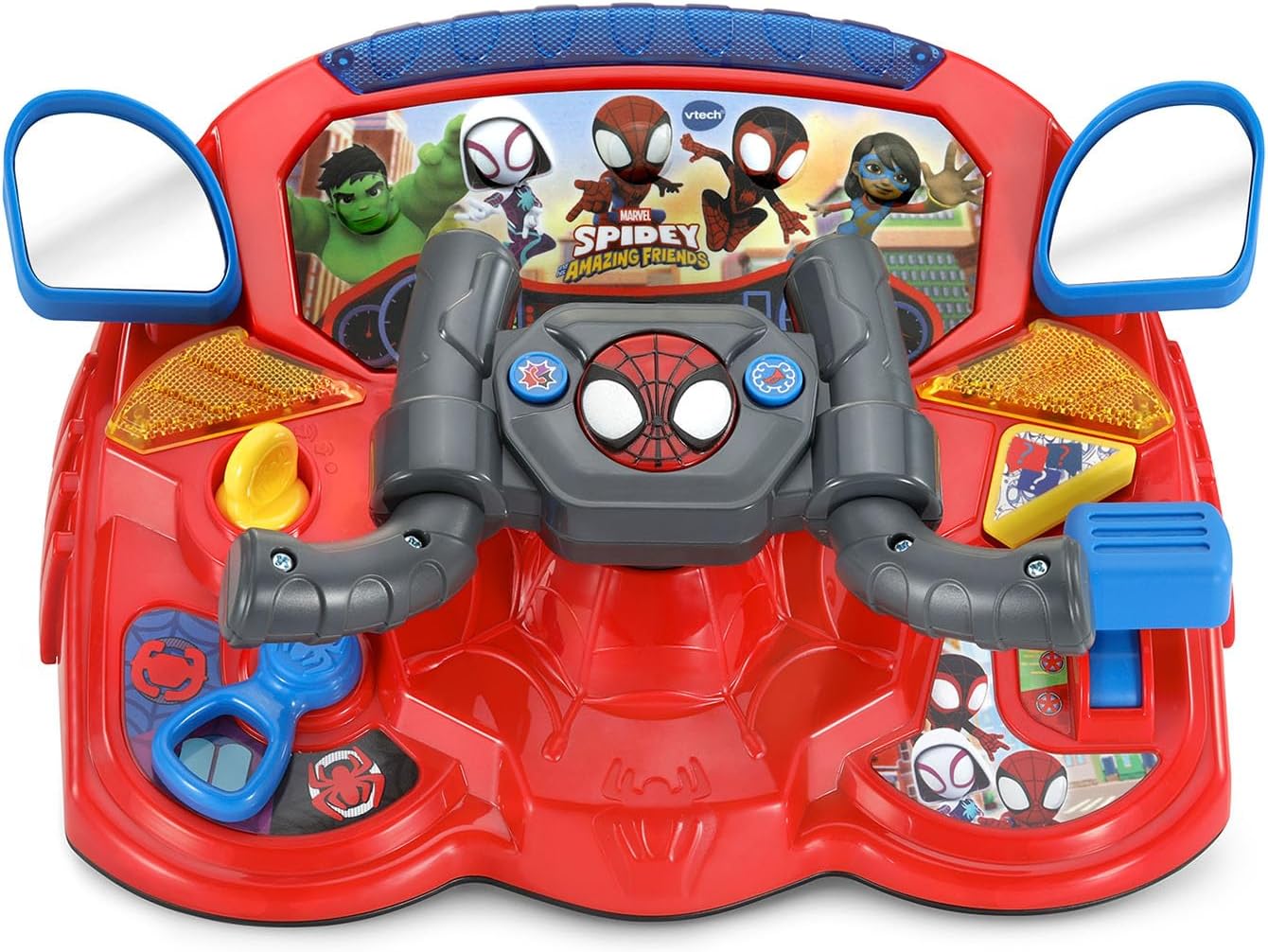
Figure 1: Spidey to The Rescue Driver in Web-Crawler mode.
การตั้งค่า
การติดตั้งแบตเตอรี่
The Spidey to The Rescue Driver requires 2 AA batteries. Batteries are included for demonstration purposes only. For regular use, new alkaline batteries are recommended.
- หาช่องใส่แบตเตอรี่ที่อยู่ด้านล่างของตัวเครื่อง
- ใช้ไขควงคลายสกรูที่ฝาปิดช่องใส่แบตเตอรี่ออก
- ถอดฝาครอบออก
- Insert 2 new AA (LR6) batteries, ensuring correct polarity (+ and -).
- ปิดฝาช่องใส่แบตเตอรี่และขันสกรูให้แน่นสนิท
ข้อมูลแบตเตอรี่ที่สำคัญ:
- แบตเตอรี่ที่ไม่สามารถชาร์จได้จะไม่สามารถชาร์จได้
- ต้องถอดแบตเตอรี่แบบชาร์จไฟออกจากของเล่นก่อนจะชาร์จ
- แบตเตอรี่แบบชาร์จไฟได้จะต้องชาร์จภายใต้การดูแลของผู้ใหญ่เท่านั้น
- อย่าผสมแบตเตอรี่เก่ากับใหม่
- Do not mix different types of batteries (e.g., alkaline, standard carbon-zinc, or rechargeable nickel-cadmium).
- ควรใช้เฉพาะแบตเตอรี่ประเภทเดียวกันหรือเทียบเท่าตามที่แนะนำเท่านั้น
- ต้องใส่แบตเตอรี่ให้ขั้วถูกต้อง
- แบตเตอรี่ที่หมดจะต้องถอดออกจากของเล่น
- ขั้วจ่ายไฟจะต้องไม่เกิดไฟฟ้าลัดวงจร

Figure 2: Back of the product packaging indicating battery requirements.
คำแนะนำการใช้งาน
เปิด/ปิดเครื่อง
Locate the On/Off switch, usually on the side or back of the unit. Slide the switch to the "On" position to activate the toy. To conserve battery life, slide the switch to "Off" when not in use. The toy also features an automatic shut-off function after a period of inactivity.
การแปลงร่าง 2-in-1
The Spidey to The Rescue Driver can transform between two modes: Spidey's Web-Crawler and Spin's Techno-Racer. To transform, simply turn the hand grips on the steering wheel. The toy will announce the current mode.

Figure 3: Spidey's Web-Crawler mode.

Figure 4: Spin's Techno-Racer mode.
การควบคุมและคุณสมบัติ
- พวงมาลัย: Turn the steering wheel to simulate driving and interact with games.
- WEB-Ster Button: Press this button to hear facts about Spidey and his friends.
- ปุ่มตัวอักษร: Press buttons featuring Spidey, Spin, Ghost-Spider, Ms. Marvel, and Hulk to hear their voices and phrases.
- การควบคุมความเร็ว: Adjust the speed for racing and braking sounds.
- ปุ่มช่วยเหลือ: Press for hints or assistance during missions.
- ปุ่มควบคุม: Use these buttons to honk the horn or call a Spidey team member.
- Turn Signals & Traffic Lights: Interact with these features to learn about road rules.
Play Modes and Games
The driver offers seven action-packed games and various play modes. Use the mode selector to choose between different activities. Follow the instructions provided by the toy to complete missions, rescue characters, and stop super-villains like Doc Ock, Green Goblin, and Rhino.

Figure 5: Child engaging with the Spidey Driver.

Figure 6: Child using the Spidey Driver at a table.
การซ่อมบำรุง
คำแนะนำในการทำความสะอาด
To keep your Spidey to The Rescue Driver in optimal condition:
- เช็ดของเล่นด้วยผ้าที่เปียกหมาดๆamp ผ้า.
- อย่าใช้สารเคมีรุนแรงหรือน้ำยาทำความสะอาดที่มีฤทธิ์กัดกร่อน
- Do not immerse the toy in water.
พื้นที่จัดเก็บ
Store the toy in a cool, dry place away from direct sunlight and heat sources when not in use for extended periods. Remove batteries if the toy will not be used for a long time to prevent leakage.
การแก้ไขปัญหา
| ปัญหา | สารละลาย |
|---|---|
| ของเล่นไม่เปิดใช้งานหรือไม่ตอบสนอง |
|
| เสียงผิดเพี้ยนหรือเบาเกินไป |
|
| Toy is not transforming correctly. |
|
ข้อมูลจำเพาะ
| คุณสมบัติ | รายละเอียด |
|---|---|
| หมายเลขรุ่น | 80-580600 |
| ยี่ห้อ | VTech |
| ประเภทวัสดุ | พลาสติก |
| ขนาดสินค้า | 29.69 x 12.09 x 0.25 ซม.; 839.15 กรัม |
| น้ำหนักสินค้า | 1.85 ปอนด์ |
| แบตเตอรี่ที่จำเป็น | แบตเตอรี่ AA 2 ก้อน (มีให้ในตัวอย่าง) |
| อายุที่แนะนำ | 36 เดือน - 6 ปี |
| วันที่วางจำหน่าย | 1 กรกฎาคม 2025 |
การรับประกันและการสนับสนุน
VTech products are designed to provide years of educational fun. For detailed warranty information or technical support, please visit the official VTech webเว็บไซต์หรือติดต่อฝ่ายบริการลูกค้าของพวกเขา
คุณสามารถหาข้อมูลเพิ่มเติมและการสนับสนุนได้ที่ ร้าน VTech บน Amazon.


