การแนะนำ
ขอบคุณสำหรับการซื้อasing the Saiyin Soundbar with 4-inch Subwoofer. This 2.1 channel audio system is designed to enhance your home entertainment experience with powerful sound and versatile connectivity. This manual provides detailed instructions for setup, operation, maintenance, and troubleshooting to ensure optimal performance and longevity of your device.
มีอะไรอยู่ในกล่อง
โปรดตรวจสอบสิ่งของในกล่องอย่างละเอียด หากมีสิ่งใดขาดหายหรือเสียหาย โปรดติดต่อฝ่ายบริการลูกค้า
- 1 x Saiyin Soundbar
- ซับวูฟเฟอร์แบบพาสซีฟ 1 ตัว
- 1 x รีโมทคอนโทรล
- อะแดปเตอร์ไฟฟ้า 1 ตัว
- 1 x สายเคเบิลออปติคอล
- สายสัญญาณเสียงขนาด 1 มม. 3.5 เส้น
- 1 x คู่มือผู้ใช้
- สกรูยึด (สำหรับติดตั้งบนผนัง)

สินค้าเกินview
The Saiyin Soundbar system consists of a compact soundbar and a dedicated 4-inch subwoofer, designed to deliver a rich and immersive audio experience. The soundbar features dual full-range speakers, while the subwoofer provides deep, resonant bass.


การตั้งค่า
1. การเชื่อมต่อซับวูฟเฟอร์
The passive subwoofer connects to the soundbar via a wired connection. Ensure the subwoofer cable is securely plugged into the designated port on the soundbar.
2. การเชื่อมต่อกับอุปกรณ์ของคุณ
The Saiyin Soundbar offers multiple connectivity options:
- Bluetooth 5.3: สำหรับการเชื่อมต่อแบบไร้สายกับสมาร์ทโฟน แท็บเล็ต และอุปกรณ์อื่นๆ ที่รองรับ Bluetooth
- ออปติคอล: For high-quality digital audio connection to TVs and other optical output devices.
- ช่องต่อ AUX (3.5 มม.): For analog audio connection to PCs, projectors, and other devices with a 3.5mm audio jack.

3. Adjusting TV Settings for Optical Cable
When using the optical cable, it is crucial to adjust your TV's audio settings to ensure proper sound output and prevent issues like silence or noisy output. Follow these general steps:
- Navigate to your TV's การตั้งค่า เมนู.
- เลือก เอาท์พุตเสียง or เอาท์พุตเสียง.
- เลือก ออฟติคอล as the output method.
- In รูปแบบเอาต์พุตเสียงดิจิตอล or การตั้งค่าผู้เชี่ยวชาญ, เลือก เสียง PCM/สเตอริโอ.
- To avoid silent or noisy output, disable Dolby/DTS on your TV and within any streaming apps (e.g., Netflix, Amazon Prime Video, Hulu, YouTube).

คำแนะนำการใช้งาน
1. เปิด/ปิดเครื่อง
Press the power button on the remote control or the soundbar to turn the unit on or off. The LED indicator will show red in standby mode.
2. การเลือกโหมด
Use the "BT", "OPT", or "AUX" buttons on the remote control to switch between Bluetooth, Optical, and AUX input modes. The LED indicator will change color to reflect the active mode (Blue for Bluetooth, Purple for Optical, Green for AUX).
3. Volume and Bass Adjustment
- ใช้ ปริมาณ +/- buttons on the remote to adjust the overall volume (23 steps).
- ใช้ เบส +/- buttons on the remote to adjust the subwoofer's bass level (10 levels).


4. DSP with 3 EQ Sound Effects
The soundbar features three pre-set Equalizer (EQ) modes to optimize audio for different content types:
- โหมดภาพยนตร์: Boosts treble and deepens bass for an immersive cinematic experience.
- โหมดเพลง: Improves vocal clarity and provides balanced sound for music playback.
- โหมดข่าว: Enhances vocals and improves the virtual surround effect, making dialogue clearer.

5. Remote Control Compatibility
The included remote control is compatible with Fire TV. Additionally, Saiyin can provide remotes compatible with Roku Box or Roku TVs upon request. This allows for seamless integration with your existing home entertainment setup.

การซ่อมบำรุง
To ensure the longevity and optimal performance of your Saiyin Soundbar, follow these maintenance guidelines:
- การทำความสะอาด: Use a soft, dry cloth to wipe down the soundbar and subwoofer. Do not use liquid cleaners or abrasive materials, as they may damage the finish.
- การจัดวาง: Place the soundbar and subwoofer on a stable, flat surface. Avoid placing them near heat sources, direct sunlight, or in areas with high humidity.
- การระบายอากาศ : Ensure adequate ventilation around the units to prevent overheating. Do not block any ventilation openings.
- พลัง: หากไม่ได้ใช้งานเครื่องเป็นเวลานาน ควรถอดอะแดปเตอร์แปลงไฟออกจากเต้ารับที่ผนัง
การแก้ไขปัญหา
If you encounter any issues with your Saiyin Soundbar, please refer to the following common problems and solutions:
| ปัญหา | สาเหตุที่เป็นไปได้ | สารละลาย |
|---|---|---|
| ไม่มีเสียงจากซาวด์บาร์ |
|
|
| ไม่มีเสียงเบสจากซับวูฟเฟอร์ |
|
|
| ปัญหาการจับคู่บลูทูธ |
|
|
| เสียงเพี้ยน |
|
|
ข้อมูลจำเพาะ
| คุณสมบัติ | รายละเอียด |
|---|---|
| ชื่อรุ่น | Saiyin Sound Bar DS6341 |
| หมายเลขรุ่นสินค้า | SDS6341-USSY01 |
| ประเภทลำโพง | ซาวด์บาร์พร้อมซับวูฟเฟอร์ |
| การกำหนดค่าช่องเสียงรอบทิศทาง | 2.1 |
| กำลังขับสูงสุดของลำโพง | 70 วัตต์ |
| การตอบสนองความถี่ | ความถี่ 20 กิโลเฮิรตซ์ |
| เทคโนโลยีการเชื่อมต่อ | บลูทูธ, อุปกรณ์เสริม, ออปติคัล |
| เทคโนโลยีการสื่อสารไร้สาย | บลูทูธ 5.3 |
| เส้นผ่านศูนย์กลางซับวูฟเฟอร์ | 4 นิ้ว |
| การเชื่อมต่อซับวูฟเฟอร์ | มีสาย |
| ขนาดสินค้า | ขนาด 3.54 นิ้ว (ลึก) x 5.16 นิ้ว (กว้าง) x 17.56 นิ้ว (สูง) (ซาวด์บาร์) |
| ประเภทการติดตั้ง | Tabletop/Wall Mount |
| วัสดุ | อะคริโลไนไตรล์ บิวทาไดอีน สไตรีน (ABS) |
| วิธีการควบคุม | ระยะไกล |
| แหล่งพลังงาน | สายไฟ |
| น้ำหนักสินค้า | 6.71 ปอนด์ |
การรับประกันและการสนับสนุน
Saiyin is committed to providing high-quality products and excellent customer service. Your Saiyin Soundbar comes with a limited warranty.
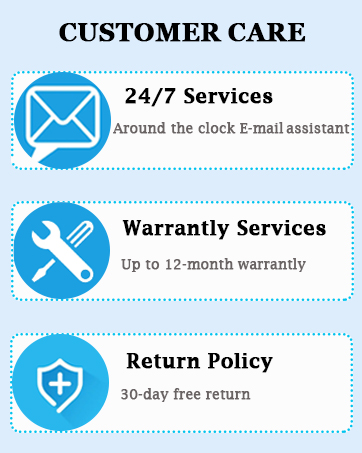
- บริการการรับประกัน: รับประกันสูงสุด 12 เดือน
- นโยบายการคืนสินค้า: คืนสินค้าได้ฟรีภายใน 30 วัน
If you have any questions or require assistance with your Saiyin Soundbar, our customer support team is available 24/7 to help you.
For further support, please visit the official Saiyin store or contact us directly through the provided channels in your product documentation.


