การแนะนำ
Thank you for choosing the Mibro Smartwatch Lite 3. This manual provides essential information for setting up, operating, and maintaining your device. Please read it carefully to ensure proper use and to maximize the performance of your smartwatch.
เนื้อหาแพ็คเกจ
ตรวจสอบให้แน่ใจว่ามีรายการทั้งหมดอยู่ในบรรจุภัณฑ์:
- Mibro Smartwatch Lite 3 (with strap)
- สายชาร์จแม่เหล็ก
- คู่มือการใช้งาน
สินค้าเกินview
The Mibro Smartwatch Lite 3 features a 1.3-inch AMOLED display, designed for clear visuals and intuitive interaction. It integrates various sensors for health monitoring and supports Bluetooth calling.
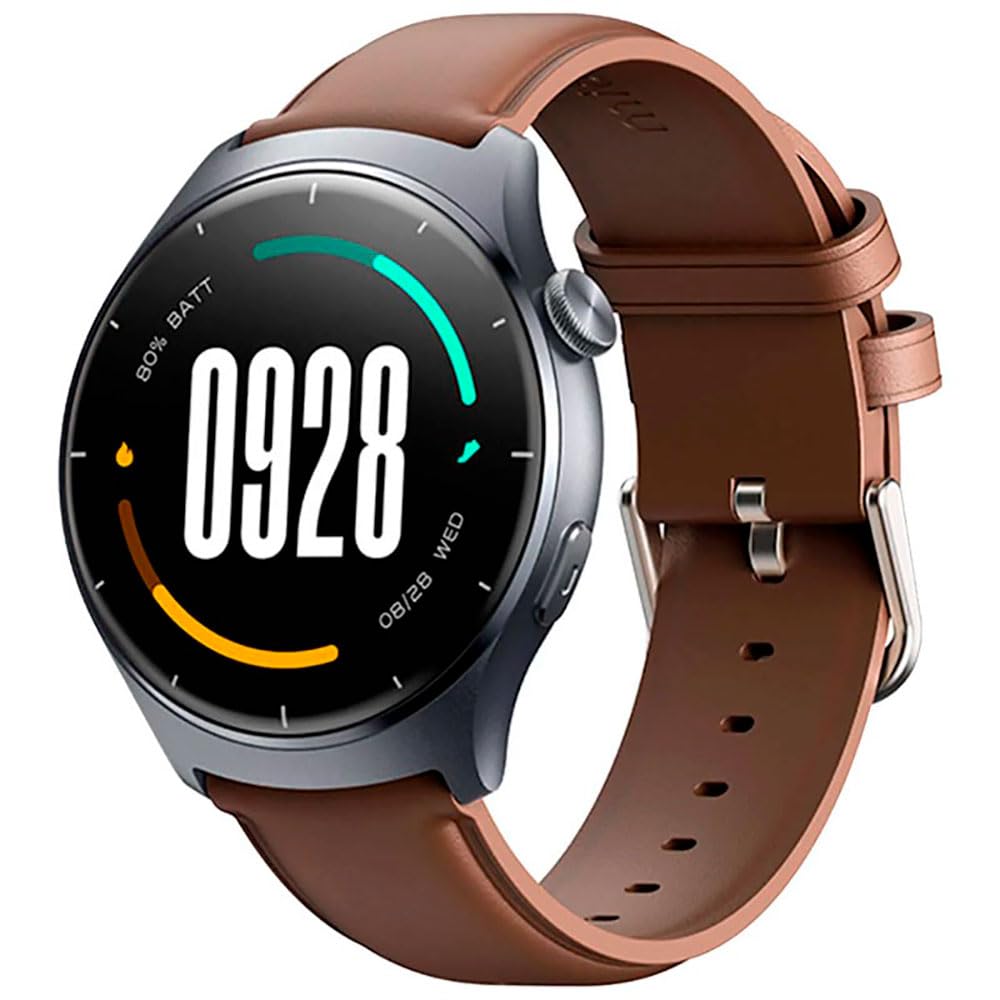
ภาพ: ด้านหน้า view of the Mibro Smartwatch Lite 3, showcasing ที่มีหน้าจอทรงกลมและสายรัด
การตั้งค่า
1. การชาร์จสมาร์ทวอทช์
- เชื่อมต่อสายชาร์จแบบแม่เหล็กเข้ากับหน้าสัมผัสการชาร์จที่ด้านหลังของสมาร์ทวอทช์
- เสียบปลายสาย USB เข้ากับอะแดปเตอร์ไฟ USB มาตรฐาน (แนะนำ 5V/1A) หรือพอร์ต USB ของคอมพิวเตอร์
- The watch display will show a charging indicator. Ensure the watch is fully charged before first use.
2. การติดตั้งและการจับคู่แอป
- Download the official Mibro Fit application from your smartphone's app store (App Store for iOS, Google Play Store for Android).
- เปิดแอป Mibro Fit และสร้างบัญชีหรือเข้าสู่ระบบ
- ตรวจสอบให้แน่ใจว่าได้เปิดใช้งาน Bluetooth บนสมาร์ทโฟนของคุณแล้ว
- In the Mibro Fit app, navigate to 'Device' or 'Add Device' and select 'Mibro Lite 3' from the list of available devices.
- Confirm the pairing request on both your smartphone and the smartwatch. A successful connection will be indicated on the watch display.
การดำเนินงาน
1. การนำทางพื้นฐาน
- เลื่อนลง: Access quick settings (e.g., brightness, do not disturb, battery saver).
- ปัดขึ้น: View การแจ้งเตือน
- ปัดไปทางซ้าย/ขวา: เลือกดูข้อมูลต่างๆ ผ่านวิดเจ็ต (เช่น อัตราการเต้นของหัวใจ สภาพอากาศ ข้อมูลกิจกรรม)
- กดปุ่มด้านข้าง: กลับไปยังหน้าปัดนาฬิกาหรือเข้าสู่เมนูหลัก
- กดปุ่มด้านข้างแบบยาว: Power on/off or restart the device.
2. โหมดกีฬา
The Mibro Lite 3 supports over 100 sports modes. To start a workout:
- From the main menu, select the 'Workout' or 'Sports' icon.
- Choose your desired activity (e.g., running, cycling, swimming).
- Tap 'Start' to begin tracking. The watch will display real-time data such as duration, heart rate, and calories burned.
- หากต้องการหยุดชั่วคราวหรือสิ้นสุดการออกกำลังกาย ให้กดปุ่มด้านข้างหรือปัดบนหน้าจอตามที่ได้รับแจ้ง
3. การโทรผ่านบลูทูธ
Once paired with your smartphone, the Mibro Lite 3 allows you to make and receive calls directly from your wrist.
- การรับสาย: เมื่อมีสายเรียกเข้า นาฬิกาจะแสดงหมายเลขผู้โทร แตะไอคอนสีเขียวเพื่อรับสาย หรือไอคอนสีแดงเพื่อปฏิเสธสาย
- โทรออก: Access the 'Phone' or 'Dialer' function on the watch, then select a contact or dial a number.
4. การติดตามสุขภาพ
- อัตราการเต้นของหัวใจ: นาฬิกาจะตรวจสอบอัตราการเต้นของหัวใจของคุณอย่างต่อเนื่อง View real-time data by swiping to the heart rate widget or accessing the 'Heart Rate' app.
- SpO2 (ออกซิเจนในเลือด): Measure your blood oxygen levels through the 'SpO2' app on the watch. Ensure the watch is snug on your wrist for accurate readings.
- การติดตามการนอนหลับ: Wear the watch to bed for automatic sleep monitoring. Data on sleep stages and duration can be viewed in the Mibro Fit app.
- การติดตามระดับความเครียดและการฝึกหายใจ: Utilize these features to manage stress and improve relaxation.
5. คุณสมบัติอื่น ๆ
- การควบคุมเพลง: ควบคุมการเล่นเพลงบนสมาร์ทโฟนของคุณโดยตรงจากนาฬิกา
- App Message Reminders: Receive notifications from various apps on your watch.
- สภาพอากาศ: รับข้อมูลอัปเดตสภาพอากาศแบบเรียลไทม์
- Alarm, Timer, Stopwatch: Standard utility functions.
- ค้นหาโทรศัพท์ของคุณ: ค้นหาสมาร์ทโฟนที่เชื่อมต่ออยู่ของคุณโดยการส่งเสียงแจ้งเตือน
- สุขภาพสตรี: Track menstrual cycles and related data.
การซ่อมบำรุง
1. การทำความสะอาด
- ทำความสะอาดตัวเรือนและสายนาฬิกาเป็นประจำด้วยผ้านุ่มๆamp ผ้า.
- ตรวจสอบให้แน่ใจว่าขั้วชาร์จปราศจากฝุ่นและสิ่งสกปรก เพื่อให้การชาร์จมีประสิทธิภาพ
- หลีกเลี่ยงการใช้สารเคมีรุนแรงหรือวัสดุขัดถูในการทำความสะอาด
2. ความทนทานต่อน้ำ
The Mibro Lite 3 is 2ATM waterproof, meaning it can withstand splashes, rain, and brief immersion in shallow water. It is suitable for activities like swimming in pools. However, it is not recommended for hot showers, saunas, or diving, as steam and high-pressure water jets may compromise the seal.
การแก้ไขปัญหา
- นาฬิกาไม่เปิด: ตรวจสอบให้แน่ใจว่านาฬิกาชาร์จเต็มแล้ว เสียบนาฬิกาเข้ากับเครื่องชาร์จอย่างน้อย 30 นาที
- ไม่สามารถจับคู่กับโทรศัพท์ได้:
- ตรวจสอบว่าเปิดใช้งาน Bluetooth ในโทรศัพท์ของคุณหรือไม่
- ตรวจสอบให้แน่ใจว่านาฬิกาอยู่ในระยะบลูทูธของโทรศัพท์ของคุณ
- รีสตาร์ททั้งนาฬิกาและโทรศัพท์ จากนั้นลองจับคู่กันอีกครั้ง
- ตรวจสอบให้แน่ใจว่าแอป Mibro Fit ได้รับการอัปเดตเป็นเวอร์ชันล่าสุด
- ข้อมูลสุขภาพที่ไม่ถูกต้อง: Ensure the watch is worn snugly on your wrist, about one finger's width from the wrist bone. Avoid excessive movement during measurements.
- ไม่ได้รับการแจ้งเตือน:
- Check notification permissions for the Mibro Fit app in your phone settings.
- Ensure 'Do Not Disturb' mode is not active on either the watch or the phone.
- Verify that the app is running in the background on your phone.
- อายุการใช้งานแบตเตอรี่สั้น: Reduce screen brightness, disable continuous heart rate monitoring if not needed, and limit background app refresh.
ข้อมูลจำเพาะ
| คุณสมบัติ | ข้อมูลจำเพาะ |
|---|---|
| ชื่อรุ่น | ไมโบร วอทช์ ไลท์ 3 |
| ขนาด | φ44.8mm, T=11.2mm (Without HR protrusion) |
| น้ำหนัก | 53.2g (with leather strap), 56g (with rubber strap) |
| แสดง | 1.3-inch AMOLED, 360*360 resolution, AOD, PPI 277 |
| การเชื่อมต่อ | บลูทูธ V5.3 |
| เซ็นเซอร์ | PPG Heart Rate/SpO2 Sensor/Accelerometer |
| ระดับการกันน้ำ | 2ตู้เอทีเอ็ม |
| อายุการใช้งานแบตเตอรี่ (โหมดรายวัน) | นานถึง 12 วัน |
| อายุการใช้งานแบตเตอรี่ (โหมดสแตนด์บาย) | นานถึง 50 วัน |
| อายุการใช้งานแบตเตอรี่ (โหมดเพลง) | นานถึง 5 ชั่วโมง |
| Battery Life (BT-Calling Mode) | นานถึง 6 ชั่วโมง |
| อุณหภูมิในการทำงาน | 0°ซ ~ 45°ซ |
การรับประกันและการสนับสนุน
The Mibro Smartwatch Lite 3 comes with a 12-month warranty from the date of purchase. This warranty covers manufacturing defects under normal use. It does not cover damage caused by misuse, accidents, unauthorized modifications, or normal wear and tear.
For technical support, warranty claims, or further assistance, please contact Mibro customer service through the official Mibro webไซต์หรือข้อมูลการติดต่อที่ระบุไว้ในเอกสารการซื้อของคุณ


