1. บทนำ
Thank you for choosing the Angrox Voice Remote Control. This remote is specifically designed as a replacement for Philips Google Smart TVs, offering enhanced functionality including voice control and dedicated shortcut buttons for popular streaming services. Please read this manual carefully to ensure proper setup and operation.

ภาพ: ด้านหน้าและด้านข้าง view of the Angrox Voice Remote Control, showcasing การออกแบบตามหลักสรีรศาสตร์และเค้าโครงปุ่ม
2. การตั้งค่า
2.1 การติดตั้งแบตเตอรี่
The remote requires two (2) AAA batteries (not included). Ensure correct polarity when inserting the batteries.
- Remove the battery cover on the back of the remote by sliding it downwards.
- Insert two AAA batteries, matching the positive (+) and negative (-) terminals as indicated inside the battery compartment.
- ปิดฝาครอบแบตเตอรี่กลับเข้าที่โดยเลื่อนกลับเข้าที่จนกระทั่งล็อคเข้าที่อย่างแน่นหนา

Image: A three-step diagram illustrating how to remove the battery cover, insert two AAA batteries, and replace the cover.
2.2 การเชื่อมต่อกับทีวีของคุณ
Before using the remote, it must be paired with your Philips Google Smart TV. This remote supports both infrared and Bluetooth technology for optimal performance.
- Ensure your Philips Google Smart TV is powered on.
- Hold down the "VOL-" button and the "Mic" (Google Assistant) button simultaneously for 5 seconds.
- The remote will initiate the pairing process. All pairing transactions occur in the background, and no further setup is typically required once the pairing is successful.

Image: A hand holding the remote, with an arrow pointing from the 'VOL-' and 'Mic' buttons to a TV screen, illustrating the pairing process.

Image: A visual guide showing the remote and a TV screen with on-screen instructions for pairing, emphasizing holding the VOL- and Mic buttons.
2.3 รุ่นทีวีที่รองรับ
This voice replacement remote is compatible with the following Philips Google Smart TV series:
- ซีรี่ส์ 7000: 75PUL7552/F7, 65PUL7552/F7, 55PUL7552/F7, 50PUL7552/F7, 43PUL7652/F7
- ซีรี่ส์ 7600: 65PUL7672/F7, 55PUL7672/F7, 50PUL7672/F7, 43PUL7672/F7

Image: The remote control centered between two Philips Google Smart TVs, with lists of compatible 7000 and 7600 series models.
3. คู่มือการใช้งาน
3.1 ฟังก์ชันปุ่มต่างๆview
Familiarize yourself with the various buttons and their functions on your Angrox remote control:
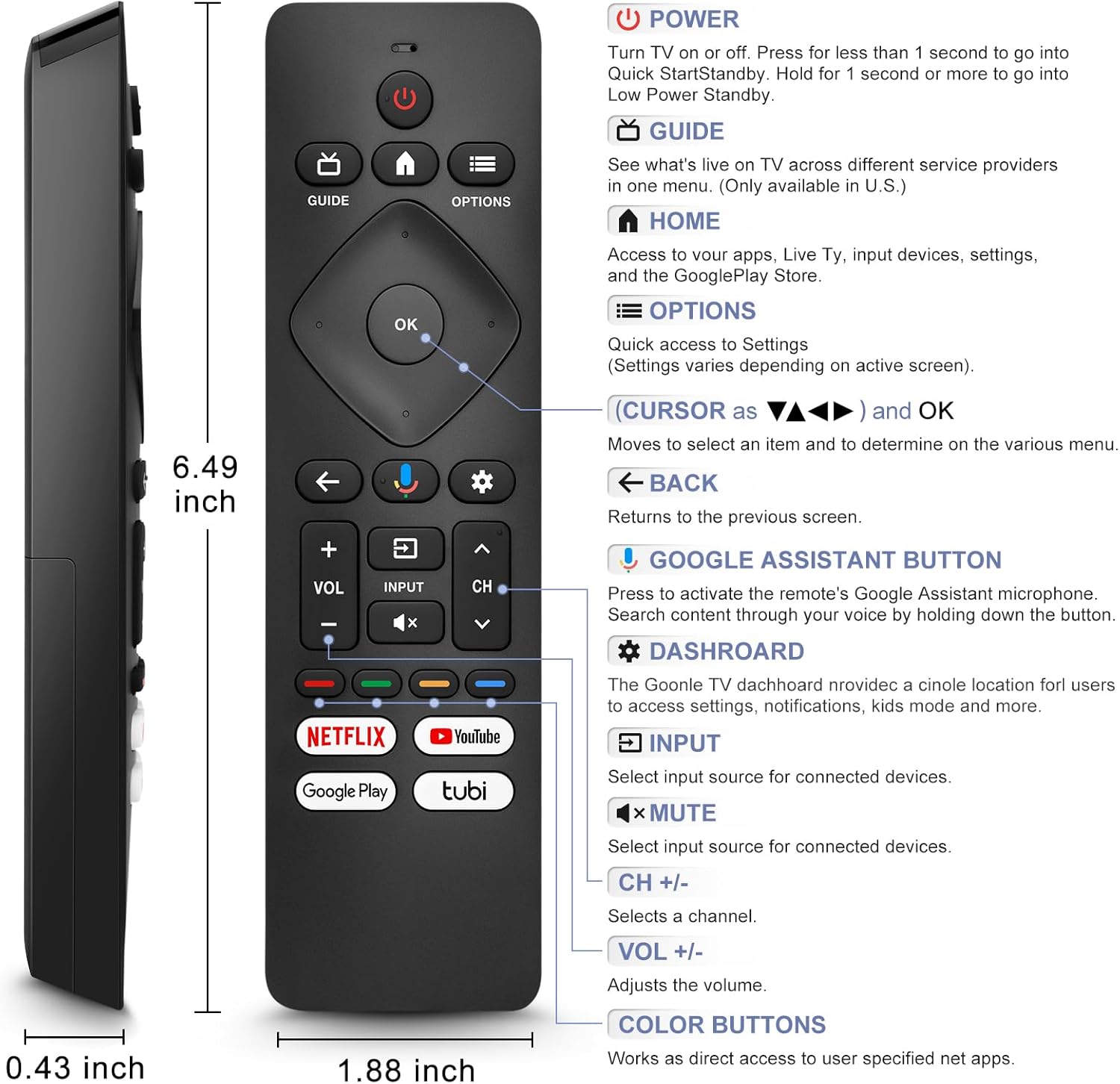
Image: A detailed diagram of the remote control with labels and descriptions for each button, including Power, Guide, Home, Options, Cursor/OK, Back, Google Assistant, Dashboard, Input, Mute, Volume, Channel, and Color Buttons.
- พลัง: Press to turn TV on or off. Hold for 1 second for Quick Start Standby, or longer for Low Power Standby.
- แนะนำ: Access live TV service providers (availability may vary by region).
- บ้าน: Access apps, Live TV, input devices, settings, and the Google Play Store.
- ตัวเลือก: Quick access to settings (settings vary based on active screen).
- Cursor (Up/Down/Left/Right) & OK: นำทางเมนูและยืนยันการเลือก
- กลับ: กลับไปยังหน้าจอที่แล้ว
- ปุ่ม Google Assistant: Press and hold to activate the remote's microphone for voice search.
- แดชบอร์ด: Access the Google TV dashboard for settings, notifications, and kids mode.
- ป้อนข้อมูล: เลือกแหล่งสัญญาณเข้าสำหรับอุปกรณ์ที่เชื่อมต่อ
- ปิดเสียง: ปิดหรือเปิดเสียงทีวี
- ฉบับ +/-: ปรับระดับเสียง.
- ช +/-: Select the next or previous channel.
- ปุ่มสี: Provide direct access to user-specified net apps.
3.2 ฟังก์ชันค้นหาด้วยเสียง
The integrated voice function allows for easier and more intuitive interaction with your smart TV. Simply press and hold the Google Assistant button and speak your command or query.
- กดปุ่มค้างไว้ ปุ่ม Google Assistant (ไอคอนไมโครโฟน)
- พูดให้ชัดเจนใส่ไมโครโฟนของรีโมท
- ปล่อยปุ่มเมื่อพูดจบ
Examples of voice commands include: "What's the weather today?", "Turn down the volume", "Open YouTube", or searching for specific content.
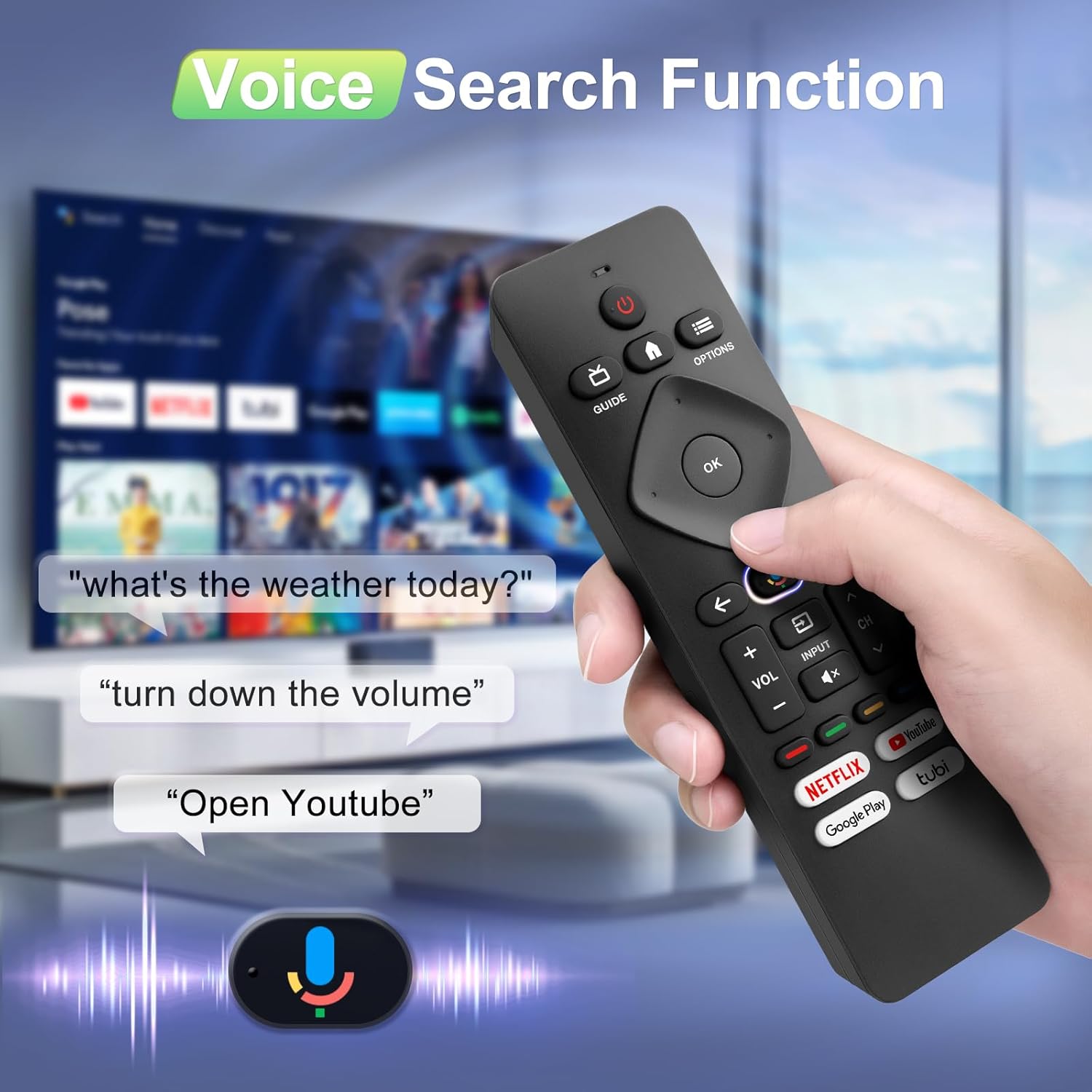
Image: A hand holding the remote, with speech bubbles showing example voice commands like "what's the weather today?" and "Open Youtube", demonstrating the voice search capability.
3.3 ปุ่มทางลัด
The remote features four dedicated shortcut buttons for quick access to popular streaming channels:
- เน็ตฟลิกซ์
- YouTube
- Google Play
- ทูบี้
Pressing these buttons will directly launch the respective application on your TV, provided they are installed and configured.

Image: The remote control highlighting the four dedicated shortcut buttons for Netflix, YouTube, Google Play, and Tubi, with their respective logos.
4. การบำรุงรักษา
เพื่อให้รีโมทคอนโทรลของคุณมีอายุการใช้งานยาวนานและมีประสิทธิภาพเหมาะสมที่สุด โปรดปฏิบัติตามคำแนะนำการบำรุงรักษาดังต่อไปนี้:
- การทำความสะอาด: เช็ดรีโมทด้วยผ้าแห้งนุ่มๆ ห้ามใช้น้ำยาทำความสะอาดหรือวัสดุที่มีฤทธิ์กัดกร่อน
- การเปลี่ยนแบตเตอรี่: Replace batteries when the remote's response becomes sluggish or it stops functioning. Always replace both batteries at the same time with new ones.
- พื้นที่จัดเก็บ: เก็บรีโมทไว้ในที่แห้งและเย็น ห่างจากแสงแดดโดยตรงและอุณหภูมิที่สูงหรือต่ำมาก
- หลีกเลี่ยงการหยด: ปกป้องรีโมตจากแรงกระแทก เพราะการตกอาจทำให้ส่วนประกอบภายในเสียหายได้
5 การแก้ไขปัญหา
หากคุณพบปัญหาเกี่ยวกับรีโมทคอนโทรล โปรดดูวิธีแก้ไขปัญหาทั่วไปต่อไปนี้:
- รีโมตไม่ตอบสนอง:
- ตรวจสอบว่าใส่แบตเตอรี่ถูกต้องและขั้วถูกต้องหรือไม่
- เปลี่ยนแบตเตอรี่เก่าด้วยแบตเตอรี่ AAA ใหม่
- ตรวจสอบให้แน่ใจว่าไม่มีสิ่งกีดขวางระหว่างรีโมทและเครื่องรับ IR ของทีวี
- ฟังก์ชั่นเสียงไม่ทำงาน:
- Ensure the remote is properly paired with your TV via Bluetooth. Refer to Section 2.2.
- Make sure you are pressing and holding the Google Assistant button while speaking.
- ตรวจสอบการตั้งค่าทีวีของคุณเพื่อให้แน่ใจว่าได้เปิดใช้งานการควบคุมด้วยเสียงแล้ว
- Buttons Unresponsive or Sticky:
- Clean the remote surface, especially around the buttons, to remove any dirt or debris.
- If buttons remain unresponsive after cleaning and battery replacement, the remote may require replacement.
- Short Remote Distance:
- The remote supports infrared and Bluetooth. Ensure no physical obstructions are blocking the signal.
- The remote is designed for optimal performance within 10 meters (approximately 33 feet) and is available up to 12 meters (approximately 39 feet).
6. ข้อมูลจำเพาะ
| ยี่ห้อ | โกรธ |
| หมายเลขรุ่น | URMT26CND002 |
| อุปกรณ์ที่รองรับ | Philips Google Smart TVs (7000 & 7600 Series) |
| เทคโนโลยีการเชื่อมต่อ | อินฟราเรด, บลูทูธ |
| คุณสมบัติพิเศษ | Ergonomic, Voice Search, Shortcut Buttons |
| แหล่งพลังงาน | 2 x แบตเตอรี่ AAA (ไม่รวม) |
| น้ำหนักสินค้า | 2.39 ออนซ์ (ประมาณ 67.7 กรัม) |
| ขนาดแพ็คเกจ | 6.73 x 1.93 x 1.02 นิ้ว |
| ความทนทานของปุ่ม | Tested for 5,000-8,000 clicks per button |
7. การรับประกันและการสนับสนุน
Angrox is committed to providing excellent after-sale service. We focus on the compatibility and quality of our replacement remotes. If you have any questions or concerns regarding your order or the product, please do not hesitate to contact us directly. Our professional after-sale service team is available to assist you.
For support, please refer to the contact information provided with your purchase or visit the Angrox store on Amazon.
