การแนะนำ
The Shark TurboBlade Fan is a bladeless tower fan designed for ultra-customizable air circulation. It features 180° oscillation, pivoting and twisting capabilities, and 10 noise levels with 10 speeds. Its design incorporates DustDefense technology for easy cleaning and optimized performance. This manual provides essential information for the safe and efficient operation of your TurboBlade Fan.
ข้อมูลด้านความปลอดภัยที่สำคัญ
Please read all instructions carefully before using your Shark TurboBlade Fan. Failure to follow these instructions may result in electric shock, fire, or serious injury.
- ควรถอดปลั๊กพัดลมออกจากเต้ารับไฟฟ้าทุกครั้งก่อนทำความสะอาดหรือดำเนินการบำรุงรักษาใดๆ
- ห้ามใช้งานพัดลมที่มีสายไฟหรือปลั๊กชำรุด ทิ้งพัดลมหรือส่งกลับไปยังศูนย์บริการที่ได้รับอนุญาตเพื่อตรวจสอบและ/หรือซ่อมแซม
- ห้ามเดินสายไฟใต้พรม ห้ามคลุมสายไฟด้วยพรมเช็ดเท้า พรมยาว หรือวัสดุคลุมที่คล้ายกัน จัดสายไฟให้ห่างจากบริเวณที่มีคนสัญจรไปมาและบริเวณที่สายไฟจะไม่สะดุดล้ม
- ห้ามสอดหรือปล่อยให้วัตถุแปลกปลอมเข้าไปในช่องระบายอากาศหรือช่องดูดควัน เนื่องจากอาจทำให้เกิดไฟฟ้าช็อต ไฟไหม้ หรือทำให้พัดลมเสียหายได้
- ห้ามใช้กลางแจ้ง พัดลมนี้มีไว้สำหรับใช้ภายในอาคารเท่านั้น
- ห้ามใช้พัดลมในบริเวณที่เปียกหรืองamp สถานที่เช่นห้องน้ำหรือห้องซักรีด
- เก็บพัดลมให้พ้นมือเด็กและสัตว์เลี้ยง
สิ่งที่รวมอยู่
- Shark TurboBlade Fan (Model TF202SWH)
- รีโมทคอนโทรล (ต้องใช้แบตเตอรี่ AAA 2 ก้อน รวมอยู่ด้วย)
การตั้งค่า
The Shark TurboBlade Fan is designed for quick and easy assembly with minimal parts and no tools required.
- แกะส่วนประกอบ: Carefully remove all parts from the packaging. Ensure all components listed in the "What's Included" section are present.
- ประกอบฐาน: Connect the fan tower to the base. Align the components and twist or click into place as indicated by the markings.
- ตำแหน่งพัดลม : วางพัดลมที่ประกอบเสร็จแล้วบนพื้นผิวที่มั่นคงและเรียบ ตรวจสอบให้แน่ใจว่ามีพื้นที่ว่างรอบพัดลมเพียงพอเพื่อให้การไหลเวียนของอากาศและการส่ายเป็นไปอย่างเหมาะสม
- ใส่แบตเตอรี่รีโมท: Open the battery compartment on the remote control and insert the two AAA batteries, observing polarity.
- เชื่อมต่อพลังงาน: เสียบสายไฟเข้ากับเต้ารับไฟฟ้ามาตรฐาน

Image: The Shark TurboBlade Fan configured in horizontal mode, demonstrating its ability to cool two distinct levels simultaneously. This setup is ideal for tiered coverage in rooms.
คำแนะนำการใช้งาน
Your Shark TurboBlade Fan offers versatile cooling options. Use the controls on the fan unit or the magnetic remote control to adjust settings.
เปิด/ปิดเครื่อง
- Press the Power button on the fan unit or remote control to turn the fan on or off.
Speed and Noise Levels
- The fan features 10 speed settings, which correspond to 10 noise levels.
- Use the '+' and '-' buttons on the control panel or remote to increase or decrease the fan speed.
- Lower speeds (1-3) provide quiet, gentle cooling, while higher speeds (6-10) offer powerful airflow.
Pivoting and Twisting Airflow
The TurboBlade Fan allows for extensive customization of airflow direction.
- Vertical to Horizontal Pivot: The fan head can pivot from a vertical (Tower Mode) to a horizontal (Air Blanket Mode) orientation. Gently adjust the fan head to your desired angle.
- Twist Vents: The dual vents can be twisted independently to direct airflow in multiple directions, allowing for multi-zone cooling.
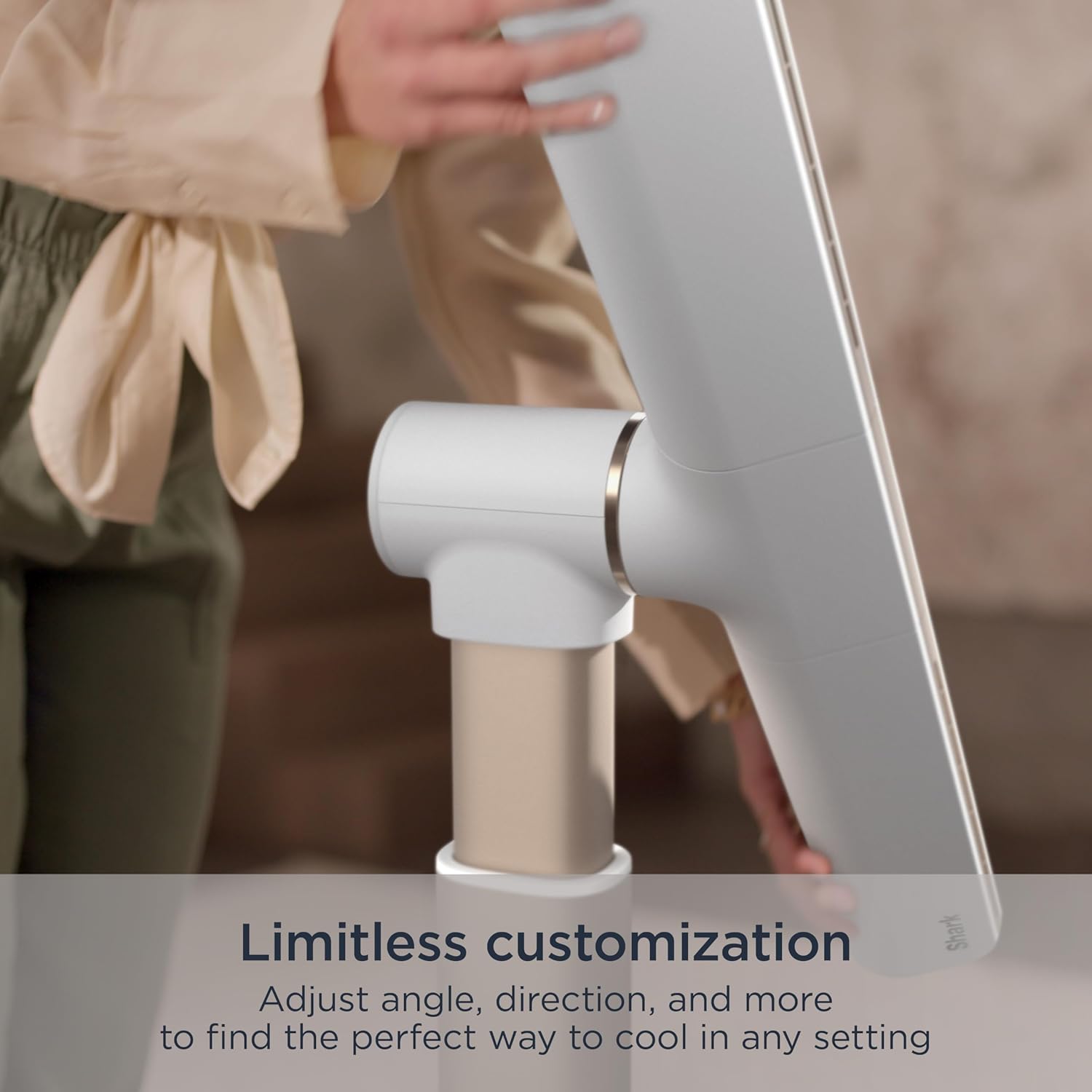
Image: A hand adjusting the fan head, illustrating the fan's limitless customization options for angle and direction.
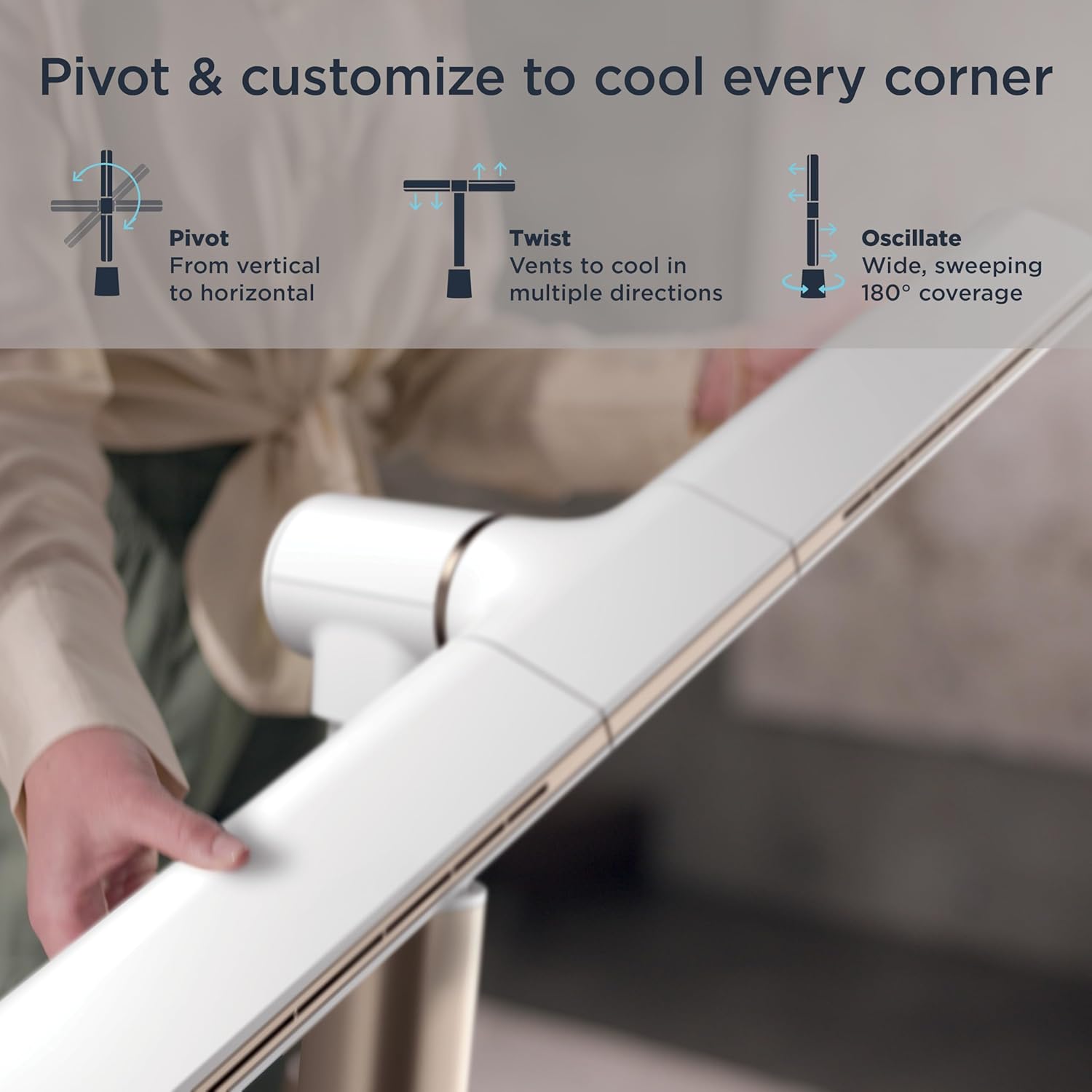
Image: Visual representation of the fan's pivot, twist, and oscillate capabilities, highlighting its ability to cool every corner.
การสั่น
- Press the Oscillation button on the remote or fan unit to activate the 180° wide, sweeping oscillation feature.
- Press again to stop oscillation at the desired position.
โหมด
- Air Blanket™ Mode: When the fan is in horizontal orientation, this mode provides widespread, soothing airflow, ideal for sleeping or covering a larger area.
- โหมดลมธรรมชาติ: This mode simulates natural wind by varying the fan speed, creating a gentle, fluctuating breeze indoors.
- Cool Tower Mode: When the fan is in vertical orientation, this mode provides powerful, sweeping coverage with a compact footprint.

Image: The fan operating in Air Blanket™ Mode, positioned horizontally to deliver widespread, soothing airflow in a bedroom setting.
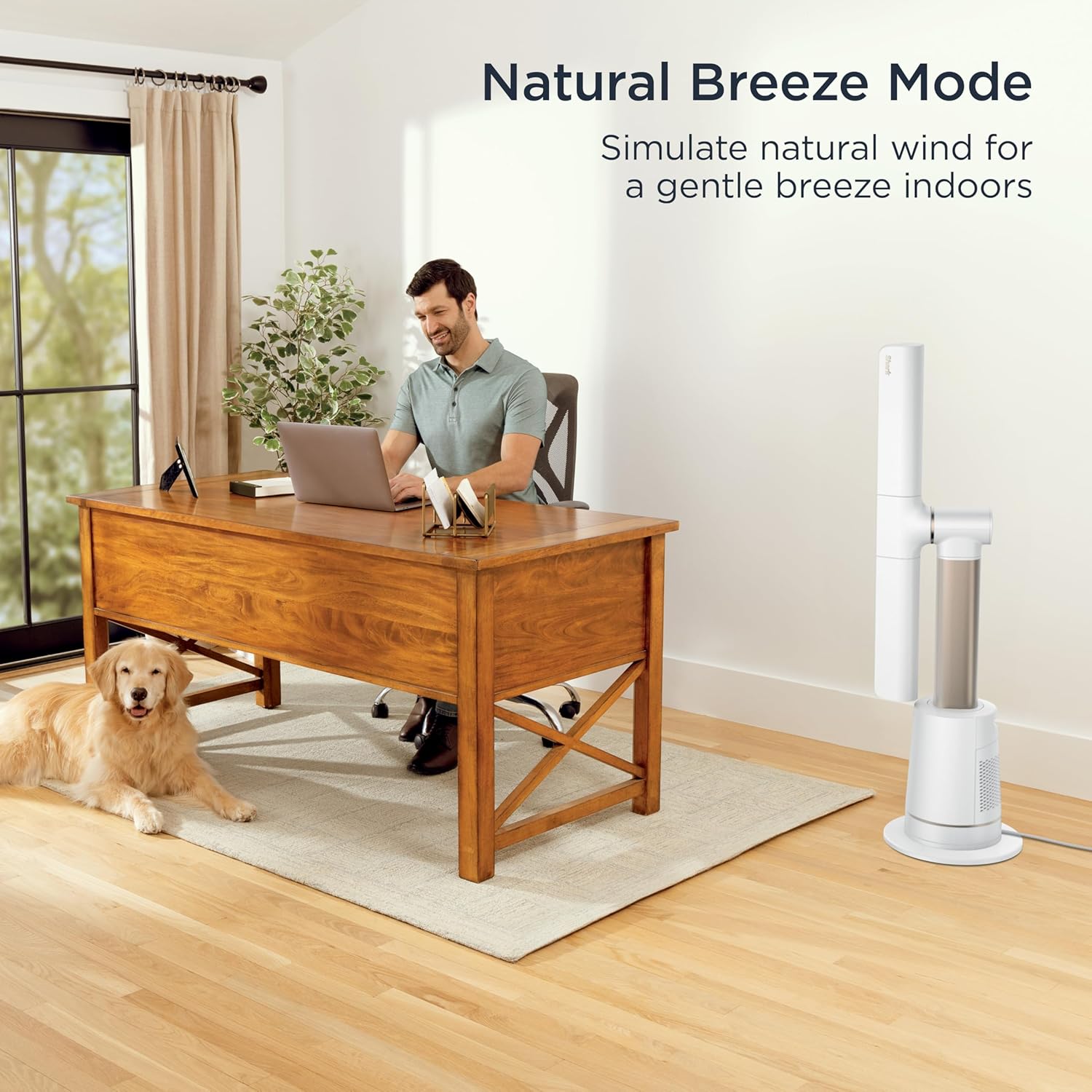
Image: The fan in Natural Breeze Mode, simulating a gentle, natural wind indoors, shown in a home office environment.

Image: The fan in Cool Tower Mode, standing vertically to provide powerful, sweeping coverage with a compact footprint.
รีโมทคอนโทรล
- รีโมทคอนโทรลที่ให้มาช่วยให้ใช้งานได้สะดวกจากระยะไกล
- It features a magnetic parking spot on the fan for easy storage.

Image: A hand holding the remote control, demonstrating its use for controlling the fan from a distance. The remote can be magnetically attached to the fan for storage.
การซ่อมบำรุง
Regular maintenance ensures optimal performance and longevity of your Shark TurboBlade Fan.
การทำความสะอาดภายนอก
- ควรถอดปลั๊กพัดลมทุกครั้งก่อนทำความสะอาด
- เช็ดพื้นผิวภายนอกของพัดลมด้วยผ้านุ่มๆamp ผ้า ห้ามใช้สารทำความสะอาดที่มีฤทธิ์กัดกร่อนหรือตัวทำละลาย
- The bladeless design makes the fan easy to wipe clean, preventing dust buildup common with traditional fans.
DustDefense™ Filter Cleaning
The fan is equipped with DustDefense™ technology to capture particles and optimize performance. Regular cleaning of the filter is recommended.
- ตัวกรองการเข้าถึง: Locate the DustDefense™ filter compartment, typically on the side or back of the base unit.
- ลบตัวกรอง: Gently open the compartment and remove the filter.
- ทำความสะอาดตัวกรอง: Tap the filter to dislodge loose dust. For more thorough cleaning, rinse the filter under cool water. Ensure the filter is completely dry before reinserting.
- ติดตั้งตัวกรองใหม่: Place the clean, dry filter back into its compartment and close securely.

Image: A hand demonstrating the removal of the DustDefense™ filter from the fan's base, highlighting the easy cleaning process for optimized performance.
การแก้ไขปัญหา
If you encounter issues with your Shark TurboBlade Fan, refer to the following common solutions:
| ปัญหา | สาเหตุที่เป็นไปได้ | สารละลาย |
|---|---|---|
| พัดลมไม่เปิด | No power, loose plug, remote batteries dead. | Ensure the fan is securely plugged into a working outlet. Check circuit breaker. Replace remote batteries. |
| การไหลเวียนของอากาศอ่อน | Low speed setting, blocked air intake/outlet, dirty DustDefense™ filter. | Increase fan speed. Ensure no obstructions. Clean the DustDefense™ filter as per maintenance instructions. |
| พัดลมมีเสียงดัง | High speed setting, fan not on a level surface, internal obstruction. | Reduce fan speed. Place fan on a stable, level surface. Check for any foreign objects. |
| รีโมทคอนโทรลไม่ทำงาน | Dead batteries, obstruction between remote and fan, remote out of range. | Replace remote batteries. Ensure clear line of sight to the fan's receiver. Move closer to the fan. |
If the problem persists after trying these solutions, please contact Shark Customer Support.
ข้อมูลจำเพาะ
| คุณสมบัติ | รายละเอียด |
|---|---|
| ยี่ห้อ | ฉลาม |
| ชื่อรุ่น | Shark TurboBlade Fan |
| หมายเลขรุ่น | TF202SWH |
| สี | นกพิราบ |
| การออกแบบพัดลมไฟฟ้า | พัดลมตั้งพื้น |
| แหล่งพลังงาน | ไฟฟ้ากระแสสลับ/ไฟฟ้ากระแสตรง |
| ขนาดสินค้า | ลึก 11.77 นิ้ว x กว้าง 31.57 นิ้ว x สูง 44.84 นิ้ว |
| น้ำหนักสินค้า | 14.99 ปอนด์ |
| คุณสมบัติพิเศษ | Adjustable Height, Oscillating, Quiet Operation, Tower Base |
| การใช้ที่แนะนำ | การหมุนเวียนอากาศ, การทำความเย็น, การทำให้แห้ง, การดูดอากาศ, การระบายอากาศ |
| ระดับเสียง | 40 เดซิเบล |
| วัดtage | 192 วัตต์ |
| เล่มที่tage | 120.0 โวลต์ |
| การตั้งค่าความเร็ว | 10 |
| ประเภทมอเตอร์ | ไร้แปรงถ่าน |
| วิธีการควบคุม | ระยะไกล |
| การใช้งานภายใน/ภายนอกอาคาร | ในร่ม |
| แบตเตอรี่ที่จำเป็น | ใช่ (ใช้แบตเตอรี่ AAA 2 ก้อน มีให้ในรีโมท) |
การรับประกันและการสนับสนุน
For warranty information, please refer to the warranty card included with your product or visit the official Shark website. If you require assistance with setup, operation, maintenance, or troubleshooting that is not covered in this manual, please contact Shark Customer Support.
Shark Customer Support:
- Webเว็บไซต์: www.sharkclean.com
- Phone: Refer to your product registration or packaging for regional contact numbers.