1. บทนำ
Thank you for choosing the Shokz OpenDots ONE Ear Cuff Wireless Earphones. These open-ear earphones are designed to provide a comfortable listening experience while keeping you aware of your surroundings. This manual provides detailed instructions for setup, operation, maintenance, and troubleshooting to ensure optimal performance.

Image 1.1: Shokz OpenDots ONE earphones and charging case.
The Shokz OpenDots ONE features:
- Open-ear ear-cuff design for pressure-free comfort and situational awareness.
- Dolby Audio support for immersive, high-quality sound with 16mm equivalent dual-driver system and Bassphere technology.
- Up to 40 hours of total battery life with the charging case, including quick charge functionality.
- Bluetooth 5.4 for stable multipoint connection.
- IP54 water resistance for protection against sweat and light splashes.
- Dedicated app for sound customization, touch control settings, and finding lost earphones.
- AI noise-canceling microphone for clear calls.
- DirectPitch technology to minimize sound leakage and enhance privacy.

ภาพที่ 1.2: จบแล้วview of key features including lightweight design, Dolby Audio, 40-hour battery, IP54 rating, and wireless charging.
2. การตั้งค่า
2.1. การชาร์จหูฟังและเคส
ก่อนใช้งานครั้งแรก ควรชาร์จหูฟังและเคสชาร์จให้เต็ม
- การชาร์จ USB-C: Connect the provided USB-C cable to the charging case and a power source. The indicator light on the case will show charging status. A full charge takes approximately 60 minutes.
- การชาร์จแบบไร้สาย: Place the charging case on a compatible wireless charging pad. The indicator light will confirm charging.
- ชาร์จเร็ว: การชาร์จเร็วเพียง 10 นาที สามารถใช้งานได้ประมาณ 2 ชั่วโมง

Image 2.1: The charging case connected via USB-C, illustrating the 40-hour total playback and quick charge feature.

Image 2.2: The charging case placed on a wireless charging pad, demonstrating wireless charging capability.
2.2. การจับคู่กับอุปกรณ์ของคุณ
- เปิดกล่องชาร์จ หูฟังจะเข้าสู่โหมดจับคู่โดยอัตโนมัติ โดยจะมีไฟ LED กระพริบแสดงขึ้น
- บนอุปกรณ์ของคุณ (สมาร์ทโฟน แท็บเล็ต คอมพิวเตอร์) ไปที่การตั้งค่าบลูทูธ
- Select "Shokz OpenDots ONE" from the list of available devices.
- เมื่อเชื่อมต่อแล้ว ไฟ LED บนหูฟังจะหยุดกะพริบ
2.3. การสวมหูฟัง
The OpenDots ONE features an ear-cuff design that rests gently on your ear without blocking the ear canal. They are designed to be worn without distinguishing between left and right, as the earphones automatically detect orientation.
- Gently place the earphone over your ear, ensuring the speaker rests comfortably near your ear canal.
- The flexible JointArc structure adapts to various ear shapes for a secure and comfortable fit.
- The design is compatible with glasses and masks, preventing interference.
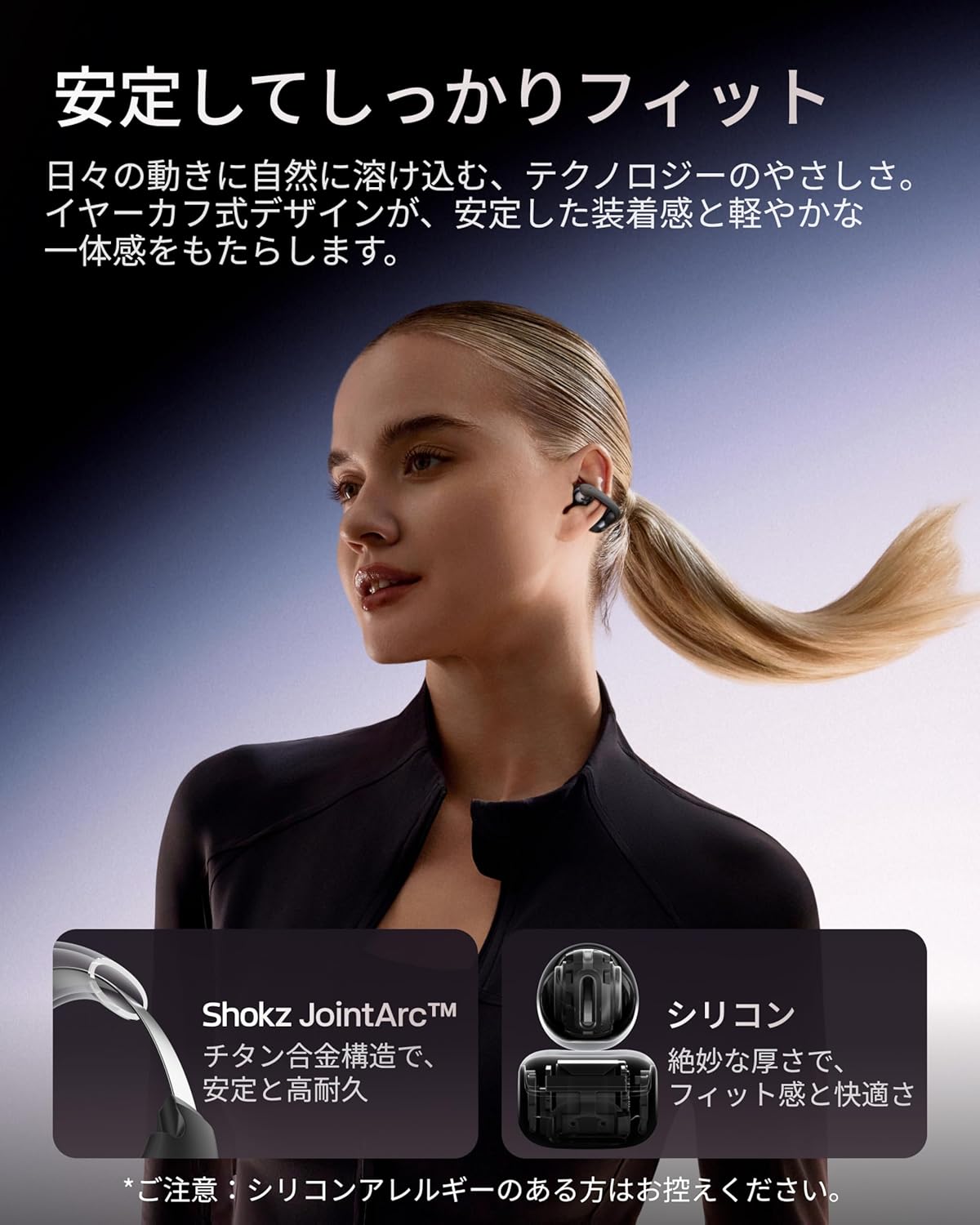
Image 2.3: A woman wearing the Shokz OpenDots ONE earphones, demonstrating the secure and comfortable ear-cuff fit.

Image 2.4: Visual guide for correct earphone placement and common incorrect wearing methods.
3. การใช้งานหูฟัง
3.1. การควบคุมแบบสัมผัสขั้นพื้นฐาน
The OpenDots ONE features intuitive touch controls on each earphone. You can customize these controls via the Shokz app.
- เล่น/หยุดชั่วคราว: Double-tap the battery compartment or JointArc area.
- เพิ่ม/ลดระดับเสียง: Touch and hold the top or bottom of the battery compartment.
- เพลงถัดไป: Triple-tap (customizable).
- แทร็กก่อนหน้า: Quadruple-tap (customizable).
- รับ/วางสาย: แตะสองครั้ง.
- ปฏิเสธสาย: แตะและกดค้างไว้
- เปิดใช้งาน Voice Assistant: Triple-tap (customizable).
3.2. Shokz App Features
Download the dedicated Shokz app for enhanced control and customization.
- การปรับแต่งเสียง: Choose from 4 preset EQ modes (Standard, Vocal, Bass Boost, Private) and 2 custom modes to adjust the sound profile.
- Touch Control Settings: Customize touch gestures to your preference.
- Find My Earphones: ค้นหาหูฟังที่สูญหาย
- อัพเดตเฟิร์มแวร์: หมั่นอัปเดตหูฟังของคุณให้ทันสมัยอยู่เสมอด้วยฟีเจอร์และการปรับปรุงล่าสุด
- Prompt Volume Adjustment: Control the volume of system prompts.
- โหมดส่วนตัว: Enhance sound leakage prevention for increased privacy.

Image 3.1: The Shokz app interface, showing options for EQ settings and other customizations.
3.3. การเชื่อมต่อแบบหลายจุด
The OpenDots ONE supports multipoint connection, allowing you to connect to two Bluetooth devices simultaneously. This enables seamless switching between devices, for example, from a laptop for music to a phone for a call.
- Ensure both devices are paired with your OpenDots ONE.
- The earphones will automatically switch audio source based on activity (e.g., incoming call).
4. การบำรุงรักษา
4.1. การทำความสะอาด
- เช็ดหูฟังและกล่องชาร์จด้วยผ้าแห้งนุ่มที่ไม่เป็นขุย
- ห้ามใช้สารทำความสะอาดที่มีฤทธิ์กัดกร่อน ตัวทำละลาย หรือสเปรย์แอโรซอล
- หลีกเลี่ยงไม่ให้ความชื้นเข้าไปในช่องเปิดต่างๆ
4.2. การจัดเก็บ
- เก็บหูฟังไว้ในกล่องชาร์จเมื่อไม่ได้ใช้งานเพื่อปกป้องหูฟังและชาร์จไฟอยู่เสมอ
- หลีกเลี่ยงการเก็บในที่ที่มีอุณหภูมิที่สูงหรือที่มีความชื้นสูง
4.3. ความทนทานต่อน้ำ (IP54)
The OpenDots ONE earphones are rated IP54, meaning they are resistant to dust and splashing water from any direction. This makes them suitable for exercise and outdoor activities in light rain. However, they are not designed for submersion in water or exposure to pressurized water jets.
- ห้ามจุ่มหูฟังลงในน้ำโดยเจตนา
- If the earphones get wet, wipe them dry before placing them back in the charging case.
5 การแก้ไขปัญหา
5.1. ไม่มีเสียงหรือเสียงขาดๆ หายๆ
- ตรวจสอบให้แน่ใจว่าหูฟังมีการชาร์จแล้ว
- Check that the earphones are properly paired and connected to your device.
- Verify the volume levels on both the earphones and your connected device.
- Move closer to your device to ensure a stable Bluetooth connection.
- ลองตัดการเชื่อมต่อและเชื่อมต่อบลูทูธใหม่อีกครั้ง
5.2. ปัญหาการจับคู่
- Ensure the earphones are in pairing mode (flashing LED).
- ปิดบลูทูธในอุปกรณ์อื่น ๆ ที่อยู่ใกล้เคียงเพื่อหลีกเลี่ยงการรบกวน
- ลืมอุปกรณ์จากการตั้งค่าบลูทูธของโทรศัพท์ของคุณและลองจับคู่ใหม่อีกครั้ง
- Perform a factory reset (refer to the Shokz app or official support for instructions).
5.3 ปัญหาการชาร์จ
- ตรวจสอบให้แน่ใจว่าสาย USB-C เชื่อมต่อกับเคสและแหล่งจ่ายไฟอย่างแน่นหนา
- หากใช้การชาร์จแบบไร้สาย โปรดตรวจสอบให้แน่ใจว่าวางเคสบนแผ่นชาร์จอย่างถูกต้อง
- ลองใช้สายชาร์จหรืออะแดปเตอร์ไฟอื่น
- ทำความสะอาดหน้าสัมผัสการชาร์จบนหูฟังและภายในเคสด้วยสำลีแห้ง
5.4. การรั่วไหลของเสียง
While DirectPitch technology significantly reduces sound leakage, some leakage may occur at very high volumes or in very quiet environments. To minimize this:
- ลดระดับเสียง
- Activate "Private Mode" in the Shokz app.
6. ข้อมูลจำเพาะ
| คุณสมบัติ | รายละเอียด |
|---|---|
| ชื่อรุ่น | OpenDots ONE |
| การอ้างอิงผู้ผลิต | โชกซ์ อี310 |
| เทคโนโลยีการเชื่อมต่อ | ไร้สาย |
| เทคโนโลยีการสื่อสารไร้สาย | บลูทูธ 5.4 |
| การตอบสนองความถี่ | 2400 เมกะเฮิรตซ์ |
| ความไวต่อความรู้สึก | 97.5 เดซิเบล |
| การวางตำแหน่งหู | หูเปิด |
| ปัจจัยรูปแบบหูฟัง | หูเปิด |
| สี | สีดำ |
| ระดับความต้านทานต่อน้ำ | IP54 (ทนน้ำ) |
| อายุการใช้งานแบตเตอรี่ (หูฟัง) | นานถึง 10 ชั่วโมง |
| อายุการใช้งานแบตเตอรี่ทั้งหมด (รวมเคส) | นานถึง 40 ชั่วโมง |
| เวลาในการชาร์จ | ประมาณ 60 นาที |
| Charging Style | USB-C, การชาร์จแบบไร้สาย |
| ประเภทการควบคุม | Call Control, Volume Control, Media Control |
| วิธีการควบคุม | แอปสัมผัส |
| น้ำหนักผลิตภัณฑ์ | 65 กรัม |
| วัสดุ | Titanium Alloy, Silicone, PC |
| การใช้ที่แนะนำ | Exercise, Entertainment, Sports, Training, Running, Work, Meetings, Daily Use, Commuting |
| อุปกรณ์ที่รองรับ | อุปกรณ์ที่ใช้บลูทูธ |
| ส่วนประกอบที่รวมอยู่ | OpenDots ONE Earphones ×1, OpenDots ONE Charging Case ×1, USB-C Charging Cable ×1 |
7. การรับประกันและการสนับสนุน
7.1. ข้อมูลการรับประกัน
For specific warranty details, please refer to the warranty card included with your product or visit the official Shokz website. Typically, Shokz products come with a limited warranty covering manufacturing defects.
7.2. การสนับสนุนลูกค้า
If you encounter any issues not covered in this manual or require further assistance, please contact Shokz customer support through their official website or the dedicated Shokz app. You can also visit the Shokz Official Store on Amazon สำหรับทรัพยากรเพิ่มเติม


