การแนะนำ
Welcome to the user manual for your new COLMI C8 Max Smartwatch. This guide provides comprehensive instructions on how to set up, operate, maintain, and troubleshoot your device. Please read this manual carefully to ensure optimal performance and longevity of your smartwatch.
The COLMI C8 Max is a versatile fitness smartwatch featuring a 1.93-inch IPS touch screen, IP68 water resistance, and a long-lasting battery. It supports various sports modes, communication features, and smart functions, compatible with both Android and iOS devices.
ข้อมูลด้านความปลอดภัย
To ensure safe and proper use of your COLMI C8 Max Smartwatch, please observe the following precautions:
- ความปลอดภัยของแบตเตอรี่: Do not disassemble, puncture, or modify the built-in lithium polymer battery. Avoid exposing the device to extreme temperatures (below -10°C or above 50°C) or direct sunlight for prolonged periods. Use only the provided charging cable.
- ความต้านทานต่อน้ำ (IP68): The device is IP68 rated, meaning it is resistant to dust and can withstand immersion in fresh water up to 1.5 meters for 30 minutes. It is suitable for daily use, hand washing, and light rain. Do not use it in hot water, saunas, or during diving. Avoid contact with seawater or corrosive liquids.
- ข้อสงวนสิทธิ์ทางการแพทย์: The COLMI C8 Max is not a medical device. Data obtained from the watch, such as heart rate or activity tracking, is for reference only and should not be used for medical diagnosis, treatment, or prevention of disease. Consult a medical professional for any health concerns.
- การทำความสะอาดและการดูแลรักษา: Clean the watch regularly with a soft, dry cloth. Avoid using harsh chemicals, detergents, or abrasive cleaners. Ensure the charging contacts are clean and dry before charging.
- การกำจัด: Dispose of the device and its battery responsibly according to local regulations. Do not dispose of it with household waste.
การตั้งค่า
เนื้อหาแพ็คเกจ
ก่อนที่คุณจะเริ่มต้น โปรดตรวจสอบว่าสินค้าทั้งหมดมีอยู่ในแพ็คเกจของคุณ:
- COLMI C8 Max Smartwatch
- สายชาร์จแม่เหล็ก
- คู่มือการใช้งาน (เอกสารนี้)
การชาร์จอุปกรณ์
For first-time use, fully charge your smartwatch. Connect the magnetic charging cable to the charging contacts on the back of the watch and plug the USB end into a standard USB power adapter (5V/1A recommended) or a computer USB port. The watch screen will display the charging status.
A full charge typically takes approximately 2.5 hours. The battery life can last between 5 to 10 days depending on usage patterns.

Image: The COLMI C8 Max Smartwatch, showing its sleek design and the included charging cable, ready for initial setup.
การเปิด/ปิดเครื่อง
- เปิดเครื่อง: Press and hold the side button for a few seconds until the COLMI logo appears.
- หมดแรง: From the watch face, swipe down to access the quick settings, then tap the power icon, or go to Settings > System > Power Off. Confirm your choice.
การติดตั้งและจับคู่แอพ
To unlock the full potential of your COLMI C8 Max Smartwatch, you need to connect it to your smartphone via the dedicated companion application. The app name is typically found in the watch's manual or on the packaging, or by scanning a QR code displayed on the watch during initial setup.
- ดาวน์โหลดแอป: ค้นหา the official COLMI companion app (e.g., "COLMI Fit" or similar) on the Google Play Store (for Android) or Apple App Store (for iOS). Download and install it.
- เปิดใช้งานบลูทูธ: ตรวจสอบให้แน่ใจว่าได้เปิดใช้งาน Bluetooth บนสมาร์ทโฟนของคุณแล้ว
- เปิดแอป: เปิดแอปพลิเคชันเสริม แล้วทำตามคำแนะนำบนหน้าจอเพื่อสร้างบัญชีหรือเข้าสู่ระบบ
- เพิ่มอุปกรณ์: In the app, navigate to the "Device" or "Add Device" section. The app will search for nearby smartwatches. Select "COLMI C8 Max" from the list of found devices.
- ยืนยันการจับคู่: A pairing request will appear on both your phone and the watch. Confirm the pairing on both devices. Once connected, the watch's time and date will synchronize with your phone.
Note: Keep your watch close to your phone during the pairing process. If pairing fails, restart both devices and try again.
คำแนะนำการใช้งาน
การนำทางอินเทอร์เฟซ
The COLMI C8 Max features a responsive 1.93-inch IPS touch screen for intuitive navigation:
- เลื่อนลง: Access quick settings (e.g., brightness, battery, DND mode).
- ปัดขึ้น: View การแจ้งเตือน
- ปัดไปทางซ้าย/ขวา: Cycle through widgets and main functions (e.g., activity tracking, heart rate, weather, music control).
- กดปุ่มด้านข้าง: กลับไปยังหน้าปัดนาฬิกาหรือเปิดเมนูแอป
- แตะ: เลือกรายการหรือเปิดแอปพลิเคชัน
การปรับแต่งหน้าปัดนาฬิกา
Personalize your smartwatch with over 100 available dial styles. You can change the watch face directly on the device or through the companion app.
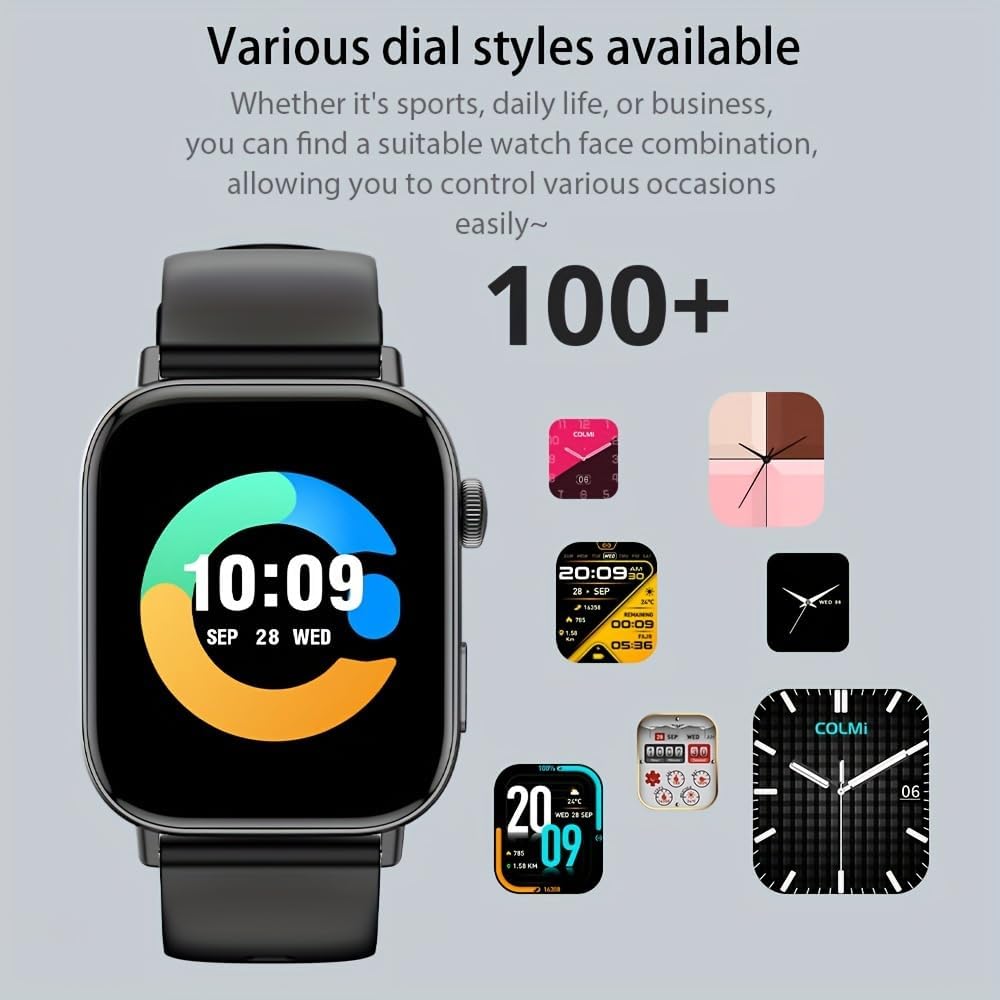
Image: A selection of over 100 diverse watch dial styles, ranging from classic to modern, available for the COLMI C8 Max Smartwatch.
- กำลังจับตาดู: Long-press the current watch face, then swipe left or right to browse and tap to select.
- ผ่านแอป: Open the companion app, go to "Watch Faces" or "Dial Market," and choose from a wider selection to download and sync to your watch.
Sports Tracking and Analysis
The COLMI C8 Max supports multiple sports modes and provides real-time analysis of your activities. It can record sports-related data such as steps, distance, calories burned, and exercise time.

Image: The COLMI C8 Max Smartwatch screen showing detailed sports tracking data, including total steps, calories, heart rate, and distance, with a visual representation of activity zones.
การเริ่มออกกำลังกาย:
- Swipe to the "Sports" or "Workout" menu on your watch.
- Select your desired sports mode (e.g., Running, Cycling, Walking).
- Tap to start the activity. The watch will begin recording data.
- To end, swipe right or press the side button and select "End" or "Pause."
Note: For accurate data, ensure the watch is worn snugly on your wrist. Data is for reference only.
ลักษณะการสื่อสาร
Synchronous Messages
Receive notifications from your smartphone directly on your COLMI C8 Max. This includes calls, SMS messages, and alerts from various social media applications.
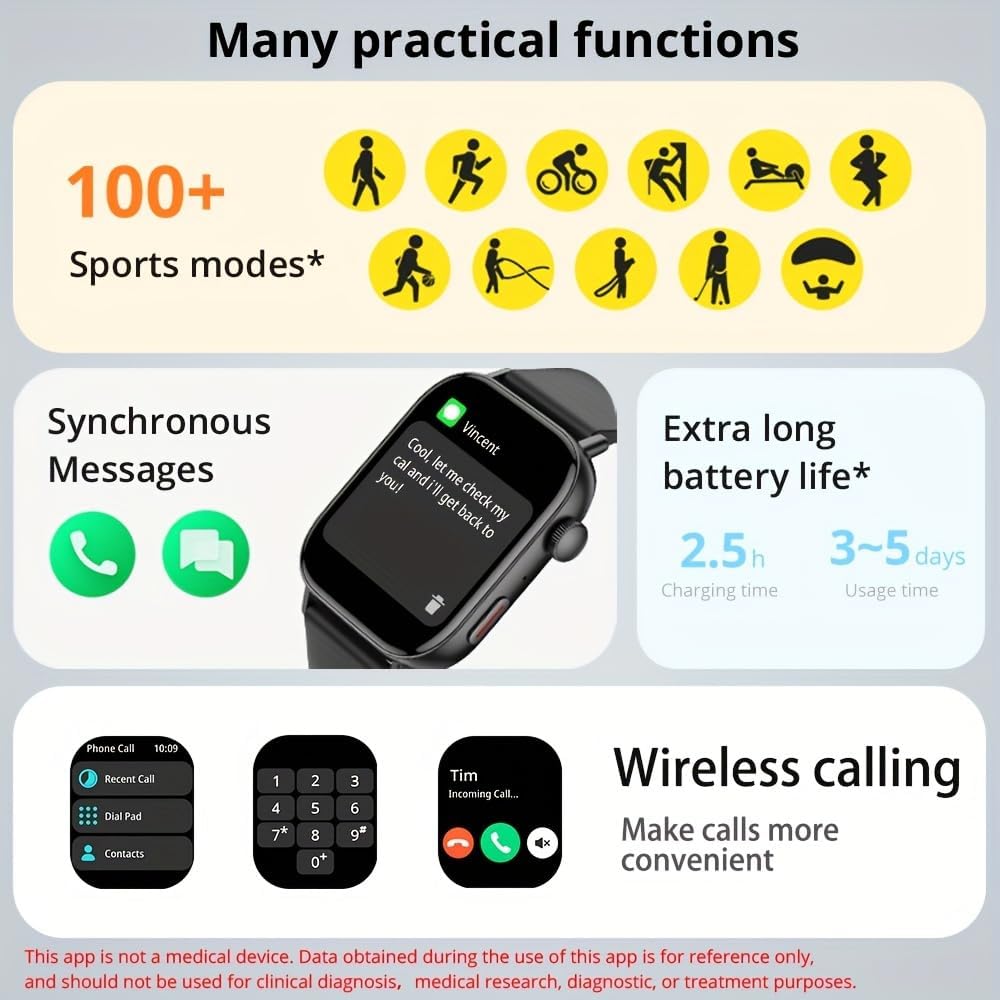
Image: A composite image illustrating several practical functions of the COLMI C8 Max, including synchronous message display, various sports modes, and battery life indicators.
Ensure that app notifications are enabled in your phone's settings and within the COLMI companion app for the desired applications.
การโทรแบบไร้สาย
The COLMI C8 Max features a built-in microphone and speaker, allowing you to make, answer, and hang up calls directly from your wrist when connected to your smartphone via Bluetooth.

Image: Three COLMI C8 Max smartwatches in different colors, showcasing the wireless calling interface with options for recent calls, dial pad, and contacts, as well as an incoming call screen.
To use wireless calling:
- ตรวจสอบให้แน่ใจว่านาฬิกาของคุณเชื่อมต่อกับโทรศัพท์ของคุณผ่านบลูทูธ
- On the watch, navigate to the "Phone Call" or "Dial Pad" function.
- You can dial a number, select from recent calls, or access your contacts (synced via the app).
- เมื่อมีสายเรียกเข้า คุณสามารถรับหรือปฏิเสธสายได้โดยตรงจากหน้าจอนาฬิกา
คุณสมบัติอัจฉริยะ
ผู้ช่วยเสียง
The smartwatch supports a voice assistant function, allowing you to control certain features or get information by voice command. This typically requires your phone's voice assistant (e.g., Siri, Google Assistant) to be active and connected.
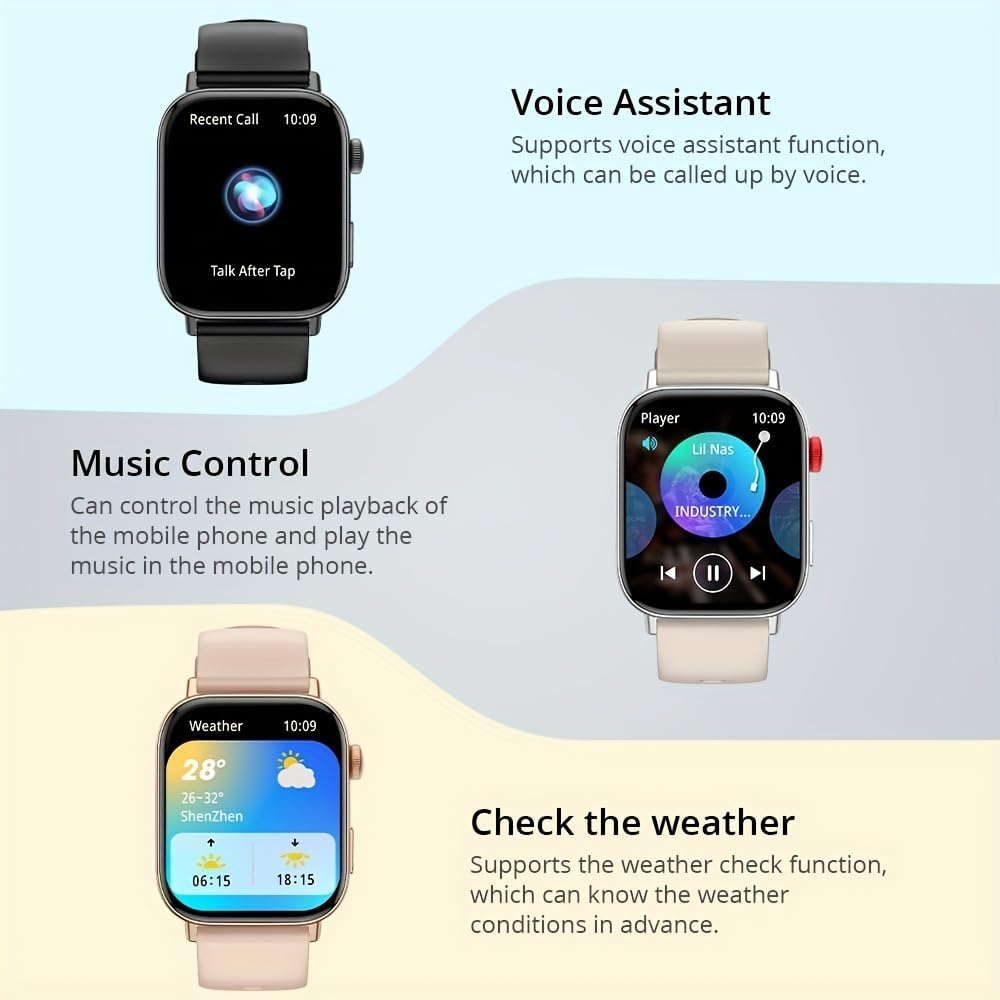
Image: A visual representation of the COLMI C8 Max's smart features, including the Voice Assistant interface, music playback controls, and a detailed weather forecast display.
To activate, swipe to the Voice Assistant screen or use a designated button shortcut (refer to watch settings).
การควบคุมเพลง
Control the music playback on your connected mobile phone directly from your smartwatch. You can play, pause, skip tracks, and adjust volume.
Navigate to the "Music Control" interface on your watch. Ensure your phone's music player is active.
ตรวจสอบสภาพอากาศ
Get real-time weather conditions and forecasts directly on your wrist. This feature requires the watch to be connected to your phone and the companion app to have location permissions enabled.
Swipe to the "Weather" widget on your watch to view current conditions and upcoming forecasts.
การจัดการอายุการใช้งานแบตเตอรี่
The COLMI C8 Max is equipped with a 250 mAh lithium polymer battery, offering an average usage time of 5-10 days, and up to 240 hours of standby time. Actual battery life may vary based on usage, notification frequency, and features enabled (e.g., continuous heart rate monitoring, frequent calls).
- ลดความสว่างหน้าจอ
- ปิดการแจ้งเตือนที่ไม่จำเป็น
- Turn off continuous heart rate monitoring if not needed.
- Limit frequent use of power-intensive features like wireless calling.
การซ่อมบำรุง
การทำความสะอาดสมาร์ทวอทช์ของคุณ
การทำความสะอาดเป็นประจำจะช่วยรักษารูปลักษณ์และฟังก์ชันการทำงานของอุปกรณ์ของคุณ:
- ตัวเรือนนาฬิกา: Wipe the screen and body with a soft, lint-free cloth. If necessary, slightly dampen the cloth with water. Avoid using soap or other cleaning agents.
- สายคล้อง: For silicone straps, you can wash them with mild soap and water, then rinse thoroughly and dry completely before reattaching to the watch.
- หน้าสัมผัสการชาร์จ: Ensure the metal charging contacts on the back of the watch are clean and free of dust or debris. Use a dry cotton swab if needed.
Always ensure the watch is completely dry before charging.
พื้นที่จัดเก็บ
When not in use for extended periods, store your smartwatch in a cool, dry place, away from direct sunlight and extreme temperatures. It is recommended to charge the battery to about 50% before long-term storage to preserve battery health.
อัพเดตเฟิร์มแวร์
Periodically, COLMI may release firmware updates to improve performance, add new features, or fix bugs. These updates are typically managed through the companion app.
เพื่อตรวจสอบการอัปเดต:
- Open the COLMI companion app on your smartphone.
- Navigate to the "Device" or "Profile" ส่วน.
- Look for "Firmware Update" or "Software Update."
- If an update is available, follow the on-screen instructions. Ensure your watch has sufficient battery (at least 50%) and remains connected to your phone during the update process.
การแก้ไขปัญหา
If you encounter issues with your COLMI C8 Max Smartwatch, try the following solutions before contacting customer support:
- นาฬิกาไม่เปิด:
- ตรวจสอบให้แน่ใจว่านาฬิกาชาร์จเต็มแล้ว เสียบนาฬิกาเข้ากับเครื่องชาร์จอย่างน้อย 30 นาที
- กดปุ่มด้านข้างค้างไว้ 10-15 วินาทีเพื่อบังคับรีสตาร์ท
- ไม่สามารถจับคู่กับโทรศัพท์ได้:
- ตรวจสอบให้แน่ใจว่าได้เปิดใช้งานบลูทูธบนโทรศัพท์และนาฬิกาของคุณแล้ว
- ตรวจสอบให้แน่ใจว่านาฬิกาอยู่ในระยะบลูทูธ (โดยทั่วไปคือ 10 เมตร)
- รีสตาร์ททั้งโทรศัพท์และนาฬิกาของคุณ
- ล้างแคชบลูทูธในโทรศัพท์ของคุณ (ถ้ามี) แล้วลองจับคู่ใหม่อีกครั้ง
- If previously paired, "forget" the device in your phone's Bluetooth settings and re-pair.
- ไม่ได้รับการแจ้งเตือน:
- ตรวจสอบว่านาฬิกาเชื่อมต่อกับแอปอย่างถูกต้องแล้วหรือไม่
- Ensure notification permissions are granted for the companion app in your phone's settings.
- Verify that app-specific notifications are enabled within the companion app.
- Check if "Do Not Disturb" mode is active on either the watch or phone.
- Inaccurate Activity Data (Steps, Heart Rate):
- ตรวจสอบให้แน่ใจว่าสวมนาฬิกาให้พอดีกับข้อมือ ไม่หลวมหรือแน่นเกินไป
- ทำความสะอาดเซ็นเซอร์วัดอัตราการเต้นของหัวใจที่ด้านหลังของนาฬิกา
- ซิงค์ข้อมูลนาฬิกากับแอปเป็นประจำเพื่อให้แน่ใจว่ามีการถ่ายโอนข้อมูลอย่างถูกต้อง
- หน้าจอไม่ตอบสนอง:
- Restart the watch by pressing and holding the side button.
- ตรวจสอบให้แน่ใจว่าหน้าจอสะอาดและแห้ง
- อายุการใช้งานแบตเตอรี่สั้น:
- Refer to the "Battery Life Management" section for tips on optimizing battery usage.
- ตรวจสอบให้แน่ใจว่านาฬิกาชาร์จเต็มทุกครั้ง
If the issue persists after trying these steps, please refer to the Warranty and Support section.
ข้อมูลจำเพาะทางเทคนิค
Below are the detailed specifications for the COLMI C8 Max Smartwatch:

Image: Detailed dimensions of the COLMI C8 Max Smartwatch, including watch face width (38mm), height (45.6mm), thickness (10mm), and strap length (155-235mm).
| คุณสมบัติ | ข้อมูลจำเพาะ |
|---|---|
| ยี่ห้อ | โคลมี |
| ชื่อรุ่น | ซี8 แม็กซ์ |
| แสดง | 1.93-inch IPS Touch Screen, 240 x 288 pixels |
| ความจุของแบตเตอรี่ | ลิเธียมโพลีเมอร์ 250 mAh |
| อายุการใช้งานแบตเตอรี่ | 5-10 days (typical usage), 240 hours (average life) |
| เวลาในการชาร์จ | ประมาณ 2.5 ชั่วโมง |
| ความต้านทานต่อน้ำ | IP68 (กันฝุ่นและกันน้ำ) |
| การจัดเก็บข้อมูลภายใน | 128MB |
| แรม | 640 กิโลไบต์ |
| การเชื่อมต่อ | บลูทูธ 5.3 |
| ความเข้ากันได้ | แอนดรอยด์, ไอโอเอส |
| ขนาด (หน้าปัดนาฬิกา) | 45.6 mm (Height) x 38 mm (Width) |
| ความหนา | 10 มม. |
| ความยาวสาย | 155 - 235 มม. |
| สี | สีดำ |
| ระบบปฏิบัติการ | Proprietary (compatible with Android/iOS) |
การรับประกันและการสนับสนุน
Your COLMI C8 Max Smartwatch comes with a standard manufacturer's warranty. Please refer to the warranty card included in your product packaging for specific terms and conditions, including warranty period and coverage details.
For technical support, troubleshooting assistance beyond this manual, or warranty claims, please contact COLMI customer service through their official website or the contact information provided in your product documentation. When contacting support, please have your product model (C8 Max) and purchase details ready.
เป็นทางการ Webเว็บไซต์: www.colmi.com (หมายเหตุ: นี่เป็นเพียงตัวอย่างชั่วคราว URL. Please refer to your product packaging for the exact official support webเว็บไซต์.)


