การแนะนำ
The STRONG Leap-UNA TV Streaming Stick is a compact and powerful device designed to transform your television into a smart TV, providing instant access to a vast array of streaming content. Powered by Android TV 11, it offers seamless 2K resolution streaming with Wi-Fi 5 connectivity. This manual provides detailed instructions for setting up, operating, and maintaining your Leap-UNA streaming stick to ensure an optimal entertainment experience.
ข้อมูลด้านความปลอดภัย
- อ่านคำแนะนำทั้งหมดก่อนใช้อุปกรณ์
- ห้ามให้อุปกรณ์โดนฝน ความชื้น หรืออุณหภูมิที่สูงหรือต่ำเกินไป
- ตรวจสอบให้แน่ใจว่ามีการระบายอากาศที่เหมาะสมรอบๆ อุปกรณ์เพื่อป้องกันความร้อนสูงเกินไป
- ใช้เฉพาะอะแดปเตอร์แปลงไฟที่ให้มากับเครื่องเท่านั้น
- อย่าพยายามถอดประกอบหรือซ่อมแซมอุปกรณ์ด้วยตนเอง แนะนำให้ส่งช่างผู้ชำนาญการไปรับบริการทั้งหมด
- เก็บอุปกรณ์ให้ห่างจากแสงแดดและแหล่งความร้อนโดยตรง
เนื้อหาแพ็คเกจ
โปรดตรวจสอบว่าสินค้าทั้งหมดมีอยู่และอยู่ในสภาพดี:
- STRONG Leap-UNA 2K Android TV Streaming Stick
- รีโมทคอนโทรล
- Power Adapter (or USB cable for power)
- HDMI Extender (if included)
- คู่มือการใช้งาน (เอกสารนี้)
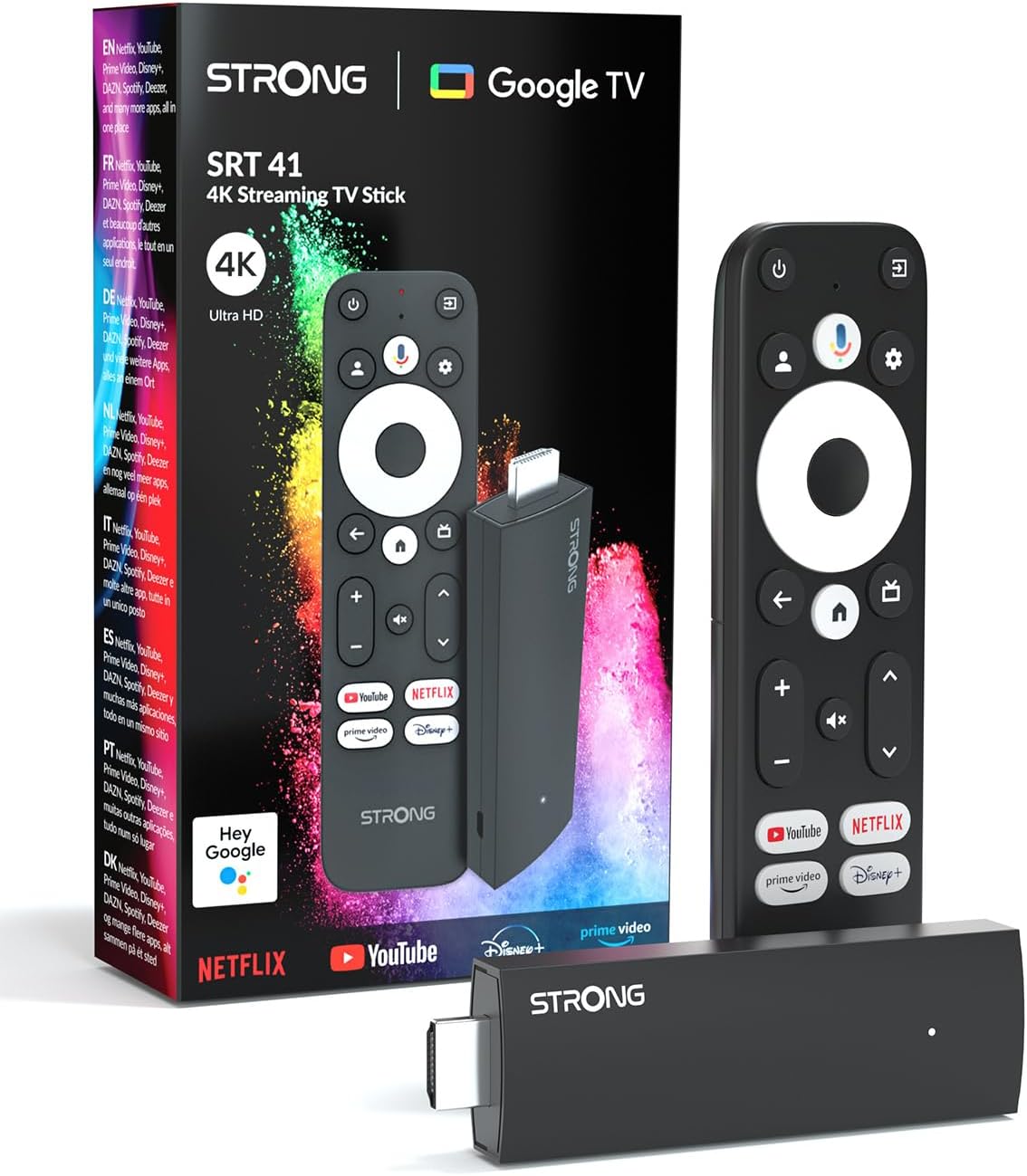
Image: The STRONG Leap-UNA streaming stick, its remote control, and the product packaging. This shows the main components included in the box.
สินค้าเกินview
The Leap-UNA stick is designed for ease of use and portability. It connects directly to your TV's HDMI port.
ส่วนประกอบอุปกรณ์:
- Streaming Stick: Compact device with an HDMI connector for TV and a Micro USB port for power.
- รีโมทคอนโทรล: Features dedicated buttons for power, navigation, volume, Google Assistant, and quick access to popular streaming services like Netflix and YouTube.

Image: A close-up of the STRONG Leap-UNA streaming stick, highlighting its compact design and connectivity options including HDMI and Micro USB ports.
การตั้งค่า
Follow these steps to set up your STRONG Leap-UNA streaming stick:
- เชื่อมต่อกับทีวี: Plug the STRONG Leap-UNA streaming stick directly into an available HDMI port on your television. If space is limited, use an HDMI extender (if provided).
- เปิดเครื่อง: Connect the power adapter to the Micro USB port on the streaming stick and then plug the adapter into a power outlet. The device will power on automatically.
- เลือกอินพุต HDMI: Use your TV's remote control to select the correct HDMI input source to which the Leap-UNA stick is connected.
- จับคู่รีโมทคอนโทรล: Follow the on-screen instructions to pair your remote control. This usually involves pressing and holding specific buttons on the remote close to the stick.
- เชื่อมต่อกับ Wi-Fi: On the screen, select your Wi-Fi network from the list and enter the password. Ensure you have a stable internet connection for optimal streaming.
- การตั้งค่าบัญชี Google: Sign in with your Google account. This is necessary to access the Google Play Store, Google Assistant, and other Google services. If you don't have one, you can create one.
- ติดตั้งแอพ: After initial setup, you can download and install your favorite streaming applications like Netflix, Amazon Prime Video, YouTube, and Disney+ from the Google Play Store.

Image: Visual representation of the simple setup process: 1. Connect the stick to your TV. 2. Connect to your internet box (Wi-Fi). 3. Start streaming your content.
คำแนะนำการใช้งาน
การใช้รีโมทคอนโทรล:
The included remote control allows you to navigate the Android TV interface and control your streaming experience.
- แผ่นนำทาง: Use the circular pad to move through menus and select items.
- ปุ่มย้อนกลับ: กลับไปยังหน้าจอที่แล้ว
- ปุ่มโฮม: กลับสู่หน้าจอหลักของ Android TV
- ปุ่ม Google Assistant: กดเพื่อเปิดใช้งานคำสั่งเสียง
- ปุ่มปรับระดับเสียง: ปรับระดับเสียงทีวี
- ปุ่มแอปเฉพาะ: Quickly launch Netflix, YouTube, Prime Video, and Disney+ (if available).

Image: The remote control for the STRONG Leap-UNA, highlighting its dedicated app buttons and the wide range of applications available through Google Play.
การควบคุมด้วยเสียงด้วย Google Assistant:
The integrated Google Assistant allows you to control your device and search for content using your voice. Press the Google Assistant button on your remote and speak your command. Exampรวมถึง:
- "เปิด Netflix"
- "Find action movies"
- "เล่น [ชื่อภาพยนตร์]"
- "สภาพอากาศเป็นอย่างไรบ้าง?"

Image: The STRONG Leap-UNA remote control positioned in front of a TV screen, illustrating the use of Google Assistant for voice commands, such as "Avvia Netflix" (Start Netflix).
Chromecast ในตัว:
With Chromecast built-in, you can cast content directly from your smartphone, tablet, or computer to your TV. Simply open a compatible app on your mobile device and tap the Cast icon ▶ to send the content to your TV.

Image: A TV screen displaying content being cast via Google Cast, with a smartphone in the foreground demonstrating the casting functionality.
การซ่อมบำรุง
To ensure the longevity and optimal performance of your STRONG Leap-UNA streaming stick, follow these maintenance guidelines:
- การทำความสะอาด: ใช้ผ้านุ่มและแห้งเช็ดทำความสะอาดอุปกรณ์ ห้ามใช้น้ำยาทำความสะอาดหรือสเปรย์
- การระบายอากาศ : Ensure the device is placed in a well-ventilated area and that its vents are not blocked.
- การอัปเดตซอฟต์แวร์: The device may receive automatic software updates. Ensure it is connected to the internet to receive these updates, which improve performance and add new features.
- พื้นที่จัดเก็บ: เมื่อไม่ได้ใช้งานเป็นเวลานาน ควรเก็บอุปกรณ์ไว้ในที่แห้งและเย็น
การแก้ไขปัญหา
If you encounter issues with your STRONG Leap-UNA streaming stick, refer to the following common problems and solutions:
| ปัญหา | สาเหตุที่เป็นไปได้ | สารละลาย |
|---|---|---|
| ไม่มีพลังงาน/อุปกรณ์ไม่เปิด | สายไฟไม่ได้เชื่อมต่ออย่างถูกต้อง; อะแดปเตอร์แปลงไฟชำรุด; ปลั๊กไฟมีปัญหา | Check all power connections. Try a different power outlet. Ensure the power adapter is working. |
| ไม่มีภาพในทีวี | Incorrect HDMI input selected; Loose HDMI connection; TV compatibility issue. | Ensure your TV is on the correct HDMI input. Reconnect the HDMI cable. Try a different HDMI port on your TV. |
| รีโมทคอนโทรลไม่ตอบสนอง | Batteries are low or dead; Remote not paired; Obstruction between remote and stick. | Replace batteries. Re-pair the remote control (refer to Setup section). Ensure no obstructions. |
| การบัฟเฟอร์หรือคุณภาพการสตรีมที่ไม่ดี | Weak Wi-Fi signal; Internet speed issues; Network congestion. | Move the stick closer to your Wi-Fi router. Restart your router. Check your internet speed. Reduce other network activity. |
| แอปขัดข้องหรือค้าง | App error; Insufficient memory; Software glitch. | Restart the app. Clear the app's cache (Settings > Apps > [App Name] > Clear cache). Restart the streaming stick. |
ข้อมูลจำเพาะ
| คุณสมบัติ | รายละเอียด |
|---|---|
| ยี่ห้อ | แข็งแกร่ง |
| ชื่อรุ่น | Leap-UNA |
| ระบบปฏิบัติการ | แอนดรอยด์ทีวี 11 |
| ปณิธาน | 2K |
| เทคโนโลยีการเชื่อมต่อ | Bluetooth, HDMI, IR, Wi-Fi (Wi-Fi 5) |
| บริการอินเทอร์เน็ตที่รองรับ | Netflix, Amazon Prime Video, Disney+, YouTube |
| ขนาดแรม | 1GB |
| ขนาด | กว้าง 9 ยาว 3 สูง 1.5 เซนติเมตร |
| อุปกรณ์ที่รองรับ | TV, smartphone, tablet, personal computer, laptop |
| สี | สีดำ |
การรับประกันและการสนับสนุน
STRONG products are designed for reliability and performance. For warranty information and technical support, please refer to the warranty card included with your product or visit the official STRONG website. You can also contact customer support through the details provided on the packaging or website for assistance with any issues not covered in this manual.
สำหรับข้อมูลและการสนับสนุนล่าสุด โปรดไปที่: www.strong.tv


