สินค้าเกินview
The ZENTALITY B220 is a compact 2G keypad mobile phone designed for essential communication. It features dual-SIM capability, a 2.4-inch display, a basic camera, and a wireless FM radio. This manual provides instructions for setting up, operating, and maintaining your device.
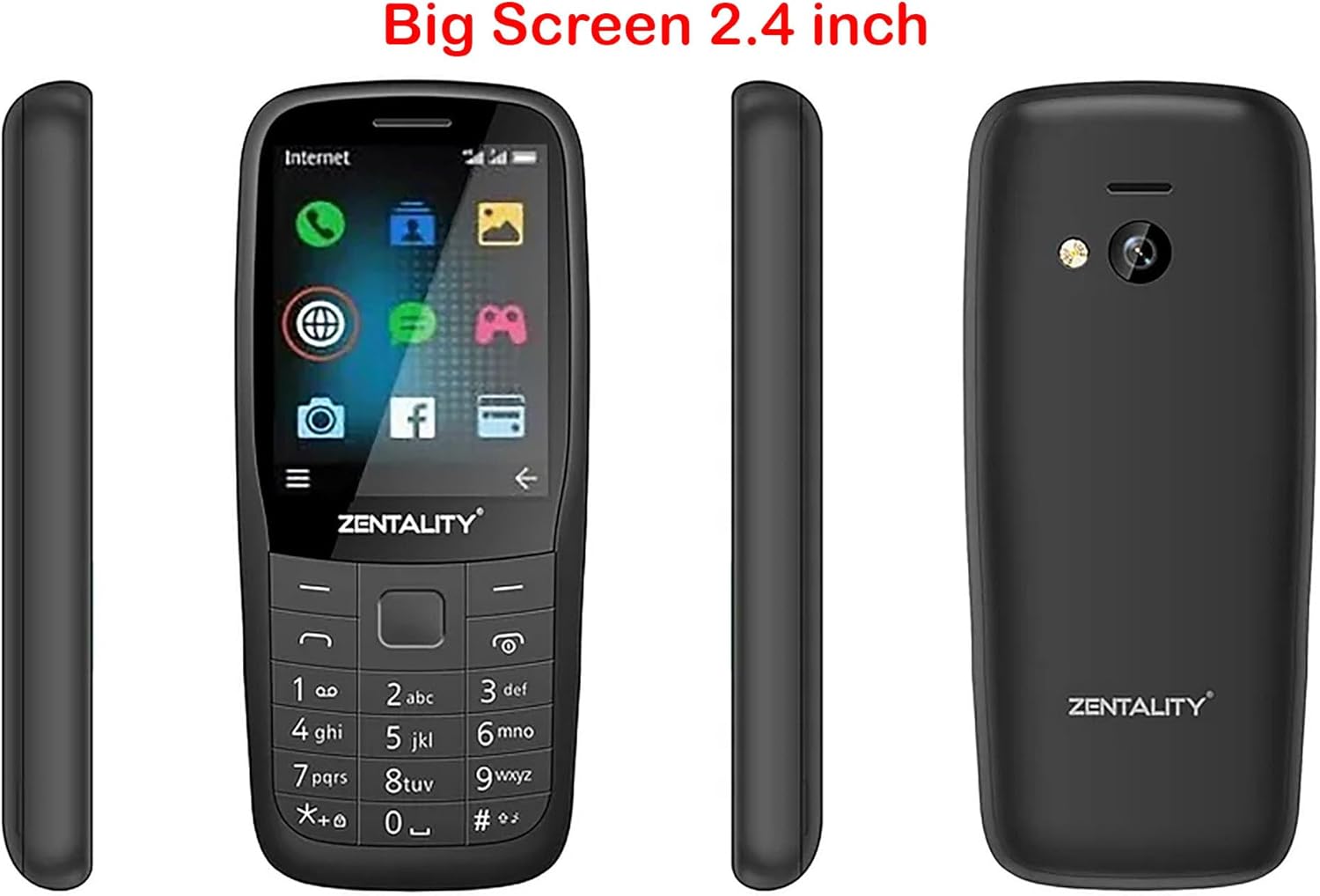
Figure 1: ZENTALITY B220 Mobile Phone - Multiple Views. This image displays the front, back, and side profiles of the ZENTALITY B220 mobile phone, illustrating its compact design and 2.4-inch screen.
1. การตั้งค่า
1.1 เนื้อหาบรรจุภัณฑ์
ตรวจสอบให้แน่ใจว่าแพ็คเกจของคุณมีรายการต่อไปนี้:
- ZENTALITY B220 Mobile Phone
- แบตเตอรี่
- เครื่องชาร์จ
- คู่มือการใช้งาน (เอกสารนี้)
1.2 Installing the SIM Card(s) and Battery
- ถอดฝาครอบด้านหลังออก: Gently pry open the back cover of the phone using the notch provided, typically at the bottom or side.
- ใส่ซิมการ์ด: Locate the SIM card slots. This phone supports dual SIM cards. Carefully insert your standard or micro SIM card(s) into the designated slots with the gold contacts facing down, ensuring they are correctly oriented as indicated by the diagrams on the phone.
- ใส่การ์ด Micro SD (ไม่จำเป็น): If you wish to expand storage, insert a Micro SD card (up to 16GB) into its dedicated slot.
- ใส่แบตเตอรี่: Align the battery contacts with the phone's terminals and gently press the battery into place.
- เปลี่ยนฝาหลัง: Align the back cover and press firmly around the edges until it clicks securely into place.

Figure 2: ZENTALITY B220 Back View. This image shows the rear of the phone, including the camera lens and flashlight, where the back cover can be removed for SIM and battery installation.
1.3 การชาร์จแบตเตอรี่
ก่อนใช้งานครั้งแรก ควรชาร์จแบตเตอรี่โทรศัพท์ให้เต็ม
- Connect the charger to the Micro 5pin USB port on the phone.
- เสียบอุปกรณ์ชาร์จเข้ากับเต้ารับไฟฟ้ามาตรฐาน
- The charging indicator on the phone will typically show charging status.
- เมื่อชาร์จเต็มแล้ว ให้ถอดเครื่องชาร์จออก
A full charge provides approximately 12 hours of talk time or 22 hours of standby time.
2. คู่มือการใช้งาน
2.1 เปิด/ปิดเครื่อง
- การเปิดเครื่อง: กดปุ่มเปิด/ปิด/วางสาย (โดยปกติจะมีไอคอนรูปโทรศัพท์สีแดง) ค้างไว้จนกว่าหน้าจอจะสว่างขึ้น
- วิธีปิดเครื่อง: Press and hold the Power/End Call button until the power-off options appear, then select "Power Off" or confirm.
2.2 การนำทางพื้นฐาน
Use the keypad and navigation keys to interact with the phone.
- แผ่นทิศทาง: Use the up, down, left, and right keys to navigate through menus and options.
- คำอธิบายสัญลักษณ์ศูนย์กลาง: Typically used to select an option or confirm an action.
- ซอฟท์คีย์: The keys directly below the screen (left and right) perform functions indicated by the text on the screen above them.
- รหัสโทร: Press the green phone icon to make a call or answer an incoming call.
- ปุ่มวางสาย/เปิด/ปิด: Press the red phone icon to end a call or power the phone on/off.

Figure 3: ZENTALITY B220 Front View. This image displays the phone's screen and physical keypad, illustrating the layout for navigation and input.
2.3 การโทรออกและรับสาย
- ในการโทรออก: ป้อนหมายเลขโทรศัพท์โดยใช้แป้นพิมพ์และกดปุ่มโทรออก
- เพื่อรับสาย: เมื่อโทรศัพท์ดังขึ้น ให้กดปุ่มโทรออก
- วิธีวางสาย: กดปุ่มวางสาย
2.4 การติดต่อ
The phone supports storing up to 2000 contacts.
- การเพิ่มผู้ติดต่อ: Navigate to the "Contacts" menu, select "Add New Contact," enter the name and number, then save.
- Searching Contacts: In the "Contacts" menu, use the search function or scroll through the list.
2.5 ข้อความ
Access the "Messages" menu to send and receive SMS text messages.
- ข้อความใหม่: Select "Write Message," enter the recipient's number or select from contacts, type your message, and send.
2.6 กล้องถ่ายรูป
โทรศัพท์รุ่นนี้มีกล้องความละเอียด 0.08 เมกะพิกเซล
- ถ่ายรูป: Navigate to the "Camera" application. Frame your shot and press the center key to capture.
- ไฟฉาย: The phone includes a built-in flashlight. Access it through the shortcuts or utilities menu.
2.7 วิทยุ FM
Enjoy wireless FM radio without needing a headset.
- Activating FM Radio: Go to the "FM Radio" application. The phone will automatically scan for available stations.
- การฟัง: Use the navigation keys to tune to different stations.
แจ็คหูฟัง 2.8
A 3.5mm headphone jack is provided for private listening of music or radio.
3. การบำรุงรักษา
3.1 การทำความสะอาดอุปกรณ์ของคุณ
To maintain the phone's appearance and functionality:
- Use a soft, dry cloth to wipe the screen and body.
- Avoid using liquid cleaners, aerosols, or harsh chemicals.
- รักษาพอร์ตให้ปราศจากฝุ่นและเศษขยะ
3.2 การดูแลแบตเตอรี่
- หลีกเลี่ยงอุณหภูมิที่สูงหรือต่ำเกินไป เพราะอาจทำให้แบตเตอรี่มีอายุการใช้งานสั้นลง
- ห้ามเจาะหรือทำให้แบตเตอรี่เสียหาย
- หากจะไม่ได้ใช้งานโทรศัพท์เป็นเวลานาน ควรชาร์จโทรศัพท์ให้เหลือประมาณ 50% ก่อนจัดเก็บ
3.3 พื้นที่จัดเก็บ
ควรเก็บโทรศัพท์ไว้ในที่แห้งและเย็น หลีกเลี่ยงแสงแดดโดยตรงและความชื้นเมื่อไม่ได้ใช้งาน
4 การแก้ไขปัญหา
If you encounter issues with your ZENTALITY B220, refer to the following common solutions:
| ปัญหา | วิธีแก้ปัญหาที่เป็นไปได้ |
|---|---|
| โทรศัพท์ไม่เปิดเครื่อง | Ensure the battery is correctly inserted and fully charged. Try charging the phone for at least 30 minutes. |
| ไม่มีสัญญาณเครือข่าย | Check if the SIM card is correctly inserted. Ensure you are in an area with 2G network coverage. Restart the phone. |
| ไม่สามารถโทรออกหรือรับสายได้ | Verify network signal. Check if your SIM card is active and has sufficient balance/credit. Ensure call barring is not enabled. |
| แบตเตอรี่ไม่ชาร์จ | Check the charger and USB cable for damage. Ensure the charging port is clean. Try a different power outlet. |
| หน้าจอไม่ตอบสนองหรือค้าง | ถอดและใส่แบตเตอรี่กลับเข้าไปใหม่เพื่อทำการรีเซ็ตแบบฮาร์ดรีเซ็ต |
หากปัญหายังคงมีอยู่หลังจากลองวิธีแก้ไขเหล่านี้แล้ว โปรดติดต่อฝ่ายสนับสนุนลูกค้า
5. ข้อมูลจำเพาะ
| คุณสมบัติ | รายละเอียด |
|---|---|
| แบบอย่าง | B220 |
| แสดง | 2.4-inch QQVGA LCD (128x160 pixels) |
| การรองรับซิม | ซิมคู่ |
| เครือข่าย | 2G (GSM 850/900/1800/1900MHz) |
| กล้อง | 0.08 เมกะพิกเซล |
| ไฟฉาย | ใช่ |
| วิทยุเอฟเอ็ม | Wireless FM (no headset required) |
| ความจุผู้ติดต่อ | สูงสุด 2000 รายชื่อติดต่อ |
| แรม | 32MB |
| พื้นที่เก็บข้อมูลแบบขยายได้ | การ์ด Micro SD สูงสุด 16GB |
| อายุการใช้งานแบตเตอรี่ | Up to 12 hours talk time / 22 hours standby time |
| การเชื่อมต่อ | 3.5mm headphone jack, Micro 5pin USB |
| ขนาด | 113 x 49.5 x 15.1 มม. |
6. การรับประกันและการสนับสนุน
6.1 ข้อมูลการรับประกัน
The ZENTALITY B220 Mobile Phone comes with an International Warranty. For specific terms, conditions, and duration of your warranty, please refer to the warranty card included with your product or contact your retailer. Keep your purchase receipt as proof of purchase.
6.2 การสนับสนุนลูกค้า
For further assistance, technical support, or service inquiries, please contact the retailer where you purchased the device or the ZENTALITY customer service department. Contact information can typically be found on the product packaging or the manufacturer's official webเว็บไซต์.
Note: As per product information, if tax issues arise, please contact KzaMiza-Technology, not Amazon.


