การแนะนำ
The Gravity C29 Rugged Smart Watch is designed for durability and performance in challenging environments. This manual provides comprehensive instructions for setting up, operating, and maintaining your smartwatch, ensuring you get the most out of its advanced features, including health tracking, sports modes, and smart connectivity.
มีอะไรอยู่ในกล่อง
- Gravity C29 Smart Watch
- สายชาร์จ
- คู่มือการใช้งาน (เอกสารนี้)
สินค้าเกินview
The Gravity C29 features a robust design with a 1.52-inch HD TFT display, built to withstand shock, dust, and water. It includes physical buttons for power and sport modes, alongside a responsive touchscreen for navigation.

ภาพ: ด้านหน้า view of the Gravity C29 Rugged Smart Watch, showcasing its robust design, circular display, and side buttons.

Image: The Gravity C29 Smart Watch display, highlighting its 1.52-inch HD screen with clear visibility even in bright conditions.
การตั้งค่า
1. การชาร์จสมาร์ทวอทช์
Before first use, fully charge your Gravity C29 Smart Watch. Connect the magnetic charging cable to the charging points on the back of the watch and plug the USB end into a power adapter (not included) or a computer's USB port. A full charge typically takes approximately 2 hours.
2. Downloading the Da Fit App
To unlock all features and synchronize data, download the "Da Fit" app from your smartphone's app store (App Store for iOS, Google Play Store for Android). The watch is compatible with Android 9.0+ and iOS 9.0+.
3. การจับคู่กับสมาร์ทโฟนของคุณ
- ตรวจสอบให้แน่ใจว่าได้เปิดใช้งาน Bluetooth บนสมาร์ทโฟนของคุณแล้ว
- Open the Da Fit app and follow the on-screen instructions to create an account or log in.
- In the app, navigate to the "Device" section and tap "Add Device" or "Bind Device".
- Select "C29" from the list of available devices.
- ยืนยันคำขอจับคู่บนนาฬิกาและสมาร์ทโฟนของคุณทั้งสอง
Once paired, the watch will automatically synchronize time and data with your phone.
คำแนะนำการใช้งาน
การนำทางพื้นฐาน
- หน้าจอสัมผัส: ปัดซ้าย/ขวา ขึ้น/ลง เพื่อนำทางผ่านเมนูและการแจ้งเตือน แตะเพื่อเลือก
- Power Button (Top Right): กดเพื่อเปิด/ปิดหน้าจอ กดค้างเพื่อเปิด/ปิดเครื่อง
- Sport Mode Button (Bottom Right): Press to quickly access sports modes.
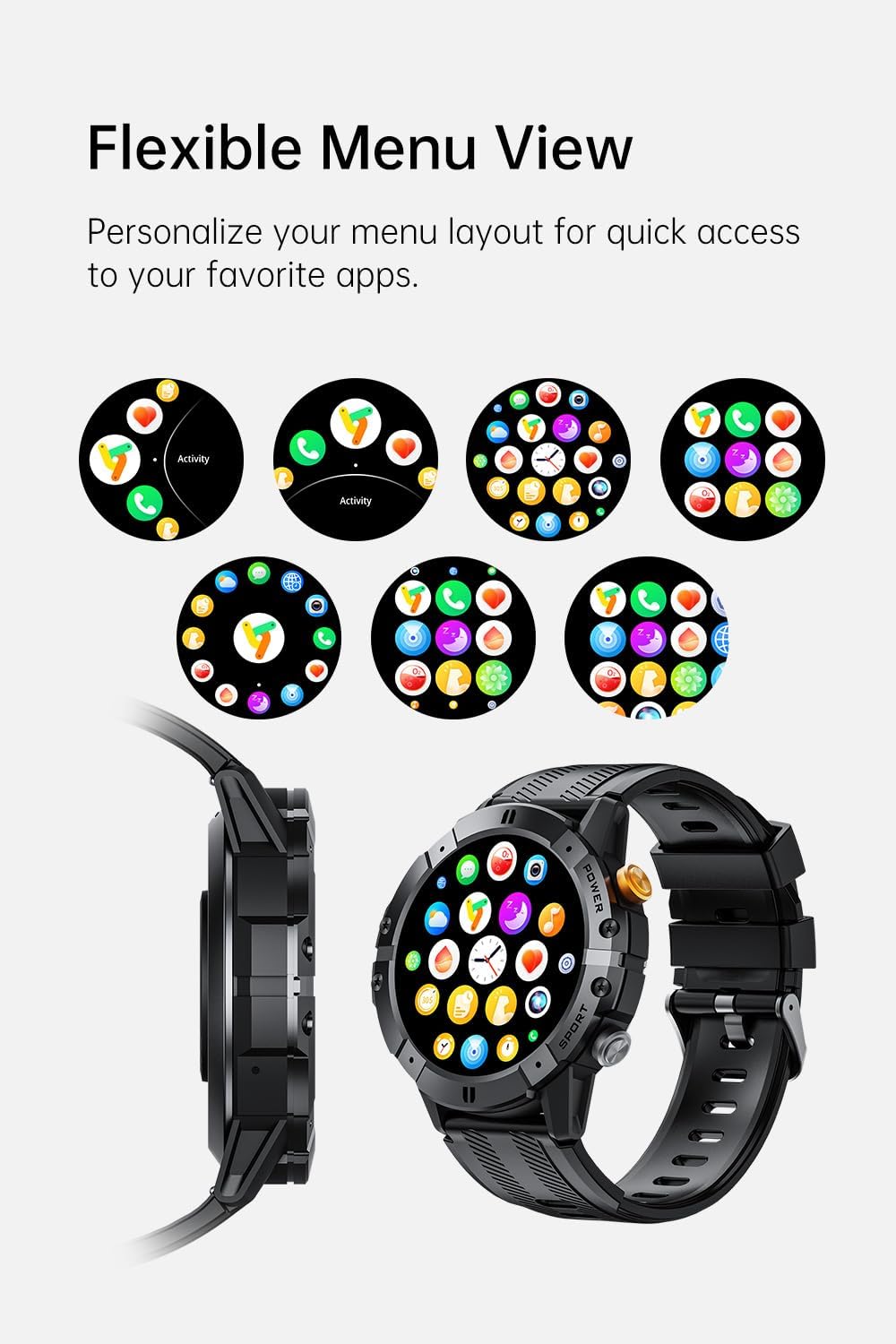
Image: Various menu layouts and app icons displayed on the Gravity C29 Smart Watch screen, demonstrating the flexible menu view.
Bluetooth Calling & Smart Notifications
Once paired, the C29 allows you to make and receive calls directly from your wrist. You will also receive real-time notifications for calls, messages, and app alerts.

Image: A hand wearing the Gravity C29 Smart Watch, showing an incoming call notification and message alerts on the watch screen.
AI ผู้ช่วยเสียง
Activate the AI Voice Assistant on your watch to perform tasks hands-free, such as setting alarms, checking weather, or controlling music, using simple voice commands.

Image: The Gravity C29 Smart Watch displaying the AI Voice Assistant interface, with examples of voice commands like "Turn on the alarm" and "Call my mom."
การติดตามสุขภาพ
The C29 monitors your heart rate 24/7 and provides detailed sleep analysis. Access these metrics through the watch interface or the Da Fit app for comprehensive health insights.

Image: The Gravity C29 Smart Watch displaying a heart rate graph, illustrating its precision sensors for accurate health monitoring.
โหมดกีฬา
With over 100 sports modes, the C29 accurately tracks various activities like running, cycling, hiking, and swimming. Select your desired sport mode before starting an activity for precise data collection.

Image: Icons representing various sports activities such as swimming, cycling, running, and hiking, indicating the Gravity C29 Smart Watch's support for over 120 sports modes.
คุณสมบัติอัจฉริยะอื่น ๆ
The Gravity C29 offers additional functionalities including weather updates, music control, and camera remote control. Access these features through the watch's menu.

Image: The Gravity C29 Smart Watch displaying a weather forecast, surrounded by icons representing other convenient functions like music control, camera remote, and settings.
การซ่อมบำรุง
การทำความสะอาด
เช็ดนาฬิกาและสายเป็นประจำด้วยผ้านุ่มๆamp ใช้ผ้าเช็ดทำความสะอาด หลีกเลี่ยงการใช้สารเคมีรุนแรงหรือวัสดุที่มีฤทธิ์กัดกร่อน ตรวจสอบให้แน่ใจว่าขั้วชาร์จสะอาดและแห้งก่อนทำการชาร์จ
ความต้านทานต่อน้ำ
The Gravity C29 is 1 ATM waterproof, meaning it can withstand splashes, rain, and brief immersion. It is suitable for everyday wear and light water activities. Do not use it for diving, hot showers, or prolonged submersion.

Image: The Gravity C29 Smart Watch being splashed with water, illustrating its 1 ATM waterproof rating suitable for handling splashes and rain.
การดูแลแบตเตอรี่
To prolong battery life, avoid extreme temperatures. Charge the watch fully before long periods of inactivity. The 410mAh battery provides up to 7-10 days of active use and up to 25 days on standby.
การแก้ไขปัญหา
- นาฬิกาไม่เปิด: ตรวจสอบให้แน่ใจว่านาฬิกาชาร์จเต็มแล้ว เสียบนาฬิกาเข้ากับที่ชาร์จและรอสักครู่ก่อนที่จะลองเปิดเครื่อง
- ไม่สามารถจับคู่กับโทรศัพท์ได้:
- ตรวจสอบให้แน่ใจว่าได้เปิดใช้งานบลูทูธบนโทรศัพท์ของคุณแล้ว และนาฬิกาอยู่ในระยะการทำงาน
- รีสตาร์ททั้งนาฬิกาและโทรศัพท์ของคุณ
- Check if the Da Fit app is updated to the latest version.
- If previously paired, try unpairing from your phone's Bluetooth settings and re-pairing through the app.
- ข้อมูลสุขภาพที่ไม่ถูกต้อง: ตรวจสอบให้แน่ใจว่าสวมนาฬิกาให้กระชับพอดีข้อมือ ไม่แน่นหรือหลวมเกินไป ทำความสะอาดเซ็นเซอร์ที่ด้านหลังนาฬิกา
- การแจ้งเตือนไม่ปรากฏ: Check notification permissions for the Da Fit app in your phone's settings. Ensure the app is running in the background.
ข้อมูลจำเพาะ
| คุณสมบัติ | รายละเอียด |
|---|---|
| ยี่ห้อ | แรงโน้มถ่วง |
| แบบอย่าง | ซี29 |
| ขนาดหน้าจอ | 1.52 นิ้ว |
| ประเภทจอภาพ | HD TFT |
| ปณิธาน | ขนาด 360x360 |
| ความจุของแบตเตอรี่ | 410 มิลลิแอมป์ |
| อายุการใช้งานแบตเตอรี่ (ขณะใช้งาน) | 7-10 วัน |
| อายุการใช้งานแบตเตอรี่ (สแตนด์บาย) | นานถึง 25 วัน |
| ความต้านทานต่อน้ำ | 1 ATM (Shockproof, Dustproof) |
| การเชื่อมต่อ | บลูทูธ 5.2 |
| ความเข้ากันได้ | แอนดรอยด์ 9.0+ / iOS 9.0+ |
| โหมดกีฬา | 100 ปีขึ้นไป |
| อุณหภูมิในการทำงาน | -24°C ถึง 60°C |
| น้ำหนักสินค้า | 4.6 ออนซ์ |
การรับประกันและการสนับสนุน
For product support, troubleshooting assistance, or warranty inquiries, please refer to the contact information provided with your purchase or visit the official Gravity webไซต์นี้ โปรดเก็บหลักฐานการซื้อไว้เพื่อใช้ยืนยันการรับประกัน
Protection plans are available for extended coverage. Please check your purchase details for more information on available protection plans.


