1. บทนำ
This manual provides detailed instructions for the installation, operation, and maintenance of your Tackform 20 Series High Strength Magnetic Wireless Charging Phone Holder. This device is designed for secure phone mounting and convenient wireless charging in vehicles, compatible with MagSafe and 20mm ball mounting systems.

Figure 1.1: The Tackform 20 Series Magnetic Wireless Charging Phone Holder.
2. สิ่งที่รวมอยู่
โปรดตรวจสอบว่าส่วนประกอบทั้งหมดมีอยู่ในแพ็คเกจของคุณ:
- Tackform 20 Series Magnetic Wireless Charging Phone Holder with 20mm Ball
- Adhesive Metal Ring (for non-MagSafe compatible devices)
- สายชาร์จ USB-C
- Car Power Adapter (Cigarette Lighter Adapter)
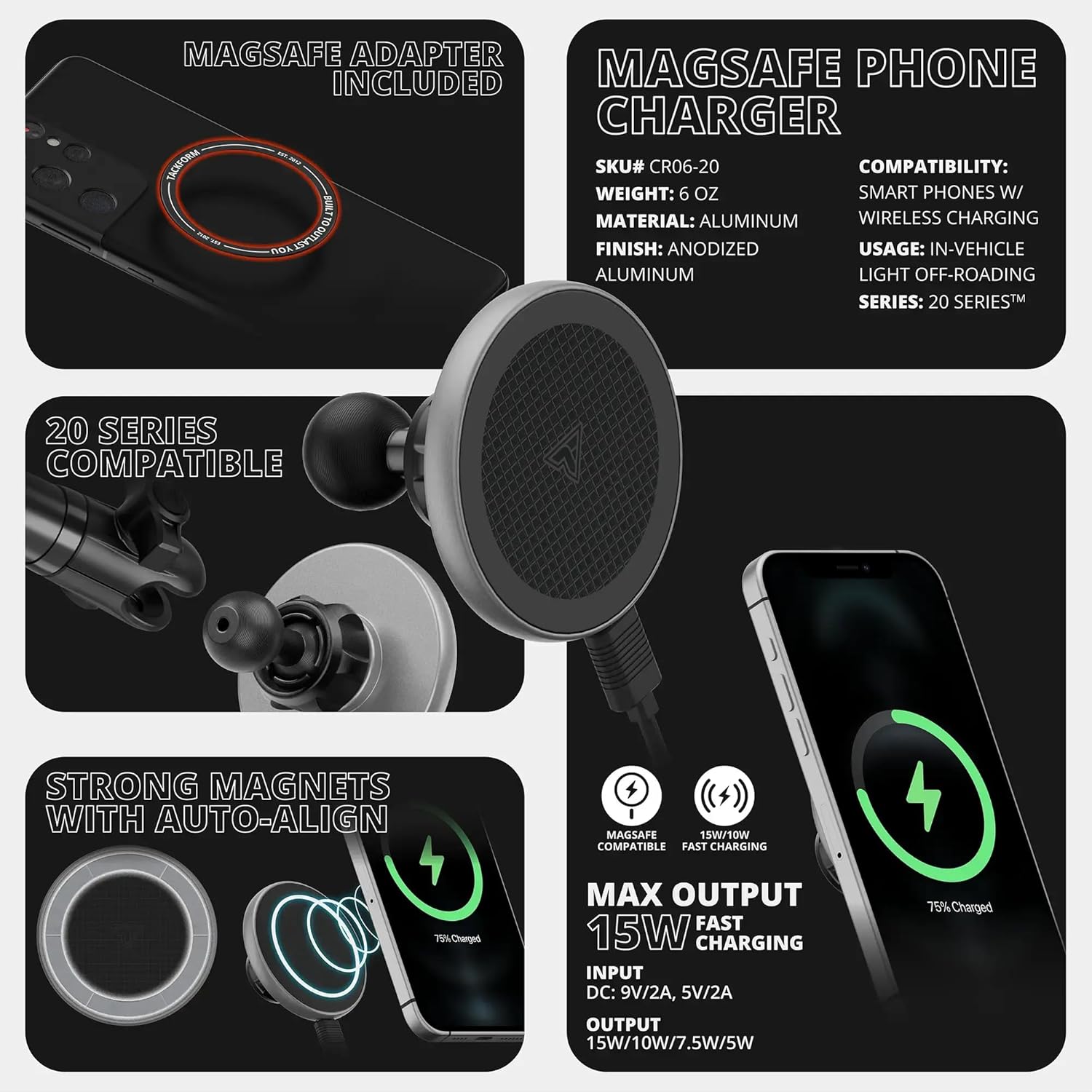
Figure 2.1: Included components of the Tackform 20 Series Phone Holder, showing the magnetic charging pad, 20mm ball mount, and accessories for MagSafe and non-MagSafe phone compatibility.
3. คำแนะนำในการตั้งค่า
3.1 Attaching the Phone Holder to a 20mm Ball System
- Ensure your existing mounting system has a 20mm ball. This product is specifically designed for compatibility with Tackform’s 20 Series Platform and other 20mm ball and socket systems. Note: Not compatible with 25.4mm / 1” / B-Sized ball systems.
- Loosen the collar on your existing 20mm ball arm or base.
- Slide the socket of the Tackform phone holder onto the 20mm ball.
- Tighten the collar securely to fix the phone holder in place.

Figure 3.1: The 20mm ball and socket mechanism for secure attachment to compatible mounting arms.
3.2 Preparing Your Phone for Magnetic Attachment and Wireless Charging
- For MagSafe Compatible Devices (e.g., iPhone 12 and newer, or MagSafe compatible cases): Your device can directly attach to the magnetic charging surface. No additional accessories are needed.
- For Non-MagSafe Compatible Devices (e.g., older iPhones, Android phones, or standard cases):
- Locate the included adhesive metal ring.
- Clean the back of your phone or phone case thoroughly.
- Carefully peel off the adhesive backing from the metal ring.
- Center the metal ring on the back of your phone or phone case. Ensure it does not obstruct the camera or any essential ports. Press firmly for several seconds to ensure a strong bond. This ring enables magnetic attachment and wireless charging for your device.
Figure 3.2: Illustrates how to use the adhesive metal ring for non-MagSafe devices to achieve magnetic compatibility and wireless charging.
3.3 การเชื่อมต่อสายไฟ
- Connect the USB-C end of the charging cable to the port on the phone holder.
- Plug the other end of the USB-C cable into the provided car power adapter.
- Insert the car power adapter into your vehicle's 12V accessory outlet (cigarette lighter socket).
- The phone holder is now ready to provide wireless charging.
4. คู่มือการใช้งาน
4.1 การเชื่อมต่อโทรศัพท์ของคุณ
Once the holder is securely mounted and powered, simply bring your MagSafe-compatible phone (or phone with the adhesive metal ring) close to the magnetic charging surface. The magnets will automatically align and secure your phone in place.
4.2 ฟังก์ชันการชาร์จไร้สาย
When your phone is correctly aligned on the magnetic surface and the holder is powered, wireless charging will begin automatically. The holder supports up to 15W fast wireless charging for compatible devices.
วิดีโอ 4.1: ผลิตภัณฑ์จบview of the Tackform Magnetic Phone Holder, demonstrating its MagSafe compatibility and general use.
Video 4.2: Demonstration of the MagSafe Charging Phone Holder with a 20mm Ball, showing magnetic attachment and charging.
4.3 การปรับแต่ง Viewอิงแองเกิล
The 20mm ball and socket design allows for 360-degree rotation and tilt, enabling you to adjust your phone to the optimal viewing angle. Simply loosen the collar on the mounting arm slightly, adjust the phone holder, and then re-tighten the collar to secure the position.
Video 4.3: A short demonstration of the 20mm ball magnetic phone holder, highlighting its 360-degree swivel and anti-slip features.
Video 4.4: A brief clip showcasing the 20mm ball dash mount magnetic phone holder's magnetic strength and adjustability.
5. การบำรุงรักษา
- การทำความสะอาด: Regularly wipe the magnetic charging surface and the holder's body with a soft, dry cloth to remove dust and debris. Avoid using harsh chemicals or abrasive cleaners.
- การดูแลสายเคเบิล: Ensure the USB-C cable is not kinked or pinched, which can damage the cable and affect charging performance.
- วงแหวนกาว: If using the adhesive metal ring, ensure it remains firmly attached to your phone or case. If it begins to peel, clean the surface and reapply a new adhesive ring if necessary.
6 การแก้ไขปัญหา
| ปัญหา | สาเหตุที่เป็นไปได้ | สารละลาย |
|---|---|---|
| โทรศัพท์ไม่ชาร์จแบบไร้สาย |
|
|
| Slow wireless charging. |
|
|
| Phone not holding securely. |
|
|
| Holder is loose on the mounting arm. |
|
|
7. ข้อมูลจำเพาะ
- หมายเลขรุ่น: CR06-20
- ยี่ห้อ: Tackform
- ระบบติดตั้ง: 20mm Ball and Socket
- เอาต์พุตการชาร์จแบบไร้สาย: Up to 15W (compatible with 15W/10W/7.5W/5W)
- ป้อนข้อมูล: DC: 9V/2A, 5V/2A
- ความเข้ากันได้: MagSafe compatible phones/cases, Universal phones with included adhesive metal ring
- วัสดุ: Aluminum (ball), other durable materials
- สี: สีดำ
- น้ำหนักสินค้า: 4 ออนซ์
- ขนาดแพ็คเกจ: 4 x 4 x 3 นิ้ว
- คุณสมบัติพิเศษ: Magnetic attachment, Wireless Charging, 360-degree adjustability
8. การรับประกันและการสนับสนุน
Tackform is an American-owned and operated company based in Addison, IL. For warranty information, technical support, or any inquiries regarding your product, please contact Tackform customer service directly. Details can typically be found on the official Tackform webเว็บไซต์หรือผ่านเอกสารการซื้อของคุณ
Tackform products are engineered for durability and load capacities, featuring a safety factor not guaranteed by other manufacturers.


