1. บทนำ
This manual provides essential information for the safe and efficient operation of your Smart Tech 24-inch HD Smart TV (Model 24HW01V). Please read it thoroughly before using the television and retain it for future reference.
The Smart Tech 24-inch (60 cm) TV is a compact and connected television designed for various spaces such as bedrooms, kitchens, or small living areas. Featuring the WebOS system, it offers easy access to popular streaming services like Netflix, YouTube, and Prime Video, combined with optimized picture and sound quality.

ภาพที่ 1.1: ด้านหน้า view of the Smart Tech 24-inch HD Smart TV.
2. ข้อมูลด้านความปลอดภัย
เพื่อให้มั่นใจถึงการทำงานที่ปลอดภัยและป้องกันความเสียหาย โปรดปฏิบัติตามข้อควรระวังต่อไปนี้:
- แหล่งจ่ายไฟ: เชื่อมต่อทีวีเข้ากับแหล่งจ่ายไฟ AC ที่มีแรงดันไฟฟ้าตามที่กำหนดเท่านั้นtagช่วงอี
- การระบายอากาศ : ตรวจสอบให้แน่ใจว่ามีการระบายอากาศรอบทีวีอย่างเพียงพอ อย่าปิดกั้นช่องระบายอากาศ
- น้ำและความชื้น: อย่านำทีวีไปวางไว้กลางฝน ความชื้น หรือสภาพอากาศที่มีความชื้นสูงเกินไป
- แหล่งความร้อน: Keep the TV away from heat sources such as radiators, heat registers, stoves, or other heat-producing appliances.
- การทำความสะอาด: ถอดปลั๊กทีวีก่อนทำความสะอาด ใช้ผ้าแห้งนุ่มๆ เช็ดทำความสะอาด ห้ามใช้น้ำยาทำความสะอาดหรือสเปรย์กระป๋อง
- การจัดวาง: วางทีวีบนพื้นผิวที่มั่นคงและเรียบเพื่อป้องกันไม่ให้ทีวีล้ม
- การบริการ: อย่าพยายามให้บริการผลิตภัณฑ์นี้ด้วยตนเอง ส่งต่อการบริการทั้งหมดไปยังช่างบริการที่ผ่านการรับรอง
3. เนื้อหาบรรจุภัณฑ์
ตรวจสอบว่ามีสินค้าทั้งหมดอยู่ในบรรจุภัณฑ์:
- Smart Tech 24-inch HD Smart TV
- รีโมทคอนโทรล
- สายไฟ
- ชั้นวางทีวี (2 ชิ้น)
- สกรูสำหรับขาตั้งทีวี
- คู่มือการใช้งาน (เอกสารนี้)
- คู่มือเริ่มต้นอย่างรวดเร็ว
4. ลักษณะทางกายภาพและการเชื่อมต่อ
4.1. ขนาด
The Smart Tech 24HW01V TV has the following approximate dimensions:
- ความกว้าง: 53.48 ซม.
- ความสูง (พร้อมขาตั้ง): 35.39 ซม.
- ความลึก (พร้อมขาตั้ง): 21.0 ซม.
- เส้นทแยงมุมของหน้าจอ: 24 นิ้ว (60 ซม.)

Image 4.1: TV dimensions (width, height, depth, and screen diagonal).
4.2. ขั้วต่อ
The TV is equipped with various ports for connecting external devices:
- สล็อต CI: For Common Interface modules (e.g., for pay-TV).
- พอร์ต USB x 2: สำหรับเชื่อมต่ออุปกรณ์จัดเก็บข้อมูล USB เพื่อเล่นสื่อ
- DVB-T2: ช่องรับสัญญาณเสาอากาศสำหรับโทรทัศน์ดิจิทัลภาคพื้นดิน
- DVB-S2: Satellite input for digital satellite television.
- สาย HDMI x 3: High-Definition Multimedia Interface for connecting devices like Blu-ray players, game consoles, or set-top boxes. One port supports ARC (Audio Return Channel).
- หูฟัง: ช่องเสียบหูฟังขนาด 3.5 มม.
- มินิ AV ใน: For connecting older analog devices using an adapter (adapter not always included).
- ออปติคอล: เอาท์พุตเสียงดิจิตอลสำหรับเชื่อมต่อกับซาวด์บาร์หรือระบบโฮมเธียเตอร์
- RJ45 (อีเธอร์เน็ต): สำหรับการเชื่อมต่อเครือข่ายแบบใช้สาย

ภาพที่ 4.2: ด้านหลัง view of the TV showing available connectors.
5. การตั้งค่า
5.1. การติดตั้งขาตั้งทีวี
- วางทีวีคว่ำหน้าลงบนพื้นผิวที่นุ่มและสะอาดอย่างระมัดระวังเพื่อป้องกันไม่ให้หน้าจอเสียหาย
- จัดวางขาตั้งให้ตรงกับช่องที่ด้านล่างของทีวี
- ยึดชิ้นส่วนขาตั้งเข้าด้วยกันโดยใช้สกรูที่ให้มา ตรวจสอบให้แน่ใจว่าขันแน่นสนิทแล้ว
5.2. การเชื่อมต่อพลังงานและอุปกรณ์
- เชื่อมต่อสายไฟเข้ากับช่องอินพุตไฟของทีวี จากนั้นจึงเชื่อมต่อกับเต้ารับที่ผนัง
- Connect your antenna or satellite cable to the DVB-T2 or DVB-S2 input.
- For external devices (e.g., game console, Blu-ray player), connect an HDMI cable from the device to one of the HDMI ports on the TV.
- For a wired internet connection, connect an Ethernet cable to the RJ45 port.
5.3. ตัวช่วยการตั้งค่าเริ่มต้น
เมื่อเปิดเครื่องครั้งแรก ทีวีจะแนะนำคุณตามขั้นตอนการตั้งค่าเบื้องต้น:
- เลือกภาษา: เลือกภาษาที่คุณต้องการ
- การเชื่อมต่อเครือข่าย: Select your Wi-Fi network and enter the password, or confirm the wired connection.
- การสแกนช่อง: The TV will scan for available digital channels.
- เขตเวลาและวันที่: ตั้งค่าเขตเวลาและวันที่ให้ถูกต้อง
- WebOS Account: You may be prompted to create or log in to a WebOS account to access all Smart TV features.
6. คู่มือการใช้งาน
6.1. รีโมทคอนโทรล
The included remote control provides access to all TV functions. It features dedicated buttons for popular streaming services.

Image 6.1: Remote control with one-click access buttons for Netflix and Prime Video.
- ปุ่มเปิด/ปิด: เปิดหรือปิดทีวี
- ปุ่มตัวเลข: สำหรับการเลือกช่องสัญญาณโดยตรง
- เพิ่ม/ลดระดับเสียง: ปรับระดับเสียง
- ช่องขึ้น/ลง: เปลี่ยนช่องทีวี
- ปุ่มนำทาง (ปุ่มลูกศร, ปุ่มตกลง): เลื่อนดูเมนูและเลือกตัวเลือกต่างๆ
- กลับ/ออก: กลับไปยังหน้าจอที่แล้วหรือออกจากเมนู
- ปุ่มโฮม: เข้าถึง Webหน้าจอหลักของระบบปฏิบัติการสมาร์ททีวี
- ปุ่ม Netflix/Prime Video: การเข้าถึงแอปพลิเคชันสตรีมมิ่งเหล่านี้โดยตรง
6.2. คุณสมบัติของสมาร์ททีวี (WebOS Hub)
Your Smart Tech TV is powered by WebOS Hub, offering a user-friendly interface and access to a wide range of applications and features.

ภาพที่ 6.2: จบแล้วview of key Smart TV features.
- WebOS Hub: Navigate through a customizable launcher bar to quickly access apps, live TV, and connected devices.
- Streaming Applications: Enjoy pre-installed apps like Netflix, YouTube, and Prime Video. Additional apps can be downloaded from the WebOS Content Store.
- การเชื่อมต่อไร้สาย: Built-in Wi-Fi and Bluetooth allow for easy internet access and connection to wireless accessories.
- AirPlay Support: Share content wirelessly from your Apple devices (iPhone, iPad, Mac) directly to your TV screen.
- LG ThinQ Compatibility: Integrate your TV into your smart home ecosystem for enhanced control and automation.
- รองรับ HDR10: สัมผัสประสบการณ์ความคมชัดและสีสันที่สดใสยิ่งขึ้นด้วยคอนเทนต์ที่รองรับ HDR10
- จูนเนอร์สามตัว: Supports DVB-T2 (terrestrial), DVB-S2 (satellite), and DVB-C (cable) for versatile reception options.
7. การบำรุงรักษา
7.1. การทำความสะอาดทีวี
- ควรถอดปลั๊กทีวีออกจากเต้ารับไฟฟ้าทุกครั้งก่อนทำความสะอาด
- ใช้ผ้าแห้งนุ่มและไม่เป็นขุยเช็ดหน้าจอและตู้เบาๆ
- สำหรับรอยฝังแน่น ให้เช็ดเบาๆampen the cloth with water or a specialized screen cleaner (ensure it's safe for TV screens). Do not spray liquid directly onto the screen.
- หลีกเลี่ยงการใช้สารทำความสะอาดที่มีฤทธิ์กัดกร่อน ขี้ผึ้งหรือตัวทำละลาย
7.2. การอัปเดตซอฟต์แวร์
The TV may receive software updates to improve performance and add new features. It is recommended to enable automatic updates or check for updates periodically through the TV's settings menu.
8 การแก้ไขปัญหา
หากคุณประสบปัญหาเกี่ยวกับทีวี โปรดดูวิธีแก้ไขทั่วไปต่อไปนี้:
| ปัญหา | สาเหตุที่เป็นไปได้ | สารละลาย |
|---|---|---|
| ไม่มีไฟฟ้า | สายไฟหลุด; ปัญหาเต้ารับไฟฟ้า | ตรวจสอบการเชื่อมต่อสายไฟ ลองใช้เต้ารับอื่น |
| ไม่มีภาพแต่มีเสียง | Incorrect input source; backlight issue | Press the "Source" button on the remote to select the correct input. |
| ไม่มีเสียงแต่มีภาพ | ปิดเสียงหรือเสียงเบาเกินไป; ปัญหาจากระบบเสียงภายนอก | เพิ่มระดับเสียง ตรวจสอบสถานะการปิดเสียง ตรวจสอบการเชื่อมต่อเสียงภายนอก |
| ไม่สามารถเชื่อมต่อ Wi-Fi ได้ | รหัสผ่านไม่ถูกต้อง; ปัญหาที่เราเตอร์; ทีวีอยู่ไกลจากเราเตอร์เกินไป | ป้อนรหัสผ่านอีกครั้ง; รีสตาร์ทเราเตอร์; เลื่อนทีวีเข้ามาใกล้ขึ้น หรือใช้การเชื่อมต่อแบบใช้สาย |
| รีโมตคอนโทรลไม่ทำงาน | แบตเตอรี่หมด; อุดตัน; รีโมตไม่จับคู่ | เปลี่ยนแบตเตอรี่; เอาสิ่งกีดขวางออก; จับคู่รีโมตใหม่หากจำเป็น |
หากปัญหายังคงมีอยู่หลังจากลองวิธีแก้ไขเหล่านี้แล้ว โปรดติดต่อฝ่ายสนับสนุนลูกค้า
9. ข้อมูลจำเพาะ
| คุณสมบัติ | รายละเอียด |
|---|---|
| ยี่ห้อ | สมาร์ทเทค |
| หมายเลขรุ่น | 24HW01V |
| ขนาดหน้าจอ | 24 นิ้ว (60 ซม.) |
| เทคโนโลยีการแสดงผล | นำ |
| ปณิธาน | 720p (1366 x 768) |
| อัตราการรีเฟรช | 60 เฮิรตซ์ |
| ระบบปฏิบัติการ | WebOS |
| บริการอินเทอร์เน็ตที่รองรับ | เน็ตฟลิกซ์, ไพรม์วิดีโอ, ยูทูป |
| เทคโนโลยีการเชื่อมต่อ | อีเธอร์เน็ต, HDMI, USB, Wi-Fi |
| พอร์ต HDMI | 3 |
| พอร์ต USB | 2 |
| คุณสมบัติพิเศษ | Integrated Speaker, HDR10, Triple Tuner, AirPlay, LG ThinQ |
| ระดับประสิทธิภาพการใช้พลังงาน | E |
| ขนาดสินค้า (กxยxส) | 21P x 53l x 35H cm (Depth x Width x Height) |
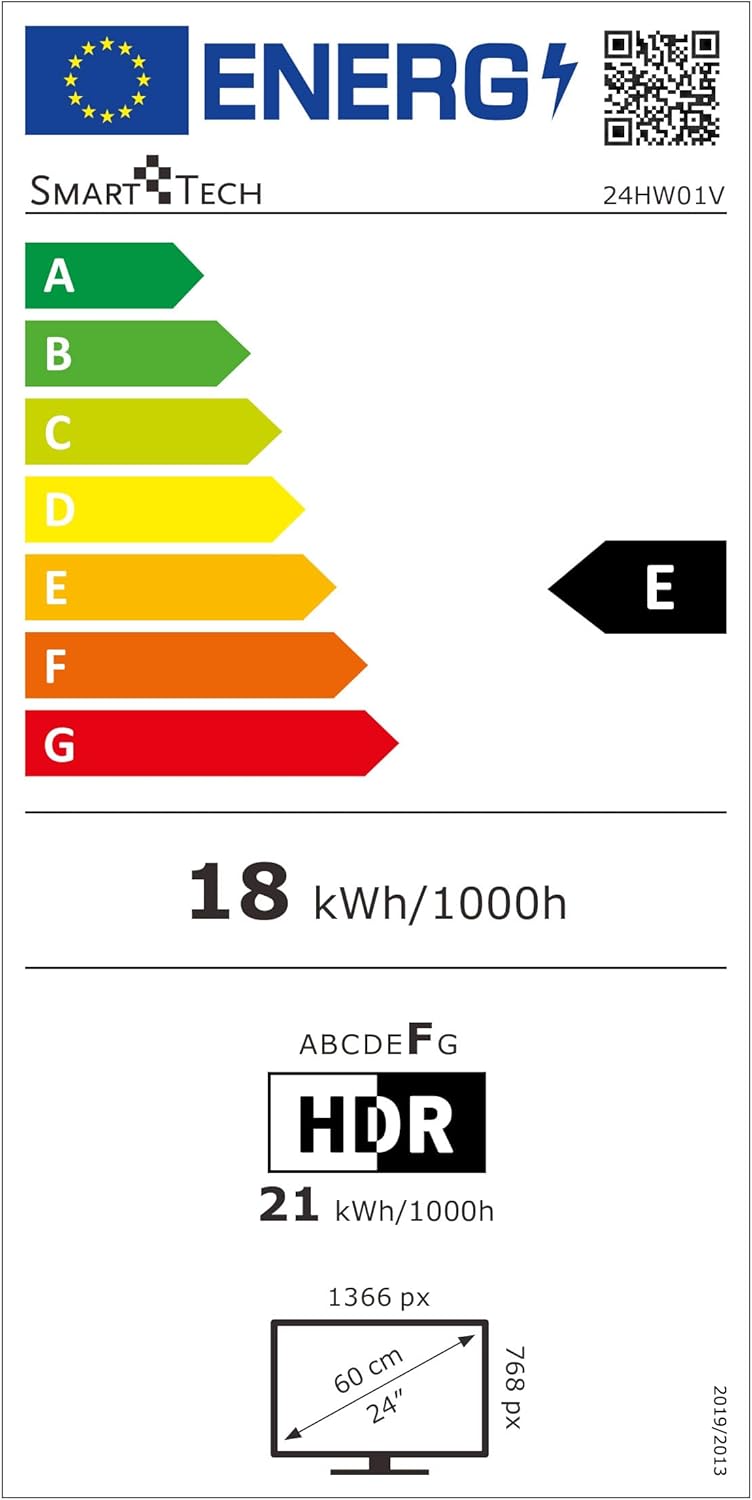
Image 9.1: EU Energy Label for Model 24HW01V. For more details, visit eprel.ec.europa.eu/qr/2124911.
10. การรับประกันและการสนับสนุน
Smart Tech products are designed for durability and performance. This product comes with a standard manufacturer's warranty. Please refer to the warranty card included in your package for specific terms and conditions.
ความพร้อมของอะไหล่: Spare parts for this model are guaranteed to be available for up to 11 years from the date of purchase.
For technical support, troubleshooting assistance, or warranty claims, please contact Smart Tech customer service through their official webไซต์หรือข้อมูลการติดต่อที่ระบุไว้ในเอกสารผลิตภัณฑ์ของคุณ


