Majority Darwin Bluetooth Alarm Clock with 10W Wireless Charging
Model: Darwin | Brand: Majority
การแนะนำ
This manual provides detailed instructions for the operation and maintenance of your Majority Darwin Bluetooth Alarm Clock. This device integrates an FM radio, dual alarm clock, 10W wireless charging, and ambient lighting to enhance your bedside experience.
ข้อมูลด้านความปลอดภัย
- อ่านคำแนะนำทั้งหมดอย่างละเอียดก่อนใช้งาน
- เก็บอุปกรณ์ให้ห่างจากน้ำและความชื้น
- ห้ามสัมผัสกับอุณหภูมิที่สูงหรือต่ำเกินไป
- ห้ามถอดประกอบหรือซ่อมแซมเครื่องด้วยตนเอง โปรดติดต่อช่างผู้ชำนาญการ
- Ensure proper ventilation when using the wireless charging function.
เนื้อหาแพ็คเกจ
ตรวจสอบว่ามีสิ่งของทั้งหมดอยู่ในกล่อง:
- Majority Darwin Bedside Clock
- อะแดปเตอร์จ่ายไฟหลัก
- คู่มือการใช้งาน

Image: Package contents of the Majority Darwin alarm clock, including the clock, power adapter, and user manual.
สินค้าเกินview
Familiarize yourself with the main components and control buttons of your Darwin alarm clock.
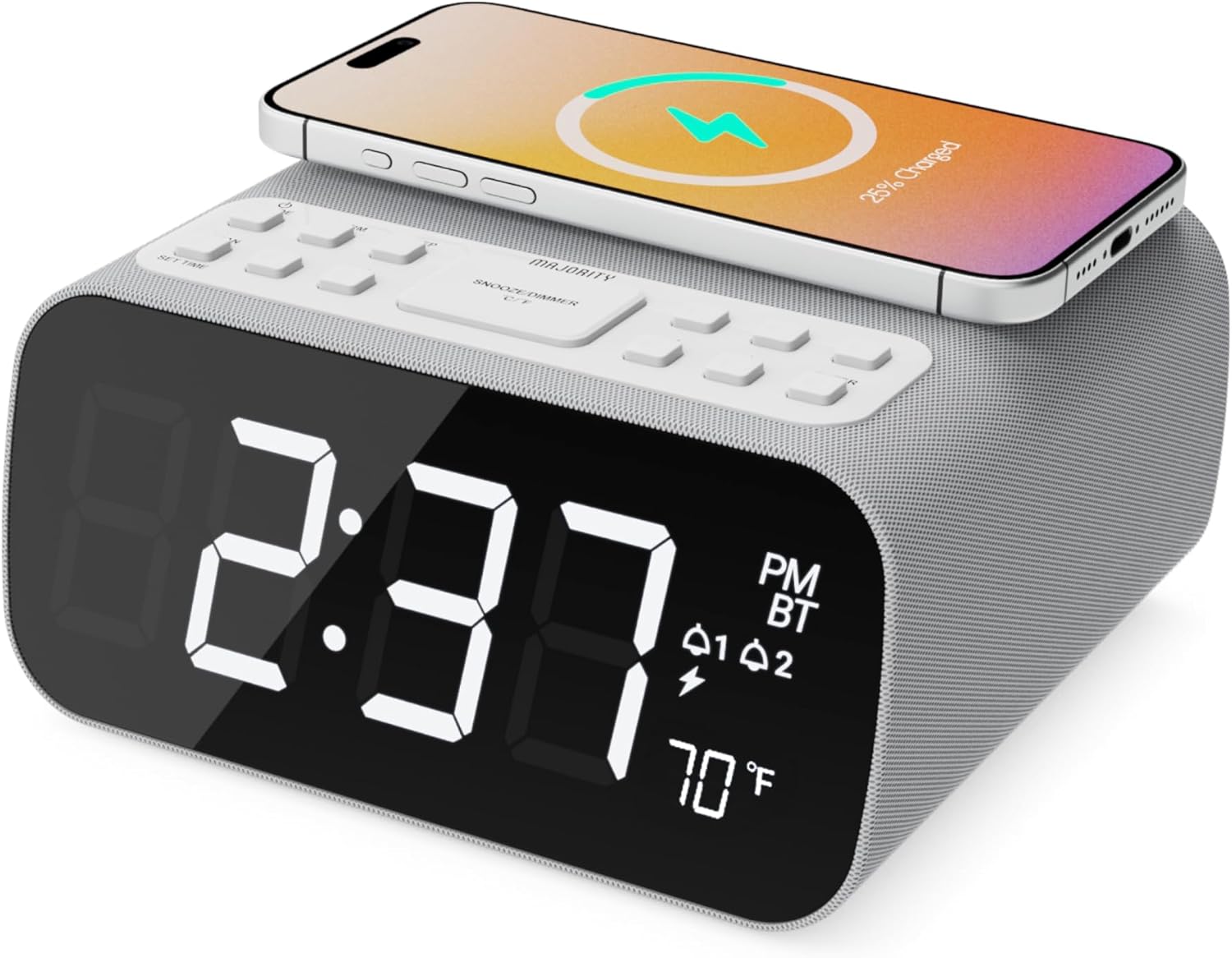
ภาพ: ด้านหน้า view of the Majority Darwin alarm clock showing the large digital display, wireless charging pad on top, and control buttons.

ภาพ: ด้านข้าง view of the Majority Darwin alarm clock highlighting the control panel with buttons for time, alarm, volume, and light settings.
แผงควบคุมด้านบน
- แผ่นชาร์จไร้สาย: Place compatible devices here for 10W wireless charging.
- ปุ่มเลื่อน/ไฟ: Short press to snooze alarm; long press to adjust display brightness or cycle through ambient light colors.
- Time/Date Set Button: Press to enter time/date setting mode.
- ปุ่มนาฬิกาปลุก 1/2: Press to activate/deactivate Alarm 1 or Alarm 2. Long press to set alarm time.
- Volume/Tune Buttons: Adjust volume or tune FM radio stations.
- ปุ่มโหมด: Switch between FM Radio, Bluetooth, and White Noise modes.
Rear Panel Controls & Ports
- อินพุต DC 12V: Connect the mains power adapter here.
- พอร์ตชาร์จ USB: For charging additional devices via USB cable.
- ช่องใส่แบตเตอรี่: For backup batteries (not for primary power).
- Display Dimmer Slider: Manually adjust the brightness of the main time display.
- Night Light Dimmer: Adjust brightness of the ambient light.
การตั้งค่า
การเชื่อมต่อไฟฟ้า
Connect the provided mains power adapter to the DC 12V input port on the rear of the alarm clock and plug it into a wall outlet. The display will light up.
For battery backup, open the battery compartment on the bottom and insert 2 x AAA batteries (not included). This will retain time settings during a power outage but will not power the display or charging functions.
ภาพ: ด้านหลัง view of the Majority Darwin alarm clock with the power adapter connected to the DC 12V input.
การตั้งค่าเวลาเริ่มต้น
- กดค้างไว้ ตั้งเวลา/วันที่ button on the top panel. The hour digits will start flashing.
- ใช้ Volume/Tune ปุ่มเพื่อปรับชั่วโมง
- กดปุ่ม ตั้งเวลา/วันที่ button again to confirm the hour and move to minute setting.
- ใช้ Volume/Tune ปุ่มปรับนาที
- Repeat this process for setting the year, month, and day.
- กดปุ่ม ตั้งเวลา/วันที่ button one last time to save all settings.
คำแนะนำการใช้งาน
Time Display & Dimmer
The large LED display shows the current time.
การหรี่แสงแบบแมนนวล: ใช้ Display Dimmer Slider on the rear panel to manually adjust the brightness of the time display.
ลดแสงอัตโนมัติ: The device features an auto-dimming function that adjusts display brightness at fixed time intervals (e.g., dimming at night, brightening during the day).

ภาพ: ด้านหน้า view of the Majority Darwin alarm clock displaying time, AM/PM, and temperature, highlighting the dual alarm icons.
การตั้งค่าการเตือนภัย
The Darwin alarm clock supports two independent alarms (Alarm 1 and Alarm 2).
- Long press either the ปลุก 1 or ปลุก 2 button. The hour digits for that alarm will flash.
- ใช้ Volume/Tune ปุ่มสำหรับตั้งเวลาปลุกที่ต้องการ
- กดที่เกี่ยวข้อง เตือน button again to confirm the hour and move to minute setting.
- ใช้ Volume/Tune ปุ่มสำหรับตั้งนาทีปลุกตามต้องการ
- กดปุ่ม เตือน button again to select the alarm source (FM radio or built-in tone). Use Volume/Tune ปุ่มเพื่อเลือก
- กดปุ่ม เตือน button again to set the alarm volume.
- กดปุ่ม เตือน button one last time to activate the alarm. An alarm icon will appear on the display.
Deactivating an Alarm: Short press the corresponding ปลุก 1 or ปลุก 2 button to turn it off. The alarm icon will disappear.
ฟังก์ชั่นการพักชั่วคราว
When an alarm sounds, short press the เลื่อน/เบา button on the top panel to temporarily silence the alarm for 9 minutes. The alarm will sound again after the snooze period.
การทำงานของวิทยุ FM
- กดปุ่ม โหมด กดปุ่มค้างไว้จนกระทั่งคำว่า "FM" ปรากฏบนหน้าจอ
- ใช้ Volume/Tune buttons to manually tune to your desired FM station.
- Auto Scan & Store Presets: กดค้างไว้ โหมด button to automatically scan and save available FM stations as presets.
- กดสั้น ๆ โหมด ปุ่มสำหรับสลับไปมาระหว่างค่าที่ตั้งไว้ล่วงหน้าที่บันทึกไว้
Bluetooth Pairing & Playback
- กดปุ่ม โหมด button until "BT" appears on the display and the Bluetooth indicator starts flashing.
- On your smartphone or other Bluetooth device, enable Bluetooth and search for "Majority Darwin".
- Select the device to pair. Once connected, the Bluetooth indicator on the alarm clock will stop flashing.
- You can now play audio from your device through the alarm clock's speaker. Use the Volume/Tune buttons on the alarm clock or your device to adjust volume.

Image: A smartphone displaying music playback, connected via Bluetooth to the Majority Darwin alarm clock.
การชาร์จแบบไร้สาย
The top surface of the alarm clock features a 10W wireless charging pad.
- Place your Qi-compatible smartphone directly onto the wireless charging pad.
- Ensure the phone is centered on the charging symbol for optimal charging.
- A charging indicator (e.g., a lightning bolt icon) may appear on your phone's screen or the alarm clock's display to confirm charging.
พอร์ตชาร์จ USB: An additional USB port on the rear allows you to charge other devices using a USB cable.
Image: The Majority Darwin alarm clock with a smartphone placed on top, indicating active wireless charging.
Night Light / Ambient Light
The alarm clock features an ambient light ring around its base.
- กดค้างไว้ เลื่อน/เบา button to turn the ambient light on/off.
- กดสั้น ๆ เลื่อน/เบา button to cycle through different color modes (e.g., red, green, blue, purple, white, color cycle).
- ใช้ หรี่ไฟกลางคืน on the rear panel to adjust the brightness of the ambient light.

Image: The Majority Darwin alarm clock illuminated with a vibrant ambient light from its base.
ฟังก์ชันเสียงรบกวนสีขาว
The device includes various white noise sounds to aid relaxation and sleep.
- กดปุ่ม โหมด button until the white noise mode is activated (indicated by a specific icon or text on the display).
- ใช้ Volume/Tune buttons to adjust the volume of the white noise.
- กดสั้น ๆ โหมด button again to cycle through different white noise sounds (e.g., nature sounds, fan noise).
การซ่อมบำรุง
- ทำความสะอาดอุปกรณ์ด้วยผ้านุ่มและแห้ง ห้ามใช้น้ำยาทำความสะอาดหรือสารละลายที่มีฤทธิ์กัดกร่อน
- รักษาช่องระบายอากาศให้ชัดเจน
- If not in use for an extended period, disconnect from power and remove backup batteries.
การแก้ไขปัญหา
ไม่มีไฟ / จอแสดงผลดับ
- ตรวจสอบให้แน่ใจว่าอะแดปเตอร์ไฟฟ้าเชื่อมต่อกับอุปกรณ์และเต้ารับไฟฟ้าที่ใช้งานได้แน่นหนา
- ตรวจสอบว่าเต้ารับไฟฟ้าใช้งานได้หรือไม่
การชาร์จแบบไร้สายไม่ทำงาน
- ตรวจสอบให้แน่ใจว่าอุปกรณ์ของคุณรองรับ Qi
- Make sure your phone is centered on the charging pad.
- นำเคสโทรศัพท์หนาๆ หรือวัตถุโลหะใดๆ ที่อยู่ระหว่างโทรศัพท์กับแท่นชาร์จออกให้หมด
ปัญหาการจับคู่บลูทูธ
- Ensure the alarm clock is in Bluetooth pairing mode (BT flashing).
- Make sure your device's Bluetooth is enabled and searching.
- ลองยกเลิกการจับคู่แล้วจับคู่อุปกรณ์ใหม่อีกครั้ง
- Ensure no other devices are currently connected to the alarm clock via Bluetooth.
สัญญาณเตือนไม่ส่งเสียง
- ตรวจสอบว่าระบบเตือนภัยทำงานอยู่ (ไอคอนเตือนภัยปรากฏบนหน้าจอ)
- ตรวจสอบการตั้งค่าระดับเสียงปลุก
- Ensure the correct alarm time is set.
ข้อมูลจำเพาะ
| คุณสมบัติ | รายละเอียด |
|---|---|
| ยี่ห้อ | ส่วนใหญ่ |
| ชื่อรุ่น | ดาร์วิน |
| เอาท์พุทชาร์จไร้สาย | 10วัตต์ |
| กำลังขับของลำโพง | 12 วัตต์ |
| เทคโนโลยีการเชื่อมต่อ | บลูทูธ |
| แหล่งพลังงาน | Mains Power (Battery Backup) |
| ขนาดสินค้า | 13.07 x 8.22 x 6.09 นิ้ว |
| น้ำหนักสินค้า | 1.42 ปอนด์ (645 กรัม) |
| คุณสมบัติพิเศษ | Adjustable Volume, Dual Alarm, Bluetooth, Wireless Charging, FM Radio, Dimmable Display, Ambient Night Light, White Noise |
การรับประกันและการสนับสนุน
The Majority Darwin Bluetooth Alarm Clock comes with a standard manufacturer's warranty. Please refer to the warranty card included in your package for specific terms and conditions.
For technical support, troubleshooting, or warranty claims, please visit the official Majority webเว็บไซต์หรือติดต่อฝ่ายบริการลูกค้าของพวกเขา
Online resources and FAQs may also be available on the product support page.


