1. บทนำ
This manual provides instructions for the installation, operation, and maintenance of the Nice Domi W1 bidirectional wall-mounted radio transmitter. The Nice Domi W1 replaces the previous ERA W1 model, offering updated functionalities and compatibility for controlling various home automation systems.
It is designed for controlling roller shutters, blinds, awnings, and other motorized installations compatible with Nice technology.
2. สินค้าหมดview
The Nice Domi W1 is an intelligent wall-mounted radio transmitter featuring bidirectional communication for feedback, intuitive controls, and a modern design. It allows for individual, grouped, or centralized control of compatible devices.


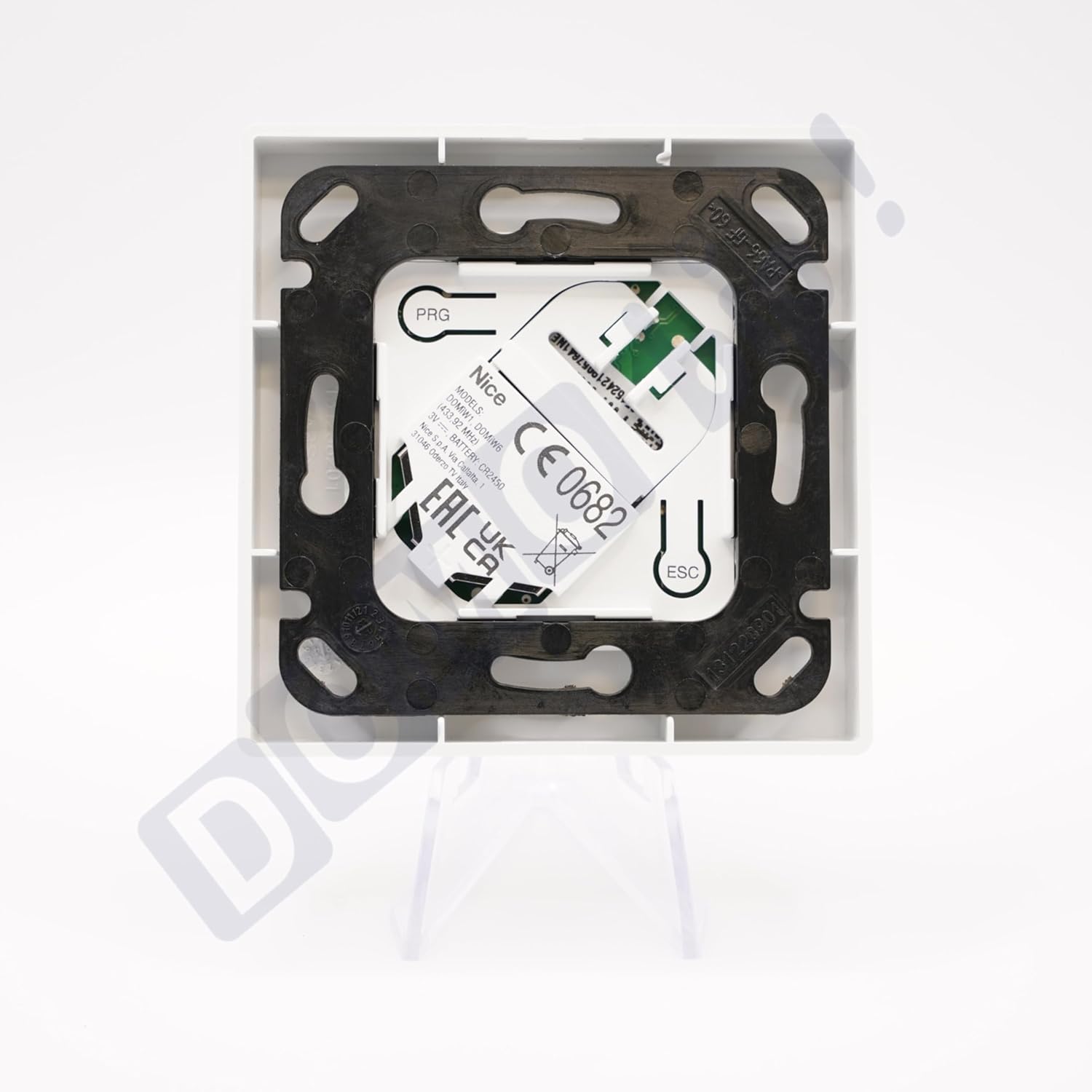
คุณสมบัติหลัก:
- การสื่อสารแบบสองทิศทาง: Provides visual and audible confirmation of commands and indicates the status of automated devices (open, closed, or partially open).
- การควบคุมที่ใช้งานง่าย: Large buttons for easy operation.
- ไฟ LED มัลติฟังก์ชั่น: For signaling and programming status.
- ติดตั้งง่าย: Quick mounting with the included wall support.
- การออกแบบที่ทันสมัย: Elegant and compact, designed to integrate seamlessly into various environments.
- ประสิทธิภาพการใช้พลังงาน: Optimized power consumption for environmental consideration.
3. ข้อมูลจำเพาะทางเทคนิค
| ข้อมูลจำเพาะ | ค่า |
|---|---|
| หมายเลขรุ่น | DomiW1 |
| ผู้ผลิต | ดี |
| ประเภทเครื่องส่งสัญญาณ | Bidirectional (unidirectional mode also possible) |
| ความถี่วิทยุ | 433.92 เมกะเฮิรตซ์ |
| Radio Coding | BD Technology (bidirectional) for feedback, O-Code compatible (unidirectional) |
| พิสัย | Approximately 100 meters in open field |
| แหล่งจ่ายไฟ | 3V Lithium Battery (CR2450) |
| เอกราชของแบตเตอรี่ | Estimated 3 years with 10 transmissions per day |
| อุณหภูมิในการทำงาน | -5°C ถึง +55°C |
| ระดับการป้องกัน | IP40 (สำหรับใช้ภายในอาคารเท่านั้น) |
| ขนาด (กว้าง x ยาว x สูง) | 50 x 50 x 13 มม. |
| น้ำหนัก | 24 กรัม |
| สี | สีขาว |
| ส่วนประกอบที่รวมอยู่ | รวมแบตเตอรี่แล้ว |
4. การตั้งค่า
4.1. การติดตั้งเครื่องส่งสัญญาณ
- Choose a suitable indoor location for installation, away from direct moisture or extreme temperatures.
- Use the included wall support to fix the transmitter to the wall. Ensure the mounting surface is clean and flat.
- Secure the mounting plate using appropriate screws (not included, typically).
- Snap the Domi W1 transmitter onto the mounted plate.
4.2. Initial Programming (Pairing with Receiver)
The Domi W1 needs to be paired with a compatible Nice receiver (e.g., OXI, OXIBD, FLOX2R, FLOXI2R) to control your automated devices. Refer to the receiver's specific instruction manual for detailed pairing procedures. General steps often include:
- Put the receiver into programming mode (usually by pressing a button on the receiver).
- On the Domi W1, press and hold the 'PRG' button (located on the rear, visible when removed from the mounting plate) until the LED on the transmitter indicates programming mode.
- Transmit a command (e.g., press the 'Up' button) from the Domi W1.
- The receiver should confirm successful pairing (e.g., by flashing its LED or moving the connected device).
- Exit programming mode on both the receiver and transmitter.
The Domi W1 can also be programmed via another already memorized transmitter. Consult the advanced programming section of the full Nice manual for details.
5. คู่มือการใช้งาน
The Nice Domi W1 features three main control buttons and an 'i' information button:
- ปุ่มขึ้น (▲): Activates the upward movement of the connected device (e.g., opening a roller shutter).
- ปุ่มหยุด (-): Stops the movement of the connected device.
- ปุ่มลง (▼): Activates the downward movement of the connected device (e.g., closing a roller shutter).
- 'i' Information Button: Used for checking the status of the device and for certain programming functions. When pressed, the LED will indicate the status of the last command or the device's current position (if bidirectional communication is active).
5.1. Bidirectional Feedback
When paired with a bidirectional receiver (e.g., OXIBD), the Domi W1 provides feedback:
- Command Confirmation: Visual and/or audible signals confirm that a command has been received by the automated device.
- การแสดงสถานะ: The 'i' button and LED can indicate the current status of the automated device (e.g., fully open, fully closed, or partially open).
5.2. Command Modes
- การควบคุมรายบุคคล: Control a single automated device.
- Grouped Control: Control multiple devices simultaneously that are programmed into the same group.
- การควบคุมแบบรวมศูนย์: Control all programmed devices from a single transmitter.
6. ความเข้ากันได้
The Nice Domi W1 is compatible with a range of Nice automation systems:
6.1. Compatible Receivers
- OXI and OXIBD (bidirectional receivers)
- FLOX2R, FLOXI2R (unidirectional receivers)
6.2. Compatible Motors and Automation Systems
- Nice motors for roller shutters and blinds (e.g., Era Fit, Era Inn series).
- Gate and garage door systems equipped with compatible Nice receivers.
6.3. Yubii Ecosystem Integration
The Domi W1 can be integrated into the Nice Yubii ecosystem for centralized management and automated scenarios, allowing for advanced control and smart home functionalities.
7. การบำรุงรักษา
7.1. การเปลี่ยนแบตเตอรี่
The Domi W1 is powered by a 3V lithium battery (CR2450). When the battery is low, the LED indicator may signal this condition. To replace the battery:
- Carefully detach the transmitter from its wall mounting plate.
- หาช่องใส่แบตเตอรี่ที่ด้านหลังของอุปกรณ์
- ถอดแบตเตอรี่ CR2450 เก่าออก
- ใส่แบตเตอรี่ CR2450 ใหม่ โดยตรวจสอบให้แน่ใจว่าใส่ขั้วถูกต้อง
- Reattach the transmitter to its mounting plate.
The estimated battery life is 3 years with typical usage (10 transmissions per day).
7.2. การทำความสะอาด
As the device has an IP40 protection rating, it is intended for indoor use only. Clean the surface of the transmitter with a soft, dry cloth. Do not use abrasive cleaners or liquids, as these may damage the device.
8 การแก้ไขปัญหา
If you experience issues with your Nice Domi W1, consider the following:
- อุปกรณ์ไม่ตอบสนอง:
- Check if the battery needs replacement (refer to Section 7.1).
- Ensure the transmitter is within range of the receiver (approx. 100m in open field, less indoors).
- Verify that the transmitter is correctly paired with the receiver (refer to Section 4.2).
- Check for any obstructions or sources of radio interference between the transmitter and receiver.
- ระยะสั้น:
- เปลี่ยนแบตเตอรี่
- Ensure there are no large metal objects or thick walls obstructing the signal path.
- Incorrect Device Status Indication:
- Ensure the receiver is bidirectional (e.g., OXIBD) and properly configured for feedback.
- Re-pair the transmitter with the receiver.
For persistent issues not resolved by these steps, please contact Nice customer support or a qualified technician.
9. การรับประกันและการสนับสนุน
The Nice Domi W1 is designed for robust daily use, ensuring stable performance even in environments with potential interference. For specific warranty terms and conditions, please refer to the documentation provided at the time of purchase or visit the official Nice webเว็บไซต์.
For technical assistance, spare parts availability, or further inquiries, please contact Nice customer support through their official channels.


