การแนะนำ
Welcome to the user manual for your AYANEO Pocket S Android Handheld Gaming Device. This manual provides essential information for setting up, operating, maintaining, and troubleshooting your device to ensure optimal performance and longevity. Please read this manual thoroughly before using your device.
ข้อมูลด้านความปลอดภัย
To prevent damage to your device or injury to yourself or others, please observe the following precautions:
- อย่าให้เครื่องสัมผัสกับอุณหภูมิที่สูงหรือต่ำเกินไป แสงแดดโดยตรง หรือความชื้นสูง
- หลีกเลี่ยงการทำตกหรือให้เครื่องได้รับแรงกระแทกรุนแรง
- ใช้เฉพาะที่ชาร์จและอุปกรณ์เสริมที่ได้รับอนุญาตเท่านั้น
- อย่าพยายามถอดประกอบหรือซ่อมแซมอุปกรณ์ด้วยตนเอง โปรดติดต่อช่างผู้ชำนาญการ
- เก็บอุปกรณ์ให้ห่างจากน้ำและของเหลวอื่นๆ
ส่วนประกอบของอุปกรณ์
Familiarize yourself with the various parts of your AYANEO Pocket S.
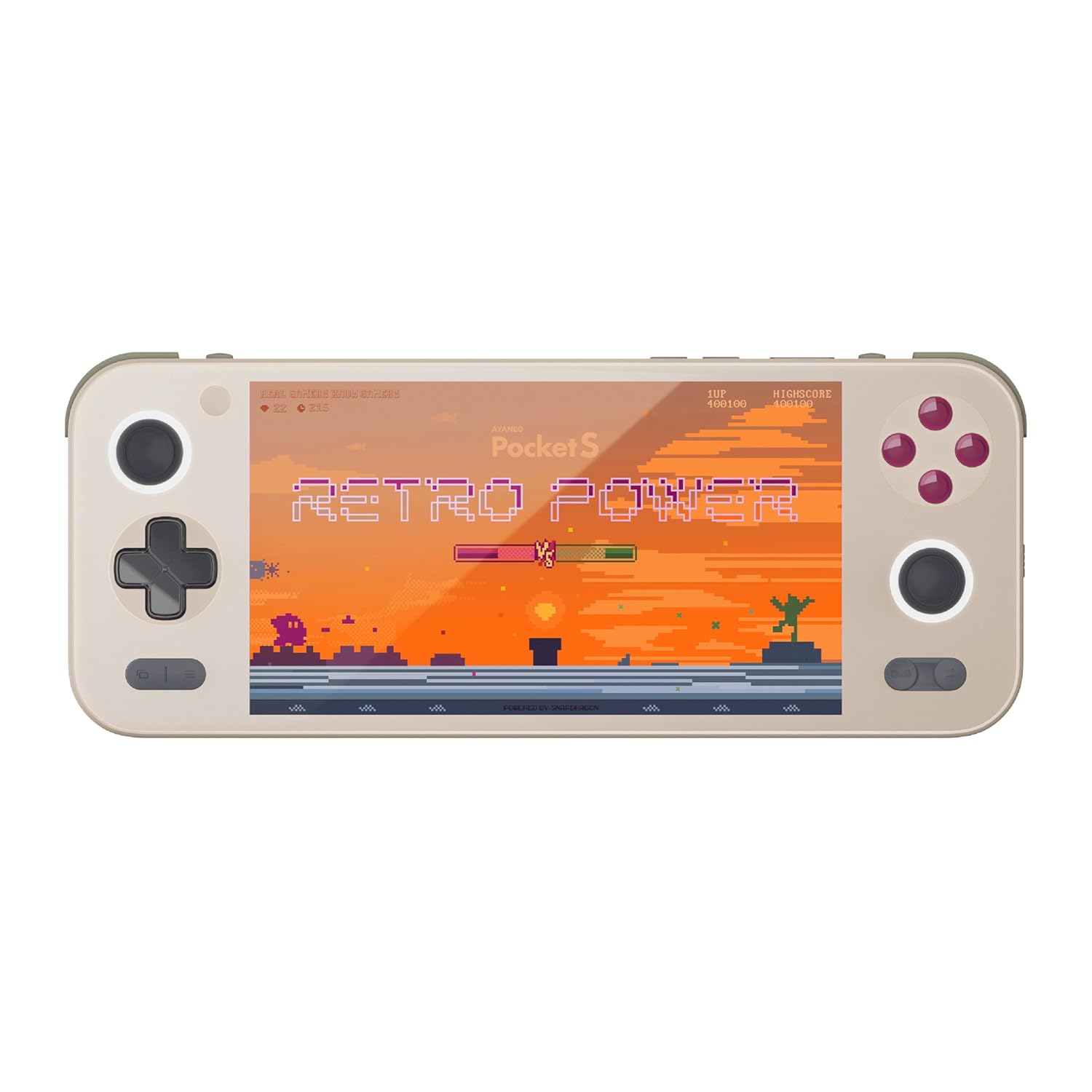
รูปที่ 1 : ด้านหน้า view of the AYANEO Pocket S, showing the screen, joysticks, D-pad, and action buttons.

Figure 2: Close-up of the Master Controller, highlighting the RGB Hall joysticks, Hall triggers, and crystal-textured keys.

Figure 3: Illustration of the internal VC thermal plate and active cooling system, along with the "Fishbone" biomimetic heat dissipation design on the side.

Figure 4: The AYANEO Pocket S displaying the AYASpace and AYAHOME Launcher interface, showing various game icons.
คุณสมบัติหลัก:
- แสดง: 6-inch 2K Borderless IPS Screen (490 PPI, 120% sRGB, 85% DCI-P3)
- โปรเซสเซอร์: Snapdragon G3x Gen 2 Gaming Platform
- หน่วยความจำและการจัดเก็บ: Up to 16GB RAM, up to 1TB Storage (This model: 12GB RAM, 128GB Storage)
- การระบายความร้อน: Large VC Heat Sink, Active Cooling System, "Fishbone" Cooling Vents
- การควบคุม: Master Controller with RGB Hall Joysticks, Linear Hall Triggers, X-axis Vibration
- ระบบปฏิบัติการ: แอนดรอยด์ 13
คู่มือการติดตั้ง
1. การชาร์จครั้งแรก
Before first use, fully charge your AYANEO Pocket S. Connect the provided USB-C cable to the device's charging port and the other end to a compatible power adapter. The charging indicator will illuminate.
2. การเปิด/ปิดเครื่อง
- การเปิดเครื่อง: Press and hold the Power button located on the top edge of the device until the AYANEO logo appears on the screen.
- วิธีปิดเครื่อง: กดปุ่มเปิด/ปิดค้างไว้จนกว่าเมนูตัวเลือกการเปิด/ปิดจะปรากฏขึ้น เลือก "ปิดเครื่อง" แล้วยืนยัน
- ในการรีสตาร์ท: จากเมนูตัวเลือกพลังงาน เลือก "รีสตาร์ท"
3 การกำหนดค่าระบบเบื้องต้น
Upon first power-on, you will be guided through the initial Android setup process. This includes:
- การเลือกภาษาของคุณ
- การเชื่อมต่อกับเครือข่าย Wi-Fi
- ลงชื่อเข้าใช้ด้วยบัญชี Google ของคุณ (ไม่บังคับ แต่แนะนำสำหรับการดาวน์โหลดแอป)
- การตั้งค่าการล็อคหน้าจอและคุณสมบัติด้านความปลอดภัยอื่น ๆ
4. การอัปเดตซอฟต์แวร์
It is recommended to check for and install any available system updates after initial setup to ensure you have the latest features and security patches. Navigate to การตั้งค่า > ระบบ > อัปเดตระบบ.
การใช้งานอุปกรณ์ของคุณ
การนำทางและการควบคุม
The AYANEO Pocket S features both touchscreen input and physical controller input for navigation and gameplay.
- หน้าจอสัมผัส: Use familiar Android gestures such as tap, swipe, pinch-to-zoom.
- จอยสติ๊ก: Analog input for movement and camera control in games.
- ดี-แพด: Digital input for menu navigation and directional controls.
- ปุ่มการกระทำ (A/B/X/Y): Primary input for in-game actions.
- Shoulder/Trigger Buttons (L1/L2/R1/R2): Additional input for various game functions.
- ปุ่มฟังก์ชั่น: Dedicated buttons for system functions, such as Home, Back, and Menu.
โหมดการทำงาน
The device offers multiple performance modes to optimize for either maximum performance or extended battery life.
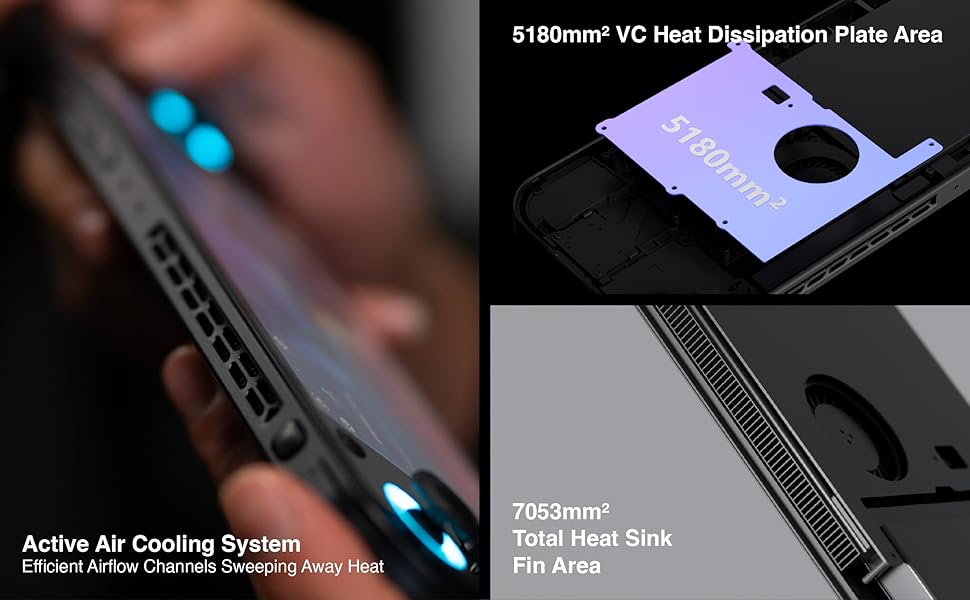
Figure 5: Diagram illustrating the three performance modes: Performance Turbo Mode, Balanced Mode, and Power-Saving Long Battery Life Mode.
- Performance Turbo Mode: Maximizes CPU, GPU, and fan speed for demanding games.
- โหมดสมดุล: Provides a good balance between performance and battery life for most games.
- Power-Saving Long Battery Life Mode: Optimizes for extended usage, suitable for less demanding applications or when battery conservation is critical.
You can switch between these modes via the AYASpace application or quick settings menu.
AYASpace and AYAHOME Launcher
The AYASpace application and AYAHOME Launcher provide a customized Android experience for gaming handhelds.
- Game Management: Organize and launch your games.
- การทำแผนที่สำคัญ: Customize button assignments for mobile games that do not natively support physical controllers.
- การตั้งค่าระบบ: Access performance mode settings, controller calibration, and other device-specific configurations.
การซ่อมบำรุง
การทำความสะอาดอุปกรณ์
- ใช้ผ้าเนื้อนุ่มที่ไม่เป็นขุยเช็ดทำความสะอาดหน้าจอและตัวเครื่อง
- สำหรับรอยเปื้อนฝังแน่น ให้เช็ดออกเล็กน้อยampชุบผ้าด้วยน้ำหรือน้ำยาทำความสะอาดหน้าจอ
- ห้ามใช้สารเคมีรุนแรง น้ำยาทำความสะอาดที่มีฤทธิ์กัดกร่อน หรือสเปรย์กระป๋อง
- Ensure all ports are free of dust and debris. Use a soft brush or compressed air if necessary, holding the can upright.
การดูแลแบตเตอรี่
- หลีกเลี่ยงการปล่อยแบตเตอรี่จนหมดบ่อยครั้ง
- อย่าปล่อยให้อุปกรณ์ไม่ได้ชาร์จเป็นเวลานาน
- Store the device in a cool, dry place if not used for a long time, with the battery charged to around 50%.
การบำรุงรักษาซอฟต์แวร์
- Regularly check for and install system updates.
- Keep your applications updated through the Google Play Store or AYASpace.
- Periodically clear cache and unnecessary fileเพื่อรักษาระดับประสิทธิภาพของระบบ
การแก้ไขปัญหา
| ปัญหา | สาเหตุที่เป็นไปได้ | สารละลาย |
|---|---|---|
| อุปกรณ์ไม่เปิดเครื่อง | แบตเตอรี่เหลือน้อย; ระบบล่ม | ชาร์จอุปกรณ์อย่างน้อย 30 นาที บังคับรีสตาร์ทโดยกดปุ่มเปิด/ปิดค้างไว้ 10-15 วินาที |
| หน้าจอไม่ตอบสนอง | Software glitch; Screen damage. | รีสตาร์ทอุปกรณ์ หากปัญหายังคงอยู่ โปรดติดต่อฝ่ายบริการลูกค้า |
| Games are lagging or performing poorly. | Incorrect performance mode; Background apps; Overheating. | Switch to Performance Turbo Mode. Close unnecessary background applications. Ensure cooling vents are not blocked. |
| ปัญหาการเชื่อมต่อ Wi-Fi | Incorrect password; Router issue; Device Wi-Fi module error. | Verify Wi-Fi password. Restart your router. Toggle Wi-Fi off and on on the device. |
If you encounter issues not listed here or if the suggested solutions do not resolve the problem, please contact AYANEO customer support.
ข้อมูลจำเพาะ
| คุณสมบัติ | รายละเอียด |
|---|---|
| แบบอย่าง | พ็อกเก็ต เอส |
| โปรเซสเซอร์ | Snapdragon G3x Gen 2 Gaming Platform |
| แสดง | 6-inch 2K Borderless IPS Display (2560*1440 resolution, 490 PPI, 120% sRGB, 85% DCI-P3) |
| แรม | 12GB (as per current model) |
| พื้นที่จัดเก็บ | 128GB (as per current model) |
| ระบบปฏิบัติการ | แอนดรอยด์ 13 |
| ระบบระบายความร้อน | Large VC Heat Sink, Active Cooling System, "Fishbone" Vents |
| แบตเตอรี่ | แบตเตอรี่ลิเธียมไอออน 1 ก้อน (รวมอยู่ด้วย) |
| ขนาด | ประมาณ 8.42 x 3.35 x 0.55 นิ้ว |
| น้ำหนัก | ประมาณ 1.59 ปอนด์ (0.72 กก.) |
ข้อมูลการรับประกัน
AYANEO products typically come with a limited manufacturer's warranty. Please refer to the warranty card included in your product packaging or visit the official AYANEO webดูรายละเอียดข้อกำหนดและเงื่อนไขการรับประกันได้ที่เว็บไซต์ เก็บหลักฐานการซื้อไว้เพื่อใช้ในการเรียกร้องการรับประกัน
Note: Protection plans may be available for purchase separately. These plans are offered by third parties and are not part of the standard manufacturer's warranty.
การสนับสนุนลูกค้า
For technical assistance, troubleshooting, or warranty inquiries, please contact AYANEO customer support through their official channels:
- เป็นทางการ Webเว็บไซต์: www.ayaneo.com (ตรวจสอบส่วนการสนับสนุนหรือหน้าติดต่อ)
- การสนับสนุนทางอีเมล์: อ้างถึงเจ้าหน้าที่ webโปรดเยี่ยมชมเว็บไซต์เพื่อดูที่อยู่อีเมลฝ่ายสนับสนุนล่าสุด
- Online Community/Forums: AYANEO may host online communities where users can find answers and share experiences.
When contacting support, please have your device model (Pocket S) and serial number ready.


