1. บทนำ
ขอบคุณสำหรับการซื้อasing the QFX Bluetooth 1961 Retro Mini Bus Speaker. This device combines a vintage design with modern audio technology, offering multiple playback options and portable convenience. This manual provides essential information for setting up, operating, and maintaining your speaker.

รูปที่ 1 : ด้านหน้า view of the QFX Bluetooth 1961 Retro Mini Bus Speaker.
2. คุณสมบัติของผลิตภัณฑ์
- วินtagการออกแบบอี: Inspired by the classic 1960s mini bus.
- เสียงอันทรงพลัง: Equipped with a 2-inch speaker and bass radiator for enhanced sound.
- ตัวเลือกการเล่นหลายแบบ: Supports Bluetooth, FM Radio, USB drives, TF cards, and AUX input.
- ไฟปาร์ตี้ LED: Built-in colorful LED headlights that flash during operation.
- การโทรแบบแฮนด์ฟรี: Integrated microphone for seamless phone calls when connected via Bluetooth.
- แบบพกพาและชาร์จใหม่ได้: Features a built-in rechargeable battery for on-the-go use.
- สเตอริโอไร้สายจริง (TWS): Ability to pair two BT-1961 speakers for stereo sound.
3. เนื้อหาบรรจุภัณฑ์
- QFX Bluetooth 1961 Retro Mini Bus Speaker
- Power Cable (USB to Micro USB)
- คู่มือการใช้งาน
Note: A 5V DC charger is required for charging and is not included.
4. สินค้าหมดview และการควบคุม
ทำความคุ้นเคยกับส่วนประกอบและแผงควบคุมของลำโพง

Figure 2: Rear panel controls and ports.
- 1. POWER / M Button: Press and hold to power on/off. Short press to switch between modes (Bluetooth, FM, USB, TF, AUX).
- 2. ปุ่มเล่น/หยุดชั่วคราว: Play or pause audio. During a call, press to answer/end.
- 3. ปุ่มเล่นเพลงก่อนหน้า / ลดระดับเสียง: กดสั้นๆ เพื่อเล่นเพลงก่อนหน้า กดค้างไว้เพื่อลดระดับเสียง
- 4. ปุ่มเล่นเพลงถัดไป / ปุ่มเพิ่มระดับเสียง: กดสั้นๆ เพื่อเล่นเพลงถัดไป กดค้างไว้เพื่อเพิ่มระดับเสียง
- 5. พอร์ต DC 5V: Micro USB input for charging the speaker.
- 6. พอร์ต USB: เสียบอุปกรณ์ USB เพื่อเล่นไฟล์ MP3
- 7. ช่องเสียบการ์ด TF: Insert a TF (MicroSD) card for MP3 playback.
- 8. ช่องต่อ AUX: เชื่อมต่ออุปกรณ์เสียงภายนอกโดยใช้สายสัญญาณเสียงขนาด 3.5 มม.
- 9. Tail Lights: Indicate charging status (refer to Charging section).
- 10. Retractable Antenna: ยืดออกเพื่อรับสัญญาณวิทยุ FM ได้ดีขึ้น
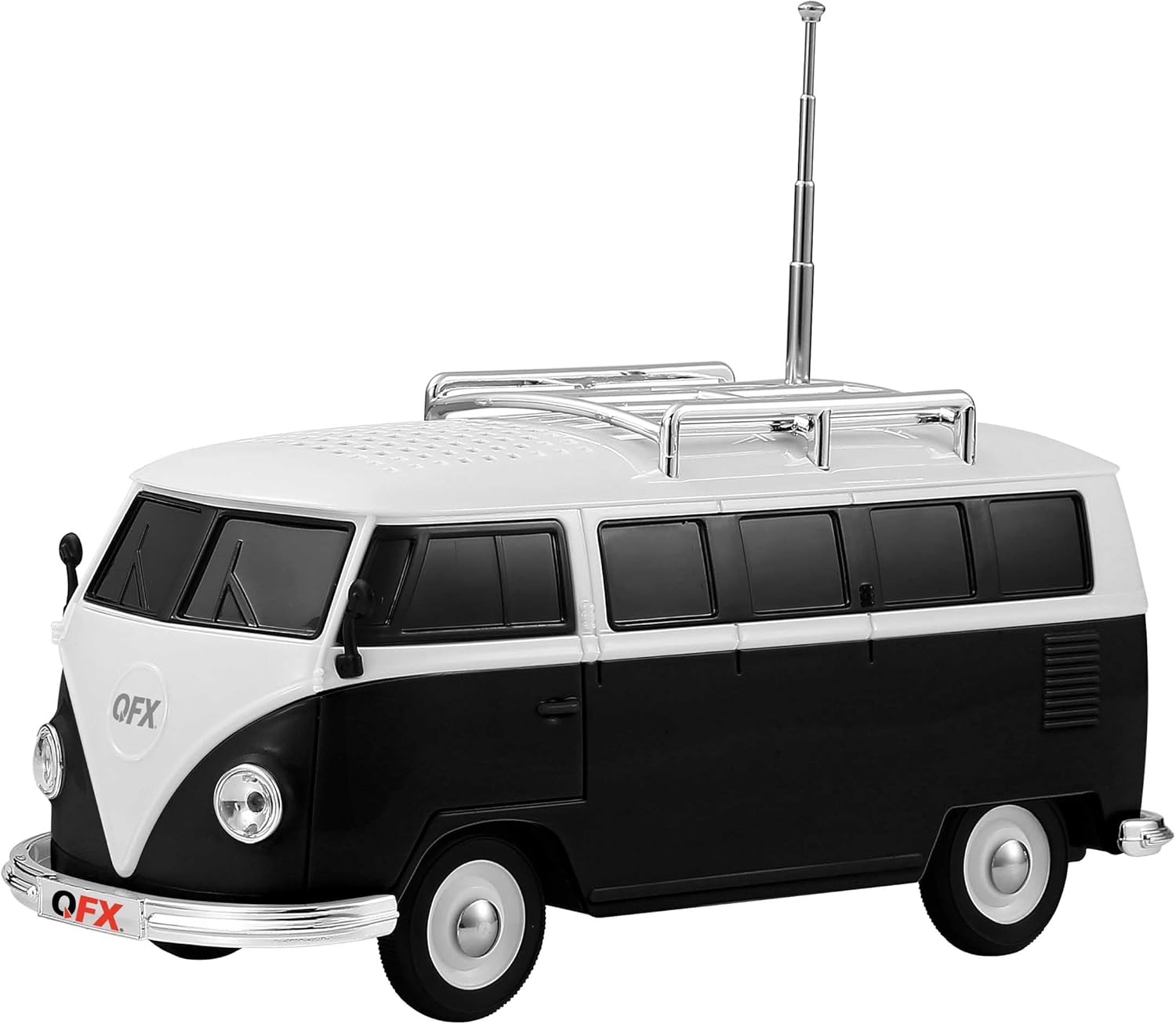
รูปที่ 3: ด้านข้าง view with retractable antenna extended.
5. การตั้งค่า
5.1 การชาร์จเริ่มต้น
- ก่อนใช้งานครั้งแรก ควรชาร์จลำโพงให้เต็ม
- Connect the provided USB charging cable to the DC 5V port on the rear of the speaker.
- Connect the other end of the USB cable to a 5V DC USB power adapter (not included).
- The front headlights will flash during charging. Once fully charged, the tail lights should illuminate (behavior may vary; refer to Troubleshooting if unsure).
5.2 เปิด/ปิดเครื่อง
- หากต้องการเปิดเครื่อง ให้กดค้างไว้ POWER / M button until you hear an engine start sound.
- ในการปิดเครื่องให้กดปุ่ม POWER / M button until you hear an engine off sound.
6. คู่มือการใช้งาน
6.1 การจับคู่บลูทูธ
- Power on the speaker. It will automatically enter Bluetooth pairing mode, indicated by a voice prompt.
- เปิดใช้งานบลูทูธบนอุปกรณ์เคลื่อนที่ของคุณ (สมาร์ทโฟน แท็บเล็ต ฯลฯ)
- ค้นหา available Bluetooth devices and select "BT-1961" from the list.
- Once paired, you will hear a confirmation sound. You can now play audio from your device through the speaker.

Figure 4: Bluetooth connectivity for music and hands-free calling.
การใช้งานวิทยุ FM 6.2
- เปิดลำโพง กดปุ่ม POWER / M button repeatedly to switch to FM Radio mode.
- กางเสาอากาศแบบยืดหดได้ออกเพื่อการรับสัญญาณที่ดีที่สุด
- หากต้องการสแกนอัตโนมัติและบันทึกสถานีที่ใช้งานได้ ให้กดปุ่มค้างไว้ เล่น/หยุดชั่วคราว button. The speaker will scan and store stations.
- ใช้ เพลงก่อนหน้า / ลดระดับเสียง และ เพลงถัดไป / เพิ่มระดับเสียง ปุ่มสำหรับนำทางระหว่างสถานีที่บันทึกไว้
6.3 การเล่นไฟล์ผ่าน USB / การ์ด TF
- Insert a USB drive or TF (MicroSD) card containing MP3 audio fileเสียบเข้ากับพอร์ตที่เกี่ยวข้อง
- ลำโพงจะตรวจจับอุปกรณ์จัดเก็บข้อมูลโดยอัตโนมัติและเริ่มเล่นเพลง หากไม่เป็นเช่นนั้น ให้กดปุ่ม POWER / M button to cycle through modes until USB/TF mode is active.
- ใช้ เพลงก่อนหน้า / ลดระดับเสียง และ เพลงถัดไป / เพิ่มระดับเสียง buttons for track control.
อินพุต AUX 6.4 ช่อง
- เชื่อมต่อปลายด้านหนึ่งของสายสัญญาณเสียงขนาด 3.5 มม. (ไม่ได้รวมอยู่ในชุด) เข้ากับพอร์ตอินพุต AUX บนลำโพง
- ต่อปลายอีกด้านหนึ่งเข้ากับช่องเสียบหูฟังหรือช่องสัญญาณเสียงออกของอุปกรณ์ภายนอกของคุณ
- กดปุ่ม POWER / M ปุ่มเพื่อสลับไปยังโหมด AUX
- ควบคุมการเล่นและระดับเสียงได้โดยตรงจากอุปกรณ์ภายนอกของคุณ
6.5 การโทรแบบแฮนด์ฟรี
- When the speaker is paired with your phone via Bluetooth, incoming calls will be routed to the speaker.
- กดปุ่ม เล่น/หยุดชั่วคราว ปุ่มสำหรับรับสายเรียกเข้า
- กดปุ่ม เล่น/หยุดชั่วคราว button again to end a call.
การจับคู่ระบบเสียงสเตอริโอไร้สาย 6.6 True Wireless Stereo (TWS)
To achieve stereo sound, you can pair two QFX BT-1961 speakers together.
- Ensure both BT-1961 speakers are powered on and in Bluetooth mode, but not yet paired to any device.
- บนลำโพงตัวใดตัวหนึ่ง (ซึ่งจะเป็นลำโพงหลัก) ให้กดปุ่มค้างไว้ POWER / M กดปุ่มค้างไว้สองสามวินาทีจนกว่าจะได้ยินเสียงสัญญาณการจับคู่
- The two speakers will automatically connect to each other. You will hear a confirmation sound once TWS pairing is successful.
- Now, connect your mobile device to the primary speaker via Bluetooth as described in section 6.1. Audio will play in stereo across both speakers.

Figure 5: TWS pairing for enhanced stereo audio.
6.7 ไฟปาร์ตี้ LED
The speaker features built-in LED headlights that flash during operation, adding a visual element to your music experience. There is no specific control to turn these lights off independently.

Figure 6: Flashing LED headlights.
7. การชาร์จไฟ
To charge the QFX Bluetooth 1961 Retro Mini Bus Speaker:
- เชื่อมต่อสายชาร์จ USB ที่ให้มาเข้ากับพอร์ต DC 5V บนลำโพง
- Plug the USB end into a compatible 5V DC USB power adapter (not included).
- The front headlights will flash to indicate that the unit is charging.
- Once charging is complete, the tail lights are expected to illuminate, and the headlights may stop flashing.
8. ข้อมูลจำเพาะ
| คุณสมบัติ | รายละเอียด |
|---|---|
| ชื่อรุ่น | BT-1961-BLK |
| ยี่ห้อ | คิวเอฟเอ็กซ์ |
| วัสดุ | พลาสติก |
| ประเภทลำโพง | Single Speaker (with Bass Radiator) |
| กำลังขับสูงสุดของลำโพง | 3 วัตต์ |
| เทคโนโลยีการเชื่อมต่อ | บลูทูธ |
| โหมดเอาต์พุตเสียง | ระบบเสียงสเตอริโอ (พร้อมการจับคู่ TWS) |
| คุณสมบัติพิเศษ | USB Port, TF Card Slot, AUX Input, FM Radio, Built-in Microphone, LED Party Lights |
| วิธีการควบคุม | ปุ่มสัมผัส |
| ขนาดสินค้า | ลึก 8 นิ้ว x กว้าง 3.3 นิ้ว x สูง 4 นิ้ว |
| น้ำหนักสินค้า | 1 ปอนด์ |
| การใช้ที่แนะนำ | ในร่ม |

รูปที่ 7: ขนาดผลิตภัณฑ์
9 การแก้ไขปัญหา
| ปัญหา | สารละลาย |
|---|---|
| ลำโพงไม่เปิดเครื่อง | Ensure the battery is charged. Connect to a 5V DC power source and allow it to charge for at least 30 minutes before attempting to power on again. |
| ไม่สามารถจับคู่ผ่านบลูทูธได้ | Ensure the speaker is in Bluetooth mode. Turn off and on your device's Bluetooth. Move the speaker closer to your device. Disconnect from any other paired devices. |
| การรับสัญญาณวิทยุ FM ไม่ดี | Fully extend the retractable antenna. Try repositioning the speaker to find a stronger signal. Perform an auto-scan again. |
| ไม่มีเสียงจาก USB/การ์ด TF | Ensure the card/drive contains compatible MP3 files. Check if the speaker is in the correct mode (press POWER/M button). Ensure volume is not at minimum. |
| Loud engine sound on power on/off. | This is a design feature and cannot be disabled. Adjust the volume before powering off if this is a concern. |
| Charging indicator (headlights/tail lights) not working as expected. | Ensure the charging cable is securely connected and the 5V DC power source is functional. While headlights typically flash during charging and tail lights indicate full charge, slight variations in indicator behavior may occur. If the speaker functions normally after charging, it is likely charging correctly. |
10. การบำรุงรักษา
- ทำความสะอาดลำโพงด้วยผ้านุ่มและแห้ง ห้ามใช้น้ำยาทำความสะอาดหรือสารละลายที่มีฤทธิ์กัดกร่อน
- ควรหลีกเลี่ยงการวางลำโพงไว้ในที่ที่มีอุณหภูมิสูงหรือต่ำเกินไป แสงแดดโดยตรง หรือความชื้น
- Do not disassemble the unit, as this will void the warranty.
- เก็บไว้ในที่แห้งและเย็นเมื่อไม่ได้ใช้งาน
11. Official Product Video (Similar Model)
วิดีโอต่อไปนี้ให้ข้อมูลโดยรวมview of a similar QFX Bluetooth speaker model (BT-1953 Hot Rod Replica) and demonstrates features that are also present in your BT-1961 Mini Bus Speaker, such as Bluetooth connectivity, LED lights, and multiple playback options.
วิดีโอ: จบแล้วview of QFX BT-1953 Hot Rod Replica Bluetooth Speaker, demonstrating features like Bluetooth, LED lights, and various input options. Note: This video features a different model (BT-1953) but showcases similar functionalities to the BT-1961 Mini Bus Speaker.
12. การรับประกันและการสนับสนุน
For warranty information and customer support, please refer to the documentation included with your product or visit the official QFX webไซต์ โปรดเก็บใบเสร็จรับเงินไว้เป็นหลักฐานการซื้อ


