การแนะนำ
The ZTE U50 Pro is a high-performance 5G portable WiFi router designed for reliable and fast internet access on the go. Featuring a powerful Qualcomm Snapdragon X62 processor, it supports dual-mode 5G and global roaming, ensuring connectivity in over 100 countries and regions. This device incorporates 5G NR carrier aggregation and low-frequency ENDC technologies for enhanced speeds and network capacity. With Wi-Fi 6 (802.11ax) technology, it delivers a peak rate of 3600 Mbps and can support up to 64 connected devices simultaneously, making it ideal for various personal and professional uses.
This manual provides essential information for setting up, operating, maintaining, and troubleshooting your ZTE U50 Pro router. Please read it thoroughly before use.
เนื้อหาแพ็คเกจ
ตรวจสอบให้แน่ใจว่ามีรายการทั้งหมดอยู่ในบรรจุภัณฑ์:
- ZTE U50 Pro 5G Portable WiFi 6 Router
- สายเคเบิลข้อมูล USB Type-C
- Quick Guide (English)
- Built-in Lithium-ion Battery (10,000 mAh)
อุปกรณ์โอเวอร์view
Familiarize yourself with the components of your ZTE U50 Pro router.

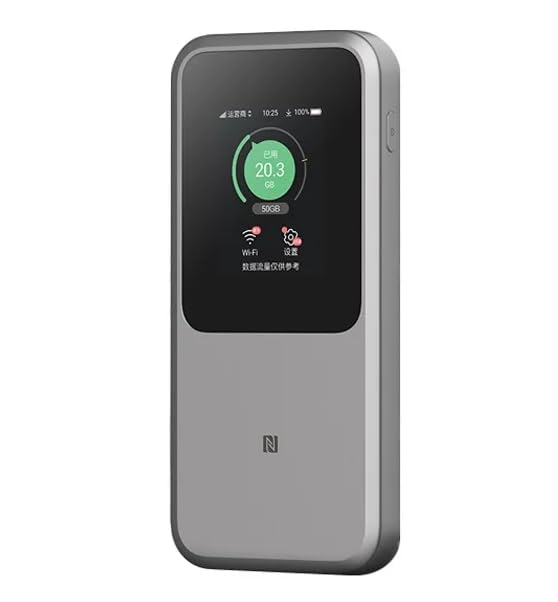
ภาพ: ด้านหน้า view of the ZTE U50 Pro 5G Portable WiFi Router, showing its 2.4-inch touch screen interface with network status, data usage, and Wi-Fi indicators.

ภาพ: ด้านหน้าและด้านหลัง view of the ZTE U50 Pro 5G Portable WiFi Router, illustrating its compact design and the ZTE branding on the rear panel.
ภาพ: The ZTE U50 Pro 5G Portable WiFi Router highlighting its main features: high-performance Snapdragon X62 chip, high-rate Wi-Fi 6 (3600Mbps), 10000mAh ultra-large capacity battery with 27W fast charge, and a 2.4-inch touch screen for easy device management.
การตั้งค่า
1. การติดตั้งซิมการ์ด
- ค้นหาช่องใส่ซิมการ์ดบนอุปกรณ์
- เปิดฝาปิดช่องใส่ซิมการ์ดอย่างระมัดระวัง
- ใส่ซิมการ์ดนาโนมาตรฐานลงในช่อง โดยให้ด้านที่เป็นขั้วสัมผัสสีทองหันลง และจัดมุมที่มีรอยบากให้ตรงกัน
- ค่อยๆ ดันซิมการ์ดเข้าไปจนกระทั่งได้ยินเสียงคลิก
- ปิดฝาช่องใส่ซิมการ์ดให้สนิท
- บันทึก: The device is unlocked and compatible with any standard Nano-SIM card.
2. การเปิด/ปิดเครื่อง
- การเปิดเครื่อง: กดปุ่มเปิด/ปิดค้างไว้สองสามวินาทีจนกระทั่งหน้าจอสว่างขึ้น
- วิธีปิดเครื่อง: Press and hold the Power button until a power-off option appears on the screen. Select "Power Off" or continue holding the button until the device shuts down.
3. การกำหนดค่าเริ่มต้น
- Upon first power-on, the device may guide you through an initial setup wizard on its 2.4-inch touch screen.
- Follow the on-screen prompts to set basic preferences such as language, time zone, and initial Wi-Fi settings (SSID and password).
- Alternatively, you can connect to the device's default Wi-Fi network (SSID and password usually found on a sticker inside the SIM card slot or on the device packaging) and access the web management interface via a browser (e.g., 192.168.0.1 or 192.168.1.1).
คำแนะนำการใช้งาน
1 การเชื่อมต่ออุปกรณ์ผ่าน Wi-Fi
- Ensure your ZTE U50 Pro is powered on.
- On your device (smartphone, laptop, tablet, etc.), open the Wi-Fi settings.
- ค้นหาเครือข่าย Wi-Fi ที่ใช้งานได้
- Select the network name (SSID) broadcast by your ZTE U50 Pro. The default SSID is usually printed on the device or its packaging.
- Enter the Wi-Fi password (key) when prompted. The default password is also typically printed on the device.
- Once connected, your device will have internet access through the ZTE U50 Pro.
- The router supports up to 64 simultaneous device connections.
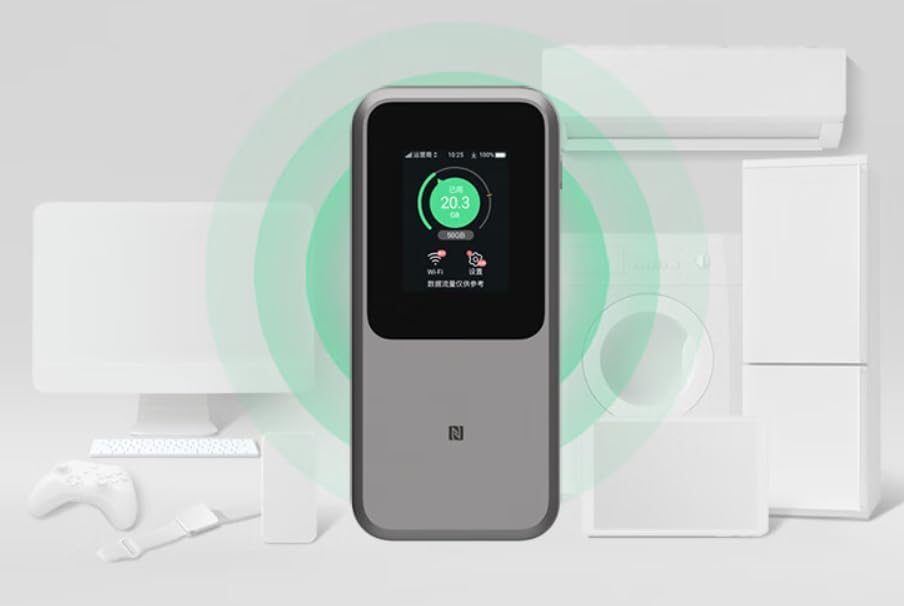
ภาพ: The ZTE U50 Pro 5G Portable WiFi Router actively broadcasting a Wi-Fi signal, demonstrating its ability to connect to various devices such as computers, mobile phones, and gaming consoles simultaneously.
2. การจัดการการตั้งค่า
- Via Touch Screen: Use the 2.4-inch touch screen to view network status, data usage, connected devices, and access quick settings.
- ทาง Web อินเทอร์เฟซการจัดการ: For advanced settings, connect a device to the router's Wi-Fi network and open a web browser. Enter the router's IP address (e.g., 192.168.0.1) in the address bar. Log in using the administrator username and password (default credentials are usually on the device or in the quick guide). Here you can configure Wi-Fi names, passwords, security settings, network modes, and more.
3. การชาร์จอุปกรณ์
- Connect the provided USB Type-C data cable to the charging port on the ZTE U50 Pro.
- เชื่อมต่อปลายสายอีกด้านหนึ่งเข้ากับอะแดปเตอร์ไฟ USB ที่ใช้งานร่วมกันได้ (ไม่รวมอยู่ด้วย) หรือพอร์ต USB ของคอมพิวเตอร์
- The device supports 27W fast charging. Use a compatible fast charger for optimal charging speed.
- ไฟแสดงสถานะแบตเตอรี่บนหน้าจอจะแสดงสถานะการชาร์จ
การซ่อมบำรุง
- การดูแลแบตเตอรี่ To prolong battery life, avoid exposing the device to extreme temperatures. For long-term storage, charge the battery to approximately 50% and store in a cool, dry place.
- การทำความสะอาด: ใช้ผ้านุ่มและแห้งเช็ดทำความสะอาดอุปกรณ์ ห้ามใช้น้ำยาทำความสะอาดหรือสเปรย์
- การอัปเดตซอฟต์แวร์: ตรวจสอบการอัปเดตเฟิร์มแวร์เป็นระยะผ่านทาง... web อินเทอร์เฟซการจัดการเพื่อให้มั่นใจถึงประสิทธิภาพและความปลอดภัยที่เหมาะสมที่สุด
การแก้ไขปัญหา
| ปัญหา | สาเหตุที่เป็นไปได้ | สารละลาย |
|---|---|---|
| ไม่มีการเชื่อมต่ออินเตอร์เน็ต | SIM card not inserted correctly, no network signal, data plan expired, incorrect APN settings. |
|
| ไม่สามารถเชื่อมต่อ Wi-Fi ได้ | Incorrect Wi-Fi password, Wi-Fi disabled, too many connected devices. |
|
| ความเร็วอินเตอร์เน็ตช้า | Weak signal, network congestion, distance from router, too many connected devices. |
|
| อุปกรณ์ไม่เปิดเครื่อง | แบตเตอรี่อ่อน, ที่ชาร์จ/สายเคเบิลชำรุด |
|
รีเซ็ตเป็นค่าโรงงาน
If the device experiences persistent issues, a factory reset may resolve them. This will erase all custom settings and restore the device to its original factory defaults. Refer to the Quick Guide or the web management interface for instructions on how to perform a factory reset.
ข้อมูลจำเพาะ
| ยี่ห้อ | แซดทีอี |
| ชื่อรุ่น | ยู50โปร |
| ระบบปฏิบัติการ | ไซโนส |
| เทคโนโลยีการเชื่อมต่อ | 5G, LTE |
| ไร้มาตรฐาน | 802.11ax (ไวไฟ 6) |
| ระดับย่านความถี่ | แบนด์คู่ (2.4 GHz และ 5 GHz) |
| Max Wi-Fi Rate | 3600 เมกะบิตต่อวินาที |
| อุปกรณ์ที่เชื่อมต่อสูงสุด | 64 |
| ความจุของแบตเตอรี่ | 10,000 mAh (ลิเธียมไออน) |
| การชาร์จไฟ | 27W Fast Charge (USB Type-C) |
| แสดง | หน้าจอสัมผัสขนาด 2.4 นิ้ว |
| ประเภทเสาอากาศ | ภายใน |
| ข้อแนะนำการใช้ | กิจกรรมกลางแจ้ง/ท่องเที่ยว |
| ส่วนประกอบที่รวมอยู่ | USB Type-C Data Cable, Quick Guide |
| ประเทศต้นกำเนิด | จีน |
ข้อมูลด้านความปลอดภัย
- อย่าให้เครื่องสัมผัสกับอุณหภูมิที่สูงหรือต่ำเกินไป แสงแดดโดยตรง หรือความชื้นสูง
- หลีกเลี่ยงการทำเครื่องตกหรือได้รับแรงกระแทกรุนแรง
- Use only approved accessories, such as the provided USB Type-C cable.
- อย่าพยายามถอดประกอบหรือดัดแปลงอุปกรณ์ การกระทำเช่นนี้จะทำให้การรับประกันเป็นโมฆะ
- เก็บอุปกรณ์ให้ห่างจากน้ำและของเหลวอื่นๆ
- กำจัดแบตเตอรี่และอุปกรณ์ตามระเบียบข้อบังคับท้องถิ่น
การรับประกันและการสนับสนุน
Information regarding specific warranty terms and conditions for the ZTE U50 Pro is typically provided with the product packaging or can be found on the manufacturer's official website. Please refer to the included Quick Guide for details on how to contact customer support for technical assistance or warranty claims.
For further assistance, please visit the official ZTE support webเว็บไซต์หรือติดต่อร้านค้าปลีกของคุณ


