1. บทนำ
ขอบคุณสำหรับการซื้อasing the DANFI AUDIO DF TE-2017 Vinyl Record Player. This manual provides essential information for the safe and correct operation of your new record player. Please read it thoroughly before use and retain it for future reference.
2. เนื้อหาบรรจุภัณฑ์
- DANFI AUDIO DF TE-2017 Vinyl Record Player
- อะแดปเตอร์ 45 RPM
- Power Cord & Adapter (100-240V~)
- เปลี่ยนเข็ม
- แผ่นรองกันลื่นสำหรับเครื่องเล่นแผ่นเสียง
- คู่มือผู้ใช้ (เอกสารนี้)
3. สินค้าหมดview
The DANFI AUDIO DF TE-2017 is a versatile 3-speed belt-drive turntable with built-in speakers, Bluetooth wireless playback, USB/SD recording, AUX input, and RCA output. It features a clear dust cover and a digital display for easy operation.

รูปที่ 1: ด้านหน้าและด้านหลัง View of the TE-2017 Record Player with Labeled Components. This image displays the turntable platter, spindle, 45 RPM adapter, tone arm lift lever, speed selection switch, auto stop on/off switch, tone arm lock, stylus, speakers, AUX input, Mode/TF/USB controls, LED display, RCA audio out, and power port.
4. การตั้งค่า
- การแกะกล่อง: นำเครื่องเล่นแผ่นเสียงและอุปกรณ์เสริมทั้งหมดออกจากบรรจุภัณฑ์อย่างระมัดระวัง เก็บรักษาบรรจุภัณฑ์ไว้สำหรับการขนส่งหรือจัดเก็บในอนาคต
- การติดตั้งฝาครอบกันฝุ่น: Slide the clear plastic dust cover into the brackets located at the rear of the turntable. Ensure it is securely seated.
- การเชื่อมต่อไฟฟ้า: Connect the power adapter to the DC 5V/1A port on the rear of the record player and plug it into a wall outlet.
- การจัดวาง: Place the record player on a stable, level surface away from direct sunlight, heat sources, and excessive dust or vibrations.
- การป้องกันสไตลัส: Remove the stylus protective cap before playing a record.
5. คู่มือการใช้งาน
5.1 การเล่นแผ่นเสียงไวนิล
- เปิดเครื่อง: Turn the ON/OFF/VOLUME knob clockwise to power on the unit and adjust the volume.
- เลือกโหมด: Set the PH/BT/AUX/USB switch to 'PH' (Phono) mode.
- บันทึกสถานที่: Place a vinyl record on the turntable platter. If playing a 7-inch single, use the included 45 RPM adapter.
- เลือกความเร็ว: Adjust the 3-speed selection switch (33, 45, 78 RPM) to match the record's speed.
- Auto-Stop (Optional): If desired, set the Auto Stop ON/OFF switch to 'ON'. The turntable will stop spinning automatically when the record finishes.
- ตำแหน่งแขนโทนเสียง: Gently lift the tone arm using the lift lever. Move the tone arm over the desired track of the record.
- แขนโทนเสียงส่วนล่าง: Slowly lower the tone arm onto the record using the lift lever. The music will begin to play.
- ปรับระดับเสียง: Use the PITCH control knob to fine-tune the playback speed if necessary.
- สิ้นสุดการเล่น: At the end of the record, lift the tone arm, return it to its rest, and lower the lift lever. Turn the ON/OFF/VOLUME knob counter-clockwise to power off.
Video 1: Demonstration of Vinyl Playback Mode on an LP&No.1 Turntable with Built-in Speakers. This video illustrates how to place a record, position the tone arm, and initiate playback, highlighting the smooth operation of the turntable.
5.2 การเล่นแบบไร้สายผ่านบลูทูธ
- เปิดเครื่อง: หมุนปุ่มเปิด/ปิด/ปรับระดับเสียงตามเข็มนาฬิกาเพื่อเปิดเครื่อง
- เลือกโหมด: Set the PH/BT/AUX/USB switch to 'BT' (Bluetooth) mode. The digital display will show 'BT' and the indicator light will blink blue, indicating pairing mode.
- จับคู่อุปกรณ์: On your smartphone, tablet, or other Bluetooth-enabled device, search for 'Turntable' in the Bluetooth settings and select it to pair. Once connected, the indicator light will stop blinking and remain solid blue.
- เล่นเพลง: เริ่มเล่นเพลงบนอุปกรณ์ที่เชื่อมต่อไว้ เสียงจะถูกส่งผ่านลำโพงในตัวของเครื่องเล่นแผ่นเสียง
- ปรับระดับเสียง: Control the volume using the ON/OFF/VOLUME knob on the record player or your paired device.
วิดีโอ 2: จบview of Record Player with Speakers, demonstrating Bluetooth connectivity. This video shows how to switch to Bluetooth mode, pair a mobile device, and stream audio wirelessly to the turntable's speakers.
5.3 USB/SD Recording and Playback
- ใส่ USB/SD: Insert a USB flash drive or SD card into the corresponding port on the front panel.
- เลือกโหมด: Set the PH/BT/AUX/USB switch to 'USB' mode. The digital display will show 'USB'.
- การเล่นซ้ำ: The unit will automatically detect and play audio files from the USB/SD device. Use the control buttons (Previous Song, Pause & Play, Next Song) to navigate tracks.
- Recording Vinyl to USB/SD:
- Start playing a vinyl record as described in section 5.1.
- Press the 'REC' button (if available, typically near the USB/SD slot) to begin recording. The indicator light may change to confirm recording is active.
- Press 'REC' again to stop recording. The recorded audio will be saved as an MP3 file on the USB/SD device.
- Use the 'SPLIT' button (if available) to create separate tracks during recording.
Video 3: USB Playback & Vinyl to MP3 Recording demonstration. This video shows how to insert a USB drive, initiate recording from vinyl, and manage recorded files, highlighting the digital conversion feature.
อินพุต AUX 5.4 ช่อง
- เปิดเครื่อง: หมุนปุ่มเปิด/ปิด/ปรับระดับเสียงตามเข็มนาฬิกาเพื่อเปิดเครื่อง
- เลือกโหมด: Set the PH/BT/AUX/USB switch to 'AUX' mode.
- เชื่อมต่ออุปกรณ์: Connect an external audio device (e.g., MP3 player, CD player) to the AUX IN port on the rear of the record player using a 3.5mm audio cable (not included).
- เล่นเสียง: เล่นไฟล์เสียงจากอุปกรณ์ภายนอกของคุณ เสียงจะถูกส่งออกทางลำโพงของเครื่องเล่นแผ่นเสียง
- ปรับระดับเสียง: Control the volume using the ON/OFF/VOLUME knob on the record player or the external device.
5.5 เอาต์พุตอาร์ซีเอ
- เชื่อมต่อลำโพงภายนอก: เชื่อมต่อลำโพงภายนอกที่มีกำลังไฟ หรือ amplifier to the RCA OUT ports (red for right, white for left) on the rear of the record player using an RCA cable (not included).
- เล่นเสียง: Play a vinyl record or stream via Bluetooth/AUX. The audio will be routed through the connected external audio system.
- ปรับระดับเสียง: Control the volume primarily through your external audio system. The record player's volume knob may still affect the output level.
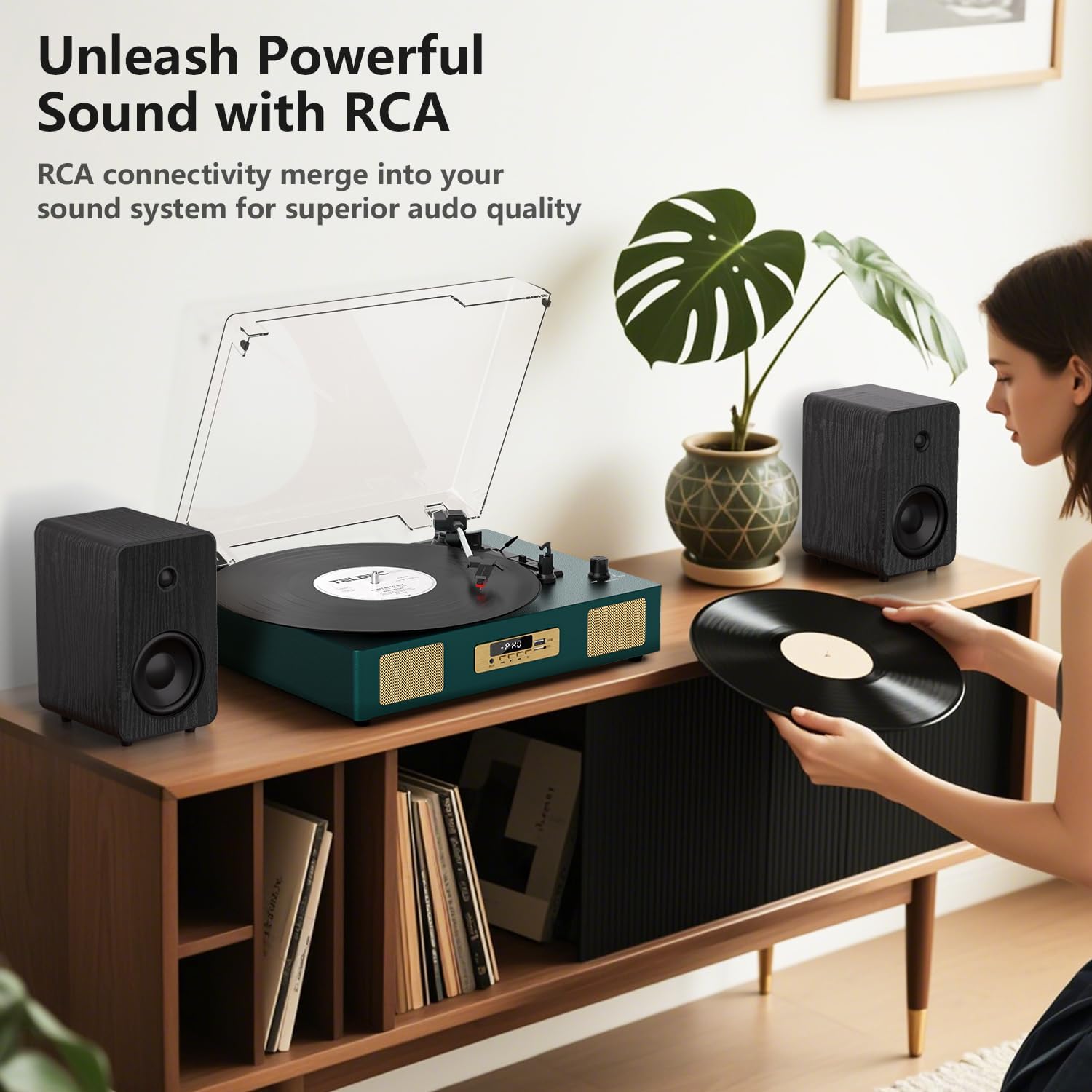
รูปที่ 2: ด้านหลัง view of the TE-2017 Record Player, illustrating the RCA output ports connected to external speakers for enhanced audio quality.
แจ็คหูฟัง 5.6
For private listening, plug 3.5mm headphones into the headphone jack located on the front panel. The built-in speakers will be muted automatically.
6. การบำรุงรักษา
- การทำความสะอาดสไตลัส: Use a soft brush (not included) to gently clean the stylus from back to front. Do not use excessive force.
- การทำความสะอาดเครื่องเล่นแผ่นเสียง: เช็ดตัวเครื่องด้วยผ้านุ่มและแห้ง ห้ามใช้น้ำยาทำความสะอาดที่มีฤทธิ์กัดกร่อนหรือตัวทำละลาย
- ฝาปิดป้องกันฝุ่น: ควรปิดฝาครอบกันฝุ่นเมื่อไม่ใช้งาน เพื่อป้องกันเครื่องเล่นแผ่นเสียงจากฝุ่นและเศษสิ่งสกปรก
- การดูแลรักษาเอกสาร: Handle records by their edges. Store them vertically in their sleeves to prevent warping and dust accumulation.
7 การแก้ไขปัญหา
| ปัญหา | สาเหตุที่เป็นไปได้ | สารละลาย |
|---|---|---|
| ไม่มีไฟฟ้า | ไม่ได้เชื่อมต่ออะแดปเตอร์ไฟหรือเต้ารับไฟฟ้าชำรุด | ตรวจสอบให้แน่ใจว่าอะแดปเตอร์ไฟฟ้าเชื่อมต่ออย่างแน่นหนาและเต้ารับใช้งานได้ |
| ไม่มีเสียงออกจากลำโพง | ระดับเสียงเบาเกินไป; เลือกโหมดไม่ถูกต้อง; ต่อหูฟังแล้ว | Increase volume; select correct mode (PH, BT, AUX, USB); disconnect headphones. |
| เครื่องเล่นแผ่นเสียงไม่หมุน | Power off; belt dislodged; auto-stop engaged prematurely. | Ensure power is on; check belt (refer to maintenance); try disabling auto-stop. |
| เสียงกระตุกหรือเสียงผิดเพี้ยน | แผ่นเสียงสกปรกหรือชำรุด; หัวเข็มสกปรกหรือสึกหรอ; เครื่องเล่นแผ่นเสียงไม่อยู่ในระดับที่เหมาะสม | Clean record; clean or replace stylus; ensure turntable is on a level surface. |
| บลูทูธไม่จับคู่ | Incorrect mode; device too far; device already paired. | Ensure 'BT' mode is selected; move device closer; unpair from other devices. |
8. ข้อมูลจำเพาะ
- ยี่ห้อ: แดนฟี ออดิโอ DF
- แบบอย่าง: TE-2017
- ความเร็วแผ่นเสียง: 33 1/3, 45, 78 รอบต่อนาที
- ประเภทไดรฟ์: สายพานไดรฟ์
- การเชื่อมต่อ: Bluetooth Receiver, USB, SD Card, AUX Input, RCA Output
- คุณสมบัติพิเศษ: Digital Recorder, WAV Converter, Digital Display, Pitch Control, Auto-Stop
- แหล่งพลังงาน: ใช้ไฟฟ้าแบบมีสาย (DC 5V/1A)
- Signal-to-noise ratio (dB): 78 เดซิเบล
- ขนาดสินค้า : 35.56 x 27.94 x 12.45 ซม. (14 x 11 x 4.9 นิ้ว)
- น้ำหนัก: 3.07 กก. (6.77 ปอนด์)
9. การรับประกันและการสนับสนุน
For warranty information or technical support, please refer to the contact details provided with your purchase or visit the official DANFI AUDIO DF webไซต์ เก็บหลักฐานการซื้อของคุณไว้เพื่อใช้ในกรณีเรียกร้องการรับประกัน