1. บทนำ
The SIGMA ROX 2.0 Endurance is a versatile GPS bike computer designed for cyclists seeking reliable performance tracking and navigation. It offers a large, easy-to-read display and intuitive operation, making it an ideal companion for various cycling activities. This manual provides detailed instructions for setup, operation, maintenance, and troubleshooting to ensure optimal use of your device.
2. คู่มือการติดตั้ง
2.1 เนื้อหาบรรจุภัณฑ์
Upon unboxing your SIGMA ROX 2.0 Endurance, please verify that all components are present:
- SIGMA ROX 2.0 Endurance GPS Bike Computer
- OVERCLAMP Butler Mount
- สายชาร์จ USB-C
- คู่มือเริ่มต้นอย่างรวดเร็ว

Figure 2.1: SIGMA ROX 2.0 Endurance package contents.
2.2 การชาร์จอุปกรณ์
Before initial use, fully charge your ROX 2.0 Endurance. Connect the supplied USB-C cable to the device's charging port and a compatible USB power source. A full charge provides up to 26 hours of battery life.

Figure 2.2: The SIGMA ROX 2.0 Endurance highlighting its 26-hour battery life.
2.3 Mounting the Device (OVERCLAMP Butler)
The OVERCLAMP Butler mount provides a secure and optimal viewing position for your ROX 2.0 Endurance on your bicycle handlebars.
- Attach the OVERCLAMP Butler to your handlebar, ensuring a firm fit.
- Place the ROX 2.0 Endurance onto the mount and twist it clockwise until it clicks securely into place.


Figure 2.3: The OVERCLAMP Butler mount (left) and the ROX 2.0 Endurance mounted on a bicycle (right).
3. คู่มือการใช้งาน
3.1 เปิด/ปิดเครื่อง
To power on the device, press and hold the main button until the display illuminates. To power off, press and hold the main button again until the display turns off.
3.2 แสดงผลเกินview
The ROX 2.0 Endurance features a 2.0-inch LCD display that provides clear visibility of your cycling data.

รูปที่ 3.1 : ด้านหน้า view of the SIGMA ROX 2.0 Endurance display.
3.3 ฟังก์ชั่นพื้นฐาน
The device monitors essential cycling metrics in real-time:
- ความเร็ว: ความเร็วในการปั่นจักรยานปัจจุบัน
- ระยะทาง: Total distance covered during your ride.
- Training Time: Duration of your current activity.
3.4 ระบบนำทาง GPS
The ROX 2.0 Endurance offers intelligent navigation capabilities. Use the SIGMA Ride app to plan your routes:
- Open the SIGMA Ride app on your smartphone.
- Enter your destination address or select a point on the map.
- The device will guide you to your destination with clear turn-by-turn directions.
The navigation feature includes smart re-routing to ensure you stay on track even if you deviate from the planned route. It is also compatible with third-party applications such as Komoot and Strava for route planning and tracking.

Figure 3.2: Smartphone connectivity with the SIGMA Ride App for navigation.
3.5 การเชื่อมต่อจักรยานไฟฟ้า
The ROX 2.0 Endurance is compatible with ANT+ and BLE e-bike systems, allowing it to display crucial e-bike data directly on its screen:
- พิสัย: Estimated remaining distance.
- ระดับแบตเตอรี่: Current e-bike battery status.
- Support Level: Current assistance mode from your e-bike.
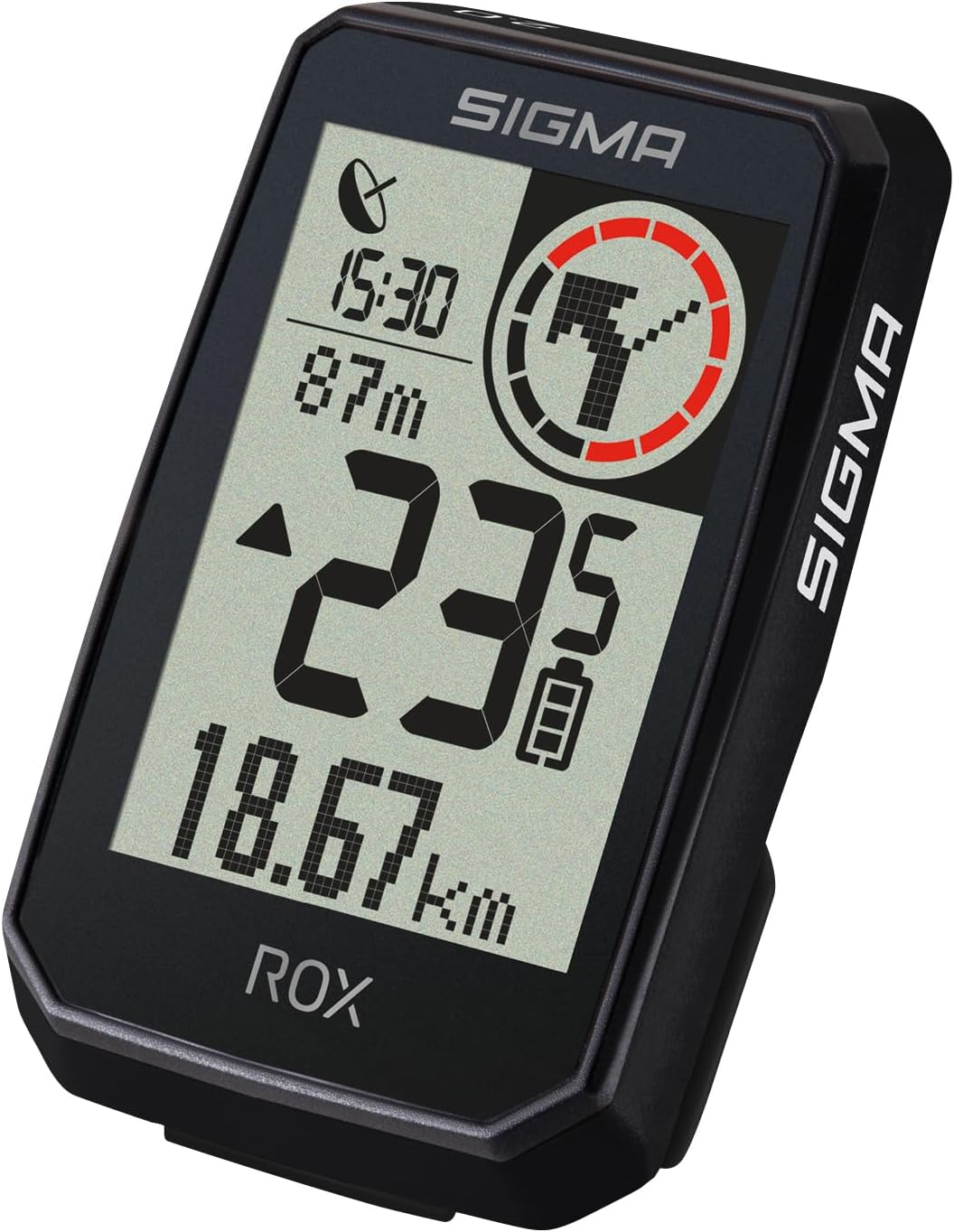
Figure 3.3: E-Bike data displayed on the ROX 2.0 Endurance.
3.6 แอป SIGMA RIDE
The free SIGMA RIDE app enhances your cycling experience by allowing you to track and analyze all your ride data on your smartphone. It also facilitates route planning and device settings management.
Download the app from:
4. การบำรุงรักษา
4.1 การทำความสะอาดเครื่อง
To maintain the device's appearance and functionality, clean it regularly. Use a soft, damp cloth to wipe the display and casing. Avoid abrasive cleaners or solvents, as these can damage the device. The device is IPX7 water-resistant, meaning it can withstand incidental exposure to water, but it should not be submerged.
4.2 พื้นที่จัดเก็บ
When not in use for extended periods, store the ROX 2.0 Endurance in a cool, dry place away from direct sunlight and extreme temperatures. Ensure the battery is partially charged (around 50%) before long-term storage to preserve battery health.
5 การแก้ไขปัญหา
5.1 ปัญหาทั่วไป
- อุปกรณ์ไม่เปิด: ตรวจสอบให้แน่ใจว่าอุปกรณ์ชาร์จแบตเตอรี่เต็มแล้ว หากปัญหายังคงอยู่ ให้ลองเชื่อมต่อกับแหล่งจ่ายไฟ USB อื่น
- ไม่ได้รับสัญญาณ GPS: ให้แน่ใจว่าคุณอยู่ในพื้นที่เปิดโล่งและมีน้ำใส view of the sky. It may take a few minutes for the device to acquire a GPS signal upon startup.
- ความเร็ว/ระยะทางไม่ถูกต้อง: Verify that the device is securely mounted and that GPS is active. Ensure no obstructions are blocking the GPS signal.
- Connectivity issues with SIGMA RIDE app: Ensure Bluetooth is enabled on your smartphone and the device. Restart both the device and the app, then attempt to reconnect.
5.2 การรีเซ็ตอุปกรณ์
If the device becomes unresponsive or exhibits unusual behavior, a soft reset may resolve the issue. Refer to the Quick Start Guide for specific instructions on performing a soft reset for your ROX 2.0 Endurance.
6. ข้อมูลจำเพาะทางเทคนิค
| คุณสมบัติ | ข้อมูลจำเพาะ |
|---|---|
| หมายเลขรุ่น | 01054 |
| สี | สีดำ |
| ขนาดจอแสดงผล | 2.0 นิ้ว |
| ประเภทจอภาพ | จอแอลซีดี |
| วัสดุหลัก | พลาสติก |
| อายุการใช้งานแบตเตอรี่ | นานถึง 26 ชั่วโมง |
| องค์ประกอบของแบตเตอรี่ | ลิเธียมไอออน |
| เทคโนโลยีการเชื่อมต่อ | บลูทูธ, ANT+ |
| ประเภทเซนเซอร์ | GPS sensor, Speed sensor |
| ความต้านทานต่อน้ำ | IPX7 |
| ขนาด (อุปกรณ์) | 44.9 x 73.6 x 18.4 มม. |
| น้ำหนัก (แพ็คเกจ) | น้ำหนักประมาณ 220 กรัม |
หมายเหตุ: ข้อมูลจำเพาะอาจมีการเปลี่ยนแปลงได้โดยไม่ต้องแจ้งให้ทราบล่วงหน้า
7. การรับประกันและการสนับสนุน
For warranty information and technical support, please refer to the official Sigma Sport webหรือติดต่อฝ่ายบริการลูกค้า เก็บหลักฐานการซื้อไว้เพื่อใช้ในการเคลมประกัน
แหล่งข้อมูลออนไลน์:
For specific inquiries, please contact your local Sigma Sport distributor or retailer.


