การแนะนำ
Thank you for choosing the Edifier Active Noise Cancelling Headphones ES850NB. These over-ear Bluetooth headphones are designed to provide an immersive audio experience with advanced features such as Hi-Res Audio certification, extended playtime, fast charging, and clear call quality. This manual will guide you through the setup, operation, and maintenance of your new headphones to ensure optimal performance and longevity.
มีอะไรอยู่ในกล่อง
กรุณาตรวจสอบเนื้อหาในแพ็คเกจของคุณเพื่อให้แน่ใจว่ามีสินค้าครบทั้งหมด:
- Edifier ES850NB Headphones
- เคสชาร์จแบบไร้สาย
- คู่มือการใช้งาน
- กระเป๋าเดินทาง
- สายชาร์จ Type-C
- คำแนะนำด้านความปลอดภัยที่สำคัญ

Image: The contents of the Edifier ES850NB package, showing the headphones, charging case, and accompanying accessories.
สินค้าเกินview
คุณสมบัติหลัก
- Immersive Hi-Res Audio: Features 40mm titanium-coated drivers and supports LDAC/AAC/SBC codecs for superb Hi-Res Audio and Hi-Res Audio Wireless.
- Upgraded Hybrid Active Noise Cancellation: Blocks up to -45dB of ambient noise with multiple ANC modes (high, medium, wind reduction, ambient sound).
- อายุการใช้งานแบตเตอรี่ที่ยาวนานและการชาร์จเร็ว: Up to 92 hours of playtime (ANC off) or 53 hours (ANC on). A 15-minute charge provides up to 11.5 hours of playback (ANC off).
- Clear Calls & Versatile Connectivity: Built-in mics with AI noise cancellation for crystal-clear calls. Supports Bluetooth 5.4 and wired connection.
- ความสบายตลอดวัน: Designed with skin-friendly leather ear cushions, an ergonomic steel headband, and a lightweight 260g build.
การควบคุมและตัวบ่งชี้
The Edifier ES850NB headphones feature intuitive controls located on the earcups for easy management of audio playback, calls, and noise cancellation modes.

ภาพ: รายละเอียด view of the headphone controls, including volume up/down, power, play/pause, call management, and ANC mode switch.
- เพิ่มระดับเสียง (+): Single press to increase volume. Press and hold for next track.
- ลดเสียงลง (-): Single press to decrease volume. Press and hold for previous track.
- Power ON/OFF / Play/Pause: Press and hold for power. Single press for play/pause.
- การจัดการการโทร: Single press to answer/end a call. Double press to reject a call.
- ผู้ช่วยเสียง: Double press to activate voice assistant.
- ANC Modes Switch / Bluetooth Pairing: Single press to cycle through ANC modes. Press and hold to initiate Bluetooth pairing.
การตั้งค่า
การชาร์จหูฟัง
Before first use, fully charge your headphones. Connect the provided Type-C charging cable to the charging port on the headphones and the other end to a USB power source. The indicator light will show charging status. A full charge provides up to 92 hours of playback (ANC off). A quick 15-minute charge can provide up to 11.5 hours of playback (ANC off).
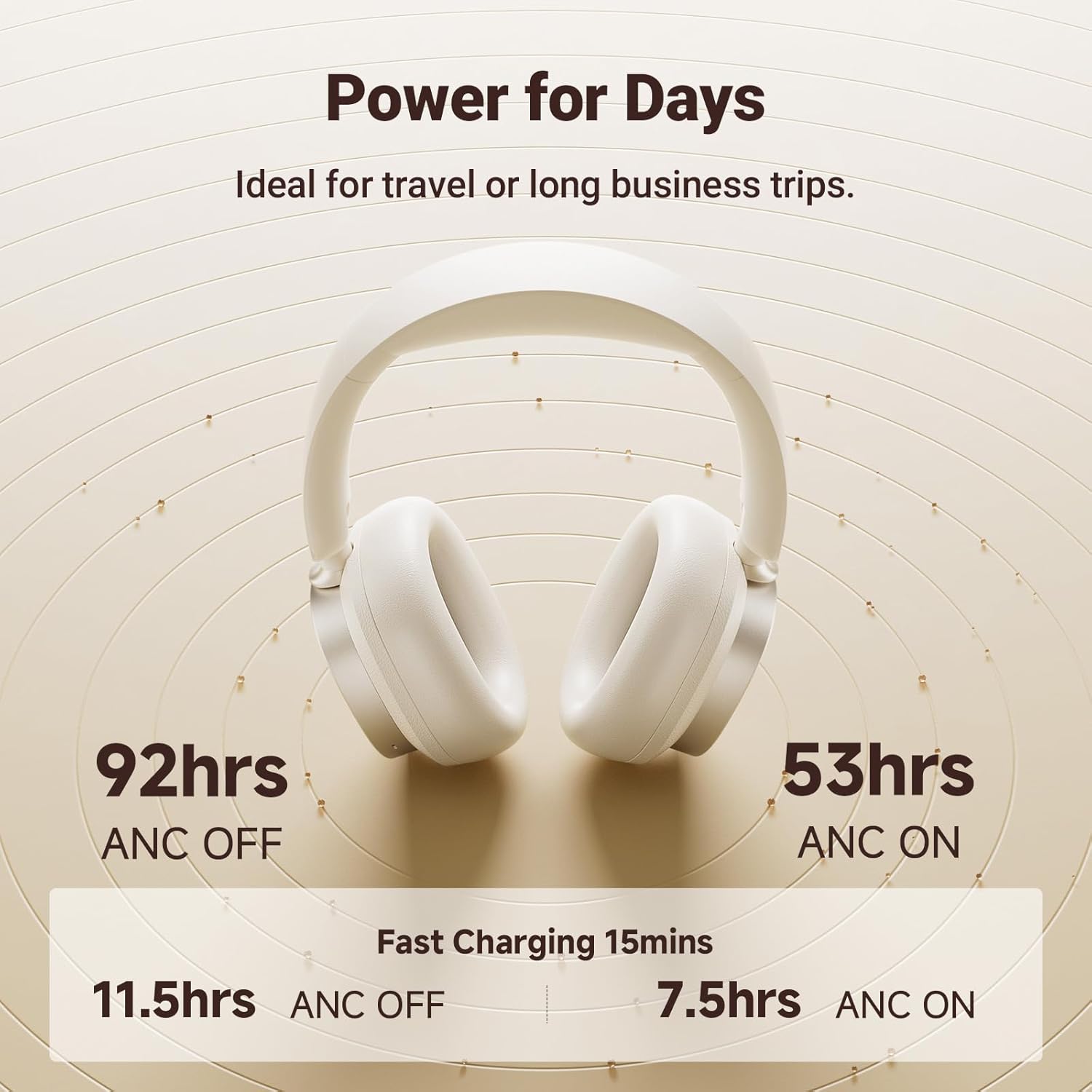
Image: Visual representation of the impressive battery life and fast charging capabilities of the headphones.
จับคู่บลูทู ธ
- ตรวจสอบให้แน่ใจว่าหูฟังปิดอยู่
- Press and hold the ANC/Bluetooth pairing button until the indicator light flashes rapidly, indicating pairing mode.
- On your device (smartphone, tablet, computer), enable Bluetooth and search for "Edifier ES850NB" in the list of available devices.
- Select "Edifier ES850NB" to connect. Once connected, the indicator light will turn solid blue or off, depending on the model.
- The headphones support multipoint connection, allowing seamless switching between two paired Bluetooth devices.
Video: An official product video demonstrating the Edifier Active Noise Cancelling Headphones, highlighting features like multipoint Bluetooth connectivity and comfort.
คำแนะนำการใช้งาน
การตัดเสียงรบกวนแบบแอคทีฟ (ANC)
The ES850NB headphones feature advanced hybrid active noise cancellation. Press the ANC button to cycle through different modes:
- การตัดเสียงรบกวนสูง: เหมาะสำหรับสภาพแวดล้อมที่มีเสียงดัง เช่น บนเครื่องบิน รถไฟใต้ดิน หรือรถโดยสารประจำทาง
- การตัดเสียงรบกวนระดับกลาง: เหมาะสำหรับสำนักงาน ร้านกาแฟ หรือสวนสาธารณะ
- การลดลม: ช่วยลดเสียงลมในระหว่างกิจกรรมกลางแจ้ง
- เสียงรอบข้าง: ช่วยให้คุณได้ยินเสียงรอบข้างไปพร้อมๆ กับการฟังเพลง

Image: A visual guide to the various Active Noise Cancellation modes and their recommended uses.
Sound Effects and Personalization
Customize your listening experience with three distinct sound effects:
- โหมดเพลง: ออกแบบมาเพื่อการฟังเพลงทั่วไปโดยเฉพาะ
- โหมดเกม: Provides 0.08s low latency for immersive gaming audio.
- เสียงเชิงพื้นที่: Creates a lifelike, surround-sound audio experience.
These modes can be selected via the Edifier Connect app, which also allows for EQ customization and firmware upgrades.

Image: The headphones emphasizing their Hi-Res Audio capabilities for an immersive sound experience.
การโทรออกและรับสาย
The built-in microphones with AI noise cancellation ensure crystal-clear calls. Use the multi-function button for call management:
- Single press to answer an incoming call.
- Single press to end an active call.
- Double press to reject an incoming call.

Image: Demonstrating the clear hands-free call feature of the headphones.
Wired and Wireless Use
The ES850NB headphones offer both wireless Bluetooth 5.4 connectivity and a wired option for versatile use. Simply connect the included USB-C to USB-A cable for a wired connection to compatible devices.

Image: Comparison showing the flexibility of using the headphones wirelessly via Bluetooth or with a wired connection.
Touch-to-Chat Functionality
For quick conversations without removing your headphones, simply touch and hold the right ear cup. This action will pause your audio and activate ambient sound mode, allowing you to hear your surroundings clearly. Release to resume playback instantly.
การซ่อมบำรุง
- การทำความสะอาด: ใช้ผ้านุ่มและแห้งเช็ดทำความสะอาดหูฟัง ห้ามใช้น้ำยาทำความสะอาดหรือสารละลายที่มีฤทธิ์กัดกร่อน
- พื้นที่จัดเก็บ: When not in use, store the headphones in the provided travel bag or charging case to protect them from dust and damage.
- การดูแลแบตเตอรี่ เพื่อยืดอายุการใช้งานแบตเตอรี่ ควรหลีกเลี่ยงการใช้หูฟังจนหมดบ่อย ควรชาร์จหูฟังเป็นประจำ แม้จะไม่ได้ใช้งานเป็นเวลานานก็ตาม
- อุณหภูมิ: ควรหลีกเลี่ยงการนำหูฟังไปวางไว้ในที่ที่มีอุณหภูมิสูงหรือต่ำเกินไป หรือมีความชื้นสูง
การแก้ไขปัญหา
| ปัญหา | สาเหตุที่เป็นไปได้ | สารละลาย |
|---|---|---|
| ไม่มีเสียงออกจากหูฟัง | Headphones not powered on; Not paired; Volume too low; Device issue. | Ensure headphones are on. Re-pair with device. Increase headphone and device volume. Test with another device. |
| ไม่สามารถจับคู่กับอุปกรณ์ได้ | Headphones not in pairing mode; Device Bluetooth off; Too many paired devices. | Put headphones in pairing mode. Ensure device Bluetooth is on. Clear old Bluetooth connections on device. |
| คุณภาพเสียงไม่ดี | Out of Bluetooth range; Interference; Low battery. | Move closer to the device. Avoid strong Wi-Fi or other wireless signals. Charge headphones. |
| ANC ไม่มีประสิทธิภาพ | Incorrect ANC mode; Poor fit. | Cycle through ANC modes. Adjust headphones for a snug fit over your ears. |
ข้อมูลจำเพาะ
| คุณสมบัติ | รายละเอียด |
|---|---|
| แบบอย่าง | ES850NB |
| เวอร์ชันบลูทูธ | 5.4 |
| ตัวแปลงสัญญาณเสียง | แอลดีเอซี เอเอซี เอสบีซี |
| ช่วงบลูทูธ | ประมาณ 10m |
| ระดับความดันเสียง | 91 ± 3 เดซิเบล (เอ) |
| การตอบสนองความถี่ | 20เฮิรตซ์-40กิโลเฮิรตซ์ |
| อายุการใช้งานแบตเตอรี่ (ปิด ANC) | ประมาณ 92 ชั่วโมง |
| อายุการใช้งานแบตเตอรี่ (เปิด ANC) | ประมาณ 53 ชั่วโมง |
| ป้อนข้อมูล | 5V=1A |
| น้ำหนักสินค้า | 1.5 ปอนด์ (ประมาณ 260 กรัม) |
| การวางตำแหน่งหู | ครอบหู |
| การควบคุมเสียงรบกวน | ระบบตัดเสียงรบกวนแบบแอคทีฟ |
การรับประกันและการสนับสนุน
ผลิตภัณฑ์ของ Edifier มาพร้อมกับการรับประกันจากผู้ผลิตตามมาตรฐาน สำหรับข้อมูลการรับประกันโดยละเอียด การสนับสนุนทางเทคนิค หรือสอบถามเกี่ยวกับการบริการ โปรดเยี่ยมชมเว็บไซต์อย่างเป็นทางการของ Edifier webไซต์หรือติดต่อฝ่ายสนับสนุนลูกค้าโดยตรง
บรรณาธิการอย่างเป็นทางการ Webเว็บไซต์: www.edifier.com


