การแนะนำ
Thank you for choosing the SONICAKE Sprint QAM-15 Electric Guitar Amplifier. This portable 15-watt combo amplifier is designed for practice, travel, and small gigs, offering versatile tone control and essential connectivity. This manual provides detailed instructions to help you get the most out of your ampชีวิต.
คุณสมบัติหลัก:
- Portable & Lightweight Design (approx. 7.45 lbs, 11.5"x11.5"x4.5")
- Dual-Channel Versatility (Clean and Overdrive)
- Enhanced Connectivity (3.5mm Headphone Output, 3.5mm AUX Input)
- Professional Sound Control (3-Band EQ: Treble, Mid, Bass, Gain, Volume)
- Closed-Back Design for High-Quality Audio Output
คำแนะนำเพื่อความปลอดภัย
Please read and understand these safety instructions before operating your ampเครื่องขยายเสียง เก็บคู่มือนี้ไว้เพื่อใช้อ้างอิงในอนาคต
- แหล่งพลังงาน: เชื่อมต่อ ampขยายสัญญาณเฉพาะตามแรงดันไฟฟ้าที่กำหนดเท่านั้นtage ตามที่ระบุไว้บนหน่วย
- การระบายอากาศ : อย่าปิดกั้นช่องระบายอากาศใดๆ ตรวจสอบให้แน่ใจว่ามีอากาศถ่ายเทเพียงพอรอบๆ amplifier เพื่อป้องกันความร้อนสูงเกินไป
- น้ำและความชื้น: อย่าเปิดเผย amplifier to rain, moisture, or any liquids. Do not place objects filled with liquids on the ampชีวิต.
- แหล่งความร้อน: เก็บรักษาไว้ ampควรวางเครื่องขยายเสียงให้ห่างจากแหล่งความร้อน เช่น เครื่องทำความร้อน ช่องระบายความร้อน เตา หรืออุปกรณ์อื่นๆ (รวมถึง) ampเครื่องให้ความร้อน) ที่ผลิตความร้อน
- การทำความสะอาด: เช็ดทำความสะอาดด้วยผ้าแห้งเท่านั้น หลีกเลี่ยงการใช้น้ำยาทำความสะอาดหรือสเปรย์กระป๋อง
- การบริการ: อย่าพยายามให้บริการผลิตภัณฑ์นี้ด้วยตนเอง ส่งต่อการบริการทั้งหมดไปยังช่างบริการที่ผ่านการรับรอง
- สาย: ปกป้องสายไฟไม่ให้ถูกเหยียบหรือถูกหนีบ โดยเฉพาะที่ปลั๊ก เต้ารับไฟฟ้า และจุดที่สายไฟออกจากเครื่อง
สินค้าเกินview

ด้านหน้า view of the SONICAKE Sprint QAM-15 Electric Guitar Ampเครื่องแสดงasinด้วยการออกแบบที่กะทัดรัดและแผงควบคุม
คุณสมบัติของแผงควบคุม:

รายละเอียด view ของ amplifier's control panel, highlighting each knob and input for user reference.
- อินพุต: 1/4" (6.35mm) jack for connecting your electric guitar.
- ได้รับ: ควบคุมปริมาณการพรีamplification or distortion. Higher settings increase saturation.
- ปุ่ม OD (Overdrive): Toggles between the clean channel and the overdrive channel. Press in for overdrive, out for clean.
- VOL (ปริมาณ): ปรับระดับเสียงโดยรวมของเอาต์พุต ampชีวิต.
- TRE (เทรเบิล): ปรับการตอบสนองความถี่สูงของ ampชีวิต.
- MID (Middle): ปรับการตอบสนองความถี่ช่วงกลางของ ampชีวิต.
- เบส: ปรับการตอบสนองความถี่ต่ำของ ampชีวิต.
- AUX (Auxiliary) Input: 3.5mm jack for connecting external audio devices (e.g., MP3 player, phone) to play along with backing tracks.
- PHONES (Headphone Output): 3.5mm jack for connecting headphones for silent practice. Mutes the main speaker when in use.
- สวิตช์เพาเวอร์: เปลี่ยนเป็น amplifier เปิดหรือปิด
- POWER Indicator LED: สว่างขึ้นเมื่อ ampไฟแสดงสถานะเปิดอยู่
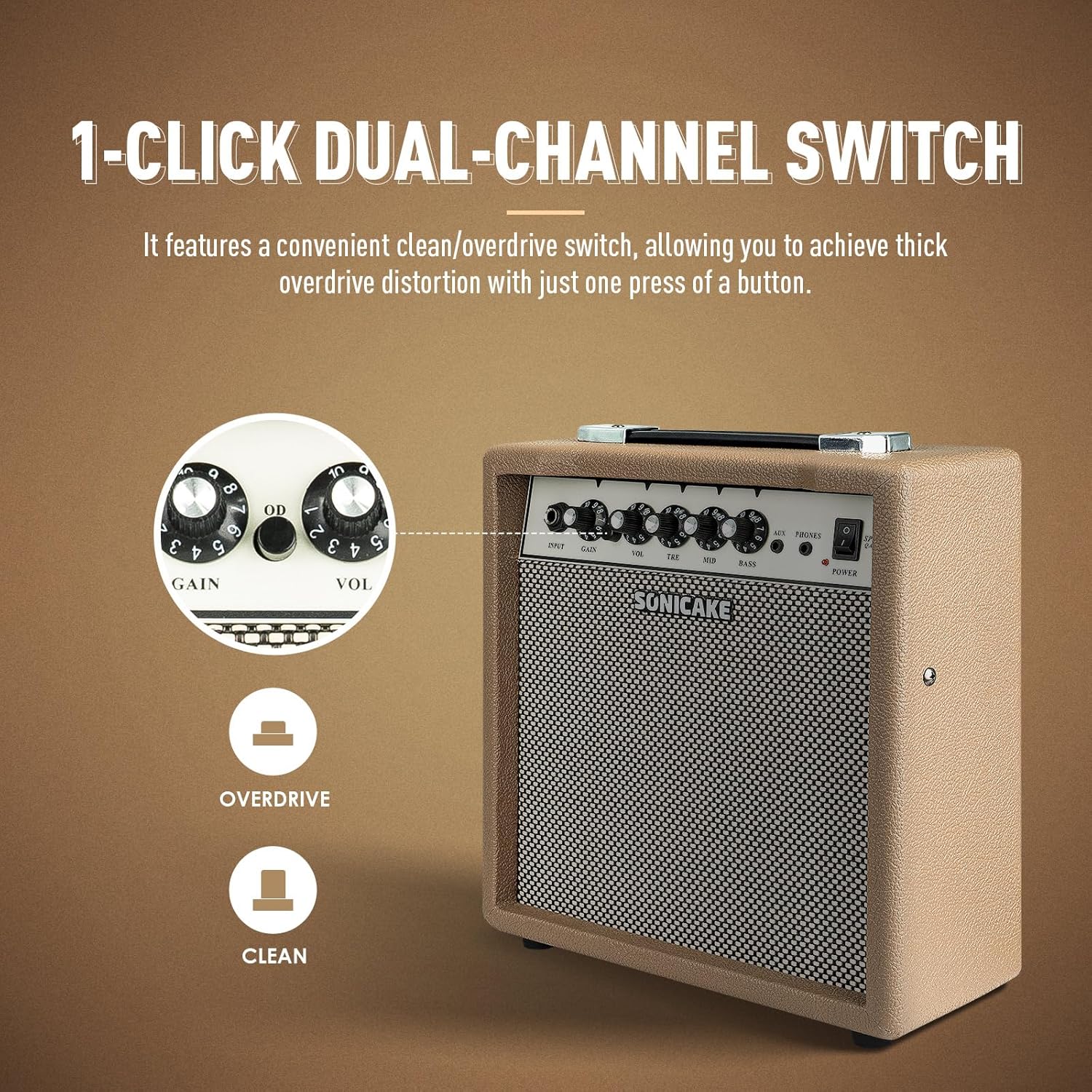
The OD button allows for instant switching between clean and overdrive tones.
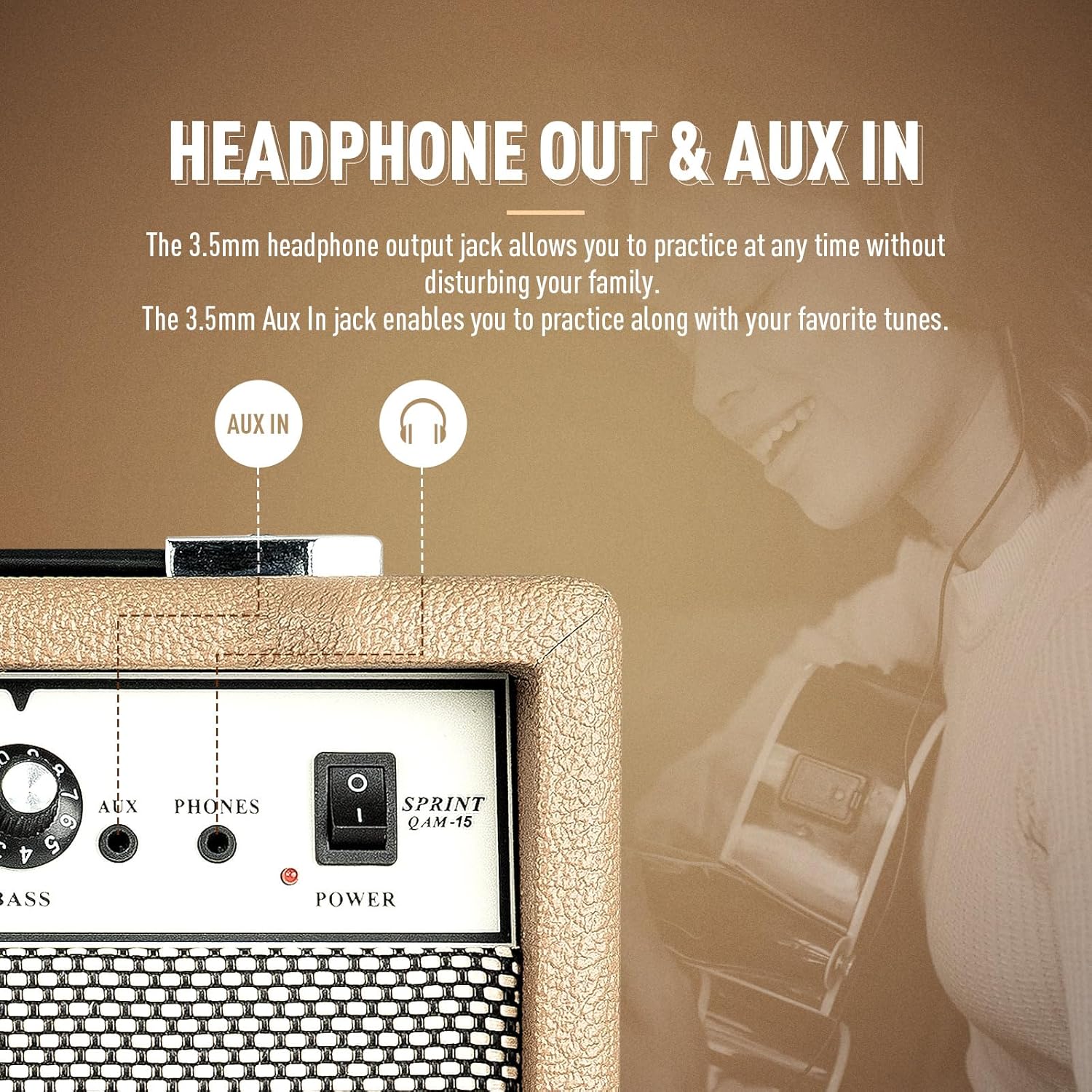
การ amplifier features dedicated AUX In and Headphone Out jacks for versatile practice options.
การตั้งค่า
- การแกะกล่อง: นำไฟล์ ampนำเครื่องขยายเสียงออกจากบรรจุภัณฑ์ ตรวจสอบดูว่ามีร่องรอยความเสียหายหรือไม่
- การจัดวาง: วาง amplifier on a stable, flat surface. Ensure there is adequate space around the unit for ventilation.
- การเชื่อมต่อไฟฟ้า: ต่อสายไฟที่ให้มาเข้ากับ amplifier's power input jack and then to a suitable electrical outlet. Ensure the power switch on the amplifier is in the 'OFF' position before connecting to power.
- การเชื่อมต่อกีตาร์: Connect your electric guitar to the 'INPUT' jack on the amplifier's front panel using a standard 1/4" (6.35mm) instrument cable.
- การตั้งค่าเริ่มต้น: Before powering on, set the 'VOL' knob to its minimum position (fully counter-clockwise) and the 'GAIN' knob to a low setting. Set the 'TRE', 'MID', and 'BASS' knobs to their center (12 o'clock) positions.
คำแนะนำการใช้งาน
การใช้งานพื้นฐาน:
- เปิดเครื่อง: Flip the 'POWER' switch to the 'ON' position. The power indicator LED will illuminate.
- การปรับระดับเสียง: Slowly turn the 'VOL' knob clockwise to increase the overall output volume to your desired level.
- หมดแรง: When finished, turn the 'VOL' knob to its minimum position, then flip the 'POWER' switch to the 'OFF' position.
การเลือกช่อง:
The Sprint QAM-15 features two distinct channels: Clean and Overdrive.
- ช่องที่สะอาด: With the 'OD' button in the 'OUT' position, the amplifier operates in the clean channel, providing a clear, uncolored tone.
- ช่อง Overdrive: Press the 'OD' button 'IN' to engage the overdrive channel. This adds distortion and sustain to your guitar tone. The 'GAIN' knob becomes more active in this mode.
Tone Control (3-Band EQ):
Use the 'TRE', 'MID', and 'BASS' knobs to shape your amplifier's tone:
- TRE (เทรเบิล): Adjusts the brightness and clarity of your sound. Turn clockwise for more sparkle, counter-clockwise for a warmer tone.
- MID (Middle): Controls the presence and punch of your sound. Adjust to cut through a mix or to create a scooped sound.
- เบส: Adjusts the low-end fullness and depth of your sound. Turn clockwise for a thicker, heavier tone, counter-clockwise for a tighter sound.
Gain Control:
The 'GAIN' knob controls the amount of signal sent to the amplifier's pre-amp stage. Higher gain settings result in more distortion and sustain, particularly noticeable in the overdrive channel. Experiment with the 'GAIN' and 'VOL' knobs to find your desired balance of distortion and overall loudness.
การเชื่อมต่อ:
- อินพุต AUX: Connect an external audio device (e.g., smartphone, tablet, MP3 player) to the 'AUX' input using a 3.5mm stereo cable. This allows you to play along with backing tracks or your favorite music through the amplifier's speaker. The volume of the AUX input is controlled by your external device.
- เอาท์พุตหูฟัง: Connect a pair of headphones to the 'PHONES' output using a 3.5mm stereo plug. This will mute the amplifier's main speaker, allowing for silent practice. The headphone volume is controlled by the amplifier's 'VOL' knob.
การซ่อมบำรุง
- การทำความสะอาด: เช็ดทำความสะอาดเป็นประจำ amplifier's exterior with a soft, dry, lint-free cloth. Do not use abrasive cleaners, solvents, or waxes.
- พื้นที่จัดเก็บ: เมื่อไม่ได้ใช้งานเป็นเวลานาน ให้เก็บ ampเก็บเครื่องขยายเสียงไว้ในที่แห้งและเย็น หลีกเลี่ยงแสงแดดโดยตรงและอุณหภูมิที่สูงหรือต่ำเกินไป
- การจัดการ: Always carry the amplifier using its handle. Avoid dropping or subjecting the unit to strong impacts.
- การระบายอากาศ : ให้แน่ใจว่า ampช่องระบายอากาศของเครื่องขยายเสียงต้องปราศจากฝุ่นและสิ่งสกปรก
การแก้ไขปัญหา
If you encounter issues with your SONICAKE Sprint QAM-15 ampเครื่องขยายสัญญาณ อ้างอิงถึงปัญหาทั่วไปและวิธีแก้ไขต่อไปนี้:
| ปัญหา | สาเหตุที่เป็นไปได้ | สารละลาย |
|---|---|---|
| ไม่มีเสียงจาก ampชีวิต. |
|
|
| เสียงผิดเพี้ยนหรือมีเสียงรบกวน |
|
|
| ช่องต่อ AUX ใช้งานไม่ได้ |
|
|
If the problem persists after trying these solutions, please contact SONICAKE customer support or a qualified technician.
ข้อมูลจำเพาะ

Dimensions of the SONICAKE Sprint QAM-15 ampชีวิต.
- แบบอย่าง: คิวเอเอ็ม-15
- เอาท์พุต วัดtage: 15 วัตต์
- น้ำหนักสินค้า: ประมาณ 7.94 ปอนด์ (3.6 กก.)
- ขนาดสินค้า : 4.53 x 11.42 x 11.42 นิ้ว (11.5 x 29 x 29 ซม.)
- อุปกรณ์ที่รองรับ: กีตาร์ไฟฟ้า
- ประเภทวัสดุ : พลาสติก
- สี: สีเบจ
การรับประกันและการสนับสนุน
For detailed warranty information, please refer to the warranty card included with your product or visit the official SONICAKE webไซต์นี้ โปรดเก็บหลักฐานการซื้อไว้เพื่อใช้ยืนยันการรับประกัน
For technical support, product registration, or further inquiries, please visit the official SONICAKE webหรือติดต่อฝ่ายบริการลูกค้าผ่านข้อมูลติดต่อที่ให้ไว้บนไซต์ webเว็บไซต์.


