1. บทนำและผลิตภัณฑ์view
The GOOLOO A2 is a versatile 5-in-1 portable device designed for roadside emergencies and outdoor activities. It integrates a powerful car jump starter, a high-efficiency tire inflator, an SOS light, a bright LED illumination, and a mobile device charger. This manual provides detailed instructions for safe and effective use of your GOOLOO A2.

Image: The GOOLOO A2 unit, showcasing its compact design, integrated display, control buttons, jump starter ports, and air hose connection. Various air nozzles and a USB-C cable are also visible.
คุณสมบัติที่สำคัญ ได้แก่:
- High-Efficient Jump Starter: 2500A peak current, capable of jump-starting vehicles with up to 8.0L gas or 6.0L diesel engines.
- Upgraded 150 PSI Cordless Air Compressor: Features smart preset auto shut-off and a turbocharged 35L/Min inflation rate for quick tire inflation.
- Emergency Lifesaver: Equipped with a bright LED light offering steady, SOS, and strobe modes, and functions as a power bank for mobile devices.
- คุณสมบัติด้านความปลอดภัย: Incorporates 10 built-in intelligent safety protections, including spark-proof technology and reverse polarity protection.
- การออกแบบพกพา: Compact and lightweight for easy storage and transport.
2. เนื้อหาบรรจุภัณฑ์
โปรดตรวจสอบว่าสินค้าทั้งหมดมีอยู่ในแพ็คเกจของคุณ:
- 1 x GOOLOO A2 Portable Car Jump Starter with Tire Inflator
- 1 x สายจัมเปอร์อัจฉริยะ
- สาย USB-A ถึง USB-C 1 เส้น
- 1 x Pump Tube (Air Hose)
- 5 x Air Nozzles (British Valve Adapter, Short Tapered Nozzle, Presta Valve Adapter, Ball Needle Adapter, Long Tapered Nozzle)
- 1 x คู่มือผู้ใช้
- 1 x กระเป๋าใส่ของ

Image: A visual representation of the GOOLOO A2 unit, its smart jumper cables, USB-C charging cable, air hose, various air nozzles, user manual, and carrying bag, all neatly arranged.
3. การตั้งค่าและการชาร์จ
Before first use, ensure the GOOLOO A2 is fully charged. It comes with a built-in lithium polymer battery.
3.1 การชาร์จเริ่มต้น
- Connect the provided USB-A to USB-C cable to the USB-C input port on the GOOLOO A2.
- Connect the other end of the USB-A cable to a 5V/2A USB wall adapter (not included) or a compatible USB port.
- The LED display will indicate the charging status. Charge until the battery indicator shows full.
บันทึก: For optimal performance and battery longevity, it is recommended to fully charge the unit every 3-6 months if not in regular use.

Image: A diagram of the GOOLOO A2 unit, highlighting the LED display, power button, up/down buttons, setting button, LED button, USB-C input (5V/2A), USB-A output (5V/2.1A), aerated port, LED flashlight, and jump cable socket.
4. คู่มือการใช้งาน
4.1 การสตาร์ทรถแบบจั๊มสตาร์ท
Ensure the GOOLOO A2 is sufficiently charged (at least 50% battery recommended) before attempting to jump start a vehicle.
- เชื่อมต่อสายจัมเปอร์: Insert the blue end of the smart jumper cable into the 12V jump cable socket on the GOOLOO A2 unit. Ensure a firm connection.
- เชื่อมต่อกับแบตเตอรี่: ติดซีแอลสีแดงamp (+) ต่อกับขั้วบวกของแบตเตอรี่รถยนต์ และ (+) ต่อกับขั้วสีดำamp (-) to the negative terminal. Ensure the clamps make good contact with the battery terminals.
- ตรวจสอบตัวบ่งชี้: สังเกตไฟแสดงสถานะบนสายจัมเปอร์อัจฉริยะ
- สีเขียวทึบ: พร้อมที่จะสตาร์ทแล้ว
- สีแดงทึบพร้อมเสียงบี๊บ: Reverse polarity detected. Disconnect clamps and re-attach correctly.
- ไฟกระพริบสีเขียว: ปริมาณแบตเตอรี่tage too low. Press the "BOOST" button on the smart cable if available, then proceed.
- สตาร์ทรถ: เมื่อไฟแสดงสถานะเป็นสีเขียวค้างแล้ว ให้สตาร์ทเครื่องยนต์รถของคุณ
- การตัดการเชื่อมต่อ: As soon as the vehicle starts, remove the jumper clamps from the car battery, then disconnect the smart jumper cable from the GOOLOO A2 unit.

Image: The GOOLOO A2 unit connected to a car battery via its smart jumper cables, demonstrating the jump-starting process. The image highlights the 2500A peak current and compatibility with 12V, 8.0L gas, and 6.0L diesel engines.

Image: A three-step visual guide showing how to jump start a vehicle: 1. Insert the jumper cable into the unit. 2. Connect the red clamp เข้ากับขั้วบวกของแบตเตอรี่และก้อนสีดำamp to the negative. 3. Start the car engine when the light on the smart cable turns green.
4.2 การเติมลมยาง
The GOOLOO A2 features an intelligent tire inflator with auto shut-off.
- ติดท่อลม: Screw the air hose securely onto the aerated port of the GOOLOO A2.
- เชื่อมต่อกับวาล์วยาง: Attach the other end of the air hose to the tire valve stem. Ensure it is tightly screwed on to prevent air leakage.
- เปิดเครื่อง & เลือกโหมด: Press the power button to turn on the unit. Use the "Setting" button (often represented by a gear icon or 'M') to cycle through inflation modes (Car, Motorcycle, Bicycle, Ball). The display will show the current pressure unit (PSI, BAR, KPA).
- ตั้งค่าความดันเป้าหมาย: Use the "+" and "-" buttons to adjust the desired target pressure. The LCD display provides real-time pressure readings.
- เริ่มต้นอัตราเงินเฟ้อ: Press the power button again to begin inflation. The compressor will automatically stop once the preset pressure is reached.
- การตัดการเชื่อมต่อ: Quickly unscrew the air hose from the tire valve and then from the GOOLOO A2 unit.
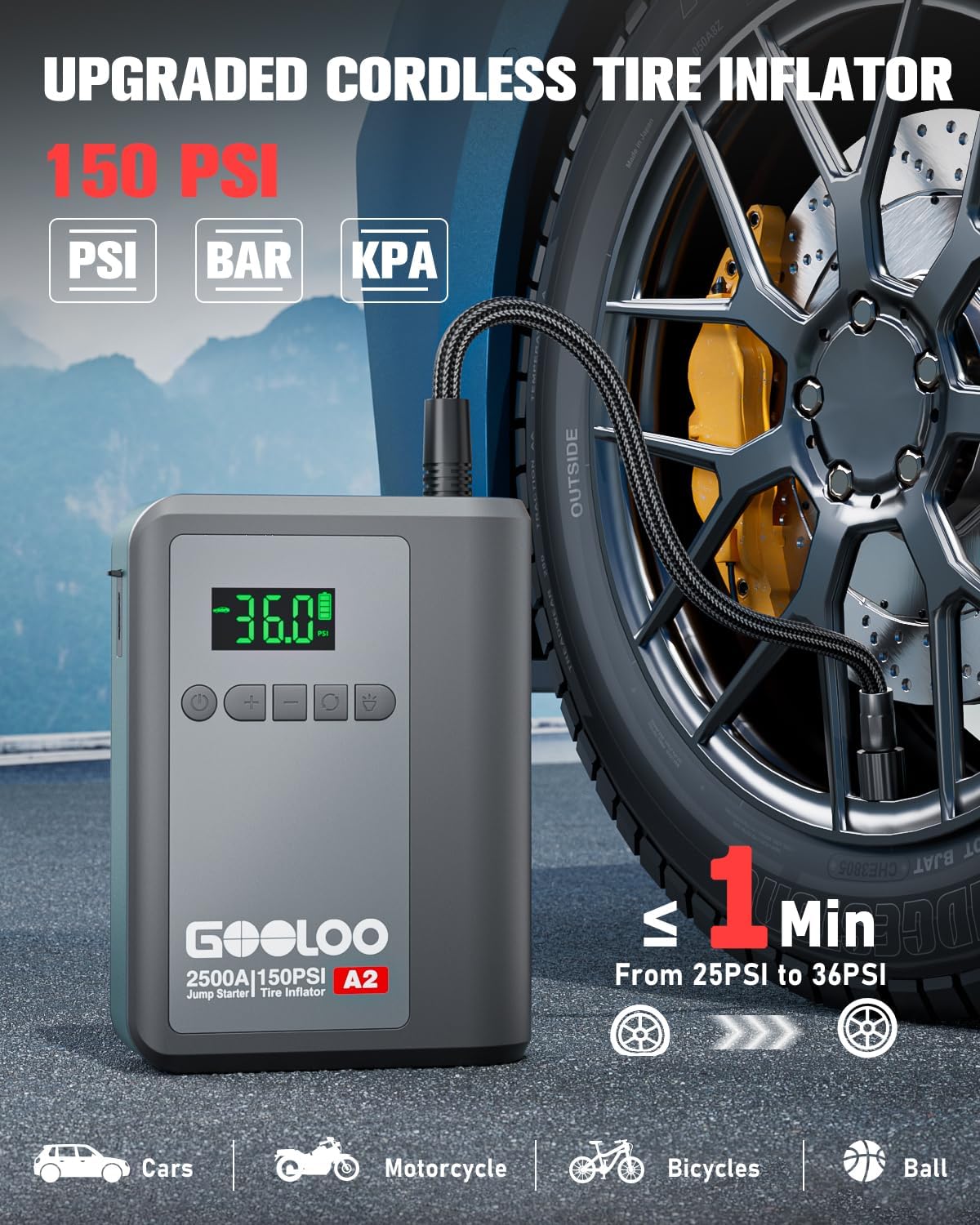
Image: The GOOLOO A2 unit connected to a car tire valve via its air hose, demonstrating the tire inflation process. The display shows "36.0" PSI, indicating the target pressure. The image highlights the 150 PSI capacity and quick inflation time.

Image: A four-step visual guide for tire inflation: 1. Attach the air hose and tighten it. 2. Press the mode button to choose the inflation mode. 3. Press the power button to start inflation. 4. Pull out the air hose when auto-stop occurs.
บันทึก: Use the appropriate air nozzle for different inflatables (e.g., car tires, bicycle tires, sports balls).

Image: A visual guide showing the GOOLOO A2's capability to inflate various items, including car tires, motorcycle tires, bicycle tires, balls, and swimming rings, along with their recommended pressure ranges and adjustable ranges.
4.3 ฟังก์ชั่นพาวเวอร์แบงค์
The GOOLOO A2 can charge your electronic devices on the go.
- Connect your device's charging cable to the USB-A output port (5V/2.1A) on the GOOLOO A2.
- เครื่องจะเริ่มชาร์จอุปกรณ์ของคุณโดยอัตโนมัติ

Image: A person sitting in a car, charging their smartphone using the GOOLOO A2 unit, demonstrating its function as a portable power bank. Icons below indicate compatibility with phones, iPads, headsets, laptops, cameras, and consoles.
4.4 ฟังก์ชั่นไฟ LED
The integrated LED light provides illumination and emergency signaling.
- Press the "LED" button (often represented by a light bulb icon) to cycle through the light modes:
- Steady On (Spotlight): สำหรับให้แสงสว่างทั่วไป
- โหมด SOS: Flashes the international SOS signal (three short, three long, three short flashes).
- โหมดแฟลช: Rapid flashing for warning or signaling.
- Press and hold the "LED" button to turn off the light.
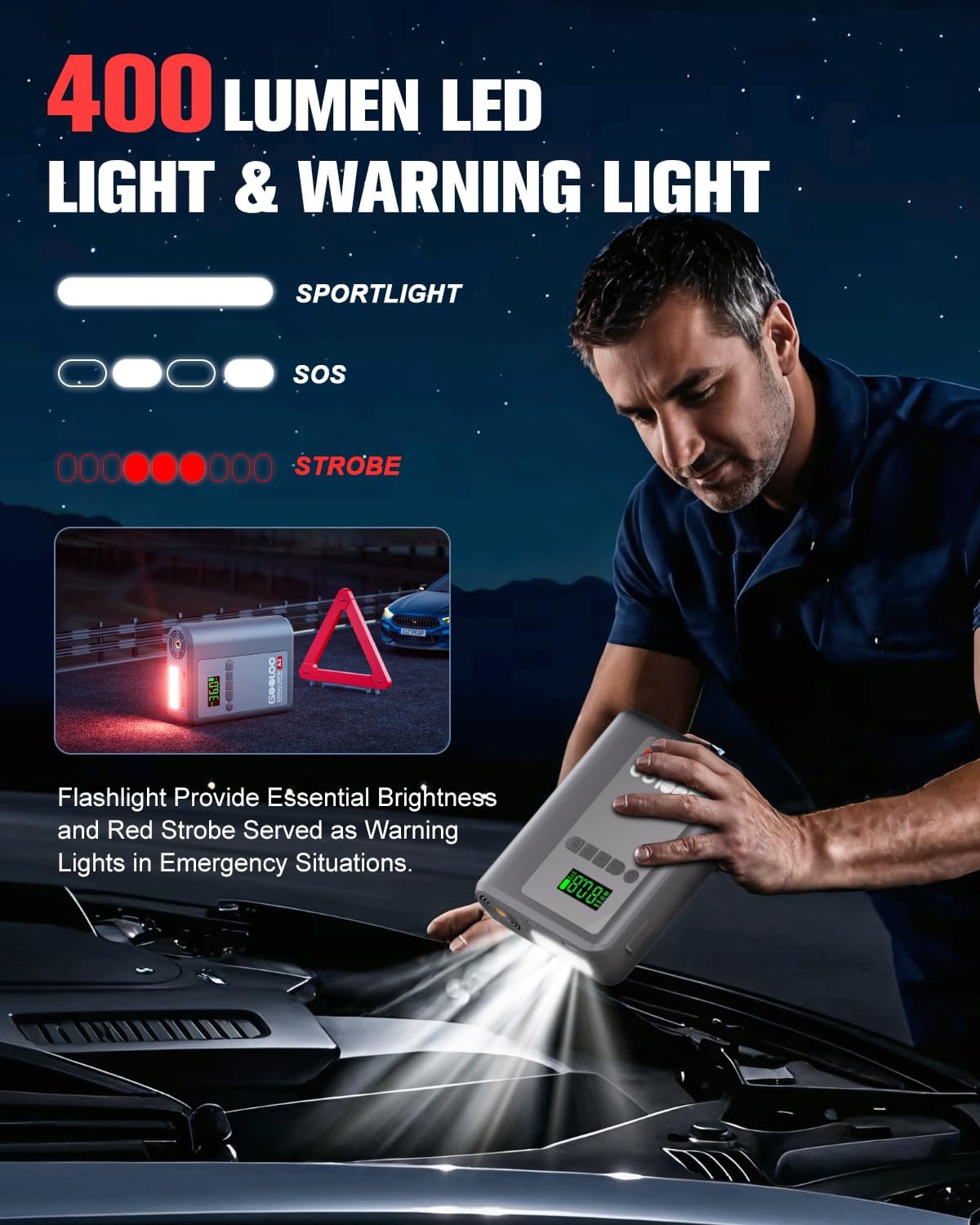
Image: A person using the GOOLOO A2's LED flashlight to illuminate a car engine bay at night, with a warning triangle in the background. The image illustrates the 400 lumen output and the spotlight, SOS, and strobe modes.
5. การบำรุงรักษาและการดูแล
Proper maintenance ensures the longevity and reliability of your GOOLOO A2.
- พื้นที่จัดเก็บ: Store the unit in a cool, dry place away from direct sunlight and extreme temperatures. Use the provided carrying bag for protection.
- การชาร์จ: ควรชาร์จแบตเตอรี่ทุกๆ 3-6 เดือน แม้ว่าจะไม่ได้ใช้งาน เพื่อรักษาอายุการใช้งานของแบตเตอรี่
- การทำความสะอาด: เช็ดทำความสะอาดตัวเครื่องด้วยผ้าแห้งเนื้อนุ่ม ห้ามใช้สารเคมีรุนแรงหรือน้ำยาทำความสะอาดที่มีฤทธิ์กัดกร่อน
- หลีกเลี่ยงน้ำ: อย่าให้เครื่องโดนน้ำหรือความชื้นมากเกินไป
- อุณหภูมิ: The unit is designed to operate in temperatures from -20℃ to 60℃. Avoid using or storing outside this range.

ภาพ: ภาพถ่ายแบบเอ็กซ์เรย์ view of the GOOLOO A2 unit, illustrating its internal design for efficient battery heat dissipation, with blue air currents flowing through. This design helps ensure longer product life and reliable operation in varying temperatures (-20°C to 60°C).
6 การแก้ไขปัญหา
If you encounter issues with your GOOLOO A2, refer to the following common problems and solutions:
| ปัญหา | สาเหตุที่เป็นไปได้ | สารละลาย |
|---|---|---|
| เครื่องไม่เปิด | แบตเตอรี่หมด | ชาร์จอุปกรณ์ให้เต็ม |
| รถไม่จั๊มพ์สตาร์ท | cl. ไม่ถูกต้องamp connection; Battery too dead; Vehicle issue. | มั่นใจ clamps are connected correctly (red to +, black to -). Check smart cable indicator. If battery is extremely low, use "BOOST" function if available. Consult a mechanic if vehicle still won't start. |
| Tire inflator not working or slow. | Air hose not securely attached; Incorrect pressure setting; Unit battery low. | Ensure air hose is tightly screwed onto both the unit and tire valve. Verify target pressure. Charge the unit. |
| LED display is dim or unreadable in sunlight. | Direct sunlight glare. | The display is designed for sunlight readability, but extreme glare can still affect visibility. Try to shade the screen if possible. |
| Unit gets warm during use. | Normal operation during high power output (jump starting, inflating). | This is normal. The unit has built-in heat dissipation. If it becomes excessively hot or emits smoke, discontinue use immediately and contact support. |
If the problem persists after trying these solutions, please contact GOOLOO customer support.
7. ข้อมูลจำเพาะ
| คุณสมบัติ | รายละเอียด |
|---|---|
| แบบอย่าง | A2 portable jump starter with tire inflator |
| กระแสไฟขาออกสูงสุด | 2500 Amps |
| ความเข้ากันได้กับเครื่องยนต์ | สูงสุด 8.0 ลิตร น้ำมันเบนซิน / 6.0 ลิตร ดีเซล |
| แรงดันลมยาง | สูงสุด 150 PSI |
| ขนาดสินค้า | ลึก 4.84 นิ้ว x กว้าง 1.97 นิ้ว x สูง 6.54 นิ้ว |
| น้ำหนักสินค้า | 1.5 ปอนด์ |
| ประเภทแบตเตอรี่ | ลิเธียมโพลิเมอร์ (ต้องใช้ 1 อัน รวมอยู่ด้วย) |
| อินพุต USB-C | 5V/2A |
| เอาต์พุต USB-A | 5V/2.1A |
| อุณหภูมิในการทำงาน | -20℃ ถึง 60℃ (-4°F ถึง 140°F) |
| เอาต์พุตไฟ LED | 400 ลูเมน |
8. การรับประกันและการสนับสนุน
GOOLOO stands behind the quality of its products.
- ระยะเวลารับประกัน: The GOOLOO A2 comes with an 18-month warranty from the date of purchase.
- การรับประกันการคืนสินค้า: A 30-day unconditional return guarantee is offered.
- การสนับสนุนลูกค้า: GOOLOO provides 24/7 customer support and lifetime technical support.
For warranty claims, technical assistance, or any inquiries, please contact GOOLOO customer service through their official website or the platform where you purchased the product. Please have your model number (A2) and purchase details ready.
You can visit the official GOOLOO store for more information: GOOLOO Official Store


