1. บทนำ
This manual provides essential information for the proper setup, operation, and maintenance of your ZEISS DTI 6/20 Thermal Imaging Camera. Please read these instructions carefully before using the device to ensure optimal performance and longevity.
2. อะไรอยู่ในกล่อง
ตรวจสอบว่าแพ็คเกจของคุณมีส่วนประกอบทั้งหมดต่อไปนี้:
- กล้องถ่ายภาพความร้อน
- Lens (20 mm)
- สายรัดนีโอพรีน
- Carrying case including shoulder strap
- สาย USB
- ผ้าทำความสะอาดเลนส์
- แบตเตอรี่ลิเธียมไอออน
- คู่มือแนะนำ
- หมายเหตุด้านความปลอดภัย
- บัตรรับประกัน
- เอกสาร EULA
3. สินค้าหมดview
The ZEISS DTI 6/20 is a high-resolution thermal imaging monocular designed for detailed observation in low-light conditions. It features advanced image processing and ergonomic design for ease of use.

รูปที่ 1: มุม view of the ZEISS DTI 6/20 Thermal Imaging Camera. This image displays the overall design, including the objective lens, eyepiece, and the ZEISS branding on the side.
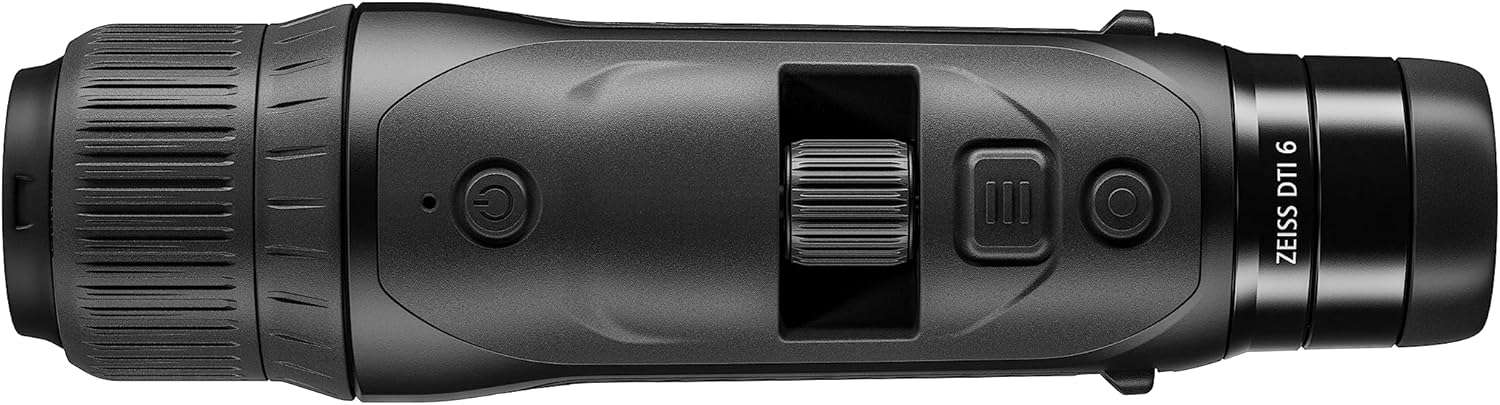
รูปที่ 2: สูงสุด view of the ZEISS DTI 6/20, highlighting the power button, scroll wheel for magnification control, and other operational buttons. The ergonomic placement of controls is visible.
คุณสมบัติหลัก:
- ZSIP Pro Image Technology: Delivers sharp, high-contrast thermal images.
- จอแสดงผลความละเอียดสูง: AMOLED display with 1024x768 resolution, paired with a 640x480 sensor and 12µm pixel pitch.
- กำลังขยาย: 1.5x optical magnification with up to 10x digital zoom, controlled by a scroll wheel.
- การปรับแต่ง: 4 preset scene modes and up to 5 user-created layouts. Adjustable zoom settings, display brightness, and color palettes.
- พื้นที่เก็บข้อมูลภายใน: 16GB for capturing images and videos.
- อายุการใช้งานแบตเตอรี่: Up to 6.5 hours of continuous operation with a removable lithium-ion battery.
- การออกแบบตามหลักสรีรศาสตร์: Suitable for both left and right-handed users, with controls positioned for natural access even with gloves.
- การเชื่อมต่อแอพ: Seamless data transfer and live streaming to smartphones via the ZEISS Hunting App using Bluetooth, USB, or WLAN.
4. การตั้งค่า
4.1 การติดตั้งแบตเตอรี่
- ค้นหาช่องใส่แบตเตอรี่บนอุปกรณ์
- เปิดฝาครอบช่อง
- Insert the provided lithium-ion battery, ensuring correct polarity.
- ปิดฝาช่องใส่แบตเตอรี่ให้แน่น
4.2 การเปิดเครื่องครั้งแรก
- Press and hold the power button (refer to Figure 2) until the ZEISS logo appears on the display.
- Allow the device to initialize. This may take a few seconds.
- Adjust the diopter on the eyepiece for clear focus according to your vision.
5. คู่มือการใช้งาน
5.1 เปิด/ปิดเครื่อง
- การเปิดเครื่อง: กดปุ่มเปิด/ปิดค้างไว้
- วิธีปิดเครื่อง: Press and hold the power button until the shutdown sequence initiates.
5.2 Magnification Control
Use the scroll wheel located on the top of the device (refer to Figure 2) to adjust the digital zoom level. Rotate the wheel forward to increase magnification and backward to decrease it.
โหมดฉาก 5.3 โหมด
The DTI 6/20 offers 4 preset scene modes optimized for different observation conditions. Access these modes through the device's menu to enhance image clarity based on your environment.
ไม่เคยปรับแต่ง
The device allows for extensive personalization:
- User Layouts: Create and save up to 5 custom display layouts.
- การตั้งค่าการแสดงผล: Adjust display brightness to suit ambient light conditions.
- จานสี: Select from various color palettes to optimize thermal contrast and target identification.
5.5 App Connectivity (ZEISS Hunting App)
Enhance your experience by connecting the DTI 6/20 to the ZEISS Hunting App on your smartphone.

รูปที่ 3: A user operating the ZEISS DTI 6/20 thermal imaging camera in an outdoor environment, demonstrating its ergonomic handling and practical application.
- การถ่ายโอนข้อมูล: Transfer images and videos from the device's 16GB internal storage to your smartphone via Bluetooth, USB, or WLAN.
- ถ่ายทอดสด: Stream live thermal footage directly to your smartphone for shared viewไอเอ็นจีหรือการบันทึก
- Further Customization: The app provides additional options for device settings and management.
6. การบำรุงรักษา
6.1 การทำความสะอาด
- Use the provided optics cleaning cloth to gently wipe the lenses. Avoid abrasive materials.
- For the device body, use a soft, damp ผ้า. อย่าใช้สารเคมีหรือตัวทำละลายที่รุนแรง
- ตรวจสอบให้แน่ใจว่าอุปกรณ์ปิดอยู่ก่อนทำความสะอาด
6.2 การดูแลแบตเตอรี่
- ชาร์จแบตเตอรี่ให้เต็มก่อนใช้งานครั้งแรก
- เก็บอุปกรณ์และแบตเตอรี่ไว้ในที่แห้งและเย็นเมื่อไม่ได้ใช้งานเป็นเวลานาน
- หลีกเลี่ยงการให้แบตเตอรี่สัมผัสกับอุณหภูมิที่สูงเกินไป
7 การแก้ไขปัญหา
7.1 อุปกรณ์ไม่เปิดเครื่อง
- ตรวจสอบให้แน่ใจว่าแบตเตอรี่ได้รับการติดตั้งอย่างถูกต้องและชาร์จจนเต็ม
- Try charging the battery for at least 30 minutes before attempting to power on again.
7.2 Image Appears Blurry
- Adjust the diopter on the eyepiece for your vision.
- Ensure the objective lens is clean and free from smudges or debris.
- Check the focus of the thermal image using the manual focus ring if available.
7.3 Connectivity Issues with ZEISS Hunting App
- Ensure Bluetooth or WLAN is enabled on both the device and your smartphone.
- Verify that the ZEISS Hunting App is updated to the latest version.
- Restart both the thermal camera and your smartphone.
8. ข้อมูลจำเพาะ
| คุณสมบัติ | ข้อมูลจำเพาะ |
|---|---|
| ขนาดสินค้า | 9.06 x 2.44 x 2.68 นิ้ว |
| น้ำหนักสินค้า | 1.52 ปอนด์ (24.33 ออนซ์) |
| หมายเลขรุ่นสินค้า | 527020-9911-000 |
| ยี่ห้อ | ไซส์ |
| ชื่อรุ่น | ดีทีไอ 6/20 |
| คำอธิบายเลนส์ชิ้นตา | Plössl |
| ประเภทโฟกัส | โฟกัสแบบแมนนวล |
| แหล่งพลังงาน | ใช้พลังงานจากแบตเตอรี่ (ลิเธียมไออน) |
| อุปกรณ์ที่รองรับ | สมาร์ทโฟน |
| คำอธิบายความยาวโฟกัส | 300มม. |
| ที่ดินของ View | 10 องศา |
| อัตราส่วนการซูม | 3x Optical, up to 10x Digital |
| ความละเอียดเซนเซอร์ | 640 x 480 with 12 micron pixel pitch |
| ความละเอียดการแสดงผล | 1024 x 768 HD AMOLED |
| การจัดเก็บข้อมูลภายใน | 16GB |
| ระยะเวลาการทำงานของแบตเตอรี่ | 6.5 ชั่วโมง (ต่อเนื่อง) |
9. การรับประกันและการสนับสนุน
The ZEISS DTI 6/20 Thermal Imaging Camera is manufactured by ZEISS. For detailed warranty information, please refer to the included warranty card or visit the official ZEISS website. For technical support, service, or inquiries, please contact ZEISS customer service through their official channels.
ผู้ผลิต: ไซส์


