1. บทนำ
Thank you for choosing the AOC 27B35HM Full HD 27-inch monitor. This display is designed to provide a high-quality visual experience with features such as a 120 Hz refresh rate, 1ms MPRT response time, and Adaptive Sync technology for smooth, responsive images. It also incorporates eye-care technologies like Low Blue Light and Flicker-Free to enhance viewing comfort during extended use. This manual will guide you through the setup, operation, and maintenance of your new monitor.
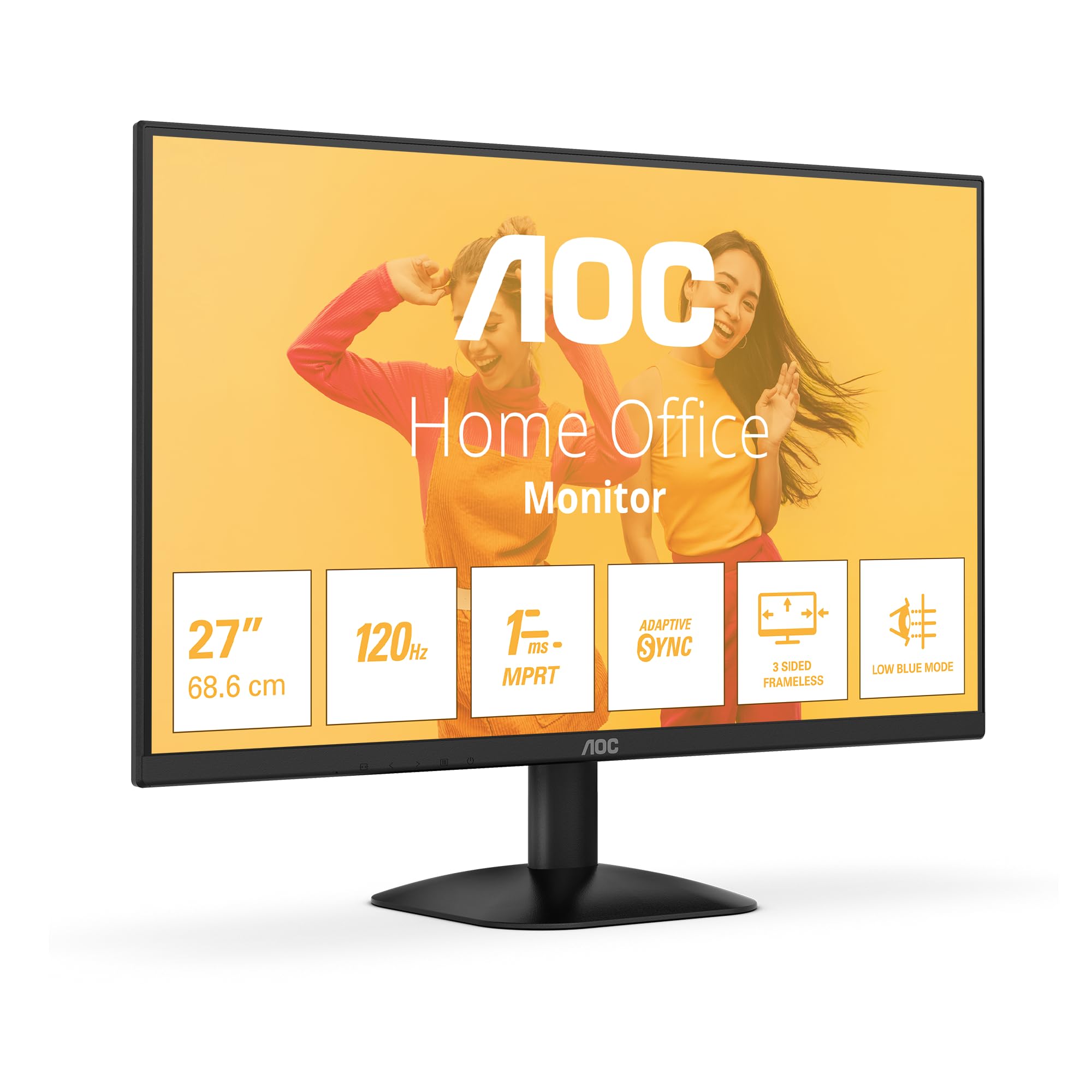
รูปที่ 1 : ด้านหน้า view of the AOC 27B35HM monitor, showcasing its 27-inch screen, 120Hz refresh rate, 1ms MPRT, Adaptive Sync, 3-sided frameless design, and Low Blue Light mode.
2. ข้อมูลด้านความปลอดภัย
โปรดอ่านคำแนะนำทั้งหมดอย่างละเอียดก่อนใช้ผลิตภัณฑ์นี้ เก็บคู่มือนี้ไว้เพื่อใช้อ้างอิงในอนาคต
- ห้ามวางจอภาพใกล้แหล่งน้ำหรือในสภาพแวดล้อมที่มีความชื้น
- ตรวจสอบให้แน่ใจว่ามีการระบายอากาศที่เหมาะสมรอบ ๆ จอภาพ อย่าปิดกั้นช่องระบายอากาศ
- ใช้เฉพาะอะแดปเตอร์ไฟฟ้าที่ให้มาพร้อมกับจอภาพเท่านั้น
- หลีกเลี่ยงการวางของหนักบนสายไฟ
- อย่าพยายามซ่อมแซมจอภาพด้วยตนเอง โปรดส่งต่อให้ช่างผู้ชำนาญการเป็นผู้ดำเนินการซ่อมแซม
- ถอดปลั๊กจอภาพออกจากเต้าเสียบไฟฟ้าในระหว่างที่มีพายุฝนฟ้าคะนองหรือเมื่อไม่ได้ใช้งานเป็นเวลานาน
3. เนื้อหาบรรจุภัณฑ์
โปรดตรวจสอบให้แน่ใจว่ามีสิ่งของต่อไปนี้ครบถ้วนในบรรจุภัณฑ์สินค้าของคุณ:
- AOC 27B35HM Monitor
- ขาตั้งจอมอนิเตอร์ (ฐานและคอ)
- สายไฟ
- สาย HDMI
- สาย D-Sub (VGA) (อาจแตกต่างกันไปตามภูมิภาค)
- คู่มือผู้ใช้และบัตรรับประกัน
4. การตั้งค่า
4.1 การประกอบขาตั้ง
- วางจอภาพคว่ำหน้าลงบนพื้นผิวที่นุ่มและสะอาดอย่างระมัดระวังเพื่อป้องกันรอยขีดข่วน
- ติดส่วนคอของขาตั้งเข้ากับแผงด้านหลังของจอภาพ ยึดให้แน่นด้วยสกรูที่ให้มา
- Attach the stand base to the stand neck. Tighten the thumb screw at the bottom of the base.
4.2 การเชื่อมต่อกับคอมพิวเตอร์
The AOC 27B35HM monitor supports HDMI and D-Sub (VGA) connections.
- การเชื่อมต่อ HDMI: ต่อปลายด้านหนึ่งของสาย HDMI เข้ากับพอร์ต HDMI บนการ์ดจอของคอมพิวเตอร์ และต่อปลายอีกด้านหนึ่งเข้ากับพอร์ต HDMI 1.4 บนจอภาพ
- การเชื่อมต่อ D-Sub (VGA): Connect one end of the D-Sub cable to the VGA port on your computer's graphics card and the other end to the D-Sub port on the monitor.
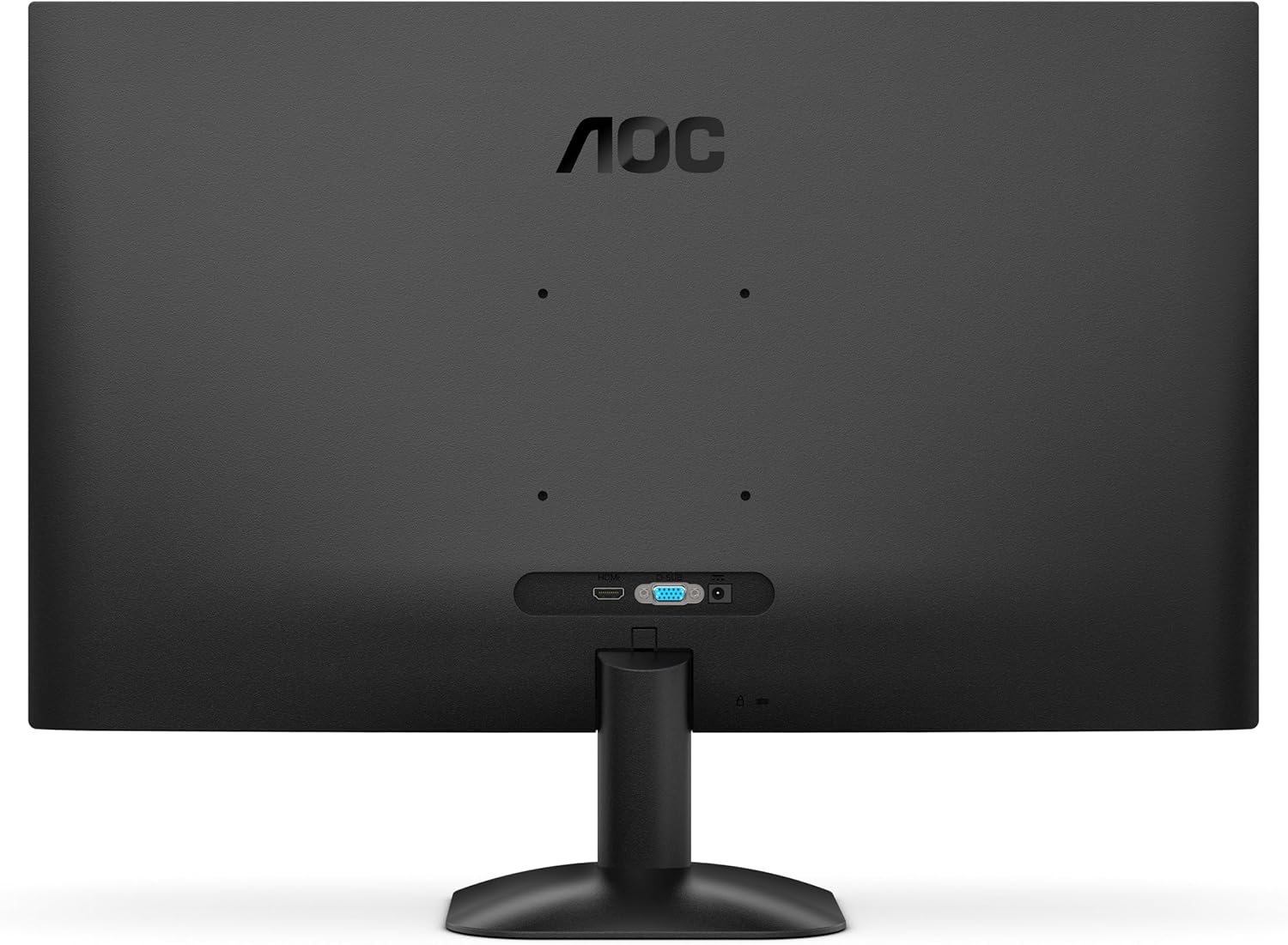
รูปที่ 2: ด้านหลัง view of the monitor, illustrating the location of the HDMI and D-Sub input ports.
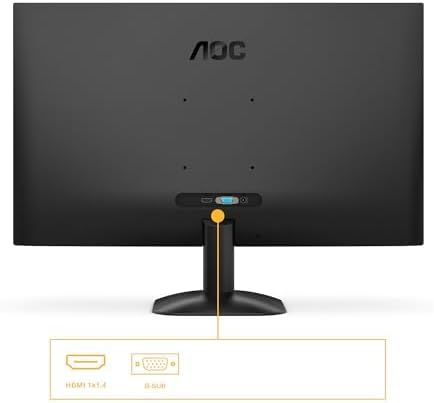
รูปที่ 3: รายละเอียด view of the monitor's connectivity options, specifically highlighting the HDMI 1.4 and D-Sub ports.
4.3 การเชื่อมต่อสายไฟ
- Connect the power cable to the monitor's power input.
- เสียบปลายสายไฟอีกด้านหนึ่งเข้ากับเต้ารับไฟฟ้าที่มีสายดิน
5. คู่มือการใช้งาน
5.1 การเปิด/ปิดเครื่อง
กดปุ่มเปิด/ปิดที่อยู่ด้านล่างขวาของจอภาพเพื่อเปิดหรือปิด ไฟแสดงสถานะจะสว่างขึ้นเมื่อจอภาพเปิดอยู่
5.2 เมนูการแสดงผลบนหน้าจอ (OSD)
The OSD menu allows you to adjust various monitor settings. Use the buttons or joystick (if applicable) on the monitor's bezel to navigate the menu.
ฟังก์ชั่นหลักของ OSD:
- ความสว่าง/คอนทราสต์: ปรับความสว่างและความคมชัดโดยรวมของจอภาพ
- การตั้งค่าสี: ปรับเปลี่ยนอุณหภูมิสี แกมมา และระดับ RGB แต่ละระดับ
- เลือกอินพุต: Manually switch between HDMI and D-Sub input sources.
- โหมดภาพ: เลือกโหมดการแสดงผลที่ตั้งไว้ล่วงหน้า (เช่น มาตรฐาน, ข้อความ, เกม, ภาพยนตร์)
- การซิงโครไนซ์แบบปรับได้: Enable or disable Adaptive Sync for tear-free gaming (requires a compatible graphics card).
- โหมดแสงสีน้ำเงินต่ำ: ลดการปล่อยแสงสีฟ้าเพื่อลดอาการปวดตา
- เทคโนโลยีปราศจากการสั่นไหว: This monitor features flicker-free technology to reduce eye fatigue during prolonged use.
- HDR10: The monitor supports HDR10 for enhanced color and contrast, providing a more vivid visual experience.
6. การบำรุงรักษา
6.1 การทำความสะอาดหน้าจอ
เช็ดหน้าจอเบาๆ ด้วยผ้านุ่มที่ไม่เป็นขุย สำหรับรอยฝังแน่น ให้...ampen the cloth with a small amount of screen cleaner (non-ammonia based) and wipe gently. Do not spray cleaner directly onto the screen.
6.2 การทำความสะอาดภายนอก
Wipe the monitor's exterior with a soft, dry cloth. Avoid using abrasive cleaners or solvents.
7 การแก้ไขปัญหา
หากคุณพบปัญหาเกี่ยวกับจอภาพของคุณ โปรดดูปัญหาทั่วไปและวิธีแก้ไขต่อไปนี้:
| ปัญหา | สาเหตุที่เป็นไปได้ | สารละลาย |
|---|---|---|
| ไม่มีไฟฟ้า | สายไฟไม่ได้เชื่อมต่อ เต้าเสียบไฟฟ้าชำรุด | ตรวจสอบให้แน่ใจว่าสายไฟเชื่อมต่อกับจอภาพและปลั๊กไฟอย่างแน่นหนาแล้ว ทดสอบปลั๊กไฟด้วยอุปกรณ์อื่น |
| ไม่มีสัญญาณ | Video cable not connected; Incorrect input selected. | Check video cable connections (HDMI/D-Sub); Use OSD menu to select correct input source. |
| รูปภาพมืด/สว่างเกินไป | การตั้งค่าความสว่าง/ความคมชัดไม่ถูกต้อง | ปรับค่าความสว่างและความคมชัดผ่านเมนู OSD |
| Image is distorted/blurry | Incorrect resolution; Faulty cable. | ตั้งค่าความละเอียดหน้าจอเป็น 1920 x 1080; ลองใช้สายวิดีโอเส้นอื่นดู |
| หน้าจอกระพริบ | Refresh rate mismatch; Graphics card issue. | Ensure graphics card drivers are updated; Check monitor refresh rate settings in OS. |
8. ข้อมูลจำเพาะ
Detailed technical specifications for the AOC 27B35HM monitor:
| คุณสมบัติ | ข้อมูลจำเพาะ |
|---|---|
| ยี่ห้อ | เอโอซี |
| หมายเลขรุ่น | 27B35HM |
| ขนาดหน้าจอ | 27 นิ้ว (68.6 ซม.) |
| ปณิธาน | 1920 x 1080 (ฟูลเอชดี) |
| อัตราส่วนภาพ | 16:9 น. |
| อัตราการรีเฟรช | 120 เฮิรตซ์ |
| เวลาตอบสนอง | 1 มิลลิวินาที (MPRT) |
| ประเภทแผง | LED-LCD |
| คำอธิบายพื้นผิว | แมทต์ |
| อัตราส่วนคอนทราสต์ | 1000-1น. |
| การเชื่อมต่อ | 1 x HDMI 1.4, 1 x D-Sub (VGA) |
| คุณสมบัติพิเศษ | Eye Care (Low Blue Light, Adaptive Sync), HDR10 |
| สี | สีดำ |
| ผู้ผลิต | AOC International |
| ประเทศต้นกำเนิด | จีน |
8.1 ข้อมูลด้านพลังงาน
สำหรับข้อมูลประสิทธิภาพการใช้พลังงานโดยละเอียด โปรดดูที่ฐานข้อมูล EPREL:
- หมายเลขทะเบียน EPREL : 2046639
- EPREL Link: https://eprel.ec.europa.eu/qr/2046639
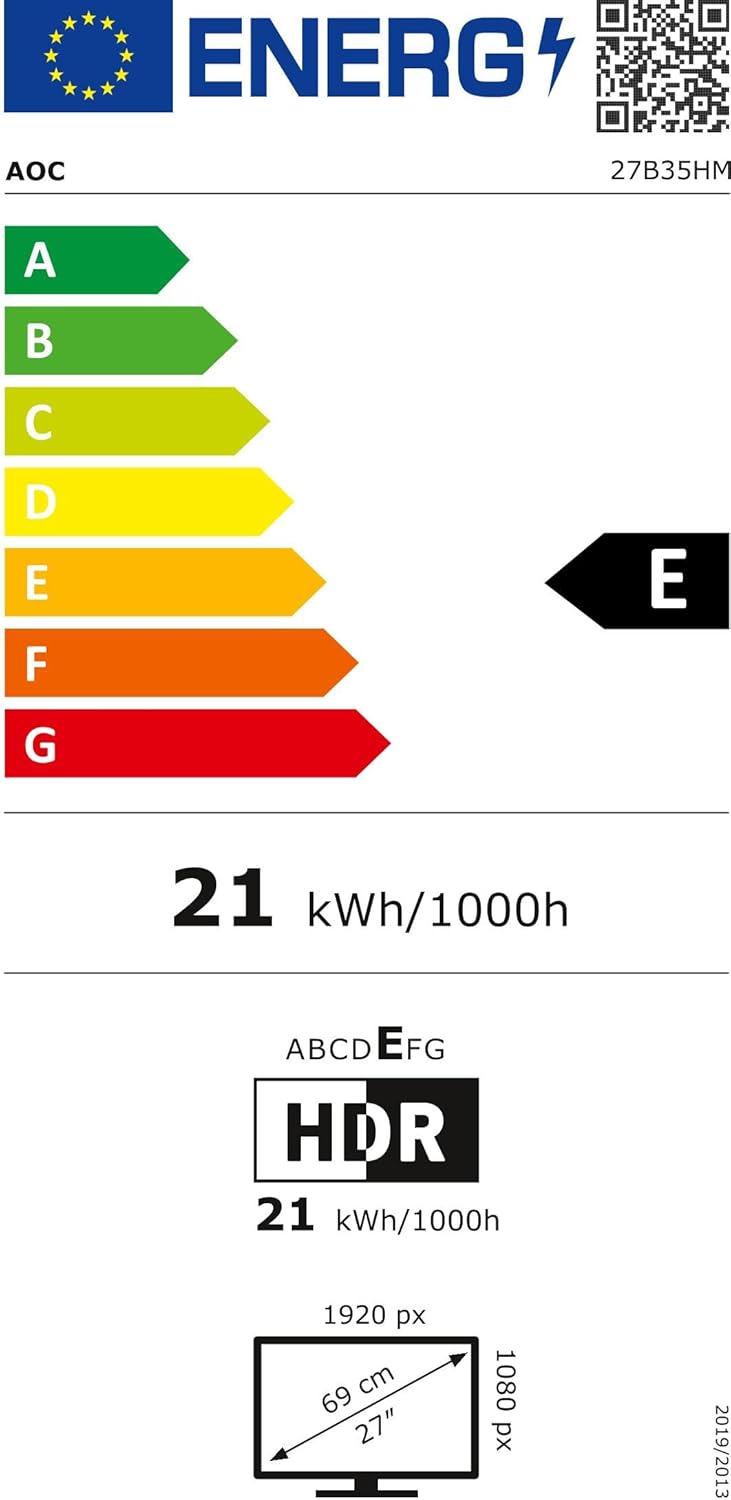
Figure 4: EU Energy Label for the AOC 27B35HM monitor, showing its energy efficiency class E and consumption of 21 kWh/1000h.
9. การรับประกันและการสนับสนุน
9.1 ข้อมูลการรับประกัน
This product comes with a minimum guaranteed product support period of 8 years and a minimum guarantee period of 3 years offered by the supplier.
9.2 การสนับสนุนลูกค้า
For technical assistance, warranty claims, or other inquiries, please contact AOC International (Europe) B.V. using the following information:
- Webเว็บไซต์: https://eu.aoc.com
- อีเมล: kevin.yang@tpv-tech.com
- โทรศัพท์: +31 (0)20 504 6962
- ที่อยู่: Prins Bernhardplein 200 1097 JB Amsterdam, Netherlands


