1. สินค้าหมดview
The Mastech MS850D is a 6000-count True RMS auto-ranging digital multimeter designed for precise electrical measurements. It is suitable for professionals, technicians, and enthusiasts, offering a wide range of functions for various electrical applications.

รูปที่ 1 : ด้านหน้า view of the Mastech MS850D Digital Multimeter, displaying a measurement of 198.7 mV.
คุณสมบัติหลัก:
- 6000 Counts Auto Ranging: Provides precise measurements across various ranges automatically.
- RMS ที่แท้จริง: Ensures accurate readings for non-sinusoidal AC waveforms.
- Comprehensive Measurement Capabilities: วัดปริมาตร AC/DCtage, AC/DC Current, Resistance, Capacitance, Frequency, and Temperature.
- ได้รับการรับรองความปลอดภัย: CAT III 600V rating for safe use in electrical testing environments.
- ฟังก์ชั่นที่เป็นมิตรต่อผู้ใช้: Includes Buzzer/Continuity, Diode Test, Transistor Test (optional), MAX/MIN, REL, Non-Contact Voltage (NCV) Detection, Live Wire Recognition, Data Hold, Flashlight, and Auto Power Off.
- การออกแบบที่กะทัดรัด: Ergonomic dimensions (150mm x 75mm x 47mm) and lightweight (284g) for easy handling.
2. เนื้อหาบรรจุภัณฑ์
ตรวจสอบว่ารายการทั้งหมดที่ระบุไว้ด้านล่างนี้รวมอยู่ในแพ็คเกจของคุณ:
- 1 x Mastech MS850D-6000 Counts True RMS Auto Ranging Digital Multimeter
- 1 x Temperature probe
- 1 x Pair of Test leads
- 2 x Batteries (AAA type, 1.5V)
- 1 x คู่มือผู้ใช้
3. ข้อมูลด้านความปลอดภัย
คำเตือน: To avoid electric shock or personal injury, read all safety information before using this product. Use the multimeter only as specified in this manual; otherwise, the protection provided by the multimeter may be impaired.
- ตรวจสอบให้แน่ใจเสมอว่ามัลติมิเตอร์อยู่ในสภาพใช้งานได้ดีก่อนใช้งาน
- ห้ามใช้เกินปริมาณที่กำหนดtage, as marked on the multimeter, between the terminals or between any terminal and earth ground. The MS850D is rated for กสท.600 XNUMXV.
- ใช้ความระมัดระวังเมื่อทำงานกับ voltages สูงกว่า 30V AC RMS, 42V peak หรือ 60V DC ปริมาตรเหล่านี้tagอาจทำให้เกิดอันตรายจากการช็อตได้
- Do not use the multimeter if the test leads are damaged or if the meter appears damaged.
- Ensure the rotary switch is in the correct position for the measurement you intend to make.
- อย่าเชื่อมต่อสายทดสอบเข้ากับเครื่องโวลท์tagแหล่งจ่ายไฟเมื่อสวิตช์แบบหมุนถูกตั้งค่าเป็นโหมดกระแส ความต้านทาน หรือความต่อเนื่อง
- Replace the battery and fuses only with the specified type and rating.
- ห้ามใช้งานมัลติมิเตอร์ในบริเวณที่มีก๊าซไวไฟ ไอระเหย หรือฝุ่นละออง
- ระหว่างการวัด ให้วางนิ้วมือไว้ด้านหลังที่ครอบนิ้วบนหัววัดทดสอบ
4. การตั้งค่า
4.1 การติดตั้งแบตเตอรี่
The MS850D multimeter requires two 1.5V AAA batteries for operation. To install or replace batteries:
- ตรวจสอบให้แน่ใจว่ามัลติมิเตอร์ปิดอยู่และถอดสายวัดทั้งหมดออกแล้ว
- ค้นหาฝาครอบช่องใส่แบตเตอรี่ที่ด้านหลังของมัลติมิเตอร์
- ใช้ไขควงคลายสกรูที่ยึดฝาครอบแบตเตอรี่ออก
- Remove the cover and insert the two AAA batteries, observing the correct polarity (+ and -).
- เปลี่ยนฝาครอบแบตเตอรี่และขันสกรูให้แน่น
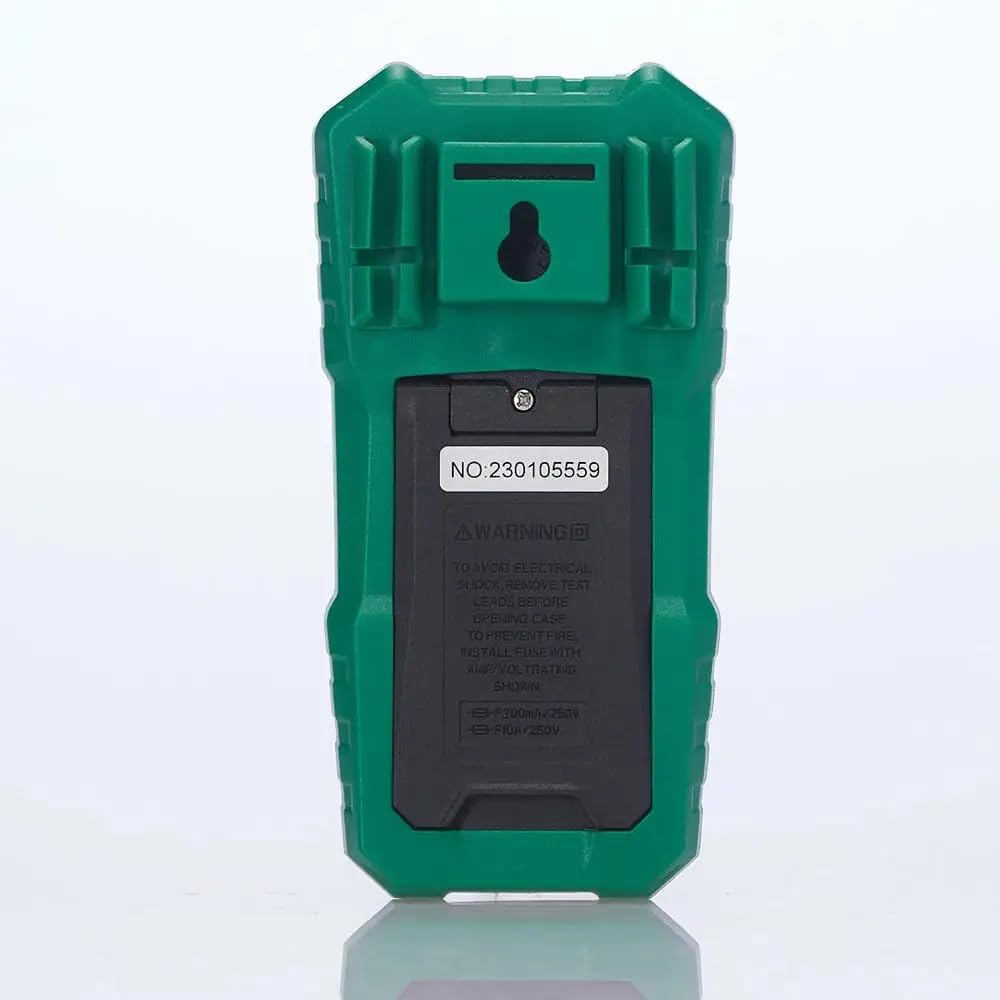
รูปที่ 2: ด้านหลัง view of the multimeter, illustrating the battery compartment and safety warnings.
4.2 การเชื่อมต่อสายทดสอบ
Proper connection of test leads is essential for accurate and safe measurements.
- ใส่สายวัดทดสอบสีดำลงใน คอม ช่องเสียบอินพุต (ทั่วไป)
- สำหรับปริมาตรส่วนใหญ่tage, resistance, continuity, capacitance, frequency, and temperature measurements, insert the red test lead into the VΩmA แจ็คอินพุต
- For current measurements up to 600mA, insert the red test lead into the VΩmA แจ็คอินพุต
- For current measurements between 600mA and 10A, insert the red test lead into the 10A สูงสุด แจ็คอินพุต

รูปที่ 3: มุม view of the multimeter, highlighting the input jacks for test leads.
5. คู่มือการใช้งาน
This section details how to use the Mastech MS850D for various measurements.
5.1 การเปิด/ปิดเครื่อง
Rotate the central dial from the "OFF" position to any desired measurement function to power on the multimeter. To power off, rotate the dial back to the "OFF" position.
5.2 Rotary Switch Functions
The rotary switch selects the primary measurement function:
- V~ (AC เล่มtagจ): วัดแรงดันไฟฟ้ากระแสสลับtage.
- V- (DC Voltagจ): วัดแรงดันไฟฟ้ากระแสตรงtage.
- Hz/% (Frequency/Duty Cycle): Measures frequency and duty cycle.
- Ω (ความต้านทาน): วัดค่าความต้านทานไฟฟ้า
- Continuity/Diode: Checks for circuit continuity and tests diodes.
- NCV/Live: แบบไม่สัมผัส Voltage detection and Live Wire recognition.
- °C/°F (Temperature): Measures temperature using the included probe.
- hFE (Transistor Test): Measures transistor gain (requires optional socket).
- μA~ / μA- (AC/DC Microampเอเรส): Measures microampเป็นปัจจุบัน
- mA~ / mA- (AC/DC Milliampเอเรส): วัดเป็นมิลลิเมตรampเป็นปัจจุบัน
- A~ / A- (AC/DC Ampเอเรส): มาตรการ ampere current (up to 10A).
5.3 ฟังก์ชันปุ่ม
- SEL (Select): Toggles between different functions within a single rotary switch position (e.g., AC/DC voltage, continuity/diode, °C/°F).
- ถือ: ฟังก์ชันนี้จะหยุดการแสดงค่าปัจจุบันบนหน้าจอ กดอีกครั้งเพื่อปล่อย
- MIN/MAX/REL:
- Press once to enter MIN/MAX mode. The multimeter will record the minimum and maximum values. Press again to cycle between MIN, MAX, and current reading.
- Long press to activate REL (Relative) mode. This subtracts the current reading from all subsequent readings, useful for measuring changes.
- Flashlight Button (often combined with backlight): Activates the built-in flashlight for illuminating the measurement area.
5.4 ขั้นตอนการวัดเฉพาะ
5.4.1 ฉบับtagการวัด (AC/DC)
- ตั้งสวิตช์โรตารี่ไปที่ V~ สำหรับ AC voltagอีหรือ V- สำหรับ DC voltage. Use the SEL button to switch between AC and DC if the position combines them.
- เชื่อมต่อสายทดสอบสีดำเข้ากับ คอม แจ็คและการทดสอบสีแดงนำไปสู่ VΩmA แจ็ค.
- Connect the test probes in parallel across the circuit or component to be measured.
- อ่านเล่มที่tagค่า e บนจอแสดงผล
5.4.2 การวัดกระแสไฟฟ้า (AC/DC)
คำเตือน: ห้ามต่อมัลติมิเตอร์แบบขนานกับโวลต์มิเตอร์เด็ดขาดtage source when measuring current. Always connect in series with the load.
- Determine if the current is AC or DC.
- Set the rotary switch to the appropriate current range (μA, mA, or A). Use the SEL button to switch between AC and DC.
- เชื่อมต่อสายทดสอบสีดำเข้ากับ คอม แจ็ค.
- For currents up to 600mA, connect the red test lead to the VΩmA jack. For currents up to 10A, connect the red test lead to the 10A สูงสุด แจ็ค.
- เปิดวงจรที่ต้องการวัดกระแสไฟฟ้า แล้วต่อมัลติมิเตอร์แบบอนุกรมเข้าไป
- อ่านค่าปัจจุบันบนจอแสดงผล
5.4.3 การวัดความต้านทาน
- ตั้งสวิตช์โรตารี่ไปที่ Ω ตำแหน่ง.
- เชื่อมต่อสายทดสอบสีดำเข้ากับ คอม แจ็คและการทดสอบสีแดงนำไปสู่ VΩmA แจ็ค.
- ตรวจสอบให้แน่ใจว่าวงจรหรืออุปกรณ์นั้นไม่มีกระแสไฟฟ้าไหลผ่านก่อนทำการวัดค่าความต้านทาน
- เชื่อมต่อหัววัดทดสอบเข้ากับส่วนประกอบนั้น
- อ่านค่าความต้านทานบนจอแสดงผล
5.4.4 การทดสอบความต่อเนื่อง
- ตั้งสวิตช์โรตารี่ไปที่ Continuity/Diode position. Use SEL to select continuity mode (usually indicated by a speaker icon).
- เชื่อมต่อสายทดสอบสีดำเข้ากับ คอม แจ็คและการทดสอบสีแดงนำไปสู่ VΩmA แจ็ค.
- เชื่อมต่อหัววัดทดสอบเข้ากับวงจรหรือชิ้นส่วนนั้น
- If the resistance is below approximately 50Ω, the buzzer will sound, indicating continuity.
5.4.5 การทดสอบไดโอด
- ตั้งสวิตช์โรตารี่ไปที่ Continuity/Diode position. Use SEL to select diode mode (usually indicated by a diode symbol).
- เชื่อมต่อสายทดสอบสีดำเข้ากับ คอม แจ็คและการทดสอบสีแดงนำไปสู่ VΩmA แจ็ค.
- ต่อหัววัดสีแดงเข้ากับขั้วบวก และต่อหัววัดสีดำเข้ากับขั้วลบของไดโอด จอแสดงผลจะแสดงค่าปริมาตรไปข้างหน้าtagอีลดลง
- สลับขั้วโพรบ หน้าจอควรแสดง "OL" (Open Loop) สำหรับไดโอดที่ใช้งานได้ดี
5.4.6 การวัดความจุ
- ตั้งสวิตช์โรตารี่ไปที่ ความจุ position (often combined with Hz/% or other functions, use SEL to select).
- เชื่อมต่อสายทดสอบสีดำเข้ากับ คอม แจ็คและการทดสอบสีแดงนำไปสู่ VΩmA แจ็ค.
- Ensure the capacitor is fully discharged before measurement to prevent damage to the multimeter.
- ต่อสายวัดทดสอบเข้ากับขั้วของตัวเก็บประจุ
- อ่านค่าความจุบนจอแสดงผล
5.4.7 การวัดความถี่
- ตั้งสวิตช์โรตารี่ไปที่ เฮิร์ตซ์/% position. Use SEL to select frequency mode.
- เชื่อมต่อสายทดสอบสีดำเข้ากับ คอม แจ็คและการทดสอบสีแดงนำไปสู่ VΩmA แจ็ค.
- Connect the test probes across the signal source.
- อ่านค่าความถี่บนจอแสดงผล
5.4.8 การวัดอุณหภูมิ
- ตั้งสวิตช์โรตารี่ไปที่ ° C / ° F position. Use SEL to switch between Celsius and Fahrenheit.
- เชื่อมต่อหัววัดอุณหภูมิเข้ากับ คอม และ VΩmA jacks, observing polarity if specified by the probe.
- วางปลายหัววัดอุณหภูมิไว้บนหรือใกล้กับวัตถุที่ต้องการวัดอุณหภูมิ
- อ่านค่าอุณหภูมิบนจอแสดงผล
5.4.9 ไม่สัมผัส Voltagการตรวจจับ e (NCV)
- ตั้งสวิตช์โรตารี่ไปที่ NCV/สด ตำแหน่ง.
- Move the top front part of the multimeter close to the conductor or outlet.
- The multimeter will emit an audible beep and the NCV indicator light will flash if AC voltage is detected, with the frequency of beeps and flashes increasing with voltagความแข็งแกร่ง
6. การบำรุงรักษา
การบำรุงรักษาอย่างถูกวิธีจะช่วยให้มัลติมิเตอร์ของคุณมีอายุการใช้งานยาวนานและแม่นยำ
6.1 การทำความสะอาด
- เช็ดเคสด้วยโฆษณาamp ผ้าและผงซักฟอกอ่อน ห้ามใช้สารกัดกร่อนหรือตัวทำละลาย
- Keep the input terminals free of dirt and moisture.
6.2 การเปลี่ยนแบตเตอรี่
Refer to Section 4.1 for detailed instructions on battery replacement. Replace batteries when the low battery indicator appears on the display.
6.3 การเปลี่ยนฟิวส์
If the current measurement function fails, the fuse may need replacement. The MS850D uses two fuses:
- F1: F300mA/250V (for mA/μA range)
- F2: F10A/250V (for 10A range)
To replace fuses:
- ตรวจสอบให้แน่ใจว่ามัลติมิเตอร์ปิดอยู่และถอดสายวัดทั้งหมดออกแล้ว
- Open the battery compartment cover (refer to Section 4.1).
- Carefully remove the old fuse(s) and replace with new fuses of the exact same type and rating.
- เปลี่ยนฝาครอบแบตเตอรี่และขันสกรูให้แน่น
7 การแก้ไขปัญหา
If you encounter issues with your Mastech MS850D, refer to the following common problems and solutions:
| ปัญหา | สาเหตุที่เป็นไปได้ | สารละลาย |
|---|---|---|
| ไม่มีจอแสดงผลหรือจอแสดงผลมืด | แบตเตอรี่เหลือน้อยหรือหมด | เปลี่ยนแบตเตอรี่ (โปรดดูหัวข้อ 4.1) |
| การอ่านไม่ถูกต้อง | Incorrect function selected; Loose test leads; Damaged test leads; Out of range measurement | Verify rotary switch position; Ensure test leads are securely connected; Inspect test leads for damage; Check if the measurement is within the multimeter's specified range. |
| การวัดกระแสไฟฟ้าไม่ทำงาน | ฟิวส์ขาด | Replace the appropriate fuse (refer to Section 6.3). |
| แสดง "OL" (โอเวอร์โหลด) | Measurement exceeds the selected range or multimeter's maximum capacity | Select a higher range if available, or confirm the measurement is within the multimeter's limits. |
8. ข้อมูลจำเพาะ
Detailed technical specifications for the Mastech MS850D Digital Multimeter:

Figure 4: Detailed specifications and packaging information for the Mastech MS850D.
| การวัด | พิสัย | ความแม่นยำ |
|---|---|---|
| DC ฉบับที่tage | 600mV, 6V, 60V, 600V | ±(0.8%+5) |
| ฉบับ ACtage | 600mV, 6V, 60V, 600V | ±(1.0%+10) |
| กระแสไฟฟ้าตรง | 600μA, 6000μA, 60mA, 600mA, 6A, 10A | ±(2.0%+5) (μA/mA), ±(3.0%+5) (A) |
| กระแสไฟ AC | 600mA, 6A, 10A | ±(2.5%+5) (mA), ±(3.0%+5) (A) |
| ความต้านทาน | 600Ω, 6KΩ, 60KΩ, 600KΩ, 6MΩ, 60MΩ | ±(1.0%+5) (600Ω-6MΩ), ±(1.2%+5) (60MΩ) |
| ความจุ | 60nF, 600nF, 6μF, 60μF, 600μF, 6mF, 60mF, 100mF | ±(4.0%+25) (60nF-600μF), ±(5.0%+25) (6mF-100mF) |
| ความถี่ | 10Hz, 100Hz, 1KHz, 10KHz, 100KHz, 1MHz, 10MHz | ±(0.5%+4) |
| อุณหภูมิ | -20°C to 0°C, 0°C to 400°C, 400°C to 1000°C | ±(4°C), ±(3.0%+3), ±(2.0%+3) |
| แสดง | 6000 นับ | |
| ระดับความปลอดภัย | กสท.600 XNUMXV | |
| แหล่งพลังงาน | แบตเตอรี่ AAA 2 ก้อน 1.5V | |
| ขนาด (กว้าง x ยาว x สูง) | 150 มม. x 75 มม. x 47 มม. (โดยประมาณ) | |
| น้ำหนัก | 284กรัม (ประมาณ) | |
9. การรับประกันและการสนับสนุน
The Mastech MS850D Digital Multimeter is manufactured by Mastech and imported by REES52. For warranty information, technical support, or service inquiries, please refer to the warranty card included with your product or contact the seller/manufacturer directly.
โปรดเก็บหลักฐานการซื้อของคุณไว้เพื่อเรียกร้องการรับประกัน
- ผู้ผลิต: Mastech
- ผู้นำเข้า: รีส52
- หมายเลขรุ่น: MS850D


