1. บทนำ
This manual provides detailed instructions for the setup, operation, and maintenance of your artfone G3 Flip Cell Phone. Designed with ease of use in mind, this phone features large buttons, a clear display, and essential functions for seniors, including an SOS button and speed dial capabilities. Please read this manual thoroughly to ensure proper use and to maximize your phone's functionality.
2. เนื้อหาบรรจุภัณฑ์
เมื่อแกะกล่อง โปรดตรวจสอบว่ามีสิ่งของต่อไปนี้ครบถ้วนในบรรจุภัณฑ์ของคุณ:
- 1x artfone G3 Flip Phone
- 1x 1300mAh Lithium-ion Battery
- สายชาร์จ USB-C 1x
- อะแดปเตอร์ไฟฟ้า 1x
- 1x Charging Station (Cradle)
- 1x คู่มือการใช้งาน

Image: Contents of the artfone G3 Flip Phone package.
3. สินค้าหมดview
The artfone G3 is a clamshell-design flip phone featuring a 2.4-inch color display and a large, backlit keypad for easy dialing and navigation. It is equipped with a rear camera and a dedicated SOS button for emergencies.

Image: The artfone G3 Flip Phone in its open position, alongside its charging cradle.

Image: Detail of the phone's large fonts, symbols, and backlit buttons for enhanced visibility.
4. การตั้งค่า
4.1. การติดตั้งซิมการ์ดและการ์ด Micro SD
The artfone G3 supports Nano SIM cards and Micro SD cards (up to 64GB) for expanded storage. To install:
- ถอดฝาหลังโทรศัพท์ออกอย่างระมัดระวัง
- Insert your Nano SIM card(s) into the designated slot(s). Ensure the gold contacts face downwards.
- หากต้องการ สามารถใส่การ์ด Micro SD ลงในช่องเสียบได้
- Insert the 1300mAh battery into the battery compartment, aligning the contacts.
- ใส่ฝาหลังกลับเข้าไปจนกระทั่งล็อคเข้าที่อย่างแน่นหนา

Image: Diagram illustrating the placement of Nano SIM, Micro SD card, and battery.
4.2. การชาร์จแบตเตอรี่
Before first use, fully charge the phone's battery. The artfone G3 offers two charging methods:
- การใช้แท่นชาร์จ: Place the phone into the charging station. Ensure the phone is seated correctly and the charging indicator appears on the screen.
- Direct USB-C Cable Charging: Connect the USB-C cable directly to the phone's charging port and then to the power adapter. Plug the adapter into a wall outlet.
A full charge typically takes several hours. The phone features a 1300mAh battery, providing extended standby time.

Image: Illustration of direct cable charging and charging via the desktop cradle.
5. การทำงานพื้นฐาน
5.1. เปิด/ปิดเครื่อง
- การเปิดเครื่อง: Open the flip and press and hold the red 'End Call' button (power button) until the screen illuminates.
- วิธีปิดเครื่อง: Open the flip and press and hold the red 'End Call' button until the power-off options appear. Select 'Power Off'.
5.2. การโทรออกและรับสาย
- ในการโทรออก: Open the flip, dial the number using the keypad, and press the green 'Call' button.
- วิธีรับสาย: When the phone rings, open the flip or press the green 'Call' button to answer.
- วิธีวางสาย: Close the flip or press the red 'End Call' button.
5.3. การปรับระดับเสียง
Use the dedicated volume buttons on the side of the phone to adjust the call volume or ringtone volume.
6. คุณสมบัติหลัก
6.1. ปุ่มฉุกเฉิน SOS
The SOS button is located on the back of the phone. It allows you to quickly contact up to five pre-programmed emergency contacts. In a crisis, press and hold the SOS button for 3 seconds. The phone will sequentially call each contact until one answers. It will also send an emergency text message to these contacts.

Image: Visual representation of the SOS button functionality and emergency contact setup.
6.2. โทรด่วน
The phone features dedicated A/B keys and numbers 2-9 for speed dial. You can assign frequently called contacts to these keys for quick access. Refer to the phone's menu for instructions on setting up speed dial contacts.
6.3. Photo Contacts
For users with visual or memory impairment, the phone supports photo contacts, making it easier to identify and call loved ones by associating their picture with their contact entry.
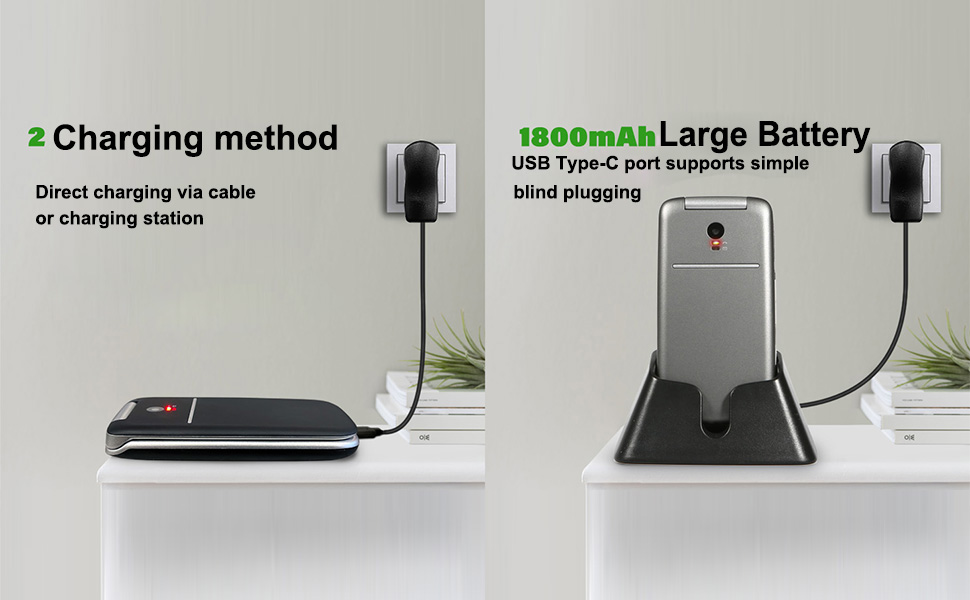
Image: The photo contacts feature, simplifying calling by visual recognition.
6.4. Talking Numbers
For the visually impaired, the phone can announce numbers as they are dialed. Additionally, long-pressing the volume button can activate a real-time voice broadcast function to read out the current time.
6.5. คุณสมบัติเชิงปฏิบัติอื่นๆ
The artfone G3 includes several other useful features:
- วิทยุ FM: Enjoy radio broadcasts without needing headphones.
- ไฟฉาย: มีไฟฉายในตัวเพื่อความสะดวกสบาย
- บลูทูธ: สำหรับการเชื่อมต่อแบบไร้สายกับอุปกรณ์ที่รองรับ
- ปฏิทิน: จดบันทึกวันเวลาและการนัดหมายต่างๆ ไว้
- เครื่องคิดเลข: ฟังก์ชันเลขคณิตพื้นฐาน
- นาฬิกาปลุก: ตั้งปลุกเพื่อเตือนความจำ
- ล็อคกุญแจ: Prevent accidental presses.

ภาพ: เหนือview of the phone's practical features.
7. การบำรุงรักษา
- ควรเก็บโทรศัพท์ให้แห้ง ความชื้นอาจทำให้วงจรไฟฟ้าเสียหายได้
- หลีกเลี่ยงอุณหภูมิที่สูงเกินไป อุณหภูมิสูงอาจทำให้อายุการใช้งานของอุปกรณ์อิเล็กทรอนิกส์สั้นลง และทำให้พลาสติกบางชนิดบิดเบี้ยวหรือละลายได้
- อย่าใช้สารเคมีรุนแรง น้ำยาทำความสะอาด หรือผงซักฟอกที่มีฤทธิ์กัดกร่อนในการทำความสะอาดโทรศัพท์ ให้เช็ดด้วยผ้าเนื้อนุ่มและอ่อนโยนamp ผ้า.
- Handle the phone gently. Dropping, knocking, or shaking it can damage internal circuit boards.
- Do not attempt to disassemble the phone. Unauthorized disassembly voids the warranty.
8 การแก้ไขปัญหา
If you encounter issues with your artfone G3, please refer to the following common solutions:
| ปัญหา | สาเหตุที่เป็นไปได้ | สารละลาย |
|---|---|---|
| โทรศัพท์ไม่เปิดเครื่อง | แบตเตอรี่หมดหรือติดตั้งไม่ถูกต้อง | Charge the battery fully. Ensure the battery is correctly inserted and contacts are clean. |
| ไม่สามารถโทรออกหรือรับสายได้ | ไม่มีซิมการ์ด ใส่ซิมการ์ดไม่ถูกต้อง หรือไม่มีสัญญาณเครือข่าย | Ensure SIM card is correctly installed. Check for network coverage. Contact your service provider if issues persist. |
| ปัญหาการชาร์จ | Charging cable/adapter faulty, phone not properly seated in cradle, or charging port obstruction. | Try a different USB-C cable or power adapter. Ensure the phone is correctly placed in the charging cradle. Check the charging port for debris. |
| ปุ่ม SOS ใช้งานไม่ได้ | Emergency contacts not set up or incorrect numbers. | Verify that emergency contacts are correctly programmed in the phone's settings. |
หากปัญหายังคงมีอยู่หลังจากพยายามแก้ไขปัญหาเหล่านี้แล้ว โปรดติดต่อฝ่ายสนับสนุนลูกค้า
9. ข้อมูลจำเพาะ
- แบบอย่าง: ARF-G3+001
- ขนาด : 4.02 x 2.01 x 0.73 นิ้ว (102 x 50 x 18 มม.)
- น้ำหนัก: 3.17 ออนซ์ (88 กรัม)
- แสดง: ขนาด 2.4 นิ้ว ความละเอียด 240 x 320 พิกเซล
- ระบบปฏิบัติการ: นิวเคลียส โอเอส
- รุ่นซีพียู : เอ็มทีเค 8121
- ความเร็วซีพียู: 128 เมกะเฮิรตซ์
- หน่วยความจำแรม: 48MB
- พื้นที่เก็บข้อมูลภายใน: 0.2GB
- พื้นที่เก็บข้อมูลที่ขยายได้: รองรับการ์ด Micro SD สูงสุด 64GB
- แบตเตอรี่: 1300mAh Lithium-ion (included)
- เวลาสนทนาทางโทรศัพท์: นานถึง 6 ชั่วโมง
- การเชื่อมต่อ: 4G, 3G, 2G, Bluetooth, USB-C
- แจ็คเสียง: 3.5 มม.
- คุณสมบัติพิเศษ: SOS Button, Speed Dial, Photo Contact, Talking Numbers, FM Radio, Flashlight, Calendar, Calculator, Alarm Clock

Image: Physical dimensions and weight of the artfone G3 Flip Phone.
10. การรับประกันและการสนับสนุน
สำหรับข้อมูลการรับประกันและการบริการลูกค้า โปรดดูเอกสารที่แนบมากับสินค้าที่ซื้อ หรือติดต่อผู้ขายโดยตรง โปรดเก็บหลักฐานการซื้อไว้เพื่อใช้ในการเรียกร้องการรับประกัน


