การแนะนำ
Thank you for choosing the AIKELA Bluetooth Speaker with Video Scrolling Remote and Phone Stand. This multi-functional device is designed to enhance your media experience by providing amplified sound, a stable viewing platform, and convenient remote control. Whether you're watching videos, listening to podcasts, or making hands-free calls, this product offers a seamless and enjoyable experience.

The AIKELA Bluetooth Speaker with Phone Stand and its accompanying remote control.
เนื้อหาแพ็คเกจ
กรุณาตรวจสอบแพ็คเกจสำหรับรายการต่อไปนี้:
- Bluetooth Speaker with Phone Stand x 1
- รีโมทคอนโทรล x 1
- สายเคเบิลชนิด C x 1
- คู่มือผู้ใช้ x 1

Visual representation of all items included in the product package.
คุณสมบัติผลิตภัณฑ์
- Small But Powerful Sound: The upgraded wireless Bluetooth speaker delivers clear, loud sound for music, movies, videos, and podcasts. It includes a built-in microphone for crisp hands-free calls, which can also assist individuals with hearing loss.
- Video Scrolling Remote: A dedicated Bluetooth remote allows for easy scrolling, pausing, playing videos, and adjusting phone volume. This feature is ideal for platforms like YouTube, TikTok, or Netflix, freeing your hands during various activities.
- Adjustable Phone Stand: The stand features a weighted base with non-slip silicone to securely hold your phone. Its adjustable angle ensures optimal viewing, whether on a desk, kitchen counter, or bedside table.
- Portable & Long-Lasting: With a foldable, lightweight design, the speaker is easy to transport. Its rechargeable battery provides up to 10 hours of use on a single 1.5-hour charge, making it suitable for home, office, or travel.

The product combines a Bluetooth speaker, phone stand, built-in microphone, and remote control.

สนุก amplified sound for media and clear hands-free calls.

The phone stand is adjustable and foldable for convenience.

The speaker offers up to 10 hours of battery life on a 1.5-hour charge.
คู่มือการติดตั้ง
1. การชาร์จอุปกรณ์
Before first use, fully charge the AIKELA Bluetooth Speaker using the provided Type-C cable. Connect the cable to the speaker's charging port and a compatible USB power source.
2. การเปิด/ปิดเครื่อง
Locate the ON/OFF button on the speaker. Press and hold to power on or off the device.
3. Bluetooth Pairing (Speaker)
- Ensure the speaker is powered on and in pairing mode (indicated by a blinking blue LED light).
- On your smartphone or tablet, go to Bluetooth settings.
- ค้นหา available devices and select "YX01" (or similar name) to connect.
- Once connected, the LED light will become solid blue.
4. Bluetooth Pairing (Remote Control)
- Slide the ON/OFF button on the back of the remote control to the ON position.
- On your smartphone or tablet, go to Bluetooth settings.
- ค้นหา available devices and select "YK01 (Remote Control)" to connect.
- Once connected, the remote is ready for use.
5. iOS Specific Setup for Remote Control
For iOS devices, you must enable AssistiveTouch for the remote control to function correctly with video scrolling and other gestures. Follow these steps:
- ไปที่ การตั้งค่า.
- เลือก การเข้าถึงได้.
- แตะ สัมผัส.
- เปิดเครื่อง แอสซิทีฟทัช.
- ทำให้มั่นใจ ดำเนินการท่าทางสัมผัส เปิดใช้งานแล้ว
- ปรับแต่ง ความไวในการติดตาม to 20%-30% for optimal performance.

Step-by-step guide for enabling AssistiveTouch on iOS devices to use the remote control.
6. Adjusting the Phone Stand
The phone stand is designed to be adjustable for various viewing angles. Gently adjust the hinges to achieve your desired height and tilt. Ensure your device is securely placed on the stand's non-slip surface. The stand is compatible with most 4"-13" smartphones, tablets, and e-readers.
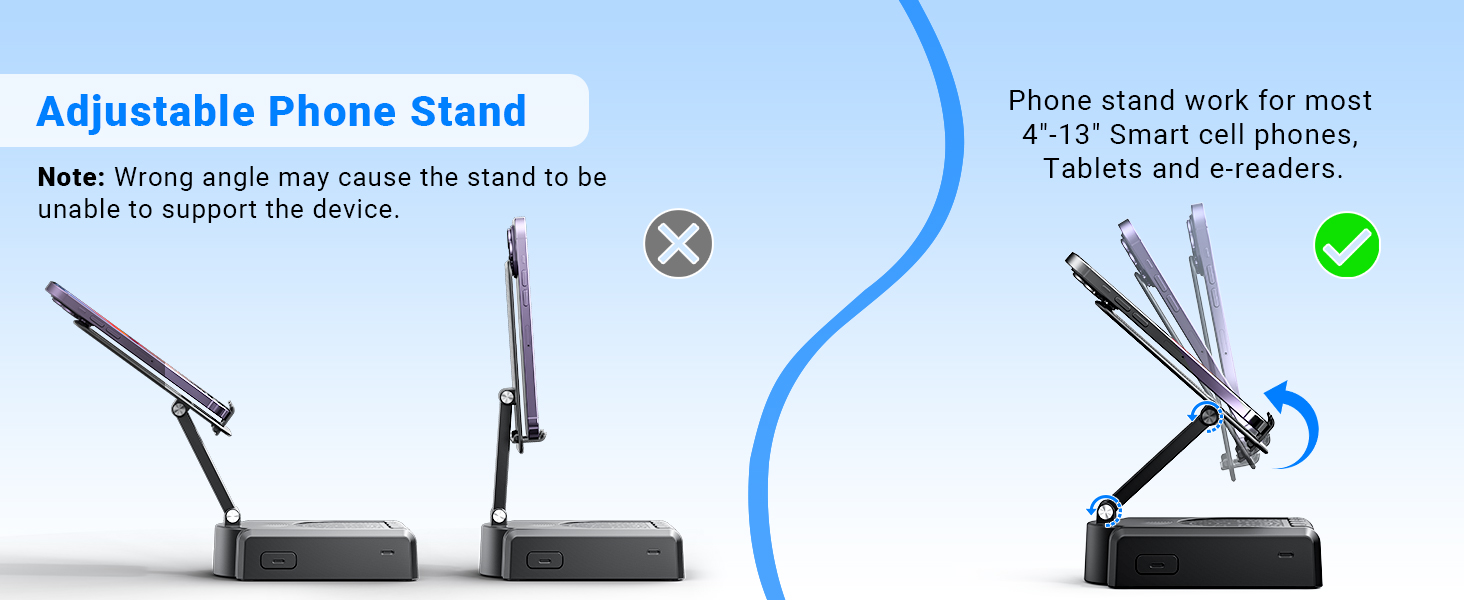
Demonstration of the adjustable angles of the phone stand.
คำแนะนำการใช้งาน
การควบคุมลำโพง
The speaker features intuitive buttons for basic functions:
- เปิด/ปิด: เปิดหรือปิดอุปกรณ์
- หยุดชั่วคราว/เล่น/รับสาย/วางสาย: Control media playback and phone calls.
- ก่อนหน้า/เล่ม-: Skip to the previous track or decrease volume.
- ถัดไป/ระดับเสียง+: Skip to the next track or increase volume.
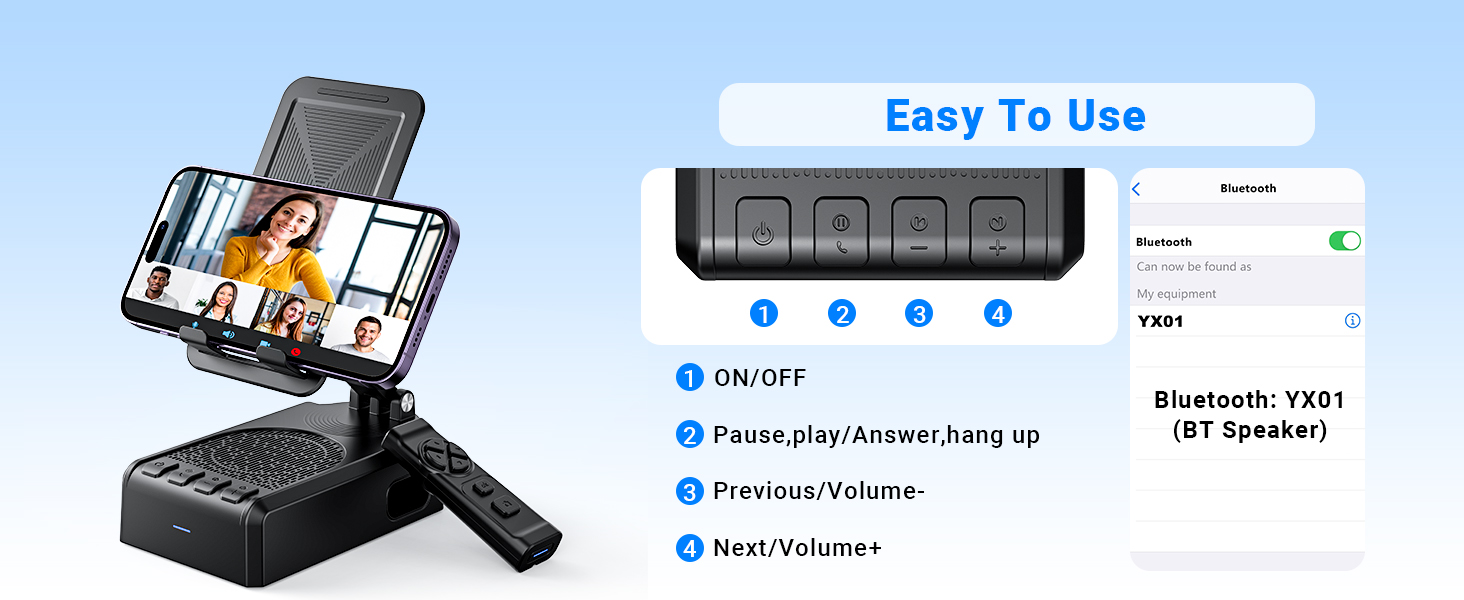
เกินview ของปุ่มควบคุมลำโพงและฟังก์ชั่นต่างๆ
ฟังก์ชั่นการควบคุมระยะไกล
The Bluetooth remote control provides convenient hands-free operation for various applications:
- Single click (Up/Down arrows): Scroll up/down in apps like TikTok or YouTube.
- Single click (Left/Right arrows): Swipe left/right (e.g., for next/previous video).
- Long press (Left/Right arrows): Adjust volume (Volume- / Volume+).
- OK button (center): เล่น/หยุดสื่อชั่วคราว
- Double click (OK button): Single 'like' in social media apps.
- Long press 3s (OK button): Continuous likes (in TikTok live state).
- ปุ่มกล้อง: Exit continuous likes (in TikTok live state).
Note: The remote control is not compatible with music software or Kindle devices.
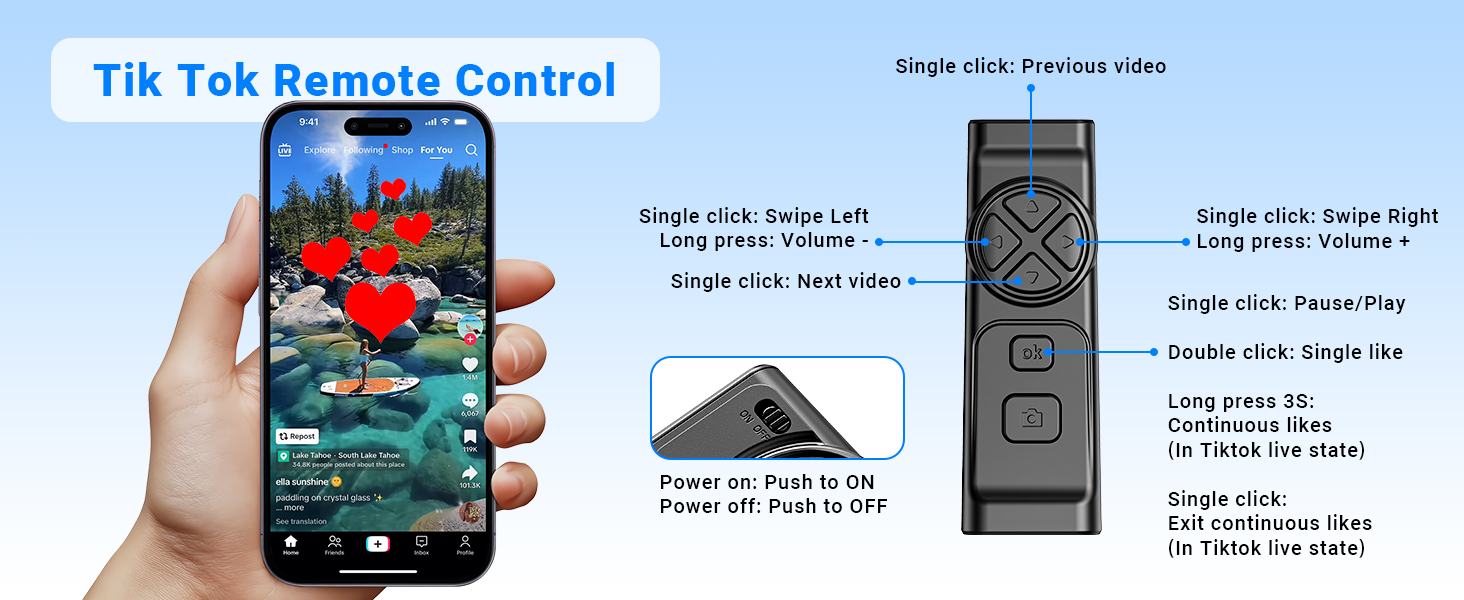
Detailed functions of the remote control for video scrolling and interaction.
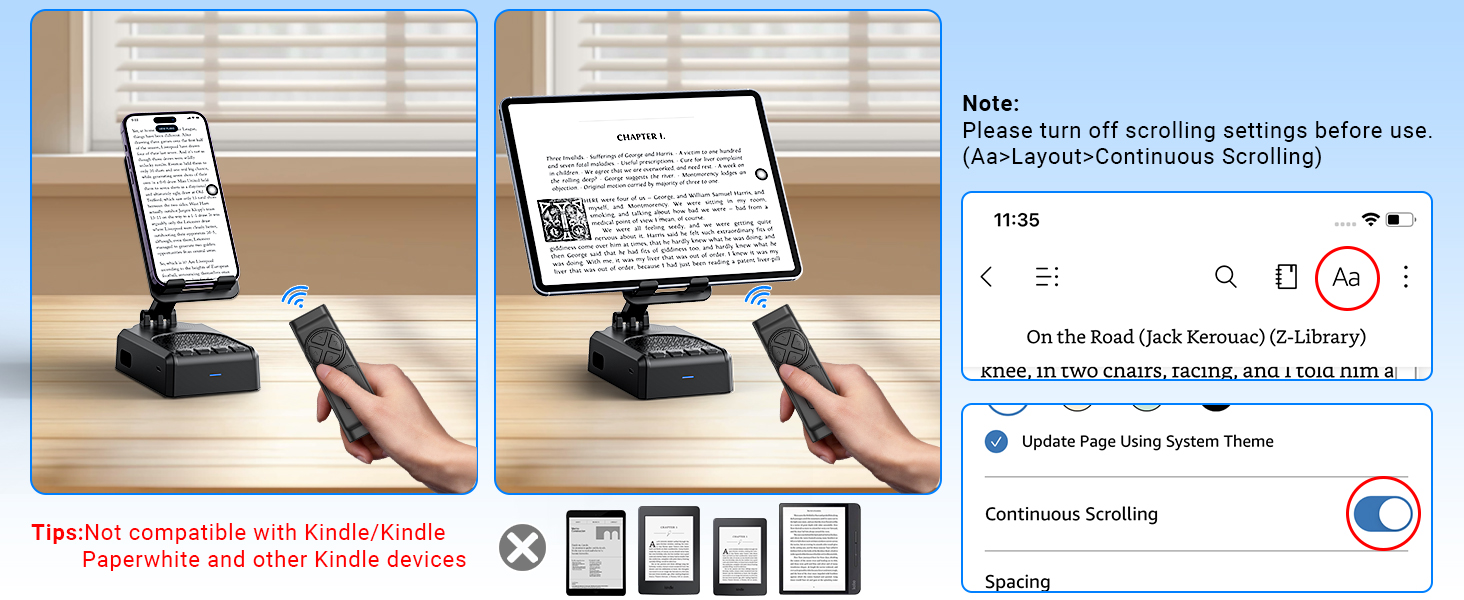
Important note regarding the remote control's compatibility with certain applications and devices.
การดูแลรักษา
- ควรเก็บอุปกรณ์ให้แห้ง อย่าให้โดนความชื้นหรืออุณหภูมิที่สูงเกินไป
- ทำความสะอาดอุปกรณ์ด้วยผ้านุ่มและแห้ง หลีกเลี่ยงการใช้สารเคมีรุนแรงหรือน้ำยาทำความสะอาดที่มีฤทธิ์กัดกร่อน
- เก็บอุปกรณ์ไว้ในที่แห้งและเย็นเมื่อไม่ใช้งาน
- หลีกเลี่ยงการทำอุปกรณ์หล่นหรือกระแทกอย่างรุนแรง
การแก้ไขปัญหา
Remote Control Issues (iOS)
ปัญหา: The remote control cannot scroll through videos on an iOS device.
สารละลาย: Ensure AssistiveTouch is properly configured. Go to การตั้งค่า > การช่วยการเข้าถึง > การสัมผัส > AssistiveTouch. Turn on AssistiveTouch, then turn on ดำเนินการท่าทางสัมผัส, and adjust the ความไวในการติดตาม to 20%-30%.
ปัญหา: Remote control still not working after enabling AssistiveTouch.
สารละลาย:
- Verify the remote control is powered on (slide the button on the back to ON).
- Confirm the remote is paired with your phone via Bluetooth. Check your phone's Bluetooth settings.
- If issues persist, try disabling and re-enabling the AssistiveTouch function.
Visual guide for troubleshooting remote control issues on iOS devices.
Low Volume on Android Devices
ปัญหา: The speaker volume is too low on an Android device.
สารละลาย: After connecting the speaker via Bluetooth, go to your phone's Bluetooth settings, find the connected speaker (e.g., YX01), tap the gear icon or settings icon next to it, and ensure 'Sync volume with phone' or 'Media volume sync' is enabled.

Instructions for adjusting volume sync settings on Android devices.
ข้อมูลจำเพาะทางเทคนิค
| คุณสมบัติ | ข้อมูลจำเพาะ |
|---|---|
| ชื่อรุ่น | YX01, YK01 |
| ประเภทลำโพง | ลำโพงแบบพกพา |
| คุณสมบัติพิเศษ | Bass Boost, Built-In Microphone, Lightweight, Portable, Stereo Pairing |
| อุปกรณ์ที่รองรับ | Android phone, Samsung, Tablet, iPad, iPhone |
| จำนวนหน่วย | 1.0 จำนวน |
| การกำหนดค่าช่องเสียงรอบทิศทาง | 1.0 |
| สี | สีดำ |
| อายุการใช้งานแบตเตอรี่ | 10 ชั่วโมง |
| ขนาดสินค้า | ลึก 5.7 นิ้ว x กว้าง 2.08 นิ้ว x สูง 3.34 นิ้ว |
| น้ำหนักสินค้า | 0.36 กิโลกรัม (12.6 ออนซ์) |
| กันน้ำได้ | เท็จ |
| เวลาในการชาร์จ | 1.5 ชั่วโมง |
| ประเภทการรับประกัน | จำกัด |
| ระยะการใช้งานสูงสุด (บลูทูธ) | 393 นิ้ว (10 เมตร) |
| จำนวนรายการ | 1 |
| วิธีการควบคุม | รีโมท, สัมผัส |
| เทคโนโลยีการสื่อสารไร้สาย | บลูทูธ |
| แหล่งพลังงาน | ใช้พลังงานจากแบตเตอรี่ |
| จำนวนแบตเตอรี่ | ต้องใช้แบตเตอรี่ 2 ก้อน (รวมอยู่ด้วย) |
| ประเภทไดร์เวอร์เสียง | ไดร์เวอร์แบบไดนามิก |
| จำนวนไมโครโฟน | 1 |
| โปรโตคอลการเชื่อมต่อ | บลูทูธ |
| สไตล์ | ทันสมัย |
| ผู้ผลิต | ไอเคลา |
| กำลังขับสูงสุดของลำโพง | 1 วัตต์ |
| โหมดเอาต์พุตเสียง | สเตอริโอ |
| ประเภทการติดตั้ง | ที่วางบนโต๊ะ |
การรับประกันและการสนับสนุน
AIKELA provides 12 months of support for your Speaker Stand. If you encounter any problems or have questions, please contact customer service. For quick assistance, use the 'Find Order - Contact Seller' option on your purchase platform.


