1. บทนำ
This manual provides detailed instructions for the installation, operation, and maintenance of your TOWODE 4CH 5MP Hybrid 5-in-1 DVR Security Camera System. Please read this manual thoroughly before using the product to ensure proper setup and functionality. This system is designed to provide comprehensive surveillance for your property.
2. ข้อมูลด้านความปลอดภัย
- Ensure all power connections are secure and correctly rated for the device.
- Do not expose the DVR to liquids or extreme temperatures.
- Handle the hard drive with care to prevent data loss or damage.
- Installation should be performed by qualified personnel if you are unsure about electrical wiring.
- Keep cameras and cables out of reach of children.
- Use only manufacturer-approved accessories and power adapters.
3. เนื้อหาบรรจุภัณฑ์
ตรวจสอบว่ารายการทั้งหมดที่ระบุไว้ด้านล่างนี้รวมอยู่ในแพ็คเกจของคุณ:
- 1x 4CH DVR recorder
- 2x 5MP HD Cameras
- 1x 1TB HDD (Pre-installed)
- 2x 15 meters integrated line (Video/Power cables)
- 2x 12V2A power supply
4. สินค้าหมดview
The TOWODE 4CH 5MP Hybrid 5-in-1 DVR Security Camera System provides robust surveillance capabilities with high-definition video recording and advanced features.
4.1 ส่วนประกอบของระบบ

This image displays the main components of the security system: the 4-channel DVR unit, two 5MP bullet-style security cameras, and an icon representing the pre-installed 1TB hard drive. The DVR features various input/output ports on its rear panel, including video inputs, audio inputs/outputs, VGA, HDMI, USB, and network ports.
4.2 DVR Rear Panel and Camera Connections

ภาพนี้ให้รายละเอียด view of the DVR's rear panel, highlighting various connection ports such as BNC video inputs (VIDEO IN), audio input/output (AUDIO IN/OUT), VGA, HD-port (HDMI), USB, network (NET), and DC 12V power input. The image also shows a 5MP camera with its power and video output cables, indicating its IP66 weatherproof rating, 3.6mm lens, and up to 80 ft IR night vision capability.
5. การตั้งค่า
5.1 การเชื่อมต่อทางกายภาพ
- เชื่อมต่อกล้อง: Connect the BNC video cable from each 5MP camera to the 'VIDEO IN' ports on the rear of the DVR. Connect the camera's power cable to the provided 12V power supply.
- เชื่อมต่อจอภาพ: Connect a monitor to the DVR using either the 'HD-port' (HDMI) or 'VGA' port.
- เชื่อมต่อเมาส์: Plug the USB mouse into one of the 'USB' ports on the DVR.
- การเชื่อมต่อเครือข่าย (ทางเลือก): สำหรับรีโมท viewing, connect an Ethernet cable from the 'NET' port on the DVR to your router.
- เปิดเครื่อง: Connect the DVR's power adapter to the 'DC 12V' input and then to a power outlet. The system will power on automatically.
5.2 การกำหนดค่าเริ่มต้น
Upon first boot, the system will guide you through an initial setup wizard. This typically includes:
- Setting up an administrator password.
- Configuring date and time settings.
- Network settings (DHCP or static IP).
- Hard drive initialization (if prompted).
6. คู่มือการใช้งาน
6.1 โหมดการบันทึก
The DVR supports various recording modes:
- บันทึกเสียงต่อเนื่องตลอด 24 ชั่วโมง 7 วันต่อสัปดาห์: The system records continuously. This mode ensures no moment is missed.
- การบันทึกการตรวจจับความเคลื่อนไหว: Recording starts only when motion is detected, saving storage space.
- การบันทึกตามกำหนดเวลา: กำหนดเวลาเฉพาะสำหรับการบันทึก

This image illustrates the 24/7 non-stop recording feature, showing a monitor displaying a 4-channel live view from various surveillance points, including a home, a warehouse, and a family playing. The DVR unit is visible below the monitor, emphasizing continuous security coverage.
6.2 การเข้าถึงระยะไกล
You can access your security system remotely via mobile app or PC software.
- แอปมือถือ: Download the recommended app (e.g., XMeye) from your smartphone's app store. Register an account, add your DVR by scanning the QR code or entering its ID, and view live feeds or playback.
- ซอฟต์แวร์พีซี: Install the VMS software on your computer. Add the DVR using its IP address or cloud ID for remote monitoring.
6.3 การเล่นซ้ำ
เพื่อview บันทึกเสียงฟูtage:
- Access the 'Playback' menu on the DVR interface.
- เลือกวันที่และช่องกล้องที่ต้องการ
- Use the timeline to navigate and play back recordings.

This image illustrates the 'Advanced Smart Playback' feature, showing a timeline at the bottom with markers indicating recorded events. Above the timeline, various snapshots from different times are displayed, such as a person entering a door, a family walking, and a delivery. This feature allows users to quickly review specific moments.
6.4 ระบบเตือนภัยอัจฉริยะ
The system features intelligent human detection and alarm functions:

This image demonstrates the AI Motion Face Detection feature. It shows a smartphone displaying a live video feed with a 'Motion Detection Alarm' notification from the XMeye app. In the background, two individuals are highlighted with detection boxes, indicating that the system has identified human presence and triggered an alert, which can be pushed to the app or sent via email.
When human motion is detected, the system can:
- ตั้งสัญญาณเตือนภัย
- Send push notifications to your mobile phone.
- ส่งอีเมลแจ้งเตือน
7. คุณสมบัติขั้นสูง
7.1 5-in-1 Hybrid DVR Compatibility
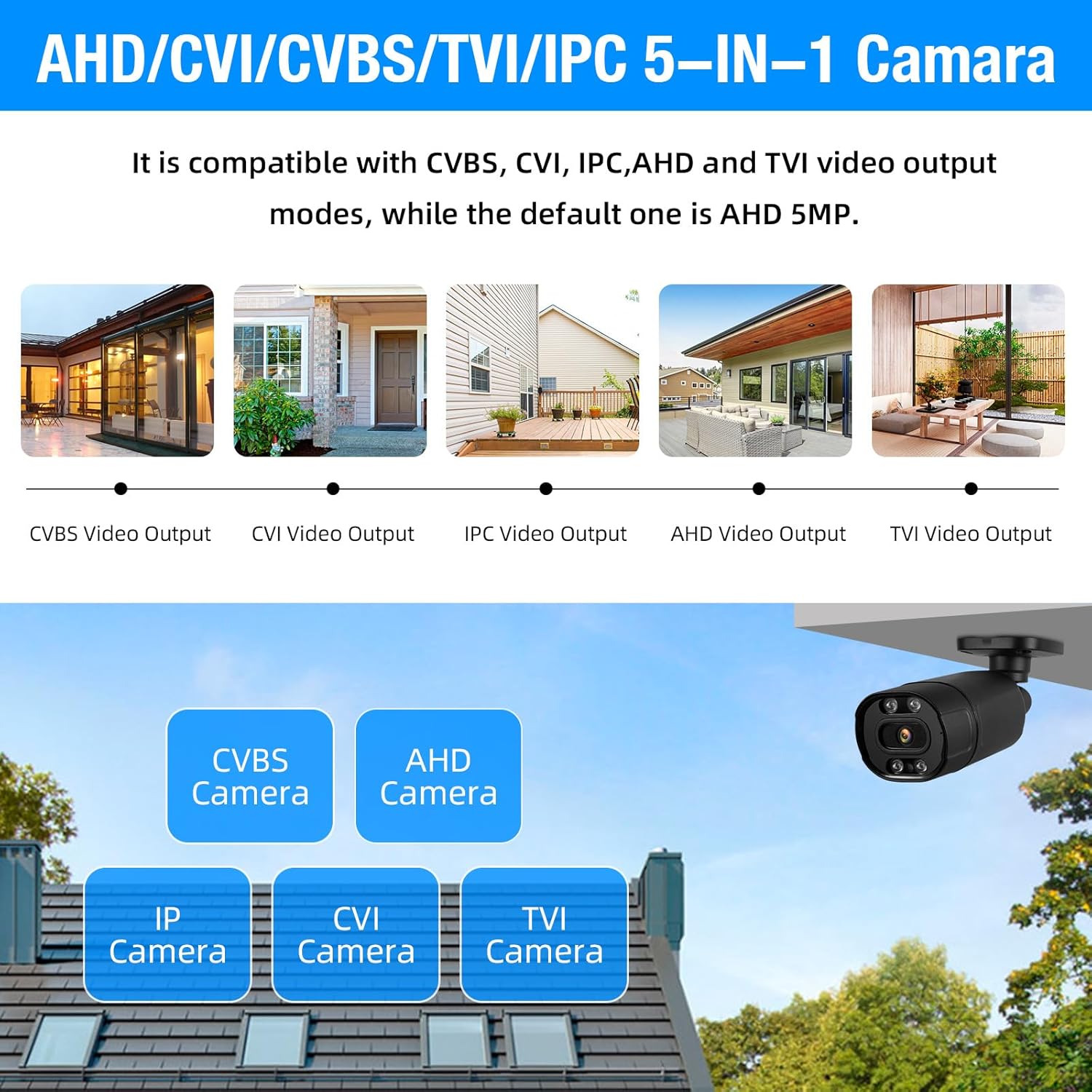
This image highlights the 5-in-1 Hybrid DVR's compatibility with multiple video output modes: CVBS, CVI, IPC (IP Camera), AHD, and TVI. It visually represents different camera types (CVBS, AHD, IP, CVI, TVI) that can be connected to the DVR, demonstrating its versatility. The default mode is AHD 5MP.
The DVR supports AHD/TVI/CVI/CVBS/IP camera 5-in-1 access mode, allowing flexibility in camera selection and integration with existing systems.
7.2 IP66 Weatherproof Cameras

This image showcases the IP66 Weatherproof and Dustproof rating of the security camera. It depicts a camera being hit by rain, with icons indicating its ability to withstand hot temperatures (up to 131°F/55°C) and cold temperatures (down to 14°F/-10°C), ensuring reliable outdoor performance in various weather conditions.
The included cameras are constructed from high-quality metal aluminum material with an IP66 rating, making them suitable for both indoor and outdoor use in various weather conditions.
7.3 H.265+ Efficient Video Compression

This image compares H.265+ and H.264 video compression technologies. It highlights that H.265+ offers smoother viewing and reduced memory space. Bar graphs illustrate that H.265+ provides 100% fluency and 100% storage space efficiency compared to H.264, which shows reduced fluency and higher storage consumption, demonstrating the superior efficiency of H.265+.
The DVR utilizes advanced H.265+ video compression technology, which significantly improves the compression ratio compared to H.264. This results in longer recording times and up to 80% storage savings, while maintaining high image quality and providing a smooth viewการสร้างประสบการณ์
7.4 พื้นที่จัดเก็บข้อมูลที่สามารถขยายได้

This image shows the DVR unit with a visual representation of a pre-installed 1TB HDD. Text overlays indicate 'Expandable Capacity' and 'Worry-Free Backup,' along with 'Up to 14TB External HDD,' signifying that the system's storage can be significantly expanded beyond the initial 1TB.
The system comes with a pre-installed 1TB hard drive. For extended recording needs, the DVR supports expandable storage up to 14TB via an external HDD.
8. การบำรุงรักษา
8.1 การทำความสะอาด
- กล้องถ่ายรูป: Periodically clean camera lenses with a soft, dry cloth to ensure clear image quality. For outdoor cameras, remove any dirt or debris from the housing.
- DVR: Keep the DVR free from dust. Use a soft brush or compressed air to clean ventilation openings. Do not use liquid cleaners directly on the unit.
8.2 การจัดการฮาร์ดไดรฟ์
- The 1TB HDD is pre-installed and configured for continuous recording, overwriting the oldest footagเมื่อเต็มแล้ว
- สำรองข้อมูลสำคัญเป็นประจำtage to an external storage device (e.g., USB drive) if needed.
- Check the hard drive status in the DVR's system settings periodically to ensure proper functioning.
9 การแก้ไขปัญหา
9.1 ไม่มีสัญญาณภาพออกทางจอภาพ
- Check if the DVR is powered on.
- Verify that the monitor is powered on and set to the correct input source (HDMI/VGA).
- Ensure the HDMI/VGA cable is securely connected to both the DVR and the monitor.
9.2 Cameras Not Displaying Image
- Check if the camera's power adapter is connected and receiving power.
- Ensure the BNC video cable is securely connected to both the camera and the DVR.
- Verify the camera type is compatible with the DVR's current channel settings (AHD, TVI, CVI, CVBS, IP).
9.3 การเข้าถึงระยะไกลไม่ทำงาน
- Ensure the DVR is connected to the internet via an Ethernet cable.
- ตรวจสอบการเชื่อมต่ออินเทอร์เน็ตของเราเตอร์ของคุณ
- Verify network settings on the DVR (DHCP enabled or correct static IP).
- Confirm that the mobile app or PC software is correctly configured with the DVR's ID/IP address.
9.4 ฮาร์ดไดรฟ์ไม่บันทึก
- Check the hard drive status in the DVR's system settings. It may need to be initialized or formatted.
- Ensure recording schedules are properly set up.
- Verify that motion detection settings are correctly configured if using that mode.
10. ข้อมูลจำเพาะ
| คุณสมบัติ | รายละเอียด |
|---|---|
| ยี่ห้อ | ทูโวเด |
| หมายเลขรุ่น | A6504L2 |
| เทคโนโลยีการเชื่อมต่อ | มีสาย |
| ความละเอียดในการจับภาพวิดีโอ | 1944p (5MP) |
| คุณสมบัติพิเศษ | App Control, Audio Recording, Human Detection, Motion Sensor |
| จำนวนช่องสัญญาณ | 4 |
| ความจุของหน่วยความจำ | 1 TB (Pre-installed) |
| แหล่งพลังงาน | สายไฟ |
| ขนาดรายการ (ยาว x กว้าง x สูง) | 9.84 x 7.87 x 1.96 นิ้ว |
| อุปกรณ์ที่รองรับ | Cameras, Personal Computers, Smartphones, Tablets |
| ช่วงการมองเห็นตอนกลางคืน | 80 ฟุต |
| อัตราเฟรม | 25 เฟรมต่อวินาที |
| โหมดการบันทึก | การตรวจจับการเคลื่อนไหวอย่างต่อเนื่อง |
| ประเภทเลนส์ | Fixed (3.6mm) |
| อินพุตวิดีโอ | BNC (AHD/TVI/CVI/CVBS/IP 5-in-1) |
| น้ำหนักสินค้า | 7.3 ปอนด์ |
| คะแนนสภาพอากาศ | IP66 |
11. การรับประกันและการสนับสนุน
For technical support, troubleshooting assistance, or warranty inquiries, please refer to the contact information provided with your product packaging or visit the official TOWODE webไซต์ โปรดเก็บใบเสร็จรับเงินไว้เป็นหลักฐานการซื้อสำหรับการเรียกร้องการรับประกัน

