การแนะนำ
Thank you for choosing the Yanosaku Vanity Desk. This manual provides essential information for the safe assembly, operation, and maintenance of your new vanity desk. Please read these instructions carefully before beginning assembly and retain them for future reference.
ข้อมูลด้านความปลอดภัย
- ควรประกอบผลิตภัณฑ์บนพื้นผิวที่นุ่มและสะอาดเสมอเพื่อป้องกันรอยขีดข่วน
- ตรวจสอบให้แน่ใจว่าทุกส่วนประกอบยึดแน่นดีแล้วก่อนใช้งาน ตรวจสอบและขันข้อต่อทั้งหมดให้แน่นเป็นระยะ
- อย่าใส่ของในลิ้นชักหรือชั้นวางมากเกินไป กระจายน้ำหนักให้เท่าๆ กัน
- Keep electrical components (lights, power outlet) away from water and moisture.
- Use only the provided power adapter for the LED lights and power outlet.
- เก็บชิ้นส่วนขนาดเล็กและวัสดุบรรจุภัณฑ์ให้ห่างจากเด็กเพื่อป้องกันอันตรายจากการสำลัก
- ผลิตภัณฑ์นี้มีวัตถุประสงค์สำหรับใช้ภายในอาคารเท่านั้น
เนื้อหาแพ็คเกจ
Your Yanosaku Vanity Desk package includes all necessary parts, hardware, and tools for assembly, along with a detailed instruction manual. The item may arrive in two separate boxes, potentially at different times. Please ensure you have received all packages before starting assembly.

Figure 1: The vanity desk is shipped in two separate boxes.
การติดตั้งและการประกอบ
Assembly of the Yanosaku Vanity Desk requires careful attention to the provided step-by-step instructions. Each part is numbered for easy identification. It is recommended to follow the instructions precisely to ensure quick and correct assembly.
- แกะกล่องและระบุชิ้นส่วน: Carefully unbox all components and lay them out. Verify that all numbered parts and hardware are present according to the parts list in your manual.
- ประกอบเฟรมหลัก: Follow the diagrams to connect the main structural pieces of the vanity desk.
- Install Drawers and Shelves: Assemble the 10 drawers and integrate the 6 shelves as indicated in the manual. Ensure drawer slides are correctly aligned for smooth operation.
- Attach Mirror and LED Lights: Securely mount the mirror and install the 10 LED Hollywood plastic bulbs.
- Connect Power Outlet: Install the power outlet and hair dryer stand on the side of the vanity.
- ประกอบเก้าอี้แต่งหน้า: Follow the separate instructions for assembling the accompanying vanity stool.
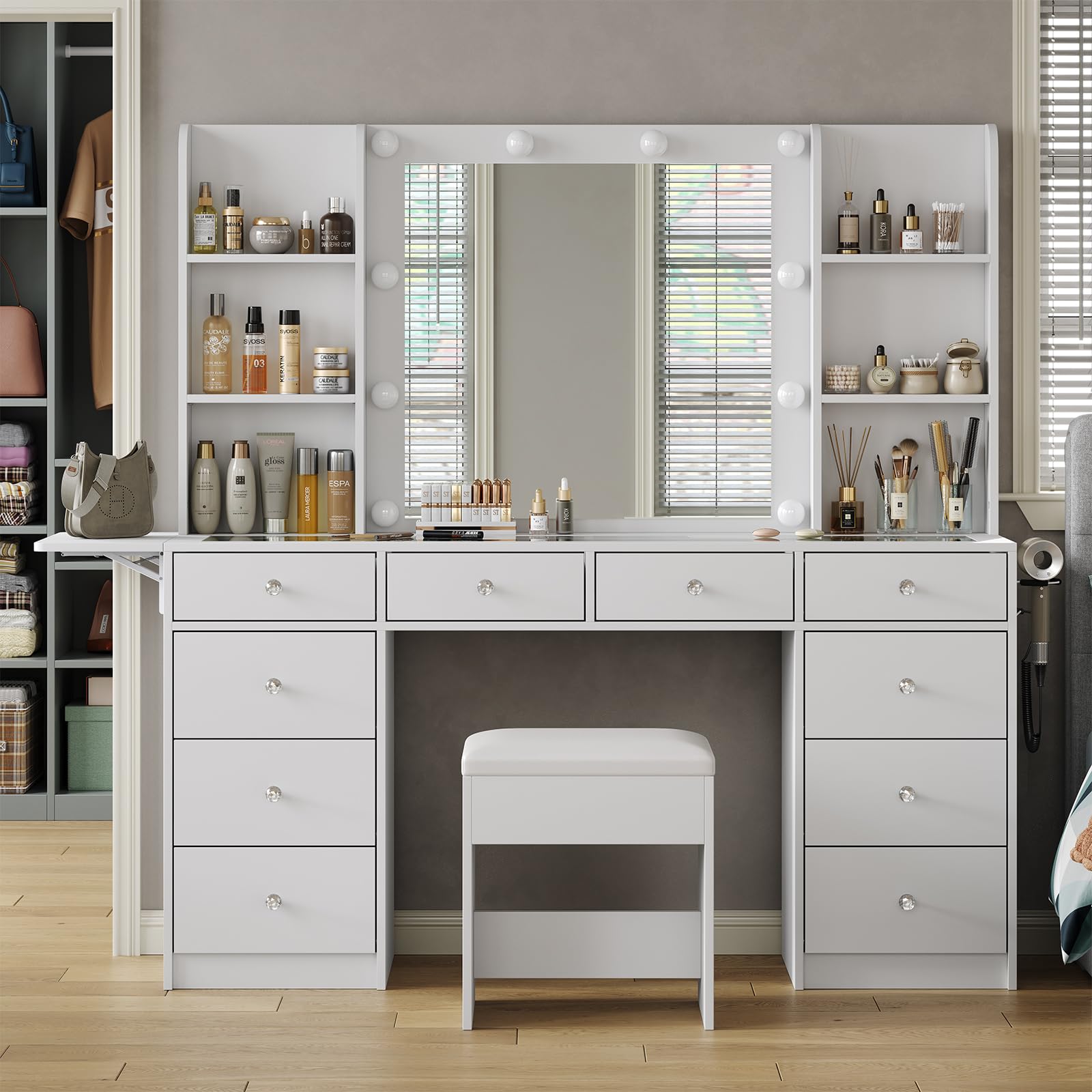
Figure 2: Fully assembled Yanosaku Vanity Desk with stool.

Figure 3: Product dimensions for the vanity desk and stool.
คำแนะนำการใช้งาน
ระบบไฟ LED
The vanity is equipped with 10 LED Hollywood plastic bulbs offering three color modes and adjustable brightness.
- โหมดสี: Cycle through warm, natural, and cool light settings by pressing the control button.
- การปรับความสว่าง: Long-press the control button to adjust the brightness level within each color mode.

Figure 4: Three adjustable lighting modes for optimal illumination.
Integrated Power Outlet and USB Ports
A built-in charging station is located on the side of the vanity, featuring two standard plug sockets and two USB ports.
- ปลั๊กไฟ: Use the 125V/12A AC outlets for appliances like hair dryers or curlเตารีด
- พอร์ต USB: Use the 5V/2A USB ports to charge mobile phones, tablets, or other USB-powered devices.
- Hair Dryer Stand: A dedicated stand is provided for convenient storage of your hair dryer.

Figure 5: Built-in power strip with AC outlets and USB ports.
Fold-up Panel (Drop Leaf Countertop)
The vanity includes a foldable side panel to expand your workspace when needed.
- ขยาย: Lift the panel and secure it in the extended position to gain additional surface area.
- พับ: Release the support mechanism and fold the panel down to make the vanity more compact.

Figure 6: Drop leaf countertop in expanded and folded states.
คุณสมบัติการจัดเก็บข้อมูล
The vanity offers extensive storage options to keep your beauty products organized.
- ลิ้นชัก: Utilize the 10 spacious drawers for various items.
- ชั้นวางสินค้า : The 6 open shelves provide easy access storage for frequently used products.
- โต๊ะกระจกนิรภัย: The embedded glass top allows you to view and easily locate cosmetics and accessories stored in the top drawers.

Figure 7: Vanity desk with drawers open, showcasing ampความจุในการจัดเก็บ

Figure 8: Embedded tempered glass tabletop for visible storage.
การซ่อมบำรุง
- การทำความสะอาด: เช็ดพื้นผิวด้วย d . ที่อ่อนนุ่มamp เช็ดด้วยผ้า หลีกเลี่ยงสารเคมีรุนแรงหรือน้ำยาทำความสะอาดที่มีฤทธิ์กัดกร่อน ซึ่งอาจทำให้พื้นผิวเสียหายได้
- การดูแลกระจก: ทำความสะอาดกระจกด้วยน้ำยาทำความสะอาดกระจกและผ้าที่ไม่เป็นขุย
- ส่วนประกอบไฟฟ้า: Ensure the power outlet and LED lights are unplugged before cleaning. Do not immerse electrical parts in water.
- ฮาร์ดแวร์: Periodically check all screws and fasteners to ensure they remain tight. Tighten as necessary to maintain stability.
การแก้ไขปัญหา
| ปัญหา | สาเหตุที่เป็นไปได้ | สารละลาย |
|---|---|---|
| ไฟ LED ไม่ทำงาน | Power cable not connected; bulb loose or faulty; power outlet issue. | Check power connection; ensure bulbs are screwed in tightly; test the power outlet with another device. |
| Drawers stick or do not close properly | Drawer slides misaligned; obstruction in the track; drawer overloaded. | Re-check drawer slide installation; remove any obstructions; redistribute contents or reduce load. |
| ความเย่อหยิ่งรู้สึกไม่มั่นคง | ตัวล็อคหลวม พื้นไม่เรียบ | Tighten all assembly screws; use furniture levelers if the floor is uneven. |
| เต้ารับไฟฟ้า/พอร์ต USB ใช้งานไม่ได้ | Power cable not connected; device not compatible; circuit breaker tripped. | Ensure the vanity's power cord is fully plugged into a working wall outlet; check device compatibility; reset household circuit breaker if necessary. |
If you encounter issues not listed here or require further assistance, please contact Yanosaku customer support.
ข้อมูลจำเพาะ
| หมายเลขรุ่น | VD011-WH |
| ยี่ห้อ | ยาโนซากุ |
| สี | สีขาว |
| สไตล์ | 10 Drawers - White |
| วัสดุ | ไม้แปรรูป |
| ขนาดสินค้า (ลึก x กว้าง x สูง) | 15.7 x 55 x 55 นิ้ว (ลึก 15.7 นิ้ว x กว้าง 55 นิ้ว x สูง 55 นิ้ว) |
| น้ำหนักสินค้า | 140 ปอนด์ |
| จำเป็นต้องประกอบ | ใช่ |
| เต้าเสียบไฟฟ้า | 2 Standard AC Outlets (125V/12A), 2 USB Ports (5V/2A) |
| แสงสว่าง | 10 LED Hollywood Plastic Bulbs, 3 Color Modes (Warm/Natural/Cool), Adjustable Brightness |
การรับประกันและการสนับสนุน
For warranty information or customer support, please refer to the documentation included with your purchase or contact the seller directly through the platform where the product was purchased. Yanosaku is committed to providing satisfactory solutions for any questions or concerns you may have.


