การแนะนำ
This manual provides instructions for the safe and effective use of your OGERY F11-20000mAh Portable Camping Fan. Please read this manual thoroughly before operating the device and retain it for future reference.
สินค้าเกินview
The OGERY F11-20000mAh is a portable, rechargeable fan designed for various environments including camping, travel, and home use. It features a 20000mAh battery, stepless speed regulation, an integrated LED lantern, and power bank functionality.

Image: OGERY F11-20000mAh Portable Camping Fan, front view พร้อมรีโมทคอนโทรล
คุณสมบัติหลัก:
- กระแสลมแรง: Provides wind speeds up to 5.3m/s with advanced Turbocharging and PWM Control.
- อายุการใช้งานแบตเตอรี่ที่ยาวนานขึ้น: Equipped with a 20000mAh battery, offering 12 to 138 hours of operation (fan only) or 33 to 152 hours (light only).
- ชาร์จเร็ว: Supports 20W fast charging, reaching full capacity in approximately 4.5 hours.
- Integrated LED Lantern: Features a 3-level eye-protective LED ring light for illumination.
- การออกแบบแบบหลายฟังก์ชั่น: Includes 30°/60°/90°/120° automatic oscillation, 270° manual tilt, a remote control, folding handle, and a 360° rotatable hook.
- ฟังก์ชั่นธนาคารพลังงาน: Dual output ports (USB and Type-C) allow charging of other devices.
ส่วนประกอบ:

ภาพ: รายละเอียด view of the fan's control panel with indicators for power, fan speed, timer, and oscillation.
- แผงควบคุม: Located on the base, includes power indicator, fan speed indicator, timer indicator, rocking head indicator, sleep button, lighting button, fan speed control knob, oscillation button, and timer button.
- รีโมทคอนโทรล: For convenient operation of fan speed, light, oscillation, and timer.
- ที่จับพับได้: For portability and carrying.
- 360° Rotatable Hook: For hanging the fan in tents or other locations.
- พอร์ตชาร์จ: USB output and Type-C input/output ports.
การตั้งค่า
การชาร์จครั้งแรก:
- Before first use, fully charge the fan. Connect the provided Type-C cable to the fan's Type-C input/output port and to a power adapter (not included, >18W recommended).
- The power indicator lights on the control panel will show charging progress. All lights will be solid when fully charged.
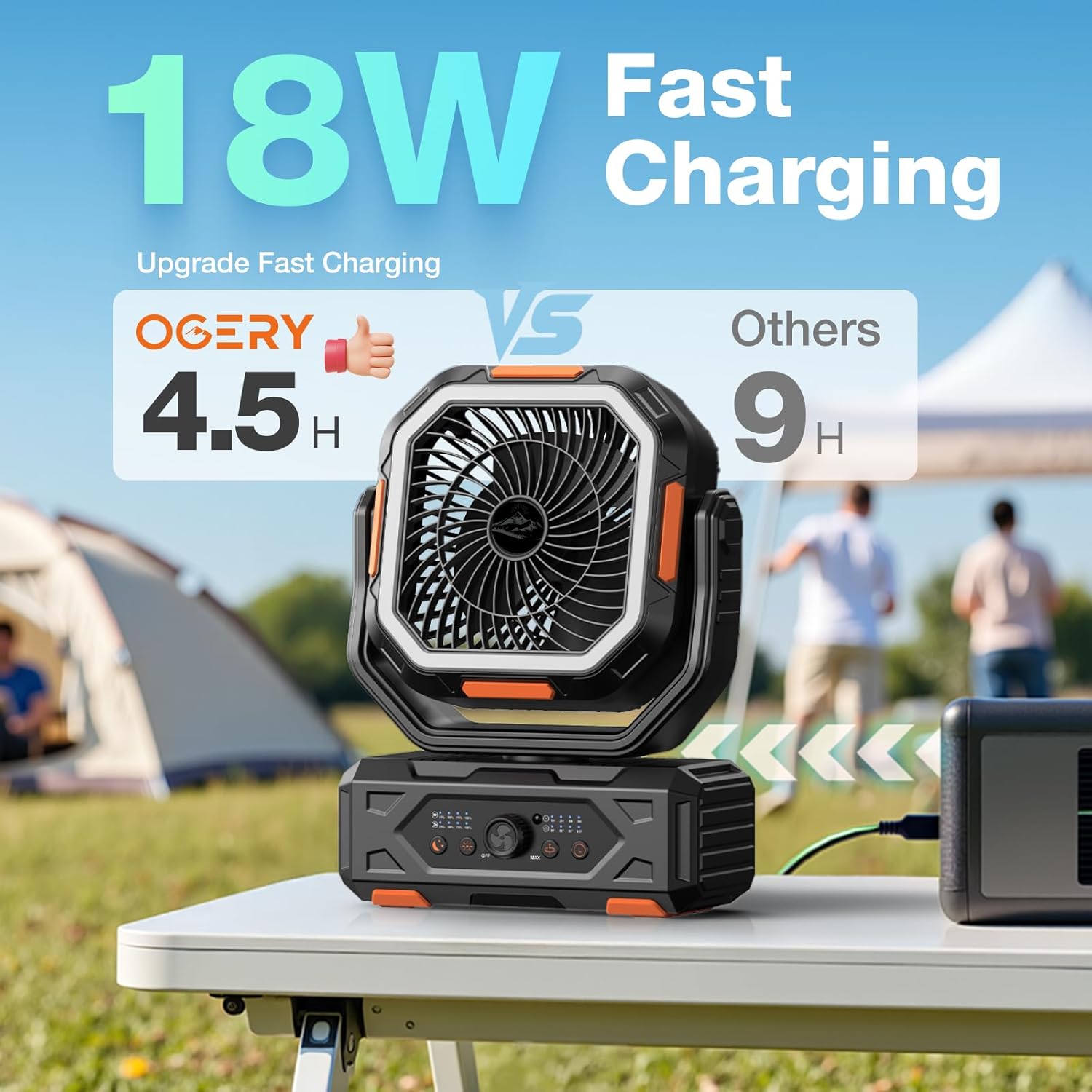
Image: The OGERY F11-20000mAh fan connected to a power source for charging.
การติดตั้งแบตเตอรี่รีโมทคอนโทรล:
The remote control requires 2 CR5 batteries (included). Open the battery compartment on the back of the remote and insert the batteries, observing polarity.

Image: Diagram illustrating the buttons and functions of the remote control.
การดำเนินการ
เปิด/ปิดเครื่อง:
- บนอุปกรณ์: Rotate the fan speed control knob clockwise from 'OFF' to turn on the fan. Rotate counter-clockwise to 'OFF' to power off.
- รีโมทคอนโทรล: กดปุ่มเปิด/ปิดเครื่อง
การปรับความเร็วพัดลม:
- บนอุปกรณ์: Rotate the fan speed control knob clockwise to increase speed (from MIN to MAX).
- รีโมทคอนโทรล: Use the '+' and '-' buttons to increase or decrease fan speed.

Image: A family outdoors, illustrating the fan's stepless speed regulation via the control knob.
การควบคุมการสั่น:
The fan supports automatic oscillation at 30°, 60°, 90°, and 120°.
- บนอุปกรณ์: Press the oscillation button on the control panel to cycle through oscillation angles or turn off oscillation.
- รีโมทคอนโทรล: Press the oscillation setting button.
The fan head can also be manually tilted 270° vertically.

ภาพ: สอง views of the fan demonstrating 270° front-back tilt and 30°/60°/90°/120° auto left-right swing.
การทำงานของไฟ LED:
The integrated LED lantern has 3 brightness levels.
- บนอุปกรณ์: Press the lighting button on the control panel to cycle through brightness levels (Low, Medium, Strong) and off.
- รีโมทคอนโทรล: Use the light increase and light decrease buttons.

Image: Fan hanging inside a tent, providing 3 levels of eye-friendly lighting.
ฟังก์ชั่นจับเวลา:
Set the fan to operate for a specific duration.
- บนอุปกรณ์: Press the timer button to select 1H, 2H, 4H, or 8H.
- รีโมทคอนโทรล: Press the timer setting button.
โหมดสลีป:
Activates a quiet operation mode with indicator lights off.
- บนอุปกรณ์: Press the sleep button.
- รีโมทคอนโทรล: Press the sleep mode button.

Image: A person sleeping in a tent with the fan operating quietly, illustrating low noise levels.
ฟังก์ชั่นพาวเวอร์แบงค์:
The fan can charge other devices using its 20000mAh battery.
- Connect your device's charging cable to the fan's USB output port or Type-C input/output port.
- Ensure the fan has sufficient battery charge.
กำลังชาร์จพัดลม
To recharge the OGERY F11-20000mAh fan:
- ใช้สายชาร์จ Type-C ที่ให้มา
- Connect the cable to the fan's Type-C input/output port.
- Plug the other end into a compatible power adapter (e.g., wall charger, power bank) with an output of 18W or greater for fast charging.
- A full charge takes approximately 4.5 hours. The power indicator lights will show charging status.
การซ่อมบำรุง
การทำความสะอาด:
- โปรดตรวจสอบให้แน่ใจว่าพัดลมปิดอยู่และถอดปลั๊กออกก่อนทำความสะอาด
- เช็ดพื้นผิวภายนอกด้วยผ้านุ่ม damp ผ้า ห้ามใช้สารทำความสะอาดที่มีฤทธิ์กัดกร่อนหรือตัวทำละลาย
- For dust accumulation on the fan blades, use a soft brush or compressed air. Do not attempt to disassemble the fan for cleaning.
พื้นที่จัดเก็บ:
- เก็บพัดลมไว้ในที่แห้งและเย็น หลีกเลี่ยงแสงแดดโดยตรงและอุณหภูมิที่สูงหรือต่ำเกินไป
- If storing for an extended period, charge the battery to approximately 50-70% every 3 months to maintain battery health.
การแก้ไขปัญหา
| ปัญหา | สาเหตุที่เป็นไปได้ | สารละลาย |
|---|---|---|
| พัดลมไม่เปิด | แบตเตอรี่หมด | ชาร์จพัดลมให้เต็ม |
| Power knob is in 'OFF' position. | Rotate the knob clockwise to turn on. | |
| การไหลเวียนของอากาศอ่อน | ตั้งความเร็วพัดลมไว้ต่ำเกินไป | Increase fan speed using the knob or remote. |
| Obstruction in front/back of fan. | Ensure clear path for airflow. | |
| ไฟ LED ไม่ทำงาน. | Light is off or set to lowest brightness. | Press the light button to cycle through brightness levels. |
| รีโมทคอนโทรลไม่ตอบสนอง | แบตเตอรี่รีโมทหมดหรือติดตั้งไม่ถูกต้อง | Replace batteries or check polarity. Ensure line of sight to the fan. |
| Device not charging from fan's power bank. | แบตเตอรี่พัดลมเหลือน้อย | ชาร์จพัดลม |
| ใช้สายเคเบิลหรือพอร์ตที่ไม่ถูกต้อง | Use appropriate USB or Type-C cable and port. |
ข้อมูลจำเพาะ
| คุณสมบัติ | รายละเอียด |
|---|---|
| ยี่ห้อ | โอเกอรี่ |
| ชื่อรุ่น | เอฟ11 |
| แหล่งพลังงาน | ใช้พลังงานจากแบตเตอรี่ |
| ความจุของแบตเตอรี่ | 20000mAh |
| เวลาในการชาร์จ | Approx. 4.5 hours (with >18W adapter) |
| Operating Time (Fan) | 12 ถึง 138 ชั่วโมง (ขึ้นอยู่กับความเร็ว) |
| Operating Time (Light) | 33 to 152 hours (depending on brightness) |
| ความเร็วลม | สูงถึง 5.3ม./วินาที |
| การสั่น | 30°/60°/90°/120° Automatic |
| มุมเอียง | คู่มือ 270° |
| ระดับไฟ LED | 3 |
| วิธีการควบคุม | Remote, On-device knob/buttons |
| ขนาดสินค้า | ลึก 4.3 นิ้ว x กว้าง 9.5 นิ้ว x สูง 15 นิ้ว |
| น้ำหนักสินค้า | 3.94 ปอนด์ |
| เล่มที่tage | 5 โวลต์ |
| วัดtage | 18 วัตต์ |
| ยูพีซี | 716597693982 |
การรับประกันและการสนับสนุน
OGERY products are designed for reliability and performance. For warranty information or technical support, please refer to the product packaging or contact OGERY customer service through their official channels. Keep your purchase receipt as proof of purchase for warranty claims.


