1. บทนำ
The Carpuride W502S Pro is a wireless motorcycle GPS system designed to integrate smartphone functionalities like CarPlay and Android Auto directly onto your motorcycle. This manual provides detailed instructions for installation, operation, and maintenance to ensure optimal performance and a safe riding experience.

Image 1.1: Carpuride W502S Pro Motorcycle GPS and included accessories.
2. สินค้าหมดview
2.1 คุณสมบัติหลัก
- Wireless CarPlay and Android Auto: Seamless integration with your smartphone for navigation, calls, music, and messages via voice assistants (Siri/Google Assistant).
- Flexible Bluetooth Connectivity: Supports both single and dual Bluetooth connections for pairing with motorcycle helmets or headsets.
- Secure and Durable Mounting: Features a metal BM05 mount with a quick-release mechanism for easy attachment and removal, enhancing security against theft.
- การปรับความสว่างอัตโนมัติ: An integrated light sensor automatically adjusts screen brightness based on ambient light conditions, protecting your eyes and ensuring visibility.
- Intercom and Music Sharing: Dual Bluetooth technology allows simultaneous connection of two Bluetooth helmets for rider-passenger intercom and shared music playback.
- Integrated Navigation Aids: Includes a compass for direction and a barometer for real-time altitude monitoring.
- ตัวควบคุมแบบมีสาย: Provides convenient control for answering calls, managing screen power, and switching between home and active interfaces.
- หน้าจอสัมผัส HD IPS ขนาด 5 นิ้ว: High-definition display with 800x600 resolution, 65K vibrant colors, and up to 1000 nits brightness for clear visibility in direct sunlight.
- ระดับการกันน้ำ IP67: Robust design ensures reliable performance in various weather conditions, operating effectively from -20°C to 80°C.
- การออกอากาศสื่อท้องถิ่น: Supports TF/SD card for playing music and videos directly on the device.
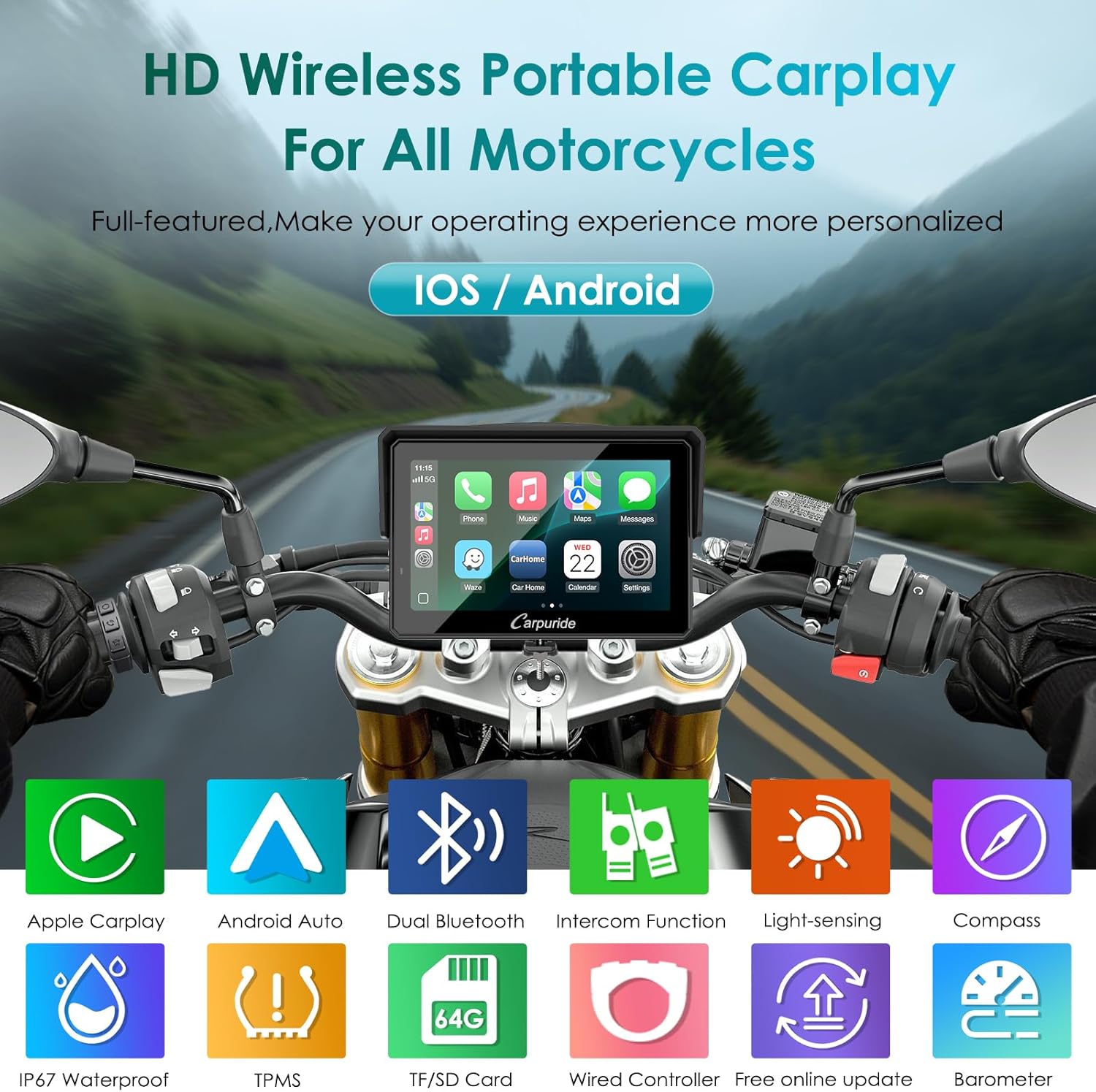
Image 2.1: Visual representation of the Carpuride W502S Pro's main features.
2.2 อะไรอยู่ในกล่อง
- Carpuride W502S Pro Motorcycle CarPlay Screen (x1)
- BM05 Metal Mount and Key (x1)
- Extension Rod Bracket (x1)
- Wired Controller (x1)
- ประแจ (x1)
- สายไฟ (x1)
- USB Power Line (x1)
- คู่มือผู้ใช้ (x1)
- Silicone Gasket Set (x1)

Image 2.2: Contents of the Carpuride W502S Pro package.
3. การตั้งค่าและการติดตั้ง
3.1 การติดตั้งอุปกรณ์
The Carpuride W502S Pro comes with a universal BM05 metal mount designed for various motorcycle handlebars. Follow these steps for installation:
- Select the appropriate silicone gasket thickness (12mm, 22mm, 25.4mm, or 28mm) to match your handlebar diameter.
- Attach the metal mount to the handlebar using a Phillips screwdriver.
- Adjust the extension rod bracket to your desired viewing angle and secure it.
- Slide the BM05 mount onto the handlebar clamp และขันสกรูให้แน่น
- Insert the metal key into the slot on the mount, push it in until it locks, then turn it left to secure.
- Align the Carpuride W502S Pro screen with the BM05 mount and slide it into place until it clicks securely.
- To remove, re-insert the key, push it in, turn it right, and slide the screen off.

Image 3.1: Installation Mode 1 - Detailed steps for mounting the device.

Image 3.2: Installation Mode 2 - Alternative mounting method.
3.2 การเดินสายไฟและการเชื่อมต่อแหล่งจ่ายไฟ
The device can be powered via a direct battery connection or a USB port.
- การเชื่อมต่อแบตเตอรี่โดยตรง: Connect the red wire of the power cable to the positive terminal of your motorcycle's battery (ACC), and the black wire to the negative terminal.
- การเชื่อมต่อไฟผ่าน USB: Use the provided USB power line to connect the device to a motorcycle USB port.
Ensure all connections are secure and waterproof. The wired controller connects to the main unit via its dedicated port.
Image 3.3: Installation Diagram - Power connection options.
4. การดำเนินการ
4.1 เปิด/ปิดเครื่อง
To power on the device, press and hold the power button for more than 5 seconds. To power off, press and hold the power button again for more than 5 seconds.
4.2 CarPlay ไร้สายและ Android Auto
Connect your smartphone to the Carpuride W502S Pro via Bluetooth for wireless CarPlay or Android Auto functionality.
- สำหรับ Apple CarPlay:
- On the W502S Pro, open the CarPlay application.
- On your iPhone, search for the Bluetooth device named "carpuride xxxx" and pair.
- Confirm by tapping "Allow" and "Use CarPlay" on your iPhone.
- การเชื่อมต่อจะถูกสร้างขึ้น
- สำหรับ Android Auto:
- On the W502S Pro, open the Android Auto application.
- On your Android phone, go to Bluetooth settings and find available devices.
- Select "carpuride xxxx" and tap "Pair" to connect.
- การเชื่อมต่อจะถูกสร้างขึ้น

Image 4.1: Apple CarPlay Connection Guide.

Image 4.2: Android Auto Connection Guide.
4.3 Bluetooth Headset Connections
The W502S Pro supports various Bluetooth audio configurations:
- Bluetooth Trans (Single-Connection Mode): Pair your Bluetooth helmet or headset directly with the W502S Pro. Ensure the headset is in pairing mode. Do not connect your mobile phone directly to the Bluetooth helmet/headset, as this may interfere with the pairing process.
- Bluetooth Trans (Dual-Connection Mode): The W502S Pro can transmit audio from CarPlay or Android Auto to two separate Bluetooth helmets/headsets (Bluetooth 1 and Bluetooth 2) simultaneously. This allows both rider and passenger to listen to music or communicate.
- iPlay/Auto (Bluetooth Audio): Connect your phone to your Bluetooth headset/helmet, and use CarPlay or Android Auto on the W502S Pro to play audio through your headset/helmet.

Image 4.3: Bluetooth Headset Connection Modes.
4.4 ฟังก์ชันของตัวควบคุมแบบมีสาย
The included wired controller provides quick access to essential functions:
- ปุ่มวงจร: Short press to answer incoming calls. Long press (over 5 seconds) to power on/off the screen.
- ปุ่มรูปภาพ: Short press to hang up calls.
- ปุ่มโฮม:
- When connected to Apple CarPlay, a short press switches between the main interface and the CarPlay interface.
- Long press (over 5 seconds) to lock the screen. In heavy rain, press the screen lock button to prevent accidental touches.

Image 4.4: Wired Controller and its functions.
4.5 การควบคุมด้วยเสียง
Utilize Siri or Google Assistant through the device for hands-free operation, including navigation, making calls, and playing music.

Image 4.5: Hands-free operation with voice control.
4.6 Music Sharing and Intercom
With the dual Bluetooth feature, the rider and passenger can share music and use the intercom function. Connect two Bluetooth helmets to the W502S Pro via BT Trans mode. This allows for shared audio experiences and instant communication during rides.

Image 4.6: Music Sharing and Intercom Mode.
4.7 Compass and Barometer
The W502S Pro includes a digital compass to help maintain your bearing and a barometer to monitor real-time altitude changes, useful for understanding environmental conditions, especially in mountainous terrain.

Image 4.7: Compass and Barometer displays.
4.8 Light Sensor and Equalizer
The integrated light sensor automatically adjusts the screen's brightness to optimize visibility and reduce eye strain in varying light conditions. The device also features a built-in equalizer with various musical styles and sound effects for audio customization.

Image 4.8: Light sensor functionality and local playback.
4.9 Local Media Playback
The W502S Pro supports local playback of music and videos from a TF/SD card (not included, purchased separately). Insert the card into the designated slot to access your media files.

Image 4.9: TF Card support for local media playback.
5. การบำรุงรักษา
5.1 การทำความสะอาด
To clean the screen and device body, use a soft, damp ผ้า หลีกเลี่ยงน้ำยาทำความสะอาดหรือตัวทำละลายที่มีฤทธิ์กัดกร่อนซึ่งอาจทำให้หน้าจอหรือผ้าเสียหายได้asing.
5.2 Water Resistance and Durability
The Carpuride W502S Pro is rated IP67 waterproof, meaning it is protected against dust and can withstand immersion in water up to 1 meter for 30 minutes. It is designed to operate reliably in temperatures ranging from -20°C to 80°C.

Image 5.1: Device performance in various riding environments.
6 การแก้ไขปัญหา
6.1 ปัญหาการเชื่อมต่อ
- Bluetooth Pairing Interference: When pairing a Bluetooth helmet or headset, ensure your mobile phone is not simultaneously connected to the headset, as this can cause interference.
- Incompatible Android Phones: Some Android phone models may not be fully compatible with wireless Android Auto. These include, but are not limited to: OnePlus Nord 2T, OnePlus Nord CE2 5G, Oppo CPH2161, Oppo A16S, Oppo Reno 2, Oppo Reno 2Z, Samsung S23, Samsung Note 20, Samsung S20, Samsung M22, Samsung S23 Ultra, Galaxy A20 (model SM-A205g), Huawei P30, Huawei P30 Pro, Huawei P40 Pro, Huawei P20, Huawei P20 Pro, Huawei P30 Lite MAR-LX1A, Huawei Mate 20, Huawei Mate 20 Pro, Huawei P Smart 2019 - POT-LX1, Huawei Nova 5T, Huawei Mate Lite 10, Honor 90, Xiaomi 11 Lite, Xiaomi 12 Pro, Redmi 9, Xiaomi 9.
- Motorcycle 'Start & Stop' Feature: If your motorcycle has a 'Start & Stop' feature and the device is powered via USB, the screen may turn off when the engine stops. This is because the USB port might lose power. To avoid this, disable the 'Start & Stop' feature or use direct battery wiring.
6.2 Wired Controller Limitations
- When connected to an Android phone, the wired controller's cycle button may not be able to answer calls.
7. ข้อมูลจำเพาะ
| คุณสมบัติ | ข้อมูลจำเพาะ |
|---|---|
| ยี่ห้อ | CARPURIDE |
| แบบอย่าง | W502S Pro |
| ขนาดสินค้า | 2.75 x 13.4 x 9 ซม. |
| น้ำหนักผลิตภัณฑ์ | 998 กรัม |
| ขนาดหน้าจอ | 5 นิ้ว |
| ประเภทจอภาพ | หน้าจอสัมผัส IPS HD |
| ปณิธาน | ขนาด 800x600 |
| ความสว่าง | สูงถึง 1000 nits |
| ระดับการกันน้ำ | IP67 |
| อุณหภูมิในการทำงาน | -20°C ถึง 80°C |
| เทคโนโลยีการเชื่อมต่อ | บลูทูธ |
| อุปกรณ์ที่รองรับ | สมาร์ทโฟน (iOS, Android) |
| โหมดเอาต์พุตเสียง | Stereo (Headphones, Speaker) |
| การกำหนดค่าช่องเสียงรอบทิศทาง | 5.1 |
| การเข้ารหัสวิดีโอ | H.264, H.265/HEVC |
8. การรับประกันและการสนับสนุน
Carpuride offers 12 months of technical support for the W502S Pro GPS navigator. For any questions or concerns, please contact Carpuride customer service. They aim to provide a satisfactory solution within 24 hours.


