1. บทนำ
This manual provides comprehensive instructions for the installation, operation, and maintenance of your SPTBMDJ JP Brushless Motor Controller with LCD Display Panel. This product is designed for electric bikes and scooters, offering reliable speed control for 24V, 36V, and 48V systems with 250-350W motors. Please read this manual thoroughly before use to ensure proper function and safety.
2. คำแนะนำด้านความปลอดภัย
- ถอดปลั๊กไฟก่อนการติดตั้งหรือบำรุงรักษาทุกครั้ง
- Ensure all connections are secure and correctly wired according to the provided diagrams. Incorrect wiring can damage the controller or other components.
- อย่าให้ตัวควบคุมหรือจอแสดงผลโดนน้ำหรืออยู่ในอุณหภูมิที่สูงหรือต่ำเกินไป
- หากคุณไม่แน่ใจเกี่ยวกับขั้นตอนการติดตั้งใดๆ ให้ขอความช่วยเหลือจากผู้เชี่ยวชาญ
- This product is intended for use with compatible electric bike and scooter systems. Do not attempt to use it with incompatible voltage or power ratings.
3. เนื้อหาบรรจุภัณฑ์
ตรวจสอบว่ามีรายการทั้งหมดอยู่ในแพ็คเกจ:
- 1 x มอเตอร์แบบไม่มีแปรง คอนโทรลเลอร์
- 1 x LCD Display Panel
- 1 x Connecting Line (Wiring Harness)

รูปที่ 3.1: The complete package contents, including the motor controller (silver box), the LCD display panel with throttle, and the associated wiring harness.
4. คุณสมบัติของผลิตภัณฑ์
- เล่มที่tagความเข้ากันได้: Supports 24V, 36V, and 48V systems.
- กำลังขับ: Suitable for 250W to 350W brushless motors.
- จอแสดงผล LCD ในตัว: Provides real-time information such as speed, battery level, and mode.
- โครงสร้างทนทาน: Made from composite materials for long service life.
- ติดตั้งง่าย: ออกแบบมาเพื่อให้ติดตั้งง่าย
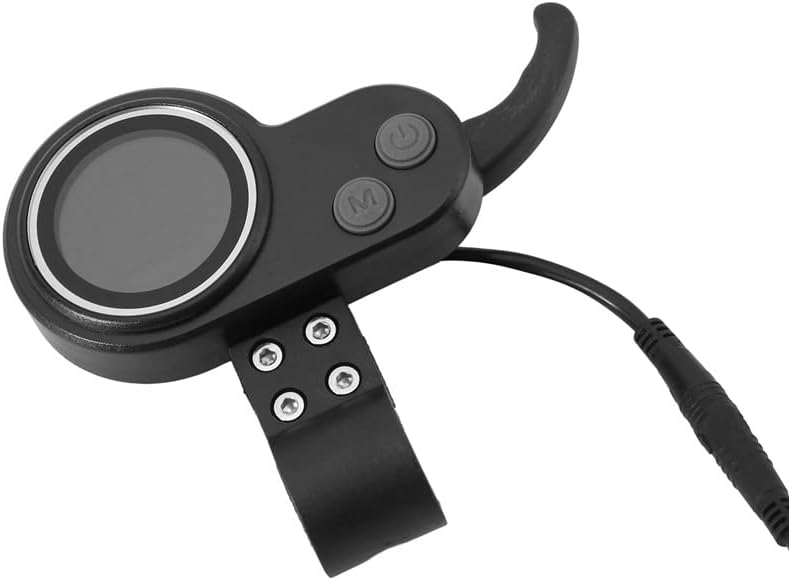
รูปที่ 4.1: The LCD Display Panel, featuring a circular screen, power button, and mode button, integrated with a thumb throttle.
5. การตั้งค่าและการติดตั้ง
Follow these steps to install the motor controller and LCD display panel:
- การตัดการเชื่อมต่อไฟฟ้า: Ensure the electric bike or scooter's power source is completely disconnected before beginning installation.
- การติดตั้งจอแสดงผล: Attach the LCD Display Panel to the handlebar using the integrated clamp. Secure it firmly but do not overtighten.
- ตำแหน่งการวางตัวควบคุม: Find a suitable, protected location for the motor controller (silver box) on your vehicle, away from direct moisture and physical impact.
- การเชื่อมต่อสายไฟ:
- Connect the main power wires from the battery to the controller (typically red for positive, black for negative).
- Connect the motor phase wires (usually three thicker wires) from the motor to the controller. Ensure correct color matching.
- Connect the Hall sensor wires (usually five thinner wires) from the motor to the controller.
- Connect the LCD Display Panel's connecting line to the corresponding port on the controller.
- Connect any additional accessories such as brake levers, lights, or pedal assist sensors (PAS) if applicable, following their specific wiring diagrams.
- การเดินสายไฟที่ปลอดภัย: Use cable ties or similar fasteners to neatly secure all wires, preventing them from snagging or interfering with moving parts.
- การเพิ่มพลังเริ่มต้น: Once all connections are secure, reconnect the main power source. Turn on the system using the power button on the LCD display.

รูปที่ 5.1: The LCD Display Panel showing the integrated throttle and the multi-pin connector for the wiring harness, ready for connection to the controller.
6. คู่มือการใช้งาน
6.1. เปิด/ปิดเครื่อง
- To power on the system, press and hold the ปุ่มเปิดปิด (usually marked with a power symbol) on the LCD display for a few seconds.
- ในการปิดเครื่องให้กดปุ่ม ปุ่มเปิดปิด ทำซ้ำไปเรื่อยๆ จนกว่าหน้าจอจะดับลง
6.2. ฟังก์ชันการแสดงผล
The LCD display provides various real-time data:
- ความเร็ว: ความเร็วในการขี่ปัจจุบัน
- ระดับแบตเตอรี่: แสดงระดับแบตเตอรี่ที่เหลืออยู่
- Mode/Gear: Current assist level or riding mode.
- Odometer/Trip: Total distance traveled or current trip distance.
6.3 การเปลี่ยนโหมด/การตั้งค่า
กดปุ่ม ปุ่มโหมด (usually marked 'M') to cycle through different display information or assist levels. Refer to your vehicle's specific manual for detailed mode functionalities.
6.4. การทำงานของคันเร่ง
The integrated thumb throttle controls the motor's speed. Gently press the throttle to accelerate. Release the throttle to decelerate. Always operate with caution and awareness of your surroundings.
7. การบำรุงรักษา
- การตรวจสอบปกติ: Periodically check all wiring connections for looseness or damage.
- การทำความสะอาด: Wipe the display and controller with a soft, dry cloth. Do not use abrasive cleaners or solvents.
- การปกป้องสิ่งแวดล้อม: Avoid prolonged exposure to direct sunlight, rain, or extreme temperatures to prolong the lifespan of the components.
- การตรวจสอบอย่างมืออาชีพ: If you notice any unusual behavior or performance issues, consult a qualified technician.
8 การแก้ไขปัญหา
| ปัญหา | สาเหตุที่เป็นไปได้ | สารละลาย |
|---|---|---|
| หน้าจอไม่แสดงผล | No power from battery; loose connection; faulty display/controller. | Check battery charge. Verify all wiring connections, especially the main power and display cable. If problem persists, contact support. |
| มอเตอร์ไม่ตอบสนองต่อคันเร่ง | Loose throttle connection; faulty throttle; motor/Hall sensor issue; controller malfunction. | Check throttle cable connection to the controller. Ensure the system is powered on. Inspect motor and Hall sensor wiring. |
| ความเร็วหรือกำลังไม่คงที่ | Low battery; loose motor phase/Hall sensor wires; controller issue. | Charge battery fully. Check all motor and sensor connections for secure fit. |
For issues not listed above, or if troubleshooting steps do not resolve the problem, please contact customer support.
9. ข้อมูลจำเพาะ
| หมายเลขรุ่น | SPTBMDJ124 |
| ยี่ห้อ | SPTBMDJ |
| เล่มที่tagความเข้ากันได้ | 24 โวลต์ / 36 โวลต์ / 48 โวลต์ |
| Motor Power Range | 250W - 350W |
| วัสดุ | วัสดุคอมโพสิต |
| น้ำหนักสินค้า | 1.76 ออนซ์ (ประมาณ 50 กรัม) |
| ขนาดแพ็คเกจ | 1.18 x 0.79 x 0.39 นิ้ว (ประมาณ 3 x 2 x 1 ซม.) |
10. การรับประกันและการสนับสนุน
For warranty information or technical support, please refer to the documentation provided with your purchase or contact the retailer directly. Keep your proof of purchase for any warranty claims.