การแนะนำ
The My Arcade Atari Pixel Pocket Pro is a portable, officially licensed Atari video game system designed for on-the-go entertainment. This compact device includes 25 classic Atari games, offering a nostalgic gaming experience in a convenient keychain format. This manual provides essential information for setting up, operating, and maintaining your device.
เนื้อหาแพ็คเกจ
- My Arcade Atari Pixel Pocket Pro device
- คู่มือการใช้งาน (เอกสารนี้)

Image: The My Arcade Atari Pixel Pocket Pro device shown within its retail packaging, highlighting the product's branding and key features.
สินค้าเกินview
The Pixel Pocket Pro features a 2-inch full-color screen and intuitive button controls for an authentic arcade experience. Its compact design includes a keychain for easy portability.

ภาพ: ด้านหน้า view of the My Arcade Atari Pixel Pocket Pro, displaying the screen, directional pad, SELECT, START, VOLUME, and 'A' buttons.
Image: The My Arcade Atari Pixel Pocket Pro with visual callouts indicating 25 officially licensed Atari titles, a 2-inch full-color screen, and power via 3 AAA batteries.
การตั้งค่า
การติดตั้งแบตเตอรี่
- ค้นหาช่องใส่แบตเตอรี่ที่ด้านหลังของอุปกรณ์
- Using a small Phillips head screwdriver (not included), carefully remove the screw securing the battery compartment cover.
- ถอดฝาครอบออก
- ใส่แบตเตอรี่ AAA จำนวนสาม (3) ก้อน (ไม่ได้รวมอยู่ด้วย) ลงในช่องใส่แบตเตอรี่ โดยตรวจสอบให้แน่ใจว่าขั้วถูกต้อง (+/-) ตามที่ระบุไว้ภายในช่องใส่แบตเตอรี่
- ใส่ฝาปิดช่องใส่แบตเตอรี่และขันให้แน่นด้วยสกรู
Note: Always use fresh batteries and dispose of old batteries responsibly. Do not mix old and new batteries or different types of batteries.

ภาพ: ด้านหลัง view of the My Arcade Atari Pixel Pocket Pro, showing the location of the battery compartment cover.
คำแนะนำการใช้งาน
เปิด/ปิดเครื่อง
- หากต้องการเปิดเครื่อง ให้กดปุ่ม เริ่ม ปุ่ม.
- หากต้องการปิดอุปกรณ์ ให้กดปุ่ม เริ่ม กดปุ่มค้างไว้ประมาณ 3 วินาทีจนกว่าหน้าจอจะดับลง
การเลือกเกม
- After powering on, use the directional pad to navigate through the list of available games.
- กดปุ่ม A button to select a game and begin playing.
การควบคุมระดับเสียง
- ใช้ ปริมาณ button to adjust the sound level. Pressing it cycles through different volume settings.
การเล่นเกม
- The directional pad controls movement within the game.
- การ A button typically serves as the action or fire button.
- การ เลือก button may be used for in-game options or pausing, depending on the specific game.
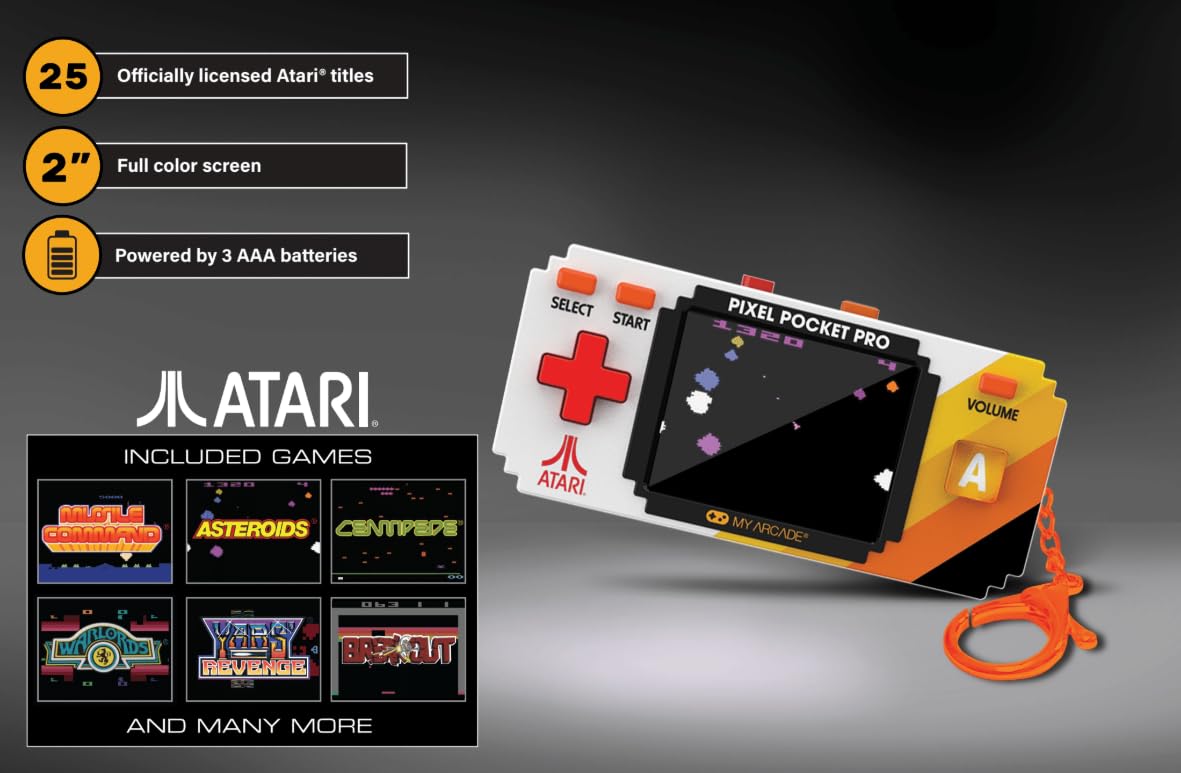
Image: A hand holding the My Arcade Atari Pixel Pocket Pro, demonstrating its portable size and how it is used for gameplay.
การซ่อมบำรุง
การทำความสะอาด
- เช็ดอุปกรณ์ด้วยผ้านุ่มแห้ง
- Do not use liquid cleaners or abrasive materials, as these can damage the screen or casing.
การดูแลแบตเตอรี่
- ถอดแบตเตอรี่ออกหากจะไม่ได้ใช้งานอุปกรณ์เป็นเวลานานเพื่อป้องกันการรั่วไหล
- เก็บอุปกรณ์ไว้ในที่แห้งและเย็น ห่างจากแสงแดดโดยตรง
การแก้ไขปัญหา
อุปกรณ์ไม่เปิดใช้งาน
- ตรวจสอบให้แน่ใจว่าใส่แบตเตอรี่อย่างถูกต้องและขั้วที่ถูกต้อง
- เปลี่ยนด้วยแบตเตอรี่ AAA ใหม่
- ตรวจสอบว่าฝาช่องใส่แบตเตอรี่ปิดสนิทดีแล้ว
ไม่มีเสียงหรือเสียงต่ำ
- กดปุ่ม ปริมาณ button to increase the sound level.
- ตรวจสอบให้แน่ใจว่าลำโพงไม่ถูกกีดขวาง
Screen Issues (e.g., Blurry, Flickering)
- ตรวจสอบให้แน่ใจว่าหน้าจอสะอาดและปราศจากรอยเปื้อน
- Replace batteries, as low power can sometimes affect screen performance.
- หากปัญหายังคงอยู่ โปรดติดต่อฝ่ายสนับสนุนลูกค้า
ข้อมูลจำเพาะ
| หมายเลขรุ่น | DGUNL-7134 |
| ยี่ห้อ | ห้องเกมอาเขตของฉัน |
| ขนาดหน้าจอ | 2 inches (full color) |
| ประเภทตัวควบคุม | ปุ่มควบคุม |
| แหล่งพลังงาน | ใช้พลังงานจากแบตเตอรี่ |
| แบตเตอรี่ที่จำเป็น | 3 x AAA (ไม่รวม) |
| ขนาด (กว้าง x สูง x ลึก) | ขนาด 1.75" x 3.8" x 1" (โดยประมาณ) |
| น้ำหนัก | 4.5 ออนซ์ (โดยประมาณ) |
| วัสดุ | พลาสติก |
| จำนวนเกม | 25 Officially Licensed Atari Titles |
การรับประกันและการสนับสนุน
สำหรับข้อมูลการรับประกันหรือการสนับสนุนทางเทคนิค โปรดดูรายละเอียดการติดต่อที่ระบุไว้บนบรรจุภัณฑ์ของผลิตภัณฑ์ หรือเยี่ยมชมเว็บไซต์อย่างเป็นทางการของ My Arcade webไซต์ โปรดเก็บใบเสร็จรับเงินไว้เป็นหลักฐานการซื้อ
Image: A QR code for collecting more My Arcade products. Scan this code to explore other available items.
Explore more My Arcade products: https://qrco.de/collectthem


