การแนะนำ
The My Arcade Casino Player (Model DGUN-3945) is an all-in-one handheld gaming device designed for portable entertainment. It comes pre-loaded with over 30 exciting casino and puzzle games, offering a diverse range of entertainment options. This manual provides essential information for setting up, operating, and maintaining your device.
มีอะไรอยู่ในกล่อง
- มาย อาร์เคด ซีasino Player Device
- คู่มือการใช้งาน
การตั้งค่า
การจ่ายไฟให้กับอุปกรณ์
The My Arcade Casino Player can be powered by either 4 AA batteries (not included) or a USB-C cable (not included).
การติดตั้งแบตเตอรี่
- ค้นหาช่องใส่แบตเตอรี่ที่ด้านหลังของอุปกรณ์
- เปิดฝาช่องใส่แบตเตอรี่
- ใส่แบตเตอรี่ AA จำนวน 4 ก้อน โดยให้แน่ใจว่าขั้วถูกต้อง (+/-)
- ใส่ฝาปิดช่องใส่แบตเตอรี่กลับเข้าที่อย่างแน่นหนา

ภาพ: ด้านหลัง view of the My Arcade Casino Player, highlighting the battery compartment. The compartment is designed to hold 4 AA batteries.
USB-C Power (Optional)
To power the device using a USB-C cable, connect one end to the USB-C port on the device and the other end to a compatible USB power source (e.g., wall adapter, computer USB port). The device will operate without batteries when connected via USB-C.
คำแนะนำการใช้งาน
การเปิด/ปิด
Locate the power switch, typically on the side or back of the device. Slide it to the 'ON' position to power on the device. Slide it to 'OFF' to power down.
การควบคุม
ซีasino Player features a variety of controls for game interaction, including a working metal lever for slot games, buttons for casino and puzzle games, and a high-resolution 3.5" full-color display.
Image: A hand is shown interacting with the controls of the My Arcade Casino Player, demonstrating the tactile experience of gameplay.
การปรับความสว่างหน้าจอ
The 3.5" full-color display has adjustable screen brightness. Refer to the on-screen menu or dedicated buttons (if available) to adjust the brightness to your preference.
ตัวเลือกเสียง
The device includes a built-in speaker with volume control. For private listening, a 3.5 mm headphone port is available to connect your headphones.
การเลือกเกม
Upon powering on, you will typically be presented with a main menu to select from the over 30 included games. Use the directional controls and action buttons to navigate and select your desired game.
รวมเกม
The My Arcade Casino Player features a diverse collection of over 30 casino and puzzle games. Below is a list of some of the included titles:
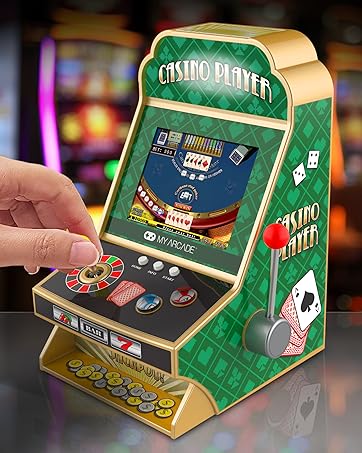
Image: The My Arcade Casino Player screen showing a partial list of the included casino and puzzle games.
Casino Games
- Texas Hold 'em Poker
- Baccarat
- Caribbean Stud Poker
- Show Hand
- Fruit Slot Machine
- Blackjack
- Change Cup
- รูเล็ต
- ไพ่นกกระจอกสะอาด
- Odd Even Number
- Polar Slot Machine
- Retro Slot
เกมปริศนา
- แบ็กแกมมอน
- ฟรีเซลล์
- โซโคบัน
- Big Shot Checkers
- หมากรุก
- Gobang
- ซูโดกุ
- Flight Chess
- Colored Squares
- Precipice
- Mix Match
- Mine Clearance
- เส้นเชื่อมต่อ
- หน่วยความจำดิจิตอล
- Shape Switcher
- Push Color
- Match Cartoon
- Brain Challenge
- Bumber Balls
การซ่อมบำรุง
To ensure the longevity of your My Arcade Casino Player, keep the device clean and dry. Use a soft, dry cloth to wipe down the exterior. Avoid using harsh chemicals or abrasive cleaners. Store the device in a cool, dry place away from direct sunlight and extreme temperatures when not in use.
การแก้ไขปัญหา
ไม่มีไฟฟ้า
- ตรวจสอบให้แน่ใจว่าติดตั้งแบตเตอรี่อย่างถูกต้องและมีขั้วที่ถูกต้อง
- Replace old batteries with new AA alkaline batteries.
- If using USB-C, ensure the cable is securely connected and the power source is active.
ปัญหาการแสดงผล
- Check screen brightness settings and adjust if necessary.
- If the screen is frozen, try turning the device off and on again.
ไม่มีเสียงหรือระดับเสียงต่ำ
- Adjust the volume control on the device.
- If using headphones, ensure they are properly plugged into the 3.5 mm port.
ข้อมูลจำเพาะ
- ขนาดสินค้า : ยาว 4 นิ้ว x กว้าง 4 นิ้ว x สูง 7 นิ้ว
- ประเภทตัวควบคุม: ปุ่มควบคุม
- น้ำหนักสินค้า: 1.08 ปอนด์
- ขนาดหน้าจอ: 3.5 นิ้ว
- แหล่งพลังงาน: Battery Powered (4 AA batteries required, not included) or USB-C (cable not included)
- ช่วงอายุ (คำอธิบาย): สำหรับผู้ใหญ่ (แนะนำสำหรับผู้ที่มีอายุ 18 ปีขึ้นไป)
- ประเภทจอภาพ: จอแอลซีดี
- วัสดุ: พลาสติก
- ความจุหน่วยความจำ: 8MB
- ฟอร์มแฟกเตอร์: โต๊ะวางของ
- หมายเลขรุ่น: ดีกัน-3945
ข้อมูลด้านความปลอดภัย
Recommended for ages 18 and up. This device is not a toy for children. Adult supervision is advised. Do not mix old and new batteries. Do not mix alkaline, standard (carbon-zinc), or rechargeable (nickel-cadmium) batteries. Remove batteries if the device is not to be used for an extended period.
การรับประกันและการสนับสนุน
For warranty information or technical support, please refer to the contact details provided on the product packaging or visit the official My Arcade webไซต์ โปรดเก็บใบเสร็จรับเงินของคุณไว้เป็นหลักฐานการซื้อสำหรับการเรียกร้องการรับประกันใดๆ


