การแนะนำ
Thank you for choosing the BACKWIN B800-T USB-C Wired Headphones. This manual provides detailed instructions for the proper use, setup, and maintenance of your new headphones. Please read this manual thoroughly before using the product to ensure optimal performance and longevity.
เนื้อหาแพ็คเกจ
ตรวจสอบให้แน่ใจว่ามีรายการทั้งหมดอยู่ในบรรจุภัณฑ์:
- BACKWIN B800-T USB-C Wired Headphones
- Ear Cushions (various sizes: large, medium, small)

Image: The BACKWIN B800-T USB-C Wired Headphones, showing the earbuds, inline control, and USB-C connector. Also included are additional ear cushions.
สินค้าเกินview
คุณสมบัติหลัก
- Four-Unit Driver Design: Each earbud features a dynamic bass unit and a high-definition decoding iron coil unit for powerful subwoofer sound and clear high-pitched audio.
- ชิป DAC ในตัว: Equipped with a 24-bit/96Khz DAC decoding chip for high-fidelity audio.
- ความเข้ากันได้แบบสากลของ USB-C: Designed for devices with a Type-C interface, especially those without a 3.5mm audio jack.
- Inline Control with Microphone: Features volume control and a high-definition microphone for convenient call management and music playback.
- ระบบตัดเสียงรบกวนแบบพาสซีฟ: The earbud design and included silicone ear caps provide passive noise isolation.
- โครงสร้างทนทาน: Metal back shell of the headphones is CNC machined for precise workmanship.
ส่วนประกอบ

Image: An exploded diagram illustrating the internal components of the earbud, including the dynamic coil, composite vibration film, sound processor with physical noise reduction, and the iron ring. This combination delivers rich bass, full midrange, and clear treble.
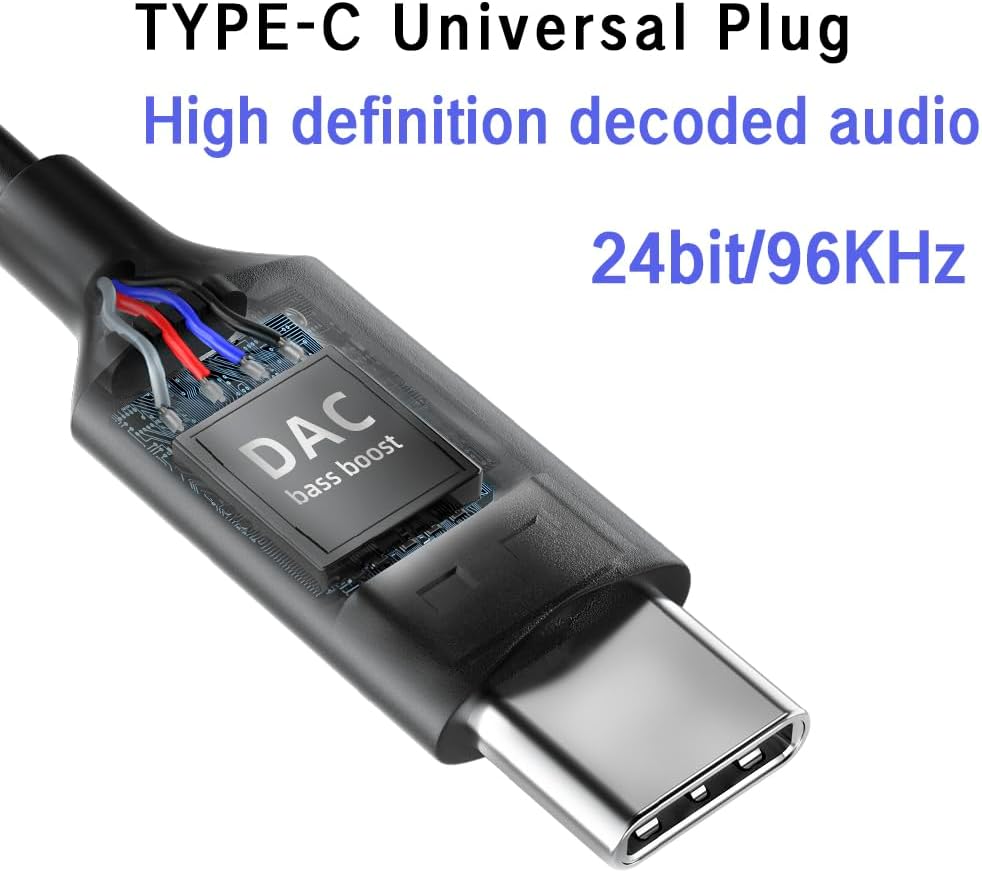
ภาพ: ภาพระยะใกล้ view of the USB-C plug, highlighting the integrated DAC (Digital-to-Analog Converter) chip, which supports 24-bit/96KHz high-definition audio decoding.

ภาพ: รายละเอียด view of the earbud's metal back shell, showcasing the CNC precision machining and overall craftsmanship.
การตั้งค่า
1. Selecting Ear Cushions
The headphones come with large, medium, and small soundproof silicone ear caps. Choose the size that provides the most comfortable and secure fit for your ears. A proper fit is crucial for optimal sound quality and passive noise cancellation.
2. การเชื่อมต่อกับอุปกรณ์ของคุณ
- Locate the USB-C port on your compatible device (e.g., smartphone, tablet, laptop).
- Insert the USB-C plug of the headphones firmly into the device's USB-C port.
- Your device should automatically recognize the headphones. No additional drivers are typically required.
บันทึก: These headphones are designed for devices with a Type-C interface, especially those without a 3.5mm audio jack. Compatibility may vary with some devices; ensure your device supports audio output via its USB-C port.

Image: A person wearing the BACKWIN B800-T USB-C Wired Headphones, demonstrating proper ear placement and fit.
คำแนะนำการใช้งาน
Inline Remote Control Functions
The inline remote control allows you to manage audio playback and calls without needing to access your device directly.

Image: A diagram detailing the functions of the inline remote control, including volume up, volume down, microphone, and multi-function button for calls and music playback.
- ปุ่มเพิ่มระดับเสียง (+): กดเพื่อเพิ่มระดับเสียง
- ปุ่มลดระดับเสียง (-): กดเพื่อลดระดับเสียง
- Multi-function Button (Center Button):
- For Calls:
- คลิกเดียว: Answer an incoming call or end an active call.
- กดแบบยาว: ปฏิเสธการรับสายเรียกเข้า
- สำหรับเพลง:
- คลิกเดียว: Play or Pause music.
- คลิกสองครั้ง: ข้ามไปยังแทร็กถัดไป
- Click Three Times: กลับไปที่แทร็กก่อนหน้า
- For Calls:
- ไมโครโฟน: The built-in microphone allows for hands-free communication during calls.
การซ่อมบำรุง
- การทำความสะอาด: เช็ดหูฟังและสายเบาๆ ด้วยผ้านุ่มและแห้ง ห้ามใช้สารเคมีรุนแรงหรือวัสดุที่มีฤทธิ์กัดกร่อน
- ฟองน้ำรองหูฟัง: Remove and clean the silicone ear cushions regularly with mild soap and water. Ensure they are completely dry before reattaching.
- พื้นที่จัดเก็บ: Store the headphones in a clean, dry place when not in use. Avoid extreme temperatures and direct sunlight.
- การดูแลสายเคเบิล: หลีกเลี่ยงการโค้งงอหรือดึงสายเคเบิลมากเกินไปเพื่อป้องกันความเสียหาย
- การสัมผัสน้ำ: หูฟังเหล่านี้ไม่กันน้ำ หลีกเลี่ยงการสัมผัสกับน้ำหรือความชื้นมากเกินไป
การแก้ไขปัญหา
| ปัญหา | สาเหตุที่เป็นไปได้ | สารละลาย |
|---|---|---|
| ไม่มีเสียงหรือเสียงเบา |
|
|
| ไมโครโฟนไม่ทำงาน |
|
|
| เสียงผิดเพี้ยนหรือคุณภาพไม่ดี |
|
|
ข้อมูลจำเพาะ
| ชื่อรุ่น | B800-ต |
| ยี่ห้อ | แบควิน |
| เทคโนโลยีการเชื่อมต่อ | มีสาย |
| แจ็คหูฟัง | ประเภท-ซี (USB-C) |
| ประเภทไดร์เวอร์เสียง | Hybrid Driver (Dynamic bass unit + high-definition decoding iron coil unit) |
| การตอบสนองความถี่ | Up to 96 KHz (24bit/96Khz Decoding chip) |
| ความไวต่อความรู้สึก | 96 เดซิเบล |
| อิมพีแดนซ์ | 32 โอห์ม |
| การควบคุมเสียงรบกวน | การยกเลิกเสียงรบกวนแบบพาสซีฟ |
| ประเภทการควบคุม | Volume Control, Push Button (for calls/music) |
| วัสดุ | Metal (earbud back shell) |
| น้ำหนักสินค้า | 3.17 ออนซ์ |
| ส่วนประกอบที่รวมอยู่ | แผ่นรองหูฟัง |
การรับประกันและการสนับสนุน
For warranty information or technical support, please refer to the documentation provided with your purchase or contact BACKWIN customer service through the retailer where the product was purchased. Keep your proof of purchase for warranty claims.
หากต้องการความช่วยเหลือเพิ่มเติม คุณสามารถไปที่ BACKWIN Store on Amazon.


