1. บทนำ
The Sophos XGS 118 (Gen2) is a next-generation network security appliance designed for mid-sized businesses. It offers robust firewall capabilities, advanced threat protection, and flexible connectivity options to secure your network infrastructure.
คุณสมบัติที่สำคัญ ได้แก่:
- Xstream Protection: Provides zero-day defense, cloud sandboxing, email filtering, intrusion prevention, and advanced reporting.
- ประสิทธิภาพสูง: Up to 15.5 Gbps firewall throughput with 9 x 2.5 GE copper ports and 1 SFP fiber port.
- Advanced Threat Inspection: Includes Deep Packet Inspection (DPI), TLS inspection, and Intrusion Prevention System (IPS) to block hidden threats.
- Integrated Security Heartbeat: Enables automatic threat isolation.
- การเชื่อมต่อแบบยืดหยุ่น: Supports VPN and SD-WAN for reliable and secure connections.
- Cloud-Based Management: Managed through Sophos Central for unified policies and reporting.

รูปที่ 1 : ด้านหน้า view of the Sophos XGS 118 (Gen2) appliance.
2. การตั้งค่า
2.1 การแกะบรรจุภัณฑ์และการตรวจสอบ
Carefully unpack the Sophos XGS 118 appliance and its accessories. Verify that all components are present and undamaged. If any items are missing or damaged, contact your vendor immediately.
2.2 การเชื่อมต่อทางกายภาพ
Before powering on the device, connect all necessary cables. Refer to the rear panel diagram for port identification.

Figure 2: Rear panel of the Sophos XGS 118 (Gen2) appliance showing various ports.
- พลัง: Connect the power adapter to the DC IN 1 or DC IN 2 port and then to a power outlet.
- พอร์ตเครือข่าย: Connect your WAN (Internet) cable to the designated WAN port (e.g., 2/WAN). Connect your internal network devices (switches, computers) to the LAN ports (e.g., 1/LAN, 3/DMZ, 4, 5, 6, 7, 8).
- พอร์ต SFP: For fiber optic connections, insert an SFP module into the F1 SFP port.
- พอร์ต USB: USB 2.0 (front) and USB 3.0 (rear) ports are available for external storage or other compatible devices.
- Console Port (COM): Use the COM port for direct console access for initial configuration or troubleshooting.
2.3 การกำหนดค่าเริ่มต้น
After connecting the hardware, power on the appliance. The Sophos XGS 118 is typically managed via Sophos Central, a cloud-based platform. Follow the on-screen instructions or refer to the Sophos Central documentation for initial registration and configuration steps. This usually involves connecting a management computer to a LAN port and accessing the device's web interface or Sophos Central portal.
3. การใช้งานอุปกรณ์
The Sophos XGS 118 runs on Sophos Firewall OS, providing a comprehensive suite of security features. All management and monitoring are performed through Sophos Central.
3.1 Sophos Central Management
Sophos Central offers a unified console for managing your XGS 118 appliance. From Sophos Central, you can:
- Configure firewall rules and policies.
- Monitor network traffic and security events.
- Manage VPN connections and SD-WAN policies.
- Deploy and manage Xstream Protection features like sandboxing and IPS.
- Generate reports on network activity and security posture.

รูปที่ 3: อดีตample of Sophos Central dashboard for unified management.
3.2 Xstream Protection Features
The XGS 118, especially with Xstream Protection, provides advanced security capabilities:
- Deep Packet Inspection (DPI) & TLS Inspection: Scans encrypted traffic for hidden threats without compromising privacy.
- ระบบป้องกันการบุกรุก (IPS): ตรวจจับและบล็อกการบุกรุกและการโจมตีเครือข่าย
- Cloud Sandboxing: Analyzes suspicious files in a secure, isolated environment to identify zero-day threats.
- Email Filtering: Protects against spam, phishing, and malware delivered via email.
- Automated Threat Response: Integrates with Sophos Security Heartbeat to automatically isolate compromised devices.

รูปที่ 4: เกินview of Xstream Protection features for comprehensive security.
4. การบำรุงรักษา
Regular maintenance ensures optimal performance and security of your Sophos XGS 118 appliance.
การอัปเดตเฟิร์มแวร์ 4.1 รายการ
Keep your appliance's firmware up-to-date to benefit from the latest security patches, features, and performance improvements. Firmware updates are managed through Sophos Central. Ensure you have a valid support subscription to receive these updates.
4.2 การติดตามและรายงานผล
Utilize Sophos Central's monitoring and reporting tools to regularly review network activity, security alerts, and system health. This proactive approach helps identify and address potential issues before they impact your network.
4.3 สภาพแวดล้อมทางกายภาพ
Ensure the appliance is placed in a well-ventilated area, free from dust and extreme temperatures. Maintain proper airflow around the device to prevent overheating.
5 การแก้ไขปัญหา
This section provides basic troubleshooting steps for common issues. For more complex problems, refer to the Sophos knowledge base or contact technical support.
5.1 ปัญหาพลังงาน
- ไม่มีไฟฟ้า: Verify the power adapter is securely connected to both the appliance and a working power outlet. Check the power LED indicators on the device.
- พลังงานไม่สม่ำเสมอ: Ensure the power source is stable. Consider using a surge protector or uninterruptible power supply (UPS).
5.2 ปัญหาการเชื่อมต่อเครือข่าย
- ไม่มีอินเทอร์เน็ต: Check WAN cable connection and status lights. Verify your ISP connection. Review firewall rules in Sophos Central to ensure traffic is allowed.
- Internal Network Problems: Confirm LAN cable connections. Check device IP configurations. Ensure Sophos Firewall OS is correctly configured for your internal network segments.
- ประสิทธิภาพการทำงานช้า: Monitor network usage and appliance performance in Sophos Central. High CPU or memory usage might indicate a bottleneck or misconfiguration.
5.3 Accessing Sophos Central
- Cannot Log In: Verify your Sophos Central credentials. Ensure your management device has internet access.
- Appliance Not Reporting: Check the appliance's internet connectivity. Ensure the appliance is properly registered with Sophos Central.
6. ข้อมูลจำเพาะ
Detailed technical specifications for the Sophos XGS 118 (Gen2) Network Security Appliance.
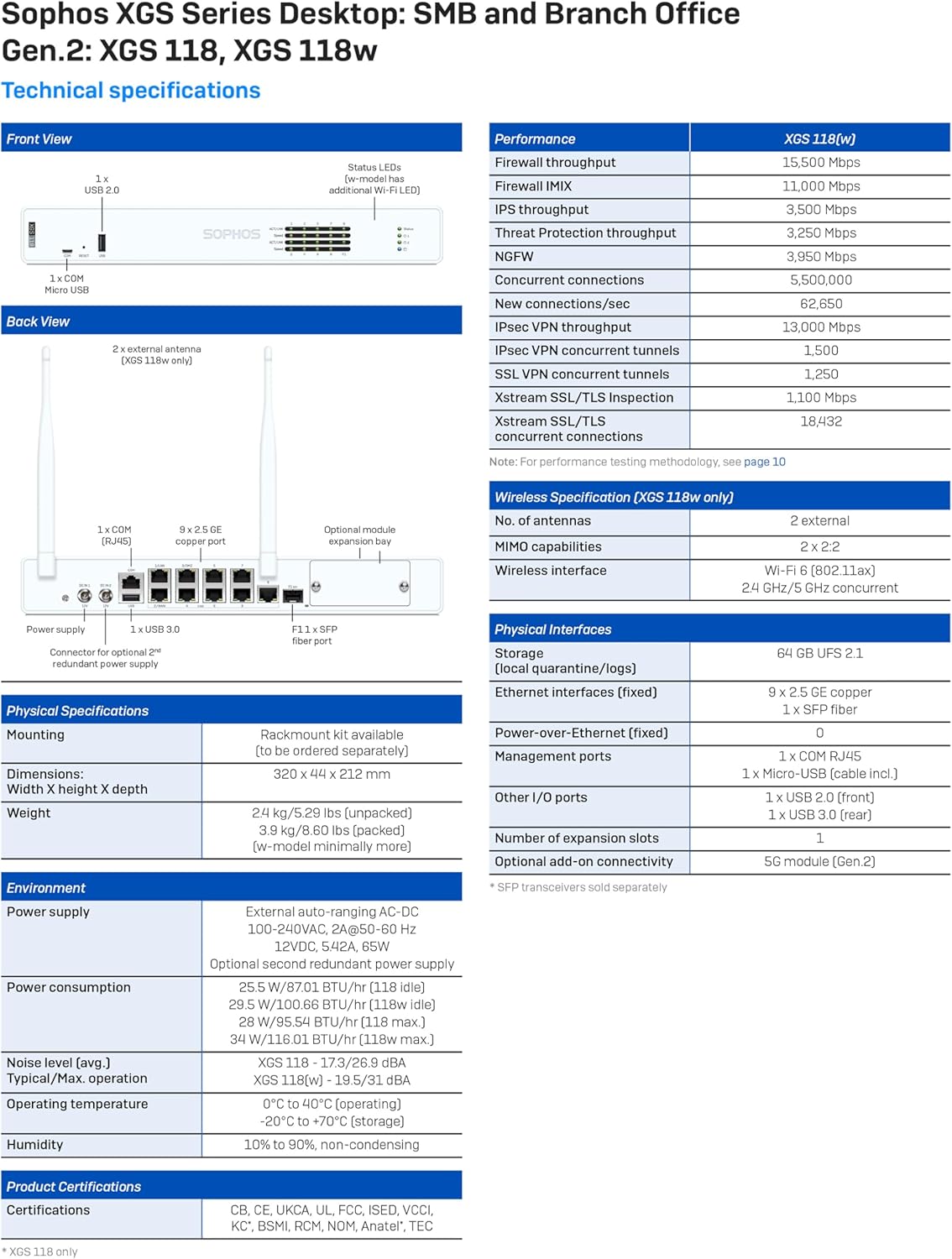
Figure 5: Comprehensive technical specifications for the Sophos XGS 118 (Gen2) appliance.
| หมวดหมู่ | ข้อมูลจำเพาะ |
|---|---|
| ชื่อรุ่น | เอ็กซ์จีเอส 118 |
| ปริมาณไฟร์วอลล์ | 15.5 กิกะบิตต่อวินาที |
| พอร์ต | 9 x 2.5 GE Copper Ports, 1 x SFP Fiber Port |
| ระบบปฏิบัติการ | Sophos Firewall OS |
| เทคโนโลยีการเชื่อมต่อ | Ethernet, Fiber Optic, Wi-Fi (802.11ax for XGS 118w) |
| ขนาด (สูง x กว้าง x ลึก) | 44 x 320 x 212 มม. |
| น้ำหนัก (ไม่บรรจุ) | 2.4 กก. (5.29 ปอนด์) |
| แหล่งจ่ายไฟ | External auto-ranging AC-DC 100-240VAC |
| อุณหภูมิในการทำงาน | 0°C ถึง 40°C (32°F ถึง 104°F) |
| ความชื้น | 10% ถึง 90% ไม่ควบแน่น |
| คุณสมบัติพิเศษ | Internet Security, Advanced Threat Protection |
For a complete list of specifications and performance metrics, refer to the official Sophos documentation or the detailed technical specifications image above.
7. การรับประกันและการสนับสนุน
7.1 การรับประกันสินค้า
The Sophos XGS 118 (Gen2) appliance typically comes with a standard hardware warranty. This specific product includes 3 Years Xstream Protection, which bundles advanced security features and support services.
7.2 บริการสนับสนุน
A valid support subscription is required to receive firmware upgrades and access to technical assistance. Enhanced support is included with all protection bundles, such as Xstream Protection. You can upgrade your support plan for additional services and faster response times.
Sophos Central provides comprehensive management and reporting capabilities, which are integral to your support experience. For detailed information on support tiers and services, please visit the official Sophos website or consult your sales representative.

รูปที่ 6: เกินview of Sophos licensing and support options.
7.3 วิดีโอผลิตภัณฑ์อย่างเป็นทางการ
Video 1: An official video providing an overview of the Sophos XGS Series 2nd Gen Desktop Appliances. This video highlights key features and benefits of the product line.


