การแนะนำ
Thank you for choosing TREBLAB X4 Wireless Earbuds. This manual provides comprehensive instructions for setting up, operating, and maintaining your earbuds to ensure optimal performance and longevity. The TREBLAB X4 earbuds are designed for active lifestyles, featuring a secure earhook design, clear audio, and robust water resistance.

Image: TREBLAB X4 Wireless Earbuds and Charging Case.
มีอะไรอยู่ในกล่อง
- TREBLAB X4 Earphones
- 6 sizes of Silicone Eartips
- เคสชาร์จแบบพกพา
- สายชาร์จ USB-C
- คู่มือการใช้งาน
- ใส่การ์ด
- สติ๊กเกอร์
- Cleaning brush and swab

Image: All items included in the TREBLAB X4 product package.
สินค้าเกินview
The TREBLAB X4 earbuds feature 10mm dynamic drivers for clear and powerful sound. Their secure earhook design ensures stability during physical activity, complemented by IPX5 water resistance for protection against sweat and splashes. The charging case provides extended battery life and doubles as a power bank for other devices.
Video: A promotional overview of the TREBLAB X4 earbuds, highlighting key features like battery life, secure fit, and sound quality.
คุณสมบัติหลัก:
- Clear and Powerful Sound: 10mm dynamic drivers deliver a full audio range.
- อายุการใช้งานแบตเตอรี่ที่ยาวนานขึ้น: Up to 11 hours on a single charge, with an additional 242 hours from the 2500mAh USB-C charging case.
- พอดีปลอดภัย: Lightweight design with flexible ear hooks and 6 eartip sizes for stability during workouts.
- ความต้านทานน้ำ IPX5: Protects against sweat and splashes, suitable for various weather conditions.
- ENC Microphones: Dual unidirectional microphones with Environmental Noise Cancellation for clear calls.
- ปุ่มควบคุมทางกายภาพ: Intuitive buttons for media playback, volume adjustment, and call management.
- ฟังก์ชั่นพาวเวอร์แบงค์: The charging case can charge other devices via its USB-A port.
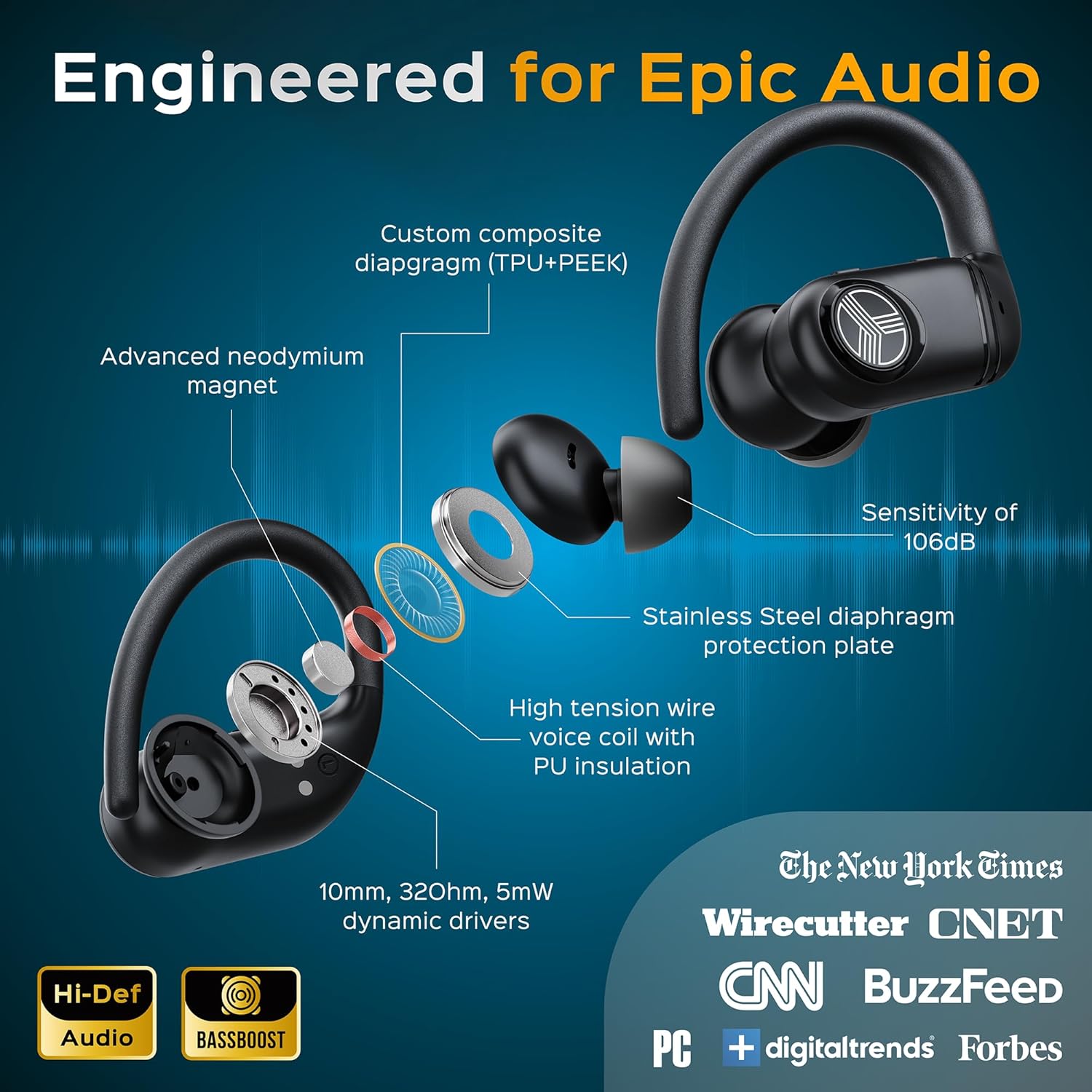
ภาพ: รายละเอียด view of the earbud's internal audio engineering.
การตั้งค่า
1. การชาร์จเคสและหูฟัง
- เชื่อมต่อสายชาร์จ USB-C ที่ให้มากับพอร์ตชาร์จบนเคสและแหล่งจ่ายไฟ
- The digital display on the case will show the charging status. A full charge is indicated by 100% and full battery icons for both earbuds.
- Place the earbuds into the charging case. They will automatically begin charging. The individual earbud battery indicators on the case display will show their charge level.

Image: Charging case display showing battery levels for the case and earbuds.
2. การจับคู่บลูทู ธ
- เปิดกล่องชาร์จและนำหูฟังทั้งสองข้างออก หูฟังจะเข้าสู่โหมดจับคู่โดยอัตโนมัติ
- บนอุปกรณ์ของคุณ (สมาร์ทโฟน แท็บเล็ต ฯลฯ) ไปที่การตั้งค่าบลูทูธ แล้วเปิดใช้งานบลูทูธ
- Look for 'TREBLAB X4' in the list of available devices and select it to connect.
- Once connected, you will hear an audio prompt, and the earbud's state indicator light will change.
คำแนะนำการใช้งาน
1. การสวมหูฟัง
- Select the most comfortable eartip size from the 6 provided options to ensure a secure fit and optimal sound isolation.
- Place the earbud into your ear canal and gently rotate the earhook over the top of your ear until it feels snug and stable.

Image: Earbud with various eartip sizes for customized comfort.
2. ปุ่มควบคุม
The TREBLAB X4 earbuds feature intuitive physical buttons for easy control:
- ปุ่มมัลติฟังก์ชัน (MFB): Located on the side of the earbud.
- ปุ่มปรับระดับเสียงขึ้น / ลง: Located on the top edge of the earbud.
| การทำงาน | การกระทำ |
|---|---|
| เล่น/หยุดเพลง | กด MFB เพียงครั้งเดียว |
| เพิ่มระดับเสียง | กดปุ่ม Volume + ครั้งเดียว |
| ลดระดับเสียง | กดปุ่มปรับระดับเสียงเพียงครั้งเดียว |
| เพลงถัดไป | กดปุ่ม Volume + ค้างไว้ |
| เพลงก่อนหน้า | กดปุ่มปรับระดับเสียงค้างไว้ - |
| รับสาย/วางสาย | กด MFB เพียงครั้งเดียว |
| ปฏิเสธการรับสาย | กด MFB . ค้างไว้ |
| เปิดใช้งานผู้ช่วยเสียง | กด MFB . สองครั้ง |

Image: Diagram illustrating the location and function of earbud controls.
3. ฟังก์ชันการทำงานของพาวเวอร์แบงค์
The TREBLAB X4 charging case can also function as a power bank to charge other USB-powered devices.
- Locate the USB-A output port on the charging case.
- เสียบสายชาร์จของอุปกรณ์เข้ากับพอร์ตนี้
- The case will begin charging your device. Monitor the case's digital display for remaining battery life.
การซ่อมบำรุง
- การทำความสะอาด: Regularly clean the earbuds and charging case with the provided cleaning brush and swab, or a soft, dry cloth. Ensure no moisture enters the charging ports or speaker grilles.
- จุกหูฟัง: ถอดและทำความสะอาดจุกหูฟังเป็นระยะด้วยสบู่และน้ำอ่อนๆ ตรวจสอบให้แน่ใจว่าแห้งสนิทก่อนใส่กลับเข้าไปใหม่
- พื้นที่จัดเก็บ: เก็บหูฟังไว้ในกล่องชาร์จเมื่อไม่ใช้งาน เพื่อปกป้องหูฟังและรักษาระดับพลังงาน หลีกเลี่ยงอุณหภูมิที่สูงหรือต่ำเกินไป
- ความต้านทานน้ำ: While IPX5 rated, avoid submerging the earbuds in water. Dry them thoroughly if they get wet from sweat or splashes.
การแก้ไขปัญหา
| ปัญหา | วิธีแก้ปัญหาที่เป็นไปได้ |
|---|---|
| หูฟังเอียร์บัดไม่จับคู่ | Ensure earbuds are charged. Turn off and on Bluetooth on your device. Forget 'TREBLAB X4' from your device's Bluetooth list and re-pair. |
| ไม่มีเสียงจากเอียร์บัดข้างเดียว | Check if both earbuds are charged. Try resetting the earbuds (refer to manufacturer's webไซต์สำหรับคำแนะนำการรีเซ็ตเฉพาะหากจำเป็น) |
| เคสชาร์จไม่ชาร์จ | ตรวจสอบให้แน่ใจว่าสาย USB-C เชื่อมต่อกับทั้งเคสและแหล่งจ่ายไฟอย่างแน่นหนา ลองใช้สายหรืออะแดปเตอร์แปลงไฟอื่น |
| คุณภาพการโทรไม่ดี | Ensure the microphone is not obstructed. Reduce background noise. Check your device's connection stability. |
| หูฟังหลุดออก | Experiment with different eartip sizes and adjust the earhooks for a more secure fit. |
ข้อมูลจำเพาะ
| คุณสมบัติ | รายละเอียด |
|---|---|
| ชื่อรุ่น | X4 |
| เทคโนโลยีการเชื่อมต่อ | ไร้สาย (บลูทูธ 5.4) |
| ช่วงบลูทูธ | 10 เมตร |
| ประเภทไดร์เวอร์เสียง | ไดร์เวอร์แบบไดนามิก |
| ขนาดไดร์เวอร์เสียง | 10 มิลลิเมตร |
| การตอบสนองความถี่ | 20 กิโลเฮิร์ตซ์ (ขีดจำกัดบน ช่วงทั่วไป 20 เฮิร์ตซ์-20 กิโลเฮิร์ตซ์) |
| ความไวต่อความรู้สึก | 105 เดซิเบล |
| อิมพีแดนซ์ | 32 โอห์ม |
| การควบคุมเสียงรบกวน | การยกเลิกเสียงรบกวนแบบพาสซีฟ |
| อายุการใช้งานแบตเตอรี่ (หูฟัง) | นานถึง 11 ชั่วโมง |
| อายุการใช้งานแบตเตอรี่ (พร้อมเคส) | นานถึง 253 ชั่วโมง |
| เวลาในการชาร์จ | 2.5 ชั่วโมง (ต่อกรณี) |
| ระดับความต้านทานต่อน้ำ | IPX5 (กันเหงื่อ, กันน้ำกระเซ็น) |
| รูปทรงของหูฟัง | ตะขอ |
| ประเภทการควบคุม | ปุ่มควบคุม |
| น้ำหนักสินค้า | 4.2 ออนซ์ (รวม) |
| วัสดุ | พลาสติก |
การรับประกันและการสนับสนุน
For warranty information, technical support, or any product-related inquiries, please refer to the official TREBLAB website or contact their customer service directly. Details are typically provided on the product packaging or an included insert card.


