การแนะนำ
This manual provides essential information for the safe and efficient use of your FLEXISPOT E3 Dual Motor Electric Standing Desk. It covers assembly instructions, operational guidelines, maintenance tips, and troubleshooting steps. Please read this manual thoroughly before assembly and first use to ensure proper function and longevity of your desk.
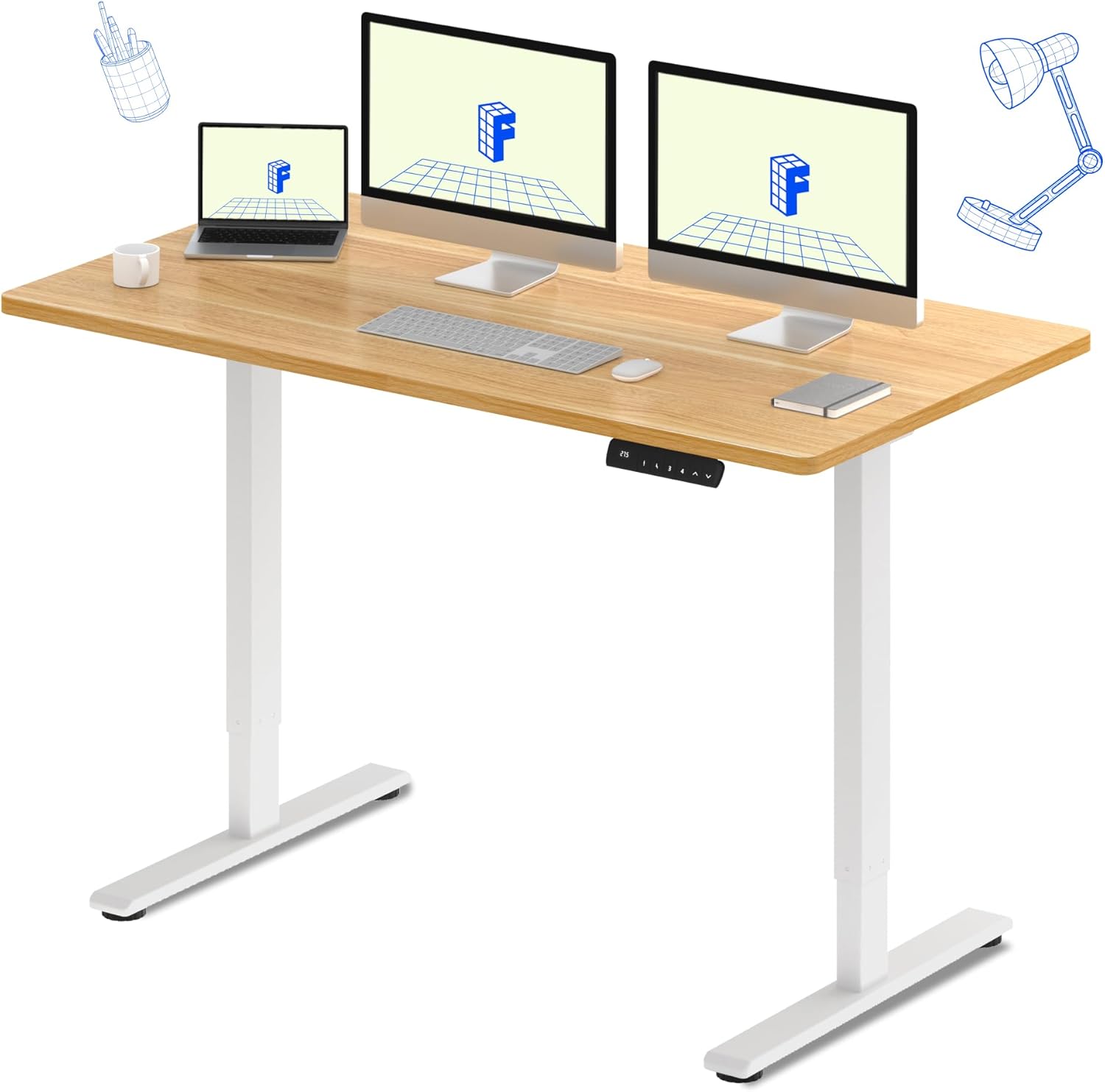
The FLEXISPOT E3 Dual Motor Electric Standing Desk, featuring a spacious 60"x24" maple desktop and a sturdy white frame, designed for a versatile workspace.
ข้อมูลด้านความปลอดภัย
เพื่อให้การใช้งานปลอดภัยและป้องกันความเสียหาย โปรดปฏิบัติตามข้อควรระวังด้านความปลอดภัยดังต่อไปนี้:
- ตรวจสอบให้แน่ใจเสมอว่าโต๊ะประกอบเสร็จเรียบร้อยและมั่นคงก่อนใช้งาน
- ห้ามเกินน้ำหนักสูงสุดที่กำหนดไว้ 220 ปอนด์ (100 กก.) บนเดสก์ท็อป
- Be cautious when adjusting the desk height to avoid pinching or crushing objects or body parts. Ensure there are no obstructions in the desk's path.
- โปรดกันเด็กและสัตว์เลี้ยงให้อยู่ห่างจากโต๊ะทำงานขณะทำการผ่าตัด
- ห้ามนั่งหรือยืนบนโต๊ะ
- โปรดใช้เฉพาะอะแดปเตอร์แปลงไฟและอุปกรณ์ที่ให้มาเท่านั้น
- ตัดการเชื่อมต่อไฟฟ้าก่อนทำความสะอาดหรือดำเนินการบำรุงรักษาใดๆ
คุณสมบัติหลัก
- Seamless & Silent Dual Motor Operation: Equipped with dual motors for quiet operation (under 50 dB) and enhanced lifting capacity.
- ความจุน้ำหนักที่แข็งแกร่ง: Capable of lifting up to 220 lbs, providing stable support for your equipment.
- Roomy & Ergonomic Workspace: Features a 59" x 23.6" (approx. 60"x24") solid-surface desktop, offering ample space for monitors, laptops, and other work essentials.
- Customizable & Convenient Height Settings: The control panel allows saving up to 4 custom height settings for quick transitions between sitting and standing positions.

Detail of the dual motor frame, illustrating the continuous height adjustment capability of the desk.

Visual representation of the desk's robust 220 lbs weight capacity.
ข้อมูลจำเพาะ
| คุณลักษณะ | รายละเอียด |
|---|---|
| ยี่ห้อ | เฟล็กซิสพอท |
| แบบอย่าง | E3 |
| ขนาดสินค้า (ลึก x กว้าง x สูง) | ลึก 60 นิ้ว x กว้าง 23.6 นิ้ว x สูง 27.6 นิ้ว |
| สี | White Frame + Maple Top |
| สไตล์ | ทันสมัย |
| วัสดุฐาน | โลหะ |
| ประเภทวัสดุยอดนิยม | ไม้ |
| ประเภทการเสร็จสิ้น | ไม้ |
| คุณสมบัติพิเศษ | แบบมีสาย |
| ขนาด | ขนาด 60"x24" ทั้งชิ้น |
| ส่วนประกอบที่รวมอยู่ | Keyboard Tray, Monitor Arm (Note: These may be optional accessories, refer to packaging) |
| คำแนะนำน้ำหนักสูงสุด | 220 ปอนด์ (100 กก.) |
| การประกอบที่จำเป็น | ใช่ |
| รูปร่าง | สี่เหลี่ยมผืนผ้า |
| การออกแบบโต๊ะทำงาน | โต๊ะทำงาน |
| ความหนาของโต๊ะ | 23.6 Inches (Note: This likely refers to the width, not thickness) |
| ความยาวแนวทแยงของพื้นผิวการทำงาน | 66.3 นิ้ว |
การติดตั้งและการประกอบ
The FLEXISPOT E3 desk requires assembly. It typically arrives in two packages: one for the desktop and one for the frame components. While assembly is generally straightforward, it is recommended to have two people for certain steps due to the weight of the components.
ขั้นตอนการประชุมสมัชชาใหญ่:
- แกะส่วนประกอบ: Carefully unpack all parts and verify against the packing list.
- ประกอบโครง: Follow the included instructions to assemble the desk frame, including the legs, crossbar, and motors.
- แนบเดสก์ท็อป: Secure the desktop to the assembled frame. Note that the desktop may require pre-drilling holes for attachment, as indicated in some user experiences. Ensure proper alignment before securing.
- ติดตั้งแผงควบคุม: Mount the control panel to the underside of the desktop in an accessible location.
- การเชื่อมต่อสายไฟ: Connect all motor and control panel wiring to the control box as per the diagram in your specific instruction manual.
- เปิดเครื่องและทดสอบ: Plug in the desk and perform an initial test of the height adjustment functions.
For detailed, step-by-step instructions and diagrams, please refer to the assembly manual included in your product packaging.
คำแนะนำการใช้งาน
Your FLEXISPOT E3 desk features an intuitive control panel for easy height adjustments and memory settings.

The programmable control panel for the FLEXISPOT E3 desk, featuring up/down buttons and four memory presets.
การใช้งานพื้นฐาน:
- ปรับความสูง: ใช้ ขึ้น (▲) และ ลง (▼) arrows on the control panel to raise or lower the desk to your desired height. The current height is displayed on the digital screen.
- Saving Memory Presets: The desk allows you to save up to four preferred height settings. To save a height:
- ปรับโต๊ะให้ได้ความสูงที่ต้องการ
- กดปุ่ม 'เอ็ม' or 'ส' button (depending on control panel version).
- Immediately press one of the numbered preset buttons ('1', '2', '3', หรือ '4') before the display stops flashing. The height is now saved to that number.
- การเรียกคืนค่าที่ตั้งไว้ล่วงหน้า: Simply press the corresponding numbered preset button ('1', '2', '3', หรือ '4') เพื่อเลื่อนโต๊ะไปยังความสูงที่บันทึกไว้โดยอัตโนมัติ
การใช้งานตามหลักสรีรศาสตร์:
Regularly switching between sitting and standing positions can help alleviate discomfort associated with prolonged sitting. Utilize the memory presets to easily transition throughout your workday.

The FLEXISPOT E3 desk supports an active workspace, allowing for comfortable standing or walking while working.
การซ่อมบำรุง
Proper maintenance ensures the longevity and smooth operation of your standing desk.
- การทำความสะอาด: เช็ดพื้นเดสก์ท็อปและกรอบด้วยผ้าเนื้อนุ่มamp ผ้า หลีกเลี่ยงน้ำยาทำความสะอาดที่มีฤทธิ์กัดกร่อนหรือสารเคมีรุนแรงที่อาจทำลายพื้นผิวได้
- การจัดการสายเคเบิล: ตรวจสอบและจัดระเบียบสายเคเบิลเป็นระยะ เพื่อป้องกันการพันกันและตรวจสอบให้แน่ใจว่าสายเคเบิลไม่กีดขวางการเคลื่อนไหวของโต๊ะ
- ตรวจสอบการเชื่อมต่อ: ตรวจสอบให้แน่ใจว่าการเชื่อมต่อไฟฟ้าทั้งหมดมีความปลอดภัยและไม่มีความเสียหาย
- การหล่อลื่น: The motors and lifting columns are generally maintenance-free. Do not attempt to lubricate internal components unless specifically instructed by FLEXISPOT support.
การแก้ไขปัญหา
หากคุณพบปัญหาใดๆ กับโต๊ะทำงาน FLEXISPOT E3 โปรดดูปัญหาและวิธีแก้ไขที่พบบ่อยต่อไปนี้:
| ปัญหา | สาเหตุที่เป็นไปได้ | สารละลาย |
|---|---|---|
| โต๊ะไม่ขยับ / ไม่มีไฟ | สายไฟหลุด; มีปัญหาที่ปลั๊กไฟ | Check all power connections. Ensure the power outlet is functional. |
| โต๊ะเคลื่อนที่ไม่สม่ำเสมอหรือหยุดนิ่ง | Overload; Obstruction; Unbalanced load | Reduce weight on the desk. Remove any obstructions. Distribute weight evenly. |
| Error codes (e.g., ASR/E20) displayed | Motor fault; Sensor issue; Overheat protection | Refer to your specific product manual for error code definitions and reset procedures. Often, unplugging the desk for 10-15 minutes and plugging it back in can clear temporary errors. If the issue persists, contact customer support. |
| Desk makes unusual noises | Loose components; Obstruction | Check for any loose screws or components. Ensure nothing is caught in the lifting mechanism. |
หากปัญหายังคงอยู่หลังจากลองวิธีแก้ปัญหาเหล่านี้แล้ว โปรดติดต่อฝ่ายบริการลูกค้าของ FLEXISPOT เพื่อขอความช่วยเหลือเพิ่มเติม
การรับประกันและการสนับสนุน
FLEXISPOT มั่นใจในคุณภาพของผลิตภัณฑ์ของตน
- ครอบคลุมการรับประกัน: Your FLEXISPOT E3 desk comes with a รับประกัน 5 ปี on the desk frame and motor, and a รับประกัน 2 ปี บนแผงควบคุมและอุปกรณ์อิเล็กทรอนิกส์
- แผนการคุ้มครอง: อาจมีแผนคุ้มครองเพิ่มเติมให้เลือกซื้อ ซึ่งให้ความคุ้มครองที่มากขึ้น โปรดตรวจสอบรายละเอียดการสั่งซื้อของคุณสำหรับข้อมูลเพิ่มเติม
- การสนับสนุนลูกค้า: For any questions, technical assistance, warranty claims, or replacement parts, please contact FLEXISPOT customer service. Have your product model and purchase information ready when contacting support.


